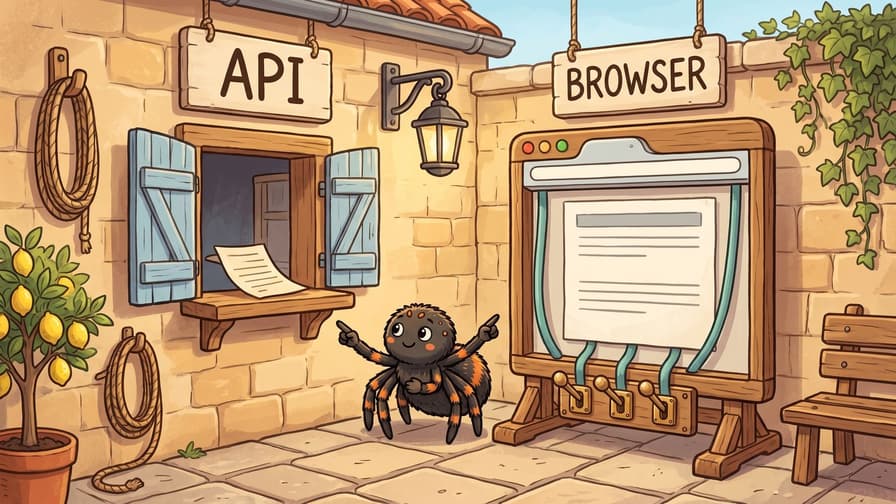
A scraper API, or web scraping API, returns a page's content from one HTTP call, with proxies, TLS fingerprints, and rendering handled by the provider. A scraping browser is a hosted browser session that your Puppeteer or Playwright code controls over a WebSocket.
A single tool for every target costs extra. In our tests on 8 production pages, a plain API request returned 6. The other 2 served JavaScript challenges, which needed an adjusted setting or a live browser session.
This guide shows you which tool to use for each target, how to route between them, and what each costs.
TL;DR
- Start with the Scraper API's
requestmode. It returned most production pages in our tests at the lowest cost per page. - Combine the
successflag with a content check. The flag confirms delivery, and your check confirms the data. - Adjust settings before you pay more. A browser header set got a DataDome-protected page 4 of 5 times, and a render that waits longer passed Kasada's challenge 5 of 5.
- Use sessions for multi-step flows and pages that need a live browser. Default sessions got both challenge pages in our tests, and a 5-page session divided its cost across every page.
How a scraper API and a scraping browser differ on the wire
The two products differ in who controls the browser. That difference determines what crosses the network, what you pay for, and how you check the result.
Evomi's Scraper API takes one HTTPS request per page and returns one response. In request mode, the API fetches the page's HTML directly, through a residential or datacenter exit.
When we sent that mode's requests to a TLS fingerprinting endpoint, it used Chrome's HTTP/2 settings and header order, and a Chrome-style TLS handshake. We compared handshakes by their JA4 fingerprints, because Chrome randomizes its TLS extension order, so its JA3 changes with each connection.
In browser mode, a hosted Chrome instance loads and renders the page before the API responds. In our checks, browser mode had the same TLS fingerprint as the Scraping Browser. In both modes, your code receives the finished document, as HTML, Markdown, or JSON. Each result is billed by mode, and the scraping modes docs list what each mode costs.
Evomi's Scraping Browser gives your code direct control of the browser. Your code opens a WebSocket to wss://browser.evomi.com and sends Chrome DevTools Protocol (CDP) commands. It controls every navigation, click, and read, and each one is a single round trip.
Each session runs Chrome with its own device profile. In all 7 sessions we checked, the profile matched the exit country. A proxy_country=DE session reported a Europe/Berlin time zone and de-DE languages. Our code connects with defaultViewport: null, so the session keeps its own viewport instead of Puppeteer's 800x600 default.
The Scraping Browser is billed by session time. The pricing page lists the current rates and plans for both products.
The difference is easiest to see in what crosses the network for one page:
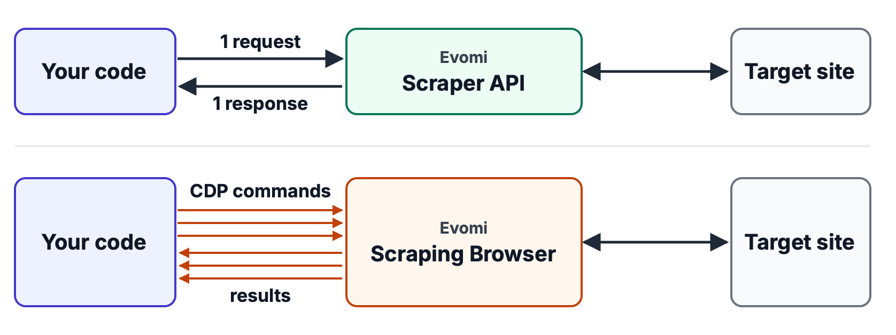
Each Scraper API call returns a finished document at a per-result price. On the Scraping Browser, every arrow is session time you pay for.
The rows below compare the two designs, using the product docs, the browser connection settings, and our runs:
Scraper API | Scraping Browser | |
|---|---|---|
Unit of work | One HTTPS call per URL | A WebSocket session you control |
Where JavaScript runs | Server-side, in | Always, in the hosted Chrome |
State between calls | Sticky exit IP with | Cookies and page state for the whole session |
Billing | Per result, by mode | Per session time |
Set by your plan | Concurrency and session length | |
What your code checks | The target's status and page, delivered inside an HTTP 200 | The live page, as it loads and after any reload |
How we tested both products
We tested public pages over two days. Two of them are sandboxes: one static page and one page that JavaScript builds. The rest are production pages that we chose to cover the protection types that production scrapers encounter.
Seven of the 8 production pages in the tables showed an anti-bot vendor's signature in the response. Examples are DataDome's captcha-delivery.com script, Kasada's ips.js, and the _pxAppId of HUMAN, formerly PerimeterX. The tables describe pages by type and do not name the sites. The same vendor's protection behaved differently on two sites, so test each new site on its own.
On day 2, both products followed the same protocol: 5 attempts per page for each path and 3 for auto, from a US exit. An attempt counted as a success only when a text pattern from the real page appeared in it. The Scraper API calls kept the default headers and ran as async tasks, and we polled each task for its result. In production, a webhook can deliver each result instead of a poll.
Each Scraping Browser attempt opened a new session and allowed up to 60 seconds for navigation. It then re-read the page every few seconds for 25 more seconds. The API, by contrast, returned one final document per call.
Our client ran in India, which adds a long network round trip to every timing, so compare the relative gaps rather than absolute seconds. Anti-bot defenses change, so treat every rate here as a snapshot, and re-run the code on your own targets. Five attempts per path show large differences clearly, while small gaps can be noise.
When to use the Scraper API
In our tests, the plain request was the lowest-cost path, and it returned most pages. The table shows the Scraper API path that returned each page in every call:
Page type (what the response showed) | Scraper API path | Calls that returned the page |
|---|---|---|
Static sandbox |
| 5/5 |
Sandbox built by JavaScript |
| 5/5 |
Real-estate search (HUMAN script present) |
| 5/5 |
Job-board search (Cloudflare script present) |
| 3/3 |
Sportswear listing (Kasada script present) |
| 5/5 |
Classifieds search (DataDome script present) |
| 3/3 |
Marketplace product page |
| 5/5 |
Retail product page (HUMAN script present) |
| 5/5 |
request mode returned 6 of the 8 production pages. On the job-board and classifieds pages, auto returned the page in every call. The other 2 production pages serve JavaScript challenges, and the Scraper API got both with the settings in the challenge section below. browser mode runs the page's JavaScript, so your code receives a page like the second sandbox as HTML that your pattern can match.
Look for embedded JSON before you render
On 6 of our 8 production pages, the data we scraped was also in a JSON blob inside the HTML that request mode returns. The blob was Next.js's __NEXT_DATA__ on four pages, JSON-LD on one, and a page-state object on one. Our guide to parsing __NEXT_DATA__ and JSON-LD shows how to extract each format.
Even the JavaScript sandbox included its 10 quotes as JSON in a var data script. Our pattern targeted rendered markup, so it never checked that JSON. If you parse that JSON, you skip both the render and the brittle selectors.
If the data isn't in a JSON blob, hydrate the page yourself: run its scripts in a lightweight DOM like jsdom, with no browser. On the sandbox HTML from request mode, jsdom built all 10 quotes in about 2 seconds, using about 142 MB of memory. To build them, jsdom first had to fetch the page's jQuery, which the inline script depends on.
In production, that jQuery fetch should use the same exit IP and fingerprint as the page, like any subrequest. Local hydration can also fail when a page uses canvas, WebGL, or anti-bot scripts that probe the browser. It also runs the site's code on your servers. browser mode runs the page's scripts in a real Chrome instance, server-side.
When a page loads its data through an XHR call instead, browser mode can return those responses with network capture. A plain request uses the fewest credits, so render only the pages that need rendering.
Auto mode picks the path for you
auto is the Scraper API's default mode: it starts with a plain request and can upgrade to the browser. In our runs, it returned 7 of the 8 production pages in every call, including the Kasada hotel homepage, with no per-target configuration.
Once you know what a target needs, set mode yourself for a predictable price per page. Use request where a plain request returns the page, and browser where JavaScript builds the content.
The success flag confirms delivery, so check the content too
success: true means the call completed, status_code contains the target's HTTP status, and content contains the page. So you see exactly what the target returned, even a challenge page, and your own check determines the next step.
A scraper that returns a block page as data can fail silently. Our guide to silent scraper failures explains that problem. Keep the API's success flag separate from your own check of the page.
status_code reports the target's first response, which shows you when a challenge came first, even if the real page loaded afterwards. The helper below therefore checks the content first:
// evomi.mjs: one Scraper API call, and a check of what the API returned
if (!process.env.EVOMI_SCRAPER_KEY) throw new Error('Set EVOMI_SCRAPER_KEY to your Scraper API key.');
const BASE = 'https://scrape.evomi.com/api/v1/scraper';
const headers = { 'x-api-key': process.env.EVOMI_SCRAPER_KEY, 'content-type': 'application/json' };
const sleep = (ms) => new Promise((r) => setTimeout(r, ms));
// The API's error docs mark these as non-retryable: fix the key, the credits, or the parameters.
const FIX_FIRST = [400, 401, 402, 422];

export async function scrape(url, options = {}) {
  const res = await fetch(`${BASE}/realtime`, {
    method: 'POST',
    headers,
    body: JSON.stringify({ url, delivery: 'json', include_content: true, ...options }),
  });
  // A reply that isn't JSON is an API or network error, not the target's answer, so the caller retries it.
  const body = await res.json().catch(() => null);
  if (!body) return { http: res.ok ? 502 : res.status, credits: 0 };
  if (FIX_FIRST.includes(res.status)) throw new Error(`Scraper API ${res.status}: ${body.error ?? 'request rejected'}`);
  // A long job returns a task_id, and this loop polls for its result.
  if ([202, 408].includes(res.status) && body.task_id) {
    for (let waited = 0; waited < 300_000; waited += 5_000) {
      await sleep(5_000);
      const poll = await fetch(`${BASE}/tasks/${body.task_id}`, { headers }).catch(() => null);
      if (!poll?.ok) continue; // the poll didn't go through: poll again
      const task = await poll.json().catch(() => ({ status: 'processing' })); // not JSON yet: poll again
      if (task.status === 'failed') return { http: 500, credits: task.credits_used ?? 0, ...task };
      if (!['pending', 'processing'].includes(task.status)) return { http: 200, credits: task.credits_used ?? 0, ...task };
    }
  }
  return { http: res.status, credits: Number(res.headers.get('x-credits-used') ?? 0), ...body };
}

// Markers of common block and challenge pages. Extend the list for your own targets.
const BLOCK_MARKERS = /captcha-delivery|px-captcha|Robot or human|unusual traffic|Click the button below to continue|KPSDK|\/ips\.js|_cf_chl_opt/i;

// `success: true` means the API delivered the target's response. Check the page yourself.
export function classify(result, mustContain) {
  if (result.http === 202) return 'queued';     // the task is still running: fetch it later
  if (result.http !== 200) return 'retry';      // a retryable reply from the API, not from the target
  const content = result.content ?? '';
  if (mustContain.test(content)) return 'ok';
  if ([404, 410].includes(result.status_code)) return 'gone'; // a dead URL, not a block
  const challenge = BLOCK_MARKERS.test(content);
  if (result.status_code === 429 && !challenge) return 'rate_limited'; // slow down instead of escalating
  if (result.status_code >= 500 && !challenge) return 'unavailable';   // the target itself is failing: try later
  // status_code reports the target's first response, so check the content too.
  return result.status_code === 200 && !challenge ? 'missing' : 'blocked';
}
To run the examples, use Node 18 or later and set two environment variables, EVOMI_SCRAPER_KEY and EVOMI_BROWSER_KEY, to the keys from your Evomi dashboard. The browser examples also need npm install puppeteer-core.
The script below, check.mjs, classifies three responses. The API returns all three with HTTP 200. The third URL is a test endpoint that returns a 403 to simulate a block page:
// check.mjs: classify three responses that the API returns with HTTP 200
import { scrape, classify } from './evomi.mjs';

const targets = [
  ['https://books.toscrape.com/', /product_pod/],       // static page
  ['https://quotes.toscrape.com/js/', /class="quote"/], // content built by JavaScript
  ['https://httpbin.org/status/403', /product_pod/],     // a test endpoint that simulates a block page
];

for (const [url, mustContain] of targets) {
  const result = await scrape(url, { mode: 'request' });
  console.log(classify(result, mustContain).padEnd(8), result.status_code ?? '-', url);
}
classify() returned a different label for each one:
ok       200 https://books.toscrape.com/
missing  200 https://quotes.toscrape.com/js/
blocked  403 https://httpbin.org/status/403
A single pattern can still miss less obvious failures. Examples are a page with half its records, a regional version of the page, and a layout change that removes a field. When you scrape at scale, check what percentage of rows has each field you need, and compare record counts with the last run. Also confirm that the page's currency or locale matches your exit country.
JavaScript challenges: give the API time before you open a session
Two production pages responded to our first requests with a JavaScript challenge. The hotel homepage returned a 429 with Kasada's challenge script, ips.js. The travel listing returned DataDome's Device Check, an interstitial that needs no user interaction. Our guide to Kasada and Shape and our DataDome overview explain how each one works.
Challenges like these run a script, set a cookie, and reload the page. An early capture, at domcontentloaded, can happen before that reload. A network-idle render waits until after the reload: browser mode with wait_until=networkidle and wait_seconds=20. The Scraper API got both pages, each with its own setting:
Challenge page | Scraper API setting that got it | Calls that returned the page |
|---|---|---|
Hotel homepage (Kasada) |
| 5/5 |
Travel listing (DataDome Device Check) |
| 4/5 |
On the hotel homepage, status_code showed the challenge's 429 even when the content was the real page. So classify() checks the content before the status. Network-idle renders wait longer by design, so send them as async tasks with async: true, as the router below does. Among the API routes that got the hotel homepage, the network-idle render costs less than an auto call that upgrades to the browser.
Scraping Browser sessions got both pages with default settings in our tests. All 5 sessions loaded the hotel homepage. On the travel site, each of our three 5-page sessions got the listing on its first page. For CAPTCHA pages, the Scraping Browser includes automatic CAPTCHA support, and the docs list the covered providers.
On both test days, a third-party bot-detection page marked every check as Normal for our sessions, including WebDriver, Headless Chrome, and CDP. You can check your own sessions with Evomi's browser fingerprint checker, which reported "No automation detected" for ours. A checker page is a quick sanity check. The real test is whether the target returns the page, which is how we evaluated every attempt.
Chrome itself removed a well-known CDP detection signal, one of the traces an automated browser leaves. In May 2025, the V8 project merged two changes that stopped object previews from running getters: 6506243 and 6513972. Those changes disabled the console getter probe, a method that detection scripts used to detect CDP clients.
When a target needs a session, limit each attempt's duration, because session time is billed.
Send a browser header set when a target checks headers
The Scraper API lets you send your own headers with additional_headers. We copied a Scraping Browser session's User-Agent and client hints into that parameter. Then we alternated calls with and without that header set on the production pages, from US exits. Alternating matters, because a target can change during a test, and that change can look like the effect of your fix:
Page type | Header set that returned the page | Calls that returned it |
|---|---|---|
Travel listing (DataDome Device Check) | A session's browser header set | 4/5 |
Marketplace product page | The API's default headers | 5/5 |
Real-estate, sportswear, classifieds, and retail pages | Both sets | 12/12 with each set |
On the travel listing, the session's header set worked with no cookies and no browser. A paired test on 8 fixed exit IPs, across 6 networks, confirmed the result: the header set got the page on all 8 IPs. In request mode, the header set is sent over the Chrome-style handshake we measured earlier, so the headers and the handshake match. If you copy the same headers into an HTTP client with a non-browser handshake, they would not match that client's own handshake.
The right header set depends on the target, though. Start with the defaults, add a browser header set for targets that check headers, and use the set that returns the page.
Some sites use a request's headers to decide whether to challenge it. A browser header set can pass that check, as on the travel listing. Others appear to challenge every visitor, like the hotel homepage, and need a browser to run the challenge.
When to use a Scraping Browser session
The Scraper API can run a fixed sequence of clicks, fills, and waits in browser mode with js_instructions. Use a session when each step depends on what the page shows, as in a flow across many pages or an authorized login. Also use one for a page that needs a live browser.
On the two challenge pages, sessions needed the fewest setting changes, and the same session code with default settings got both pages. On the API, auto or a network-idle render got the hotel homepage, and a header set got the travel listing.
In an earlier live run of the router, the session step got the travel listing as the final fallback.
A session keeps cookies and page state across every page it loads. Our three 5-page sessions on the travel site loaded all 15 city listings. Each took about half a minute, so its time cost was split across 5 pages.
On the Kasada hotel site, a session that passed the challenge once kept that clearance for its next page. After a session passed the homepage's challenge, the second hotel page returned 200 on its first response, in 2 of 2 sessions. The site challenged direct visits to that page in our control runs. So on hosts like this, open the homepage first, and send that host's next URLs through the same session.
On the travel listing, the session's headers alone were enough, which kept that page on the cheaper request path. request calls with that header set got the page with or without the session's cookies, including DataDome's anti-bot cookie.
The Scraper API can also keep state between calls. proxy_session_id kept the same exit IP, a sticky session, in our runs. Three calls with the same ID used one exit IP, while 3 calls without it used 3 addresses on 3 networks.
capture_headers: true returns the target's cookies in parsed form, and additional_headers sends them on later calls. So each call includes exactly the cookies you choose:
// session.mjs: the Scraper API keeps a sticky exit IP, and you choose the cookies each call sends
import { scrape } from './evomi.mjs';

const session = { proxy_session_id: 'job4821', mode: 'request' }; // a short ID; the docs list the format

// Call 1: the target sets a cookie. capture_headers returns it in parsed form.
const first = await scrape('https://httpbin.org/response-headers?Set-Cookie=sid%3Dabc123', { ...session, capture_headers: true });
if (first.http !== 200) throw new Error(`call 1 got HTTP ${first.http}: poll task ${first.task_id} or retry`);
const jar = (first.headers?.cookies ?? []).map((c) => `${c.name}=${c.value}`).join('; ');

// Call 2 without the jar, then call 3 with it.
const without = await scrape('https://httpbin.org/cookies', session);
const withJar = await scrape('https://httpbin.org/cookies', { ...session, additional_headers: { Cookie: jar } });
const cookiesSeen = (r) => JSON.parse(r.content.replace(/<[^>]+>/g, '')).cookies;

console.log('captured:', jar);
console.log('call 2 sees:', cookiesSeen(without));
console.log('call 3 sees:', cookiesSeen(withJar));
The captured cookie reached the target only on call 3:
captured: sid=abc123
call 2 sees: {}
call 3 sees: { sid: 'abc123' }
A sticky IP and a cookie jar keep a cookie-based session across Scraper API calls. Keep each cookie jar with the proxy_session_id and header set that obtained it, and rotate all three together. Practitioners report that anti-bot systems often link a clearance cookie to the IP and fingerprint that got it. On long flows, a session also saves time, because its cookies and open page stay available between steps.
Session length and concurrency
Your plan sets how long a session can run and how many sessions can run at once. The Scraping Browser product page lists both. Design long jobs for that limit: track session age and reconnect before a session ends, so the job keeps its progress.
When every session your plan allows is busy, a new WebSocket handshake receives HTTP 429. Puppeteer reports it as Unexpected server response: 429. Match your worker pool size to your plan's limit, and retry that error with a backoff instead of logging it as a failed page.
What a remote browser session costs
The Scraping Browser is billed by session time. Two things determine that time: what the page loads, and how many round trips your code makes, which you control.
A rendered page loads the scripts, images, and XHRs that a visitor's browser loads. On day 2, the median transfer per loaded production page ranged from 525 KB to 3,878 KB. The median request count ranged from 20 to 153. The heaviest page load transferred 4,853 KB across 183 requests.
For comparison, the HTTP Archive's 2025 Web Almanac reports a median desktop home page weight of 2,862 KB. In request mode, only the HTML document is transferred, so each call is small.
From our client in India, the median CDP round trip was 244 ms on day 1 and 297 ms on day 2. We extracted the same 20 rows from a books sandbox three ways, and a relay in front of the WebSocket counted every command:
Pattern | CDP commands | Time, day 1 | Time, day 2 |
|---|---|---|---|
| 479 | 94.8 s | 108.4 s |
One | 93 | 3.2 s | 4.3 s |
One | 2 | 0.27 s | 0.29 s |
All three returned identical data, and the command counts matched exactly on both days. Because session time is billed, switching to the third pattern saved more than 99% of the session time.
page.$$eval looks batched, but Puppeteer resolved and released a handle for every matched element. Our capture showed 20 DOM.resolveNode, 20 DOM.describeNode, and 45 Runtime.releaseObject calls. Put the query and the mapping in one function that runs inside the page:
// extract.mjs: read all rows with one in-page evaluation
import puppeteer from 'puppeteer-core';

if (!process.env.EVOMI_BROWSER_KEY) throw new Error('Set EVOMI_BROWSER_KEY to your Scraping Browser key.');
const endpoint = `wss://browser.evomi.com?key=${process.env.EVOMI_BROWSER_KEY}&proxy_country=US`;
const browser = await puppeteer.connect({ browserWSEndpoint: endpoint, defaultViewport: null, protocolTimeout: 30_000 });

try {
  const page = await browser.newPage();
  await page.goto('https://books.toscrape.com/', { waitUntil: 'domcontentloaded', timeout: 60_000 });

  // The query and the mapping both run inside the page: one Runtime.callFunctionOn.
  const rows = await page.evaluate(() =>
    [...document.querySelectorAll('article.product_pod')].map((card) => ({
      title: card.querySelector('h3 a').title,
      price: card.querySelector('.price_color').textContent,
      inStock: card.querySelector('.availability').textContent.includes('In stock'),
    })),
  );
  console.log(`${rows.length} rows`);
  console.log(rows[0]);
} finally {
  await browser.close().catch(() => {});
}
One in-page evaluation returned all 20 rows:
20 rows
{ title: 'A Light in the Attic', price: '£51.77', inStock: true }
The Scraping Browser also works with Playwright, through connectOverCDP, and the same batching rule applies.
Scraper API or scraping browser: a routing rule you can run
Choose a route for each target: probe each new target in the order below, and keep the first path that returns the page. The order runs from the simplest call to the most flexible session. Stateless calls at a flat price come first, and a live session under your code's control comes last. Check each target's terms before you run a large job against it.
- Probe with
requestmode. Keep it when your content check matches. When the page has embedded JSON, check for that JSON. - Retry a blocked page with a browser header set, and use the header set that returns the page. The router below copies that set from a live Scraping Browser session.
- Switch to
browsermode when JavaScript builds the data. - Retry a challenge page as a network-idle render, with
networkidleandwait_seconds, and keep that setting when your content check matches. - Open a Scraping Browser session for challenges that need a live browser, and for flows where each step depends on what the page shows.
- Give every host a stop rule. Log a host that blocks every step, and find another source: the JSON endpoint its pages call, the site's API, or a feed.
Anti-bot detection changes over time, and teams that run scrapers at scale report that their success rates change from month to month. So a learned step expires after a day, and the router probes from the cheapest step again. It also copies its header set again every day, because the User-Agent and client hints change as Chrome releases new versions.
The router below applies that order and stores, per host, which step last returned the page. It sets each mode explicitly, so it records what each host needs. It treats a 404 or 410 as a dead URL.
The router tries each API call up to 3 times on retryable replies, then defers the URL. When a host blocks 3 URLs in a row, the router pauses that host for an hour:
// route.mjs: plain request, a browser header set, rendering, a network-idle render, then a live Scraping Browser session
import puppeteer from 'puppeteer-core';
import { scrape, classify } from './evomi.mjs';

if (!process.env.EVOMI_BROWSER_KEY) throw new Error('Set EVOMI_BROWSER_KEY to your Scraping Browser key.');
const ENDPOINT = `wss://browser.evomi.com?key=${process.env.EVOMI_BROWSER_KEY}&proxy_country=US`;
const STEPS = {
  request: { mode: 'request' },
  headers: { mode: 'request' }, // plus a browser header set copied from a live session: see copiedHeaders()
  browser: { mode: 'browser' },
  // Challenges that reload the page need time, so run these renders as async tasks.
  patient: { mode: 'browser', wait_until: 'networkidle', wait_seconds: 20, async: true },
};
const ORDER = [...Object.keys(STEPS), 'session'];
const PARK_AFTER = 3, PARK_MS = 60 * 60_000; // pause a host for an hour after it blocks 3 URLs in a row
const RETEST_MS = 24 * 60 * 60_000; // detection changes over time, so learned steps and copied headers expire after a day
const hosts = new Map(); // host -> { step, since, fails, until }, in this process: share it if several workers route one host
export const spend = new Map(); // host -> { credits, sessionMs, verified }: divide what you spent by verified pages
export const pending = new Map(); // url -> task_id of an async task: fetch its result from /tasks/{id} later instead of resubmitting
const sleep = (ms) => new Promise((r) => setTimeout(r, ms));

function tally(key, add) {
  const s = spend.get(key) ?? { credits: 0, sessionMs: 0, verified: 0 };
  for (const [k, v] of Object.entries(add)) s[k] += v;
  spend.set(key, s);
}

// A retryable reply is an API or network error, not the target's answer: retry it, then defer the URL. Never escalate it or save a route from it.
async function viaApi(url, mustContain, options, tries = 3) {
  for (let i = 1; i <= tries; i++) {
    // fetch() throws a TypeError on a network failure, which gets the same retry. A rejected key stops the run.
    const result = await scrape(url, options).catch((err) => { if (err instanceof TypeError) return { http: 0 }; throw err; });
    tally(new URL(url).host, { credits: result.credits ?? 0 });
    const v = classify(result, mustContain);
    if (v === 'queued') pending.set(url, result.task_id);
    if (v !== 'retry') return v;
    if (i < tries) await sleep(5_000 * i);
  }
  return 'retry-later';
}

async function connect(tries = 4) {
  for (let i = 1; ; i++) {
    try {
      // protocolTimeout limits every CDP call, which also limits each billed session's time.
      return await puppeteer.connect({ browserWSEndpoint: ENDPOINT, defaultViewport: null, protocolTimeout: 30_000 });
    } catch (err) {
      // When every session your plan allows is busy, the handshake receives HTTP 429: wait and retry.
      if (!err.message.includes('429') || i === tries) throw err;
      await sleep(2_000 * i);
    }
  }
}

// A refused key (401 or 403) stops the run. A busy pool or a network error returns null, and the URL is retried later.
const openSession = () => connect().catch((err) => { if (/: 40[13]\b/.test(err.message)) throw err; return null; });

// Closing the WebSocket also ended the session in our tests, so disconnect() ensures the billed time stops.
async function release(browser) {
  await Promise.race([browser.close(), sleep(5_000)]).catch(() => {});
  try { await browser.disconnect(); } catch {}
}

// Copy the User-Agent and client hints from a live Scraping Browser session, and refresh them daily,
// because both change as Chrome releases new versions. Concurrent callers share one copy.
let headerSet = null, copiedAt = 0, copying = null;
function copiedHeaders() {
  if (headerSet && Date.now() - copiedAt < RETEST_MS) return Promise.resolve(headerSet);
  copying ??= copyHeaders().finally(() => { copying = null; });
  return copying;
}
async function copyHeaders() {
  const started = Date.now();
  const browser = await openSession();
  if (!browser) return headerSet; // keep the last working set until a session is available
  try {
    const page = await browser.newPage();
    await page.goto('https://example.com/', { timeout: 30_000 });
    const { ua, hints } = await page.evaluate(() => ({ ua: navigator.userAgent, hints: navigator.userAgentData.toJSON() }));
    headerSet = {
      'user-agent': ua,
      'sec-ch-ua': hints.brands.map((b) => `"${b.brand}";v="${b.version}"`).join(', '),
      'sec-ch-ua-mobile': hints.mobile ? '?1' : '?0',
      'sec-ch-ua-platform': `"${hints.platform}"`,
    };
    copiedAt = Date.now();
    return headerSet;
  } catch {
    return headerSet;
  } finally {
    await release(browser);
    tally('(header copy)', { sessionMs: Date.now() - started });
  }
}

// One session attempt, with a time limit for the whole attempt, because session time is billed. Each attempt opens a new session.
// For a host that challenges deep links, keep one session per host and open its homepage first, as in the Kasada example.
async function viaSession(url, mustContain, capMs = 60_000) {
  const started = Date.now();
  const browser = await openSession();
  if (!browser) return 'retry-later'; // no session is available right now, which is not a problem with the target
  let stop = false;
  const attempt = (async () => {
    const page = await browser.newPage();
    await page.goto(url, { waitUntil: 'domcontentloaded', timeout: 45_000 }).catch(() => {});
    // A passed challenge reloads the page, so poll for your data instead of one load event.
    while (!stop) {
      if (mustContain.test(await page.content().catch(() => ''))) return true;
      await sleep(2_500);
    }
    return false;
  })().catch(() => false);
  let timer;
  const cap = new Promise((r) => { timer = setTimeout(r, capMs, false); });
  try {
    return (await Promise.race([attempt, cap])) ? 'ok' : 'failed';
  } finally {
    clearTimeout(timer);
    stop = true;
    await release(browser);
    tally(new URL(url).host, { sessionMs: Date.now() - started });
  }
}

// Returns the step that got the page, or what to do with the URL: 'gone' (remove it), 'queued' (fetch pending.get(url) later),
// 'retry-later', 'rate_limited', or 'unavailable' (requeue it with a delay), and 'parked' or 'none' (skip the host for now).
export async function route(url, mustContain) {
  const host = new URL(url).host;
  const mem = hosts.get(host) ?? { step: null, since: 0, fails: 0, until: 0 };
  if (Date.now() < mem.until) return 'parked'; // this host blocked its last 3 URLs
  // A learned step expires, so the host is probed from the cheapest step again.
  const known = mem.step && Date.now() - mem.since < RETEST_MS ? mem.step : null;
  const steps = known ? [known, ...ORDER.filter((s) => s !== known)] : ORDER;
  let last = '';
  for (const step of steps) {
    // A header set helps with a block, and content that JavaScript builds needs a render.
    if (step === 'headers' && last === 'missing') continue;
    // A challenge page goes directly to the network-idle render.
    if (step === 'browser' && last === 'blocked') continue;
    if (step === 'session') {
      last = await viaSession(url, mustContain);
      if (last === 'failed') last = await viaSession(url, mustContain); // the browser can pass a challenge on a second attempt
    } else if (step === 'headers') {
      const additional_headers = await copiedHeaders();
      if (!additional_headers) continue; // no session to copy headers from right now
      last = await viaApi(url, mustContain, { ...STEPS.headers, additional_headers });
    } else {
      last = await viaApi(url, mustContain, STEPS[step]);
    }
    if (last === 'ok') {
      hosts.set(host, { step, since: step === known ? mem.since : Date.now(), fails: 0, until: 0 });
      tally(host, { verified: 1 });
      return step;
    }
    if (['gone', 'queued', 'retry-later', 'rate_limited', 'unavailable'].includes(last)) return last; // not a result of the route
  }
  const fails = mem.fails + 1;
  const park = fails >= PARK_AFTER; // after a pause, the count starts again at 0
  hosts.set(host, { ...mem, fails: park ? 0 : fails, until: park ? Date.now() + PARK_MS : 0 });
  return 'none';
}

const pages = [
  ['https://books.toscrape.com/', /product_pod/],
  ['https://books.toscrape.com/catalogue/page-2.html', /product_pod/],
  // This pattern needs the rendered markup. A pattern on the page's embedded JSON would stop at `request`.
  ['https://quotes.toscrape.com/js/', /class="quote"/],
];
for (const [url, mustContain] of pages) console.log((await route(url, mustContain)).padEnd(8), url);
On the sandbox pages, the router stopped at the first step that returned each URL's data:
request  https://books.toscrape.com/
request  https://books.toscrape.com/catalogue/page-2.html
browser  https://quotes.toscrape.com/js/
The sandboxes test only the first steps, so we also ran the router on live pages. It kept the marketplace page on plain request. On the hotel homepage, it detected Kasada's 429 challenge, skipped default rendering, and got the page with the network-idle render, the patient step. On the travel listing, the header set got the page, and for the next listing, the router started with that step.
A dead hotel URL in our live run became a useful check on our own test. The network-idle render returned the site's error page, whose links contained the brand name we used as the homepage pattern.
So we re-tested the hotel homepage with a marker that only the real homepage contains. Every page that matched the brand name also contained that marker. Pick a pattern that only the real content contains, such as a field from the page's data.
For a host that needs a session, the router records this and tries a session first on every later URL. When the session gets the page, the router skips the API steps and their cost. Otherwise, it continues through the API steps. Different sections of one host can need different routes, so key the memory by page type in that case.
A 429 alone doesn't tell you which problem you have, because the hotel homepage's Kasada challenge also returned a 429. A challenge script requires the next step, while a plain rate-limit page requires a slower request rate. So classify() returns rate_limited for a 429 without a challenge marker, and the router requeues that URL instead of escalating it. For a 5xx without a challenge marker, classify() returns unavailable, and the router requeues it too, because the target itself is likely down.
When the percentage of blocked calls on a known host rises, reduce that host's request rate and try another exit country before you escalate. Operators also report that some targets add more checks as volume grows, so increase each host's volume gradually and monitor its block rate.
If you use an AI agent, have it find a target's route once, and let the router run that route at scale. A model call on every page can cost far more than the fetch itself. Evomi's MCP server lets Claude, Cursor, or any MCP client scrape pages, pick an exit country, and keep a session open.
The routes differ in what you pay for:
Route | What you pay for | Use it for |
|---|---|---|
Scraper API, | Each result | Targets that accept datacenter IPs |
Scraper API, | Each result | The default for most other targets |
Scraper API, | Each rendered result | Content that JavaScript builds, challenges that resolve with time, and scripted clicks |
Scraper API, | Each result, priced by the path it takes | One option that adapts to each page, with no per-target configuration |
Scraping Browser session | Session time | Flows where each step depends on the page, logins, and pages that need a live browser |
The pricing page and the scraping-modes docs list the current rates for each route. In our runs, request mode was the lowest-cost route per delivered page, because it uses the fewest credits and returned most pages. A session's cost depends on its length, so a session that loads several pages divides that cost across all of them. To price a flow of your own, count its API calls by mode and its session seconds, then apply the current rates from those pages.
For sessions, limit each attempt's duration and batch your reads. Then track the real cost of scraping per host: everything you spent, retries and escalations included, divided by the pages that passed your content check. Retries raise that cost without appearing as errors, so log attempts per verified page as well. The router's spend map stores each host's credits, session time, and verified pages, so you can compute that cost.
Final thoughts
In our tests, the Scraper API's request mode returned most production pages at the lowest cost, and a network-idle browser render passed a Kasada challenge. Header sets vary by target: session headers got a DataDome page 4 of 5 times, and the defaults worked better on a marketplace page.
Scraping Browser sessions got both challenge pages with default settings in our tests, and a 5-page session divided its cost across every page it loaded. Check the HTML for embedded JSON before you render, give your router a stop rule, and set a time limit for each session attempt. Probe each new target in the router's order, and open a session for pages that need a live browser and for multi-step flows.
FAQ
Which browser is best for scraping?
A common choice is Chrome or another Chromium-based browser that Puppeteer or Playwright controls over CDP. Evomi's Scraping Browser runs Chrome with its own device profile for each session. In our tests, a third-party bot-detection page rated our Scraping Browser sessions normal on every check, and Evomi's fingerprint checker reported no automation.
What are the disadvantages of using a headless browser?
A headless browser does more work per page than an HTTP call, because it runs the page like a visitor. It loads the page's scripts and XHRs, and each remote CDP command is a round trip. Batching keeps that cost small. In our tests, one call read 20 rows in 0.29 seconds, while separate calls per field took 108.4 seconds.
Can web scraping be detected?
Yes. Many sites check the TLS and HTTP/2 handshake, header order, the JavaScript environment, and IP reputation, among other signals. In our tests, request calls that sent a full browser header set got a DataDome-protected listing in 4 of 5 attempts. Make your headers and TLS handshake match the browser that your User-Agent names.
Is scraper API free?
Evomi's Scraper API is self-service, and you can start with the free trial offered on its product page. Evomi's pricing page lists the current plans and prices, and the scraping-modes docs show how many credits each mode uses. Plain requests cost the least, so start there and render only when a page needs rendering.
What is the difference between API and web scraping?
An official API returns the data a site chooses to expose, in a documented format and under its terms. Web scraping reads the pages themselves. A scraper API is a scraping service you call like an API: it fetches and optionally renders pages, then returns their content. Our comparison of APIs and web scraping explains when to use each one.