
HTTP/2 and HTTP/3 Fingerprinting: The Layer Above TLS

The Scraper

Scraping Techniques

You did everything right. You swapped requests for curl_cffi, set impersonate="chrome131", and your JA3/JA4 hash now matches a real Chrome. You verified it against a TLS echo service. And you're still getting flagged on the first request, before any JavaScript runs, before any IP reputation check.

The TLS handshake is only the first layer a server can fingerprint. Once the encrypted tunnel is up, the very next thing it sees is your HTTP/2 connection setup, a second handshake, just as distinctive as the TLS one. If your TLS says Chrome but your HTTP/2 says Go, you've handed the server a contradiction it can act on. This is the sibling problem to TLS fingerprinting; here's how the layer above it works.
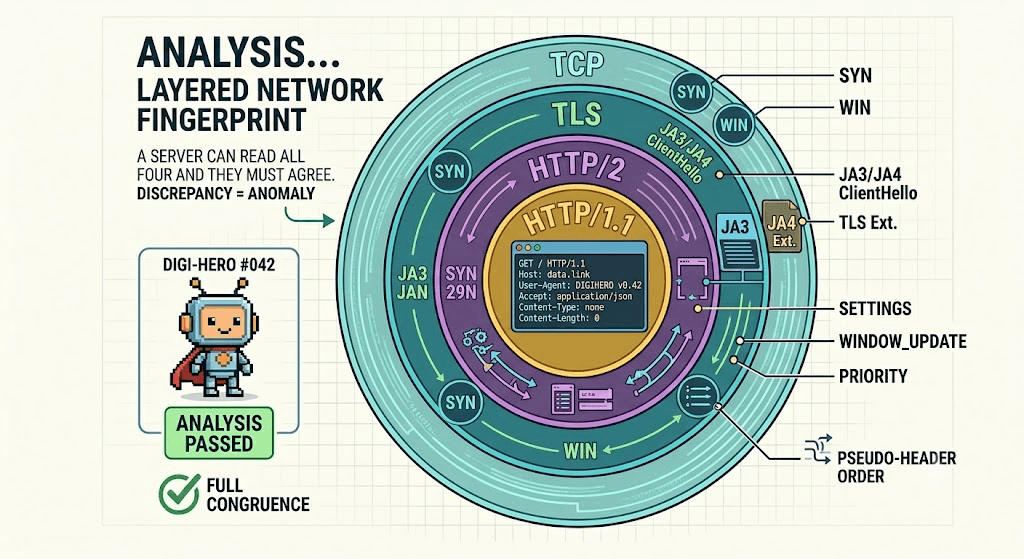

Diagram: the layered fingerprint stack — TCP (SYN/window) → TLS (JA3/JA4 ClientHello) → HTTP/2 (SETTINGS, WINDOW_UPDATE, priority, pseudo-header order) → HTTP (header names, order, casing). A server can read all four and they must agree.


Why HTTP/2 Is Fingerprintable at All

HTTP/1.1 was plain text — a request line and a list of headers, not much to fingerprint beyond the headers themselves. HTTP/2 is different in two ways that matter:

  • It's binary and framed. Everything is a frame with a type: SETTINGS, HEADERS, WINDOW_UPDATE, PRIORITY, DATA. The protocol gives clients latitude in which frames they send, in what order, and with what values, and every client library makes those choices differently.

  • It's stateful. A connection opens with a negotiation. Both sides send a SETTINGS frame announcing their parameters, and clients typically send flow-control and priority information immediately after. That opening sequence is effectively a second handshake, and it happens the same way on every connection a given client makes.

Because the spec allows a wide range of valid behavior, the specific choices a client makes, values no human ever configures — become a stable signature. Chrome always opens its connections the same way. So does Go's net/http. They just don't do it the same way as each other.


What the Server Actually Sees

When your client establishes an HTTP/2 connection, a passive observer on the server side can record:

  1. The SETTINGS frame values. Things like SETTINGS_HEADER_TABLE_SIZE, SETTINGS_INITIAL_WINDOW_SIZE, SETTINGS_MAX_CONCURRENT_STREAMS, and SETTINGS_MAX_HEADER_LIST_SIZE. Chrome sends a specific set of these in a specific order. A bare HTTP/2 library sends a different set.

  2. The WINDOW_UPDATE frame. After the connection preface, clients usually bump the connection-level flow-control window. The increment value is client-specific, Chrome adds a large, recognizable amount.

  3. Stream priority. HTTP/2 lets a client express a dependency tree so the server knows which streams to serve first. Browsers build an elaborate priority tree; most scraping libraries send no priority information at all, or a single flat default.

  4. Pseudo-header order. Every HTTP/2 request carries four pseudo-headers: :method, :authority, :scheme, :path. The spec doesn't mandate their order. Chrome sends them as :method, :authority, :scheme, :path. Other clients use different orders. This single detail is one of the most reliable tells.

  5. Regular header order and casing. HTTP/2 lowercases header names, but the order of the real headers, and which ones appear, still varies by client.

None of these change the meaning of your request. All of them are observable before you've sent a single byte of application data.


The Akamai HTTP/2 Fingerprint Format

The most widely referenced way to summarize all of this is the format popularized by Akamai's research, often written as four pipe-separated sections:


SETTINGS|WINDOW_UPDATE|PRIORITY|PSEUDO_HEADER_ORDER


Conceptually, each section captures one of the surfaces above:

  • SETTINGS — the SETTINGS frame parameters as id:value pairs in the order sent. For example, a client might emit 1:65536;2:0;4:6291456;6:262144. The IDs map to the named settings (1 is header table size, 4 is initial window size, and so on).

  • WINDOW_UPDATE — the connection-level window increment, or 00 if the client sent none.

  • PRIORITY — the priority frames, encoded as streamId:exclusivity:dependsOn:weight, separated by commas. Browsers populate this richly; many libraries leave it empty.

  • PSEUDO_HEADER_ORDER — the order of the four pseudo-headers, abbreviated, e.g. m,a,s,p for :method, :authority, :scheme, :path.

A full fingerprint string looks something like:


1:65536;2:0;4:6291456;6:262144|15663105|0|m,a,s,p


That whole string hashes into a single ID. The point isn't the exact bytes, it's that this string is stable per client and different across clients. Servers don't need to know you're a bot; they only need to know your H2 fingerprint doesn't match the browser your User-Agent and TLS claim to be.


How Real Clients Differ

The reason this works is that the major HTTP/2 implementations don't even try to look alike.

  • Real Chrome. Sends a distinctive SETTINGS set, a large connection-level WINDOW_UPDATE, a built-out priority tree, and pseudo-header order m,a,s,p. Firefox and Safari each have their own consistent-but-different signatures.

  • Go net/http. Go's HTTP/2 client sends a smaller SETTINGS set, no priority tree, and, critically, a different pseudo-header order than Chrome. Anything built on Go (and a lot of scraping tooling is) inherits this. A Go client claiming to be Chrome via User-Agent is one of the easiest contradictions to catch.

  • Python httpx / hyper / h2. The h2 state machine that httpx builds on has its own SETTINGS defaults and, again, no browser-like priority behavior. It's internally consistent but unmistakably not a browser.

  • nghttp2. The reference C library underneath many tools (including curl) has its own signature. Plain curl --http2 does not look like Chrome at the H2 layer even though both use HTTP/2 correctly.

Every one of these is a perfectly compliant HTTP/2 client. Compliance was never the question. The question is whether your H2 signature matches the rest of your story.


The Consistency Trap

This is the part that catches people who treat fingerprinting as a single checkbox. Imagine you've fixed your TLS fingerprint so JA4 says "Chrome 131", but you're sending the actual requests through a Go-based layer or a plain HTTP/2 library. Now the server sees:

  • TLS layer: Chrome 131

  • HTTP/2 layer: Go net/http

  • User-Agent header: Chrome/148

Three layers, three different stories. A real Chrome produces the same answer at every layer because it's one program, so the mismatch itself is the signal, the server doesn't have to identify your tool, it just notices that no real browser produces this combination. Detection increasingly scores the agreement across TLS, H2, headers, and UA rather than any single one. That's why piecemeal fixes plateau: fixing TLS alone moves you from "obvious bot" to "inconsistent client," which is still flagged. The layers have to line up.


Inspecting Your Own H2 Fingerprint

You don't need special tooling to see this, you need an echo service that reports back what it observed. Several public HTTP/2 fingerprinting endpoints return the Akamai-format string and a hash for whatever client connected. Hit one and read the JSON:


from curl_cffi import requests

# An H2 fingerprint echo endpoint reports the SETTINGS/WINDOW_UPDATE/
# PRIORITY/pseudo-header signature it saw on your connection.
r = requests.get(
    "https://tls.peet.ws/api/all",   # reports both TLS and HTTP/2 fingerprints
    impersonate="chrome131",
)
data = r.json()
print(data["http2"]["akamai_fingerprint"])
print(data["http2"]["akamai_fingerprint_hash"])


Run it twice, once with impersonate="chrome131" and once with plain httpx or requests, and compare the strings. The browser-impersonating client returns a Chrome-shaped fingerprint; the bare client returns its library's signature. That side-by-side is the whole concept made concrete.


What Aligns the H2 Layer

Two approaches actually produce a coherent fingerprint across layers:

  • A browser-impersonating client. curl_cffi with impersonate= doesn't just patch TLS, the impersonation targets carry matching HTTP/2 settings, window updates, and pseudo-header order for the browser version you select. Because TLS and H2 are configured together to match the same Chrome build, the layers agree by construction. This is the lowest-effort path that holds up.

  • A real browser engine. Playwright, Camoufox, or a real Chromium build send a genuine Chrome H2 fingerprint because they areChrome's networking stack. There's nothing to align, it's the real thing. More expensive per request, but inherently consistent down to the priority tree.

If your tooling does neither, no amount of header tuning will close the gap, because header tuning never touches the frame layer.


HTTP/3 and QUIC: The Next Surface

HTTP/3 changes the foundation. It runs over QUIC, which runs over UDP instead of TCP, and it folds the TLS handshake into the transport itself. That shuffles the fingerprint surface rather than removing it.

  • The QUIC transport parameters, values like max_idle_timeout, initial_max_data, max_udp_payload_size, and their order, play the role SETTINGS played in H2.

  • The Initial packet structure and the way the client packages its first flight become observable, much like the TLS ClientHello.

  • Pseudo-header behavior carries over conceptually from H2.

It's early days for QUIC fingerprinting, fewer servers gate on it, and impersonation tooling is thinner than for H2. But Chrome already prefers HTTP/3 to many origins, so a client speaking H2 to a host that real Chrome reaches over H3 is itself a small inconsistency. The surface is coming; know it exists before you assume TLS plus H2 is the whole picture.


What People Get Wrong

  • Forcing HTTP/1.1 to dodge H2 fingerprinting. Tempting, but a modern Chrome on a modern site negotiates HTTP/2 (or H3) every time. A client that downgrades to 1.1 stands out more, not less, you've traded a subtle mismatch for an obvious one.

  • Assuming a TLS fix covers HTTP/2. They're separate layers configured separately. A JA4 match says nothing about your SETTINGS frame.

  • Tuning headers to fix a frame-layer problem. Reordering or adding HTTP headers can't change your SETTINGS values, window increment, or priority tree. Wrong layer.

  • Hand-rolling an H2 client to "look like Chrome." You'd have to replicate the SETTINGS set, the exact window increment, the full priority tree, and pseudo-header order, and keep it matching Chrome's TLS, across every Chrome release. This is genuinely hard to make convincing and breaks every time Chrome ships. Use an impersonation library or a real browser instead.

  • Ignoring the IP entirely. A flawless fingerprint from a flagged datacenter range still gets scored down. Pair a coherent client with a clean residential pool, like Evomi's, so the network layer doesn't undo the work.


Wrapping Up

TLS is the first layer a server fingerprints, not the only one. The HTTP/2 connection setup, SETTINGS frame, WINDOW_UPDATE increment, priority tree, and pseudo-header order, is just as distinctive, and a passive observer reads it before you send any data. The detection that matters now is consistency: TLS, HTTP/2, headers, and User-Agent all have to tell the same story, because a real browser is one program that tells one story.

The practical takeaway is short. Use a client that configures TLS and H2 together to match a real browser (curl_cffi impersonation) or use a real browser engine, verify both layers against an echo service, and don't try to fix a frame-layer fingerprint with header edits. HTTP/3 is the same idea moving to QUIC parameters, not here in force yet, but the layer above the layer above TLS, and worth watching.


You did everything right. You swapped requests for curl_cffi, set impersonate="chrome131", and your JA3/JA4 hash now matches a real Chrome. You verified it against a TLS echo service. And you're still getting flagged on the first request, before any JavaScript runs, before any IP reputation check.

The TLS handshake is only the first layer a server can fingerprint. Once the encrypted tunnel is up, the very next thing it sees is your HTTP/2 connection setup, a second handshake, just as distinctive as the TLS one. If your TLS says Chrome but your HTTP/2 says Go, you've handed the server a contradiction it can act on. This is the sibling problem to TLS fingerprinting; here's how the layer above it works.


Diagram: the layered fingerprint stack — TCP (SYN/window) → TLS (JA3/JA4 ClientHello) → HTTP/2 (SETTINGS, WINDOW_UPDATE, priority, pseudo-header order) → HTTP (header names, order, casing). A server can read all four and they must agree.


Why HTTP/2 Is Fingerprintable at All

HTTP/1.1 was plain text — a request line and a list of headers, not much to fingerprint beyond the headers themselves. HTTP/2 is different in two ways that matter:

  • It's binary and framed. Everything is a frame with a type: SETTINGS, HEADERS, WINDOW_UPDATE, PRIORITY, DATA. The protocol gives clients latitude in which frames they send, in what order, and with what values, and every client library makes those choices differently.

  • It's stateful. A connection opens with a negotiation. Both sides send a SETTINGS frame announcing their parameters, and clients typically send flow-control and priority information immediately after. That opening sequence is effectively a second handshake, and it happens the same way on every connection a given client makes.

Because the spec allows a wide range of valid behavior, the specific choices a client makes, values no human ever configures — become a stable signature. Chrome always opens its connections the same way. So does Go's net/http. They just don't do it the same way as each other.


What the Server Actually Sees

When your client establishes an HTTP/2 connection, a passive observer on the server side can record:

  1. The SETTINGS frame values. Things like SETTINGS_HEADER_TABLE_SIZE, SETTINGS_INITIAL_WINDOW_SIZE, SETTINGS_MAX_CONCURRENT_STREAMS, and SETTINGS_MAX_HEADER_LIST_SIZE. Chrome sends a specific set of these in a specific order. A bare HTTP/2 library sends a different set.

  2. The WINDOW_UPDATE frame. After the connection preface, clients usually bump the connection-level flow-control window. The increment value is client-specific, Chrome adds a large, recognizable amount.

  3. Stream priority. HTTP/2 lets a client express a dependency tree so the server knows which streams to serve first. Browsers build an elaborate priority tree; most scraping libraries send no priority information at all, or a single flat default.

  4. Pseudo-header order. Every HTTP/2 request carries four pseudo-headers: :method, :authority, :scheme, :path. The spec doesn't mandate their order. Chrome sends them as :method, :authority, :scheme, :path. Other clients use different orders. This single detail is one of the most reliable tells.

  5. Regular header order and casing. HTTP/2 lowercases header names, but the order of the real headers, and which ones appear, still varies by client.

None of these change the meaning of your request. All of them are observable before you've sent a single byte of application data.


The Akamai HTTP/2 Fingerprint Format

The most widely referenced way to summarize all of this is the format popularized by Akamai's research, often written as four pipe-separated sections:


SETTINGS|WINDOW_UPDATE|PRIORITY|PSEUDO_HEADER_ORDER


Conceptually, each section captures one of the surfaces above:

  • SETTINGS — the SETTINGS frame parameters as id:value pairs in the order sent. For example, a client might emit 1:65536;2:0;4:6291456;6:262144. The IDs map to the named settings (1 is header table size, 4 is initial window size, and so on).

  • WINDOW_UPDATE — the connection-level window increment, or 00 if the client sent none.

  • PRIORITY — the priority frames, encoded as streamId:exclusivity:dependsOn:weight, separated by commas. Browsers populate this richly; many libraries leave it empty.

  • PSEUDO_HEADER_ORDER — the order of the four pseudo-headers, abbreviated, e.g. m,a,s,p for :method, :authority, :scheme, :path.

A full fingerprint string looks something like:


1:65536;2:0;4:6291456;6:262144|15663105|0|m,a,s,p


That whole string hashes into a single ID. The point isn't the exact bytes, it's that this string is stable per client and different across clients. Servers don't need to know you're a bot; they only need to know your H2 fingerprint doesn't match the browser your User-Agent and TLS claim to be.


How Real Clients Differ

The reason this works is that the major HTTP/2 implementations don't even try to look alike.

  • Real Chrome. Sends a distinctive SETTINGS set, a large connection-level WINDOW_UPDATE, a built-out priority tree, and pseudo-header order m,a,s,p. Firefox and Safari each have their own consistent-but-different signatures.

  • Go net/http. Go's HTTP/2 client sends a smaller SETTINGS set, no priority tree, and, critically, a different pseudo-header order than Chrome. Anything built on Go (and a lot of scraping tooling is) inherits this. A Go client claiming to be Chrome via User-Agent is one of the easiest contradictions to catch.

  • Python httpx / hyper / h2. The h2 state machine that httpx builds on has its own SETTINGS defaults and, again, no browser-like priority behavior. It's internally consistent but unmistakably not a browser.

  • nghttp2. The reference C library underneath many tools (including curl) has its own signature. Plain curl --http2 does not look like Chrome at the H2 layer even though both use HTTP/2 correctly.

Every one of these is a perfectly compliant HTTP/2 client. Compliance was never the question. The question is whether your H2 signature matches the rest of your story.


The Consistency Trap

This is the part that catches people who treat fingerprinting as a single checkbox. Imagine you've fixed your TLS fingerprint so JA4 says "Chrome 131", but you're sending the actual requests through a Go-based layer or a plain HTTP/2 library. Now the server sees:

  • TLS layer: Chrome 131

  • HTTP/2 layer: Go net/http

  • User-Agent header: Chrome/148

Three layers, three different stories. A real Chrome produces the same answer at every layer because it's one program, so the mismatch itself is the signal, the server doesn't have to identify your tool, it just notices that no real browser produces this combination. Detection increasingly scores the agreement across TLS, H2, headers, and UA rather than any single one. That's why piecemeal fixes plateau: fixing TLS alone moves you from "obvious bot" to "inconsistent client," which is still flagged. The layers have to line up.


Inspecting Your Own H2 Fingerprint

You don't need special tooling to see this, you need an echo service that reports back what it observed. Several public HTTP/2 fingerprinting endpoints return the Akamai-format string and a hash for whatever client connected. Hit one and read the JSON:


from curl_cffi import requests

# An H2 fingerprint echo endpoint reports the SETTINGS/WINDOW_UPDATE/
# PRIORITY/pseudo-header signature it saw on your connection.
r = requests.get(
    "https://tls.peet.ws/api/all",   # reports both TLS and HTTP/2 fingerprints
    impersonate="chrome131",
)
data = r.json()
print(data["http2"]["akamai_fingerprint"])
print(data["http2"]["akamai_fingerprint_hash"])


Run it twice, once with impersonate="chrome131" and once with plain httpx or requests, and compare the strings. The browser-impersonating client returns a Chrome-shaped fingerprint; the bare client returns its library's signature. That side-by-side is the whole concept made concrete.


What Aligns the H2 Layer

Two approaches actually produce a coherent fingerprint across layers:

  • A browser-impersonating client. curl_cffi with impersonate= doesn't just patch TLS, the impersonation targets carry matching HTTP/2 settings, window updates, and pseudo-header order for the browser version you select. Because TLS and H2 are configured together to match the same Chrome build, the layers agree by construction. This is the lowest-effort path that holds up.

  • A real browser engine. Playwright, Camoufox, or a real Chromium build send a genuine Chrome H2 fingerprint because they areChrome's networking stack. There's nothing to align, it's the real thing. More expensive per request, but inherently consistent down to the priority tree.

If your tooling does neither, no amount of header tuning will close the gap, because header tuning never touches the frame layer.


HTTP/3 and QUIC: The Next Surface

HTTP/3 changes the foundation. It runs over QUIC, which runs over UDP instead of TCP, and it folds the TLS handshake into the transport itself. That shuffles the fingerprint surface rather than removing it.

  • The QUIC transport parameters, values like max_idle_timeout, initial_max_data, max_udp_payload_size, and their order, play the role SETTINGS played in H2.

  • The Initial packet structure and the way the client packages its first flight become observable, much like the TLS ClientHello.

  • Pseudo-header behavior carries over conceptually from H2.

It's early days for QUIC fingerprinting, fewer servers gate on it, and impersonation tooling is thinner than for H2. But Chrome already prefers HTTP/3 to many origins, so a client speaking H2 to a host that real Chrome reaches over H3 is itself a small inconsistency. The surface is coming; know it exists before you assume TLS plus H2 is the whole picture.


What People Get Wrong

  • Forcing HTTP/1.1 to dodge H2 fingerprinting. Tempting, but a modern Chrome on a modern site negotiates HTTP/2 (or H3) every time. A client that downgrades to 1.1 stands out more, not less, you've traded a subtle mismatch for an obvious one.

  • Assuming a TLS fix covers HTTP/2. They're separate layers configured separately. A JA4 match says nothing about your SETTINGS frame.

  • Tuning headers to fix a frame-layer problem. Reordering or adding HTTP headers can't change your SETTINGS values, window increment, or priority tree. Wrong layer.

  • Hand-rolling an H2 client to "look like Chrome." You'd have to replicate the SETTINGS set, the exact window increment, the full priority tree, and pseudo-header order, and keep it matching Chrome's TLS, across every Chrome release. This is genuinely hard to make convincing and breaks every time Chrome ships. Use an impersonation library or a real browser instead.

  • Ignoring the IP entirely. A flawless fingerprint from a flagged datacenter range still gets scored down. Pair a coherent client with a clean residential pool, like Evomi's, so the network layer doesn't undo the work.


Wrapping Up

TLS is the first layer a server fingerprints, not the only one. The HTTP/2 connection setup, SETTINGS frame, WINDOW_UPDATE increment, priority tree, and pseudo-header order, is just as distinctive, and a passive observer reads it before you send any data. The detection that matters now is consistency: TLS, HTTP/2, headers, and User-Agent all have to tell the same story, because a real browser is one program that tells one story.

The practical takeaway is short. Use a client that configures TLS and H2 together to match a real browser (curl_cffi impersonation) or use a real browser engine, verify both layers against an echo service, and don't try to fix a frame-layer fingerprint with header edits. HTTP/3 is the same idea moving to QUIC parameters, not here in force yet, but the layer above the layer above TLS, and worth watching.

You did everything right. You swapped requests for curl_cffi, set impersonate="chrome131", and your JA3/JA4 hash now matches a real Chrome. You verified it against a TLS echo service. And you're still getting flagged on the first request, before any JavaScript runs, before any IP reputation check.

The TLS handshake is only the first layer a server can fingerprint. Once the encrypted tunnel is up, the very next thing it sees is your HTTP/2 connection setup, a second handshake, just as distinctive as the TLS one. If your TLS says Chrome but your HTTP/2 says Go, you've handed the server a contradiction it can act on. This is the sibling problem to TLS fingerprinting; here's how the layer above it works.


Diagram: the layered fingerprint stack — TCP (SYN/window) → TLS (JA3/JA4 ClientHello) → HTTP/2 (SETTINGS, WINDOW_UPDATE, priority, pseudo-header order) → HTTP (header names, order, casing). A server can read all four and they must agree.


Why HTTP/2 Is Fingerprintable at All

HTTP/1.1 was plain text — a request line and a list of headers, not much to fingerprint beyond the headers themselves. HTTP/2 is different in two ways that matter:

  • It's binary and framed. Everything is a frame with a type: SETTINGS, HEADERS, WINDOW_UPDATE, PRIORITY, DATA. The protocol gives clients latitude in which frames they send, in what order, and with what values, and every client library makes those choices differently.

  • It's stateful. A connection opens with a negotiation. Both sides send a SETTINGS frame announcing their parameters, and clients typically send flow-control and priority information immediately after. That opening sequence is effectively a second handshake, and it happens the same way on every connection a given client makes.

Because the spec allows a wide range of valid behavior, the specific choices a client makes, values no human ever configures — become a stable signature. Chrome always opens its connections the same way. So does Go's net/http. They just don't do it the same way as each other.


What the Server Actually Sees

When your client establishes an HTTP/2 connection, a passive observer on the server side can record:

  1. The SETTINGS frame values. Things like SETTINGS_HEADER_TABLE_SIZE, SETTINGS_INITIAL_WINDOW_SIZE, SETTINGS_MAX_CONCURRENT_STREAMS, and SETTINGS_MAX_HEADER_LIST_SIZE. Chrome sends a specific set of these in a specific order. A bare HTTP/2 library sends a different set.

  2. The WINDOW_UPDATE frame. After the connection preface, clients usually bump the connection-level flow-control window. The increment value is client-specific, Chrome adds a large, recognizable amount.

  3. Stream priority. HTTP/2 lets a client express a dependency tree so the server knows which streams to serve first. Browsers build an elaborate priority tree; most scraping libraries send no priority information at all, or a single flat default.

  4. Pseudo-header order. Every HTTP/2 request carries four pseudo-headers: :method, :authority, :scheme, :path. The spec doesn't mandate their order. Chrome sends them as :method, :authority, :scheme, :path. Other clients use different orders. This single detail is one of the most reliable tells.

  5. Regular header order and casing. HTTP/2 lowercases header names, but the order of the real headers, and which ones appear, still varies by client.

None of these change the meaning of your request. All of them are observable before you've sent a single byte of application data.


The Akamai HTTP/2 Fingerprint Format

The most widely referenced way to summarize all of this is the format popularized by Akamai's research, often written as four pipe-separated sections:


SETTINGS|WINDOW_UPDATE|PRIORITY|PSEUDO_HEADER_ORDER


Conceptually, each section captures one of the surfaces above:

  • SETTINGS — the SETTINGS frame parameters as id:value pairs in the order sent. For example, a client might emit 1:65536;2:0;4:6291456;6:262144. The IDs map to the named settings (1 is header table size, 4 is initial window size, and so on).

  • WINDOW_UPDATE — the connection-level window increment, or 00 if the client sent none.

  • PRIORITY — the priority frames, encoded as streamId:exclusivity:dependsOn:weight, separated by commas. Browsers populate this richly; many libraries leave it empty.

  • PSEUDO_HEADER_ORDER — the order of the four pseudo-headers, abbreviated, e.g. m,a,s,p for :method, :authority, :scheme, :path.

A full fingerprint string looks something like:


1:65536;2:0;4:6291456;6:262144|15663105|0|m,a,s,p


That whole string hashes into a single ID. The point isn't the exact bytes, it's that this string is stable per client and different across clients. Servers don't need to know you're a bot; they only need to know your H2 fingerprint doesn't match the browser your User-Agent and TLS claim to be.


How Real Clients Differ

The reason this works is that the major HTTP/2 implementations don't even try to look alike.

  • Real Chrome. Sends a distinctive SETTINGS set, a large connection-level WINDOW_UPDATE, a built-out priority tree, and pseudo-header order m,a,s,p. Firefox and Safari each have their own consistent-but-different signatures.

  • Go net/http. Go's HTTP/2 client sends a smaller SETTINGS set, no priority tree, and, critically, a different pseudo-header order than Chrome. Anything built on Go (and a lot of scraping tooling is) inherits this. A Go client claiming to be Chrome via User-Agent is one of the easiest contradictions to catch.

  • Python httpx / hyper / h2. The h2 state machine that httpx builds on has its own SETTINGS defaults and, again, no browser-like priority behavior. It's internally consistent but unmistakably not a browser.

  • nghttp2. The reference C library underneath many tools (including curl) has its own signature. Plain curl --http2 does not look like Chrome at the H2 layer even though both use HTTP/2 correctly.

Every one of these is a perfectly compliant HTTP/2 client. Compliance was never the question. The question is whether your H2 signature matches the rest of your story.


The Consistency Trap

This is the part that catches people who treat fingerprinting as a single checkbox. Imagine you've fixed your TLS fingerprint so JA4 says "Chrome 131", but you're sending the actual requests through a Go-based layer or a plain HTTP/2 library. Now the server sees:

  • TLS layer: Chrome 131

  • HTTP/2 layer: Go net/http

  • User-Agent header: Chrome/148

Three layers, three different stories. A real Chrome produces the same answer at every layer because it's one program, so the mismatch itself is the signal, the server doesn't have to identify your tool, it just notices that no real browser produces this combination. Detection increasingly scores the agreement across TLS, H2, headers, and UA rather than any single one. That's why piecemeal fixes plateau: fixing TLS alone moves you from "obvious bot" to "inconsistent client," which is still flagged. The layers have to line up.


Inspecting Your Own H2 Fingerprint

You don't need special tooling to see this, you need an echo service that reports back what it observed. Several public HTTP/2 fingerprinting endpoints return the Akamai-format string and a hash for whatever client connected. Hit one and read the JSON:


from curl_cffi import requests

# An H2 fingerprint echo endpoint reports the SETTINGS/WINDOW_UPDATE/
# PRIORITY/pseudo-header signature it saw on your connection.
r = requests.get(
    "https://tls.peet.ws/api/all",   # reports both TLS and HTTP/2 fingerprints
    impersonate="chrome131",
)
data = r.json()
print(data["http2"]["akamai_fingerprint"])
print(data["http2"]["akamai_fingerprint_hash"])


Run it twice, once with impersonate="chrome131" and once with plain httpx or requests, and compare the strings. The browser-impersonating client returns a Chrome-shaped fingerprint; the bare client returns its library's signature. That side-by-side is the whole concept made concrete.


What Aligns the H2 Layer

Two approaches actually produce a coherent fingerprint across layers:

  • A browser-impersonating client. curl_cffi with impersonate= doesn't just patch TLS, the impersonation targets carry matching HTTP/2 settings, window updates, and pseudo-header order for the browser version you select. Because TLS and H2 are configured together to match the same Chrome build, the layers agree by construction. This is the lowest-effort path that holds up.

  • A real browser engine. Playwright, Camoufox, or a real Chromium build send a genuine Chrome H2 fingerprint because they areChrome's networking stack. There's nothing to align, it's the real thing. More expensive per request, but inherently consistent down to the priority tree.

If your tooling does neither, no amount of header tuning will close the gap, because header tuning never touches the frame layer.


HTTP/3 and QUIC: The Next Surface

HTTP/3 changes the foundation. It runs over QUIC, which runs over UDP instead of TCP, and it folds the TLS handshake into the transport itself. That shuffles the fingerprint surface rather than removing it.

  • The QUIC transport parameters, values like max_idle_timeout, initial_max_data, max_udp_payload_size, and their order, play the role SETTINGS played in H2.

  • The Initial packet structure and the way the client packages its first flight become observable, much like the TLS ClientHello.

  • Pseudo-header behavior carries over conceptually from H2.

It's early days for QUIC fingerprinting, fewer servers gate on it, and impersonation tooling is thinner than for H2. But Chrome already prefers HTTP/3 to many origins, so a client speaking H2 to a host that real Chrome reaches over H3 is itself a small inconsistency. The surface is coming; know it exists before you assume TLS plus H2 is the whole picture.


What People Get Wrong

  • Forcing HTTP/1.1 to dodge H2 fingerprinting. Tempting, but a modern Chrome on a modern site negotiates HTTP/2 (or H3) every time. A client that downgrades to 1.1 stands out more, not less, you've traded a subtle mismatch for an obvious one.

  • Assuming a TLS fix covers HTTP/2. They're separate layers configured separately. A JA4 match says nothing about your SETTINGS frame.

  • Tuning headers to fix a frame-layer problem. Reordering or adding HTTP headers can't change your SETTINGS values, window increment, or priority tree. Wrong layer.

  • Hand-rolling an H2 client to "look like Chrome." You'd have to replicate the SETTINGS set, the exact window increment, the full priority tree, and pseudo-header order, and keep it matching Chrome's TLS, across every Chrome release. This is genuinely hard to make convincing and breaks every time Chrome ships. Use an impersonation library or a real browser instead.

  • Ignoring the IP entirely. A flawless fingerprint from a flagged datacenter range still gets scored down. Pair a coherent client with a clean residential pool, like Evomi's, so the network layer doesn't undo the work.


Wrapping Up

TLS is the first layer a server fingerprints, not the only one. The HTTP/2 connection setup, SETTINGS frame, WINDOW_UPDATE increment, priority tree, and pseudo-header order, is just as distinctive, and a passive observer reads it before you send any data. The detection that matters now is consistency: TLS, HTTP/2, headers, and User-Agent all have to tell the same story, because a real browser is one program that tells one story.

The practical takeaway is short. Use a client that configures TLS and H2 together to match a real browser (curl_cffi impersonation) or use a real browser engine, verify both layers against an echo service, and don't try to fix a frame-layer fingerprint with header edits. HTTP/3 is the same idea moving to QUIC parameters, not here in force yet, but the layer above the layer above TLS, and worth watching.

Author

The Scraper

Engineer and Webscraping Specialist

About Author

The Scraper is a software engineer and web scraping specialist, focused on building production-grade data extraction systems. His work centers on large-scale crawling, anti-bot evasion, proxy infrastructure, and browser automation. He writes about real-world scraping failures, silent data corruption, and systems that operate at scale.

Like this article? Share it.
You asked, we answer - Users questions:

In This Article