
Your crawler gets a 403. The body is a small HTML shell referencing geo.captcha-delivery.com, with an embedded identifier and a feedback form. The headers carry x-datadome and a Set-Cookie: datadome=....
Nothing in your stack produced that, and the origin server may never have seen your request.
DataDome is documented well enough to reconstruct what happened, worth doing, because the route from "blocked" to "allowed" runs through the site's configuration, not your code.
Where DataDome Actually Sits
It is not a proxy you route through, but a module inside infrastructure the site already operates, plus a detection API DataDome runs.
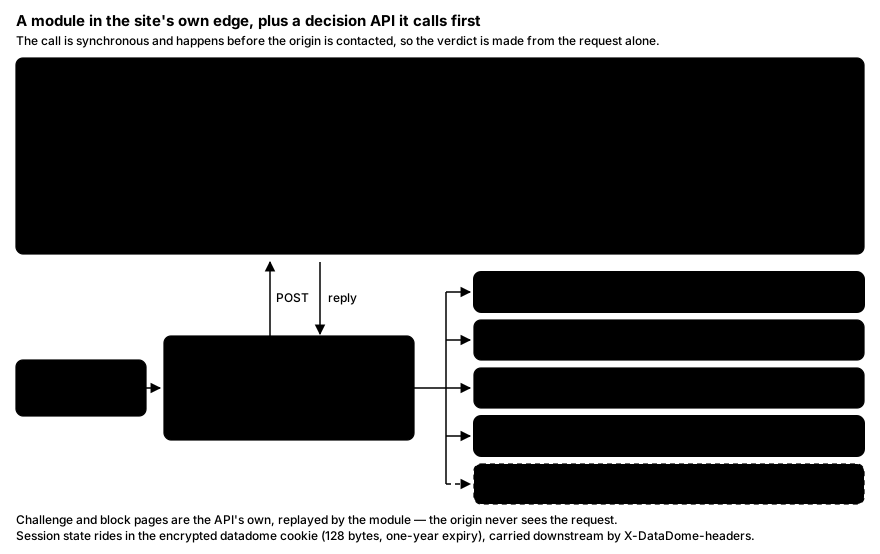
The integration surface is wide — edge modules (Cloudflare Workers, Fastly, Akamai EdgeWorkers, AWS CloudFront), reverse-proxy modules (Nginx, Apache, HAProxy, Envoy, Traefik, Varnish), server-side SDKs (Go, Node.js, Java, ASP.NET Core, Ruby, Python ASGI, Next.js), a JS Tag and mobile SDKs. Whichever is deployed does the same thing synchronously, before the origin is contacted: describes the request to https://api.datadome.co/validate-request/ as a POST of URL-encoded form fields, authenticated with the site's key, then acts on the answer.
That hop has to be cheap: the API is deployed regionally, a geo-proximity hostname plus 33 named endpoints, with keep-alive connections to the nearest. The figure DataDome publishes with AWS is an average computing time of about two milliseconds per request across 26 locations; that is the vendor's number for API compute, not an end-to-end measurement of your request.
The Decision Loop, Header by Header
The module's contract is small:
- Extract the
ClientID— theX-DataDome-ClientIDheader if present, otherwise thedatadomecookie, the session handle. - POST the description to the Protection API. The payload is capped at 24 kB, so fields truncate at documented limits —
UserAgentat 768 bytes,Requestat 2048. - Read
X-DataDomeResponsefrom the reply.200means allow: forward to the origin. Anything else is challenge or block: return the API's status code, body and mapped headers verbatim and do not contact the backend. - If the header is missing — timeout, network error, API unavailable — fail open: the request is allowed.
Two pointer headers drive header mapping: X-DataDome-request-headers (upstream, toward the origin) and X-DataDome-headers (downstream, toward you) — how the datadome cookie reaches your client and bot classification reaches the site's code.
The API picks the status and the module replays it, so blocks usually appear as 403 but can be configured as 401 or another code.
What the Module Forwards
The Protection API's field list is public — the fastest way to see what "request-level signals" means:
- Request shape and network identity.
Method,Protocol,Request,Host,Origin,Referer,IP,Port,XForwardedForIP,TrueClientIP,Via, plus length-only fields,PostParamLen,AuthorizationLenandCookiesLentake the size of your body and auth header, not the contents. - Header consistency.
HeadersListandCookiesListcarry the names in order. Order is a property of the HTTP client, not of a header dictionary, and order disagreeing with the declared browser is cheap to spot. - TLS.
JA3,JA4,TlsProtocol,TlsCipher, the module sits at or behind TLS termination, so the ClientHello is available. - Client Hints.
SecCHUA,SecCHUAPlatform,SecCHUAArch,SecCHUAModel,SecCHUAMobile,SecCHDeviceMemory,SecFetch*.Sec-CH-Device-Memoryis a bucketed power of two, so an implausible value shows up before any script runs. - Declared identity.
Signature,SignatureInput,SignatureAgent— the Web Bot Auth fields.
Client-side signals arrive separately: the JS Tag (https://js.datadome.co/tags.js, keyed by window.ddjskey) posts to https://api-js.datadome.co/js/. Under Device Check, an interstitial needing no user interaction — the documented collection covers screen details and touch actions, codecs, media extensions, plugins, browser type and version, CPUs and GPUs, and JavaScript challenges whose stated purpose is proving "the consistency of the collected information".
Consistency, explicitly: agreement between values, not exotic ones.
The Four Model Families
The models are documented in four groups, and the grouping tells you what a block was about:
- Signature-based — static or dynamically generated signatures over TLS fingerprints, browser fingerprints and HTTP headers.
- Behavioral — abnormal or aggressive patterns not associated with human activity, such as repeated login attempts.
- Reputational — source IP reputation, including addresses classified as datacenter or residential proxy, combined with other criteria because addresses are shared.
- Vulnerability scanner — systematic probing of predictable paths, filenames and parameters.
Models are also scoped: some generic, others only to endpoints declared as login, account creation, add-to-cart, forms, payment, API or agentic protocols, the same pattern can pass on a catalogue page and trip a model on checkout.
What the Response Actually Looks Like
Three response pages are documented: Device Check (invisible verification), Slider (the interactive CAPTCHA) and Block.
State lives in the datadome cookie: encrypted, documented as containing no PII, 128 bytes, one-year expiry, used for both server-side and client-side detection. Of its three documented companions, dd_testcookie is added and removed instantly to test whether cookies can be stored.
Telling this apart from an ordinary origin error takes a few lines:
import httpx

r = httpx.get("https://example.com/catalog/page-2", follow_redirects=False)
print(r.status_code)                          # usually 403; the API chooses the code
print(r.headers.get("x-datadome"))            # e.g. "protected"
print("datadome" in r.cookies)                # a session cookie was issued
print("captcha-delivery.com" in r.text)       # challenge or block page body
A blocked XHR gets a 403; the JS Tag aborts it by default (abortAsyncOnChallengeDisplay). On MCP endpoints the shape is unusually explicit — a JSON-RPC error with code: -32000, message: "Access denied", and error.data.type pointing at DataDome's own error page. Its guidance to the blocked agent: "Do not retry automatically. Retrying without addressing the root cause may result in further blocking."
Reading a Block Page as a Signal
The reference id is not decoration and not a token. It identifies one decision, so the site's operator can look that request up in their dashboard and see whether a threat model, a custom rule or a rate limit blocked you, the only part of the page useful to you.
Use it:
- Record it, with the timestamp, the URL and your exit IP, those four together make the decision findable. A Slider or Device Check means the system was uncertain; a hard block means a model or rule matched with confidence.
- Contact the site, quoting the reference. Ask whether they publish an API, a licence or a feed for what you were fetching, and what they need to allowlist a declared crawler.
- Stop the job meanwhile: reputational and behavioural models both key on volume, and a retry loop against a block page is the clearest bot signal you can emit.
Retrying harder cannot work by construction: the decision is made from the request's own properties, before the origin is reached.
The Operator's Side — Which Is Your Actual Route
DataDome's default, in its own words: "any automated request coming from an unauthenticated bot or AI agent is categorized as Threat Detection and is blocked by default." The dashboard is where a site owner overrides that: per-model policies — Device Check, Slider or Block, notably not Allow, unsupported for threat models; a site deactivates a model instead, plus up to 1,000 custom rules with priorities and expiry dates.
Rule responses go further: Allow, Timeboxing (allowed in defined hours, challenged outside), Rate Limiting (allowed up to a per-hour or per-day threshold, challenged above it), Captcha, Block, Device Check and Custom (allowed through, tagged with a header so the site's code decides). The first three exist only for custom rules, Verified Bots and AI agents: exactly the case of an identified crawler.
"Verified Bot" is not a euphemism for search engines: the categories include Data Provider, Competitive Intelligence, SEO Software, Media Monitoring, Web Aggregator and a Partners category defined as "all IPs manually allowed on your website." Commercial crawling is a named, admissible class.
Joining it is documented: use a dedicated User-Agent, set up one of five authentication mechanisms, then submit the verification form.
- Web Bot Auth — HTTP message signatures per RFC 9421, cryptographically verified.
- Reverse DNS — a two-way rDNS/DNS lookup, as Googlebot and Bingbot use.
- Static IP — you share the full address list.
- Dynamic IP list — you publish a CSV/JSON/plaintext file of your IPs, fetched on a schedule.
- Private AS — AS numbers that must be your own corporate AS, not a host like AWS, GCP or Hetzner.
Each of the five is a way of being identifiable. Rotating away from identification is rotating away from the only path that ends in a 200.
Mistakes That Waste Time
- Treating the
datadomecookie as a token to acquire. It is encrypted, tied to a session, and re-evaluated on every request. Holding one is not being allowed. - Retrying a
403on a backoff. Nothing about your request changed, and the volume is itself a reputational signal. - Rotating IPs against a client-side block. If the escalation was Device Check or Slider, the finding was about the browser environment, not the exit IP.
- Assuming
403always means DataDome. Check forx-datadome, the cookie and thecaptcha-delivery.comreference first. - Reaching for a solver service. Set aside the terms of service: the dashboard documents a Slider outcome of "detected an automated challenge solver or a challenge-solving service" followed by a block page — a documented detection, not a gap.
Wrapping Up
DataDome is a synchronous module plus a regional decision API: it evaluates the request's own properties before your target's server is involved, replays the verdict, and keeps session state in an encrypted cookie. You are not being rate-limited, you are being classified.
Which leaves one productive move: read the reference id off the block page, take it to the site with a description of what you need, and ask about the API, the licence or the allowlist. There is a documented mechanism for admitting a declared crawler, and every version starts with the crawler saying who it is.