
A page that worked last week now returns 200 OK with 9kB of markup and none of the data. You open DevTools, and before you get near the Network tab you glance at Application → Cookies. Three cookies sit on the domain that you did not put there: bm_sz, ak_bmsc, and one called _abck with a value about two thousand characters long.
You now know more than the response body would have told you. The site is behind Akamai Bot Manager, the protection is stateful across requests rather than per-request, and a JavaScript sensor is posting telemetry somewhere on the same domain. Ten minutes of investigation, saved by reading three names.
Cookie names are a better tell than headers because the cookie is the mechanism. The edge has to recognise a returning client cheaply on the next request, which means a name it can look up every time, set on the protected domain, stable across the vendor's customer base. A few products partially randomise, but doing it universally would break tooling, debugging and the cookie disclosures customers need for compliance. So the names stay.
The Table
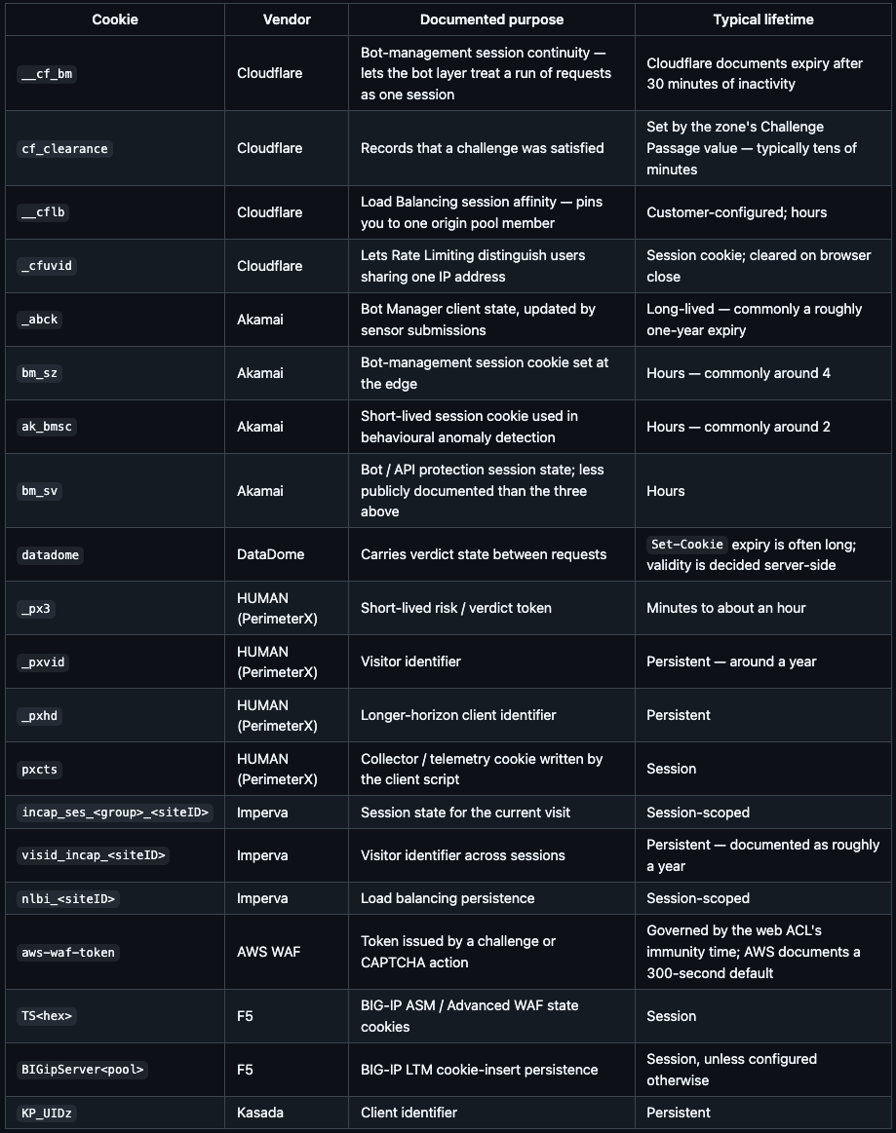
Two caveats. Lifetimes marked "commonly" are observed, not vendor commitments, several are customer-configurable. And a cookie's presence tells you which product is deployed, not which features are switched on.
Cloudflare: Continuity Versus Clearance
__cf_bm is continuity. Cloudflare's cookie documentation describes it as necessary for its bot products to function and states the 30-minute inactivity expiry. It is not a verdict and not a pass; it exists so the bot layer can reason about a sequence rather than judging each request in isolation. Seeing it means the bot layer is active, and nothing about what it decided.
cf_clearance carries a decision: Cloudflare documents it as storing proof that a challenge was passed, with a lifetime set by the zone owner's Challenge Passage value. So __cf_bm without cf_clearance is the normal state of an ordinary visit. The Cloudflare Bot Management post covers the scoring model behind both. _cfuvid is the footnote worth knowing: Cloudflare sets it so Rate Limiting can separate individual users behind one shared address.
Akamai: State That Only Means Anything in Its Own Session
_abck is the cookie most often misread as a session ID. It is bot-management state, updated by submissions from a JavaScript sensor served with the page, tamper-sensitive and bound to the client and session that obtained it. The value is long because it encodes edge-issued state, not because it is a portable token.
bm_sz and ak_bmsc cover the session-scale layer around it, which is why Akamai deployments care so much about request order, the Akamai Bot Manager post goes into that. All three on a cold request means the sensor is on the page before your first click.
DataDome, HUMAN and Imperva: Verdicts and Visitor IDs
These three show a useful split in what a cookie is for.
DataDome uses one cookie, datadome, holding opaque server-signed verdict state, so the edge knows cheaply that this client was already assessed rather than re-querying the verdict API inside its latency budget, see the DataDome post.
HUMAN (PerimeterX) splits the roles, which makes the design legible. _px3 is a short-lived verdict, minutes rather than days; _pxvid and _pxhd are long-horizon identifiers; pxcts is written by the client-side collector. Verdicts expire fast, identity persists, a stale verdict is dangerous, a stale identifier is just a weaker prior.
Imperva does the same with different names: incap_ses_* is the current visit, visid_incap_* the visitor across visits, nlbi_* is load balancing and carries no security meaning at all. The <siteID> suffix is the site's numeric ID in Imperva's console, so names vary between sites while prefixes do not.
AWS WAF and F5: Tokens and Persistence
aws-waf-token is a challenge artefact, not a session. AWS's model is an immunity time: once a client completes a challenge or CAPTCHA, the token satisfies subsequent requests for a configured window, defaulting to 300 seconds in AWS's documentation. The token domain is configurable, so one token can cover several subdomains, the AWS WAF Bot Control post covers how that meets the labelling system.
F5 is the odd one out, because "F5 cookies" usually are not bot-defence cookies at all. BIGipServer<poolname> is BIG-IP LTM's cookie-insert persistence, pure load balancing, whose historical default encoding of the backend member's address and port is a familiar infrastructure-review finding. TS-prefixed cookies come from ASM / Advanced WAF. Neither tells you whether F5's Bot Defense product is deployed: that ships as a connector at whatever edge the customer already runs, signalling through collection endpoints rather than a cookie.
Read the Attributes, Not Just the Names
The name identifies the vendor. The attributes tell you how it is wired.
HttpOnlymeans page JavaScript cannot read it, the signature of a cookie the edge issues and validates, not one a collector script manages.__cf_bmis HttpOnly;pxcts, written client-side, is not.Secure+SameSite=Nonemeans the cookie travels in cross-site subrequests, typically because the protection covers embedded iframes, widgets or an API on another host.SameSite=Laxmeans it does not.Domainis the blast radius. Set on.example.comit covers every subdomain; set on the exact host, one service — the fastest way to see whether a site's API sits behind the same policy as its website.Max-Age/Expires/ absent separates verdicts (short) from identifiers (long) from pure session state (absent).Partitionedis CHIPS, a cookie keyed to the top-level site it was set under, so a third-party context gets a separate jar per embedding site.
That last one points at a bigger shift. Safari and Firefox block third-party cookies by default, and Google changed direction more than once before confirming in 2025 that Chrome would keep them. Vendors could not wait for that to settle, and the result is visible across the whole table: almost every anti-bot cookie here is first-party. A protection that depended on a third-party cookie would have stopped working on a large share of the web years ago.
Inspecting a Cookie Jar
This reads what a site sets on a cold request and labels anything it recognises. It changes nothing and decodes nothing.
import httpx

EXACT = {
    "__cf_bm": "Cloudflare — bot-management session continuity",
    "cf_clearance": "Cloudflare — a challenge was satisfied",
    "__cflb": "Cloudflare — load balancer session affinity",
    "_cfuvid": "Cloudflare — rate limiting across a shared IP",
    "_abck": "Akamai Bot Manager — client state, updated by sensor posts",
    "bm_sz": "Akamai — bot-management session",
    "ak_bmsc": "Akamai — short-lived session / behavioural cookie",
    "bm_sv": "Akamai — bot / API protection session",
    "datadome": "DataDome — verdict state",
    "_px3": "HUMAN (PerimeterX) — short-lived verdict token",
    "_pxvid": "HUMAN (PerimeterX) — visitor identifier",
    "_pxhd": "HUMAN (PerimeterX) — long-horizon identifier",
    "pxcts": "HUMAN (PerimeterX) — client collector telemetry",
    "aws-waf-token": "AWS WAF — challenge / CAPTCHA token",
    "KP_UIDz": "Kasada — client identifier",
}

PREFIX = {
    "incap_ses_": "Imperva — session state",
    "visid_incap_": "Imperva — visitor identifier",
    "nlbi_": "Imperva — load balancing persistence",
    "BIGipServer": "F5 BIG-IP — cookie-insert persistence",
    "TS0": "F5 BIG-IP ASM / Advanced WAF (heuristic: TS + hex)",
}

def identify(name: str) -> str | None:
    if name in EXACT:
        return EXACT[name]
    for prefix, label in PREFIX.items():
        if name.startswith(prefix):
            return label
    return None

UA = ("Mozilla/5.0 (Macintosh; Intel Mac OS X 10_15_7) AppleWebKit/537.36 "
      "(KHTML, like Gecko) Chrome/148.0.0.0 Safari/537.36")

with httpx.Client(headers={"User-Agent": UA}, follow_redirects=True) as c:
    r = c.get("https://example.com")

print(r.status_code, "|", r.headers.get("server"), "|", r.headers.get("cf-ray", "-"))

for raw in r.headers.get_list("set-cookie"):
    name = raw.split("=", 1)[0].strip()
    attrs = "; ".join(p.strip() for p in raw.split(";")[1:]) or "(no attributes)"
    print(f"\n{name}\n  {identify(name) or 'application cookie'}\n  {attrs}")
Run it against a site you have permission to test and one you know is unprotected. The difference in the first thirty lines of output is the whole point.
Why the Verdicts Are Short-Lived
A verdict is a statement about a moment. Addresses get reassigned, exits rotate, and a session that looked fine at minute one can behave differently by minute forty. A long-lived pass means acting on stale evidence and makes the cookie worth stealing; a short window bounds the cost of being wrong, and re-evaluation at the edge is cheap. Identifiers live longer for the opposite reason: they are not permissions, so being wrong about one costs almost nothing.
Do Security Cookies Need Consent?
This comes up constantly and is not settled.
The relevant EU rule is not GDPR itself but Article 5(3) of the ePrivacy Directive as transposed nationally: storing or accessing information on a user's terminal equipment requires consent unless it is strictly necessary to provide a service the user explicitly requested. The Article 29 Working Party's 2012 opinion on consent exemptions listed user-centric security cookies among the categories that can qualify, and the EDPB's 2023 guidelines confirmed Article 5(3) reaches beyond cookies to any storage or access on the device.
Most operators classify anti-bot cookies as strictly necessary, and for a short-lived verdict cookie that exists solely to keep the requested service available that is a reasonable reading. It gets harder to defend further down the table: a persistent identifier whose function is recognising a device across sessions is doing something a user would not describe as "the service I asked for", and the exemption is tied to purpose, not to vendor. No comprehensive ruling settles the category.
One useful side effect, and none of this is legal advice: a site's own cookie policy page is often the best free documentation of its security vendors that exists, the strictly-necessary section frequently names the product, the cookie and the retention period.
What People Get Wrong
- "The cookie is the gate." Nearly all of these are state the edge issued about a session, validated server-side. The decision lives at the edge, not in the value.
- "
__cf_bmmeans I was challenged." It means the bot layer is running.cf_clearancerecords a challenge outcome. - "A long expiry means a long-lived pass."
Set-Cookieexpiry is what the browser is told to keep. Server-side validity is separate and usually much shorter. - "Vendor cookies mean the site blocks bots." They mean a product is deployed. The policy on top is a customer configuration, possibly logging-only, possibly one route, frequently permissive to declared crawlers.
- "One cookie, one vendor." Sites stack these. A CDN bot layer, an origin WAF and application rate limiting is an ordinary arrangement, and three families of cookie in one jar is what it looks like.
A Recogniser, Not a Decoder
All of the above is for recognising what you are looking at. It is not a starting point for decoding, replaying or manufacturing these values, they are opaque, signed server-side and session-bound, and attempting it puts you on the wrong side of an access control the site configured on purpose.
What recognition buys is a faster decision. A jar full of vendor state is a site stating its position on automated access, and the productive next steps are the ordinary ones: look for the official API, which sites with heavily protected HTML very often publish; ask for access or a licence where the data has commercial value; identify your crawler with a real user-agent and a contact URL; respect robots.txt; and pace yourself so nobody has to think about you.
Wrapping Up
Three or four cookie names give you the shape of a site's protection before you read a header. __cf_bm and cf_clearance are continuity and clearance, not the same thing. _abck with bm_sz and ak_bmsc means Akamai with a sensor on the page and state spanning requests. A datadome cookie means a per-request verdict API on a millisecond budget. _px3 beside _pxvid is a short verdict and a long identity kept deliberately apart, and incap_ses_ / visid_incap_ is the same split under Imperva. Read the attributes as carefully as the names: HttpOnly tells you who issues it, the domain tells you the blast radius, the lifetime tells you whether it is a verdict or an identity. Then take the jar for what it is — a site saying in public that it has made a decision about automated access.