
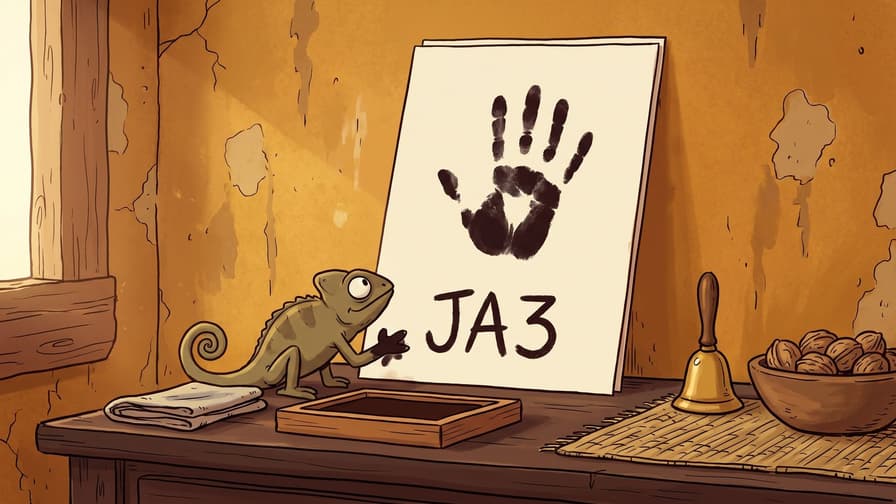
How TLS Fingerprinting Works: JA3, JA4 & Why Your Requests Get Flagged


The Scraper
Scraping Techniques
You copied a real Chrome User-Agent. You added Accept-Language, the full Sec-Fetch-* set, the right Accept string. You're routing through a clean residential IP that loads the site fine in a browser. And the server still hands you a block page.
At this point most people start mutating headers at random. That rarely helps, because the thing giving you away already happened, before your HTTP request existed. It happened during the TLS handshake, in the very first packet your client sent. The server looked at how your client negotiated the encrypted connection, decided it didn't look like the browser your User-Agent claimed to be, and flagged you on that contradiction alone.
This post explains the mechanism: what's in that first packet, how it gets turned into a fingerprint called JA3 (and its successor JA4), and why a Python client betrays itself even when every header is perfect.
The ClientHello: your client's accent
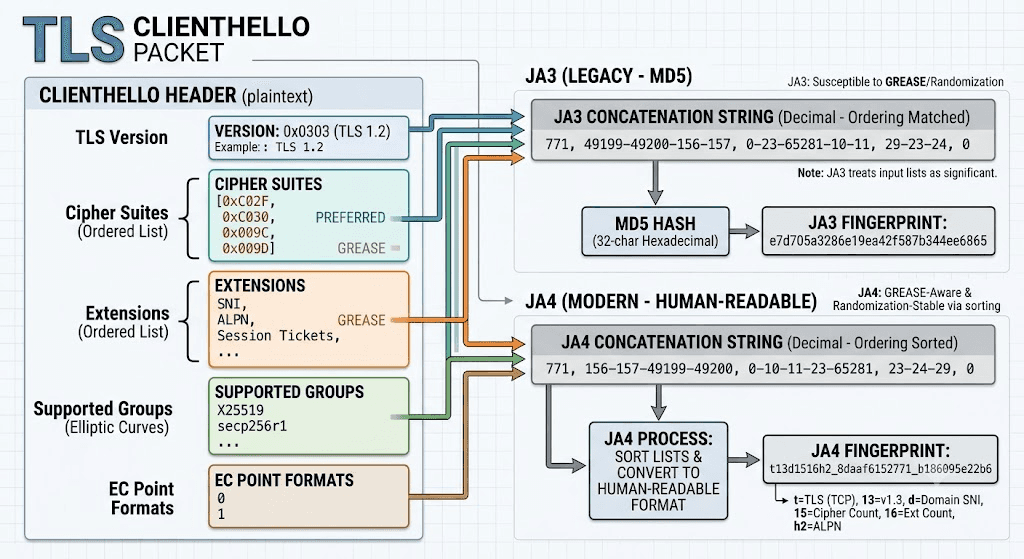
When any TLS client opens a connection, your browser, curl, Python's requests, a Go program, it sends a ClientHello. This is the opening message of the handshake, sent in the clear, before encryption is established and long before any HTTP. Its job is to tell the server "here's everything I support, pick something we both understand."
The ClientHello carries a list of capabilities:
TLS version — the highest protocol version offered (today, TLS 1.3).
Cipher suites — the encryption algorithms the client supports, in preference order.
Extensions — a list of feature flags: SNI, ALPN, session tickets, supported versions, and more.
Supported groups — the elliptic curves / key-exchange groups offered (e.g. X25519, secp256r1).
EC point formats — how elliptic-curve points are encoded.
ALPN — the application protocols offered, like
h2andhttp/1.1.Signature algorithms — which signing schemes the client accepts for certificates.
Here's the key insight: none of this is standardized down to the exact list and ordering. Each TLS library makes its own choices. Chrome's BoringSSL offers one specific set of cipher suites in one specific order, with extensions in one specific arrangement. Firefox's NSS offers a different set and order. Go's crypto/tls produces yet another. Python's requests rides on urllib3, which uses your system's OpenSSL, different again.
So the ClientHello is effectively an accent. The protocol carries the same meaning regardless, but the precise word choice and ordering reveal which library is speaking. A server can read that accent without decrypting anything.
JA3: hashing the handshake
JA3 (published by Salesforce engineers in 2017) was the first widely adopted way to turn that accent into a single comparable value. The recipe is deliberately simple.
Take five fields from the ClientHello, in this order:
TLS version
Cipher suites
Extensions
Supported groups (elliptic curves)
EC point formats
Convert each to its decimal value, join the values within a field with -, join the five fields with ,. You get a string like:
771,4865-4866-4867-49195-49199-...,0-23-65281-10-11-...,29-23-24,0
Then take the MD5 of that string. The result is the JA3 fingerprint, a 32-character hash like e7d705a3286e19ea42f587b344ee6865. There's a server-side companion, JA3S, built the same way from the ServerHello, useful for fingerprinting what the server is running.
JA3's appeal was that two clients using the same TLS library produce the same hash, regardless of headers or destination. A server could keep a list of "known automation tool" hashes and block on a match.
But JA3 aged. Two things eroded it:
GREASE (RFC 8701). Chrome and others deliberately inject random, reserved values into the cipher and extension lists to keep servers from hard-coding assumptions. Naive JA3 implementations hash those random values, so the "same" browser yields different hashes. (Good implementations strip GREASE first.)
ClientHello randomization. Some clients shuffle extension order on purpose, so the raw ordering, which JA3 treats as significant, stops being stable.
The net effect: a single JA3 became both less stable for the same client and less unique across clients. It's still seen in the wild, but it's no longer the sharpest tool.
JA4 and the JA4+ suite: the 2026 standard
JA4 (from FoxIO, 2023) is the modern replacement, and it's what most current fingerprinting is built around. It fixes JA3's weaknesses with a few deliberate design choices:
Human-readable, not just a hash. A JA4 fingerprint looks like
t13d1516h2_8daaf6152771_b186095e22b6. The first chunk is plaintext you can read:t= TLS over TCP,13= TLS 1.3,d= a domain (SNI) was present,1516= counts of cipher suites and extensions,h2= ALPN negotiated HTTP/2.Sorted, so order tricks don't matter. JA4 sorts the cipher and extension lists before hashing them. ClientHello randomization no longer changes the fingerprint, which makes it both more stable and more honest about what the client actually is.
GREASE-aware by construction.
A whole suite, not one value. JA4 is one of several:
JA4 — the TLS ClientHello.
JA4S — the server's response.
JA4H — the HTTP layer (method, version, header names and order, cookies).
JA4T — the TCP layer (window size, options).
That last point matters. JA4H means the HTTP request itself, the order of your headers, not just their values, is also a fingerprint. So "I sent all the right headers" isn't enough if you sent them in requests' order rather than Chrome's order.
The mismatch problem
Here's why a perfectly-headered Python script still gets caught, stated plainly:
Your requests call produces a JA3/JA4 that says "OpenSSL/urllib3." Your User-Agent header says "Chrome 148." Those two facts cannot both be true for a real browser. Chrome does not negotiate TLS with OpenSSL, it uses BoringSSL, which has a distinctly different ClientHello.
A server doesn't need to know your exact tool. It just needs to notice the contradiction: the handshake belongs to one family, the User-Agent claims another. That inconsistency is the flag. You'd actually look less suspicious sending a Python User-Agent with a Python TLS fingerprint, at least it's coherent, than faking Chrome's headers over an OpenSSL handshake.
This is the core idea worth internalizing: fingerprinting isn't looking for "bad" values, it's looking for combinations that don't occur in nature.
Inspect your own fingerprint
You can't fix what you can't see, so the first move is always to look at your own handshake. There are public echo endpoints that read your TLS (and HTTP/2) fingerprint and hand it back as JSON, tls.peet.ws/api/all is the well-known one. Hit it with the exact client you plan to scrape with and read what the server sees.
First, the naive client, so you can see the "tell":
import requests r = requests.get("https://tls.peet.ws/api/all") data = r.json() print("JA3:", data["tls"]["ja3"]) print("JA4:", data["tls"]["ja4"]) print("UA :", data["http_version"], data.get("user_agent"))
Run that and the JA3/JA4 will resolve to an OpenSSL profile. Now compare against a client that impersonates a browser:
from curl_cffi import requests # curl_cffi reproduces Chrome's actual ClientHello via a patched libcurl r = requests.get("https://tls.peet.ws/api/all", impersonate="chrome131") data = r.json() print("JA3:", data["tls"]["ja3"]) print("JA4:", data["tls"]["ja4"])
The second one returns a JA4 that matches a real Chrome build. Same destination, same network, completely different fingerprint, because the handshake itself changed.
How tooling aligns the handshake
You don't reimplement BoringSSL by hand. A couple of mature libraries do it for you:
curl_cffi(Python). Bindings to a build of curl with browser TLS profiles compiled in. You pick a target withimpersonate="chrome131"(or a Firefox/Safari/Edge profile) and it sends that browser's actual ClientHello. This is the path of least resistance in Python and the one this blog reaches for most.uTLS (Go). A drop-in replacement for
crypto/tlsthat lets you specify a ClientHello spec, mimic Chrome, Firefox, or a custom profile. It's the engine underneath a lot of Go-based tooling.
A minimal working request that aligns both the TLS and HTTP layers:
from curl_cffi import requests # impersonate sets TLS *and* the HTTP/2 frame fingerprint and header order # to match the chosen browser — keep the UA consistent with the profile resp = requests.get( "https://example.com", impersonate="chrome131", ) print(resp.status_code)
Note what you don't do here: you don't hand-set a User-Agent. The impersonate profile ships a coherent set, so the handshake and the headers agree by default. Overriding the UA to a different version than the profile reintroduces the exact mismatch you were trying to avoid.
The limit worth flagging: TLS is one layer. Modern fingerprinting also reads the HTTP/2 fingerprint, the SETTINGS frame values, window-update size, header pseudo-order, and priority frames (this is the territory JA4H and Akamai-style HTTP/2 fingerprints cover). curl_cffi's impersonate handles HTTP/2 too, which is exactly why it works better than bolting TLS impersonation onto a stack that still sends a stock HTTP/2 frame. That HTTP/2 layer is its own deep topic, a sibling to this one, but the principle is identical: every layer has to tell the same story.
What People Get Wrong
Rotating the User-Agent. The UA is an HTTP header. It has zero effect on the TLS handshake. Cycling through fifty User-Agents over the same OpenSSL ClientHello just gives the server fifty contradictions instead of one.
verify=False. Disabling certificate verification changes whether you trust the server. It does nothing to your ClientHello and nothing to your fingerprint. It's unrelated to getting flagged.Adding more headers. Past the realistic browser set, extra headers don't help, and the wrong header order (JA4H) can hurt. Coherence beats volume.
Assuming a new IP fixes it. A fresh residential IP solves IP-reputation problems. It does not change your fingerprint — the same JA3/JA4 contradiction follows you to every IP you rotate to.
Treating JA3 as still-unique. Because of GREASE and randomization, a bare JA3 match is weak evidence on its own. Current systems lean on JA4 plus the HTTP/2 fingerprint together.
Wrapping Up
If your headers and your proxy are right and you're still flagged, stop editing headers. Go look at your actual handshake against an echo endpoint, and check whether your TLS fingerprint agrees with the browser your User-Agent claims to be. Almost always it won't, a stock Python client speaks OpenSSL while pretending to be Chrome, and that single contradiction is the flag.
The fix is coherence, not disguise: let a tool like curl_cffi send a real browser's ClientHello and matching HTTP/2 frames, and stop overriding the pieces it already aligns for you. One consistent story across every layer beats a perfect User-Agent over the wrong handshake every time.

You copied a real Chrome User-Agent. You added Accept-Language, the full Sec-Fetch-* set, the right Accept string. You're routing through a clean residential IP that loads the site fine in a browser. And the server still hands you a block page.
At this point most people start mutating headers at random. That rarely helps, because the thing giving you away already happened, before your HTTP request existed. It happened during the TLS handshake, in the very first packet your client sent. The server looked at how your client negotiated the encrypted connection, decided it didn't look like the browser your User-Agent claimed to be, and flagged you on that contradiction alone.
This post explains the mechanism: what's in that first packet, how it gets turned into a fingerprint called JA3 (and its successor JA4), and why a Python client betrays itself even when every header is perfect.
The ClientHello: your client's accent
When any TLS client opens a connection, your browser, curl, Python's requests, a Go program, it sends a ClientHello. This is the opening message of the handshake, sent in the clear, before encryption is established and long before any HTTP. Its job is to tell the server "here's everything I support, pick something we both understand."
The ClientHello carries a list of capabilities:
TLS version — the highest protocol version offered (today, TLS 1.3).
Cipher suites — the encryption algorithms the client supports, in preference order.
Extensions — a list of feature flags: SNI, ALPN, session tickets, supported versions, and more.
Supported groups — the elliptic curves / key-exchange groups offered (e.g. X25519, secp256r1).
EC point formats — how elliptic-curve points are encoded.
ALPN — the application protocols offered, like
h2andhttp/1.1.Signature algorithms — which signing schemes the client accepts for certificates.
Here's the key insight: none of this is standardized down to the exact list and ordering. Each TLS library makes its own choices. Chrome's BoringSSL offers one specific set of cipher suites in one specific order, with extensions in one specific arrangement. Firefox's NSS offers a different set and order. Go's crypto/tls produces yet another. Python's requests rides on urllib3, which uses your system's OpenSSL, different again.
So the ClientHello is effectively an accent. The protocol carries the same meaning regardless, but the precise word choice and ordering reveal which library is speaking. A server can read that accent without decrypting anything.

JA3: hashing the handshake
JA3 (published by Salesforce engineers in 2017) was the first widely adopted way to turn that accent into a single comparable value. The recipe is deliberately simple.
Take five fields from the ClientHello, in this order:
TLS version
Cipher suites
Extensions
Supported groups (elliptic curves)
EC point formats
Convert each to its decimal value, join the values within a field with -, join the five fields with ,. You get a string like:
771,4865-4866-4867-49195-49199-...,0-23-65281-10-11-...,29-23-24,0
Then take the MD5 of that string. The result is the JA3 fingerprint, a 32-character hash like e7d705a3286e19ea42f587b344ee6865. There's a server-side companion, JA3S, built the same way from the ServerHello, useful for fingerprinting what the server is running.
JA3's appeal was that two clients using the same TLS library produce the same hash, regardless of headers or destination. A server could keep a list of "known automation tool" hashes and block on a match.
But JA3 aged. Two things eroded it:
GREASE (RFC 8701). Chrome and others deliberately inject random, reserved values into the cipher and extension lists to keep servers from hard-coding assumptions. Naive JA3 implementations hash those random values, so the "same" browser yields different hashes. (Good implementations strip GREASE first.)
ClientHello randomization. Some clients shuffle extension order on purpose, so the raw ordering, which JA3 treats as significant, stops being stable.
The net effect: a single JA3 became both less stable for the same client and less unique across clients. It's still seen in the wild, but it's no longer the sharpest tool.
JA4 and the JA4+ suite: the 2026 standard
JA4 (from FoxIO, 2023) is the modern replacement, and it's what most current fingerprinting is built around. It fixes JA3's weaknesses with a few deliberate design choices:
Human-readable, not just a hash. A JA4 fingerprint looks like
t13d1516h2_8daaf6152771_b186095e22b6. The first chunk is plaintext you can read:t= TLS over TCP,13= TLS 1.3,d= a domain (SNI) was present,1516= counts of cipher suites and extensions,h2= ALPN negotiated HTTP/2.Sorted, so order tricks don't matter. JA4 sorts the cipher and extension lists before hashing them. ClientHello randomization no longer changes the fingerprint, which makes it both more stable and more honest about what the client actually is.
GREASE-aware by construction.
A whole suite, not one value. JA4 is one of several:
JA4 — the TLS ClientHello.
JA4S — the server's response.
JA4H — the HTTP layer (method, version, header names and order, cookies).
JA4T — the TCP layer (window size, options).
That last point matters. JA4H means the HTTP request itself, the order of your headers, not just their values, is also a fingerprint. So "I sent all the right headers" isn't enough if you sent them in requests' order rather than Chrome's order.
The mismatch problem
Here's why a perfectly-headered Python script still gets caught, stated plainly:
Your requests call produces a JA3/JA4 that says "OpenSSL/urllib3." Your User-Agent header says "Chrome 148." Those two facts cannot both be true for a real browser. Chrome does not negotiate TLS with OpenSSL, it uses BoringSSL, which has a distinctly different ClientHello.
A server doesn't need to know your exact tool. It just needs to notice the contradiction: the handshake belongs to one family, the User-Agent claims another. That inconsistency is the flag. You'd actually look less suspicious sending a Python User-Agent with a Python TLS fingerprint, at least it's coherent, than faking Chrome's headers over an OpenSSL handshake.
This is the core idea worth internalizing: fingerprinting isn't looking for "bad" values, it's looking for combinations that don't occur in nature.
Inspect your own fingerprint
You can't fix what you can't see, so the first move is always to look at your own handshake. There are public echo endpoints that read your TLS (and HTTP/2) fingerprint and hand it back as JSON, tls.peet.ws/api/all is the well-known one. Hit it with the exact client you plan to scrape with and read what the server sees.
First, the naive client, so you can see the "tell":
import requests r = requests.get("https://tls.peet.ws/api/all") data = r.json() print("JA3:", data["tls"]["ja3"]) print("JA4:", data["tls"]["ja4"]) print("UA :", data["http_version"], data.get("user_agent"))
Run that and the JA3/JA4 will resolve to an OpenSSL profile. Now compare against a client that impersonates a browser:
from curl_cffi import requests # curl_cffi reproduces Chrome's actual ClientHello via a patched libcurl r = requests.get("https://tls.peet.ws/api/all", impersonate="chrome131") data = r.json() print("JA3:", data["tls"]["ja3"]) print("JA4:", data["tls"]["ja4"])
The second one returns a JA4 that matches a real Chrome build. Same destination, same network, completely different fingerprint, because the handshake itself changed.
How tooling aligns the handshake
You don't reimplement BoringSSL by hand. A couple of mature libraries do it for you:
curl_cffi(Python). Bindings to a build of curl with browser TLS profiles compiled in. You pick a target withimpersonate="chrome131"(or a Firefox/Safari/Edge profile) and it sends that browser's actual ClientHello. This is the path of least resistance in Python and the one this blog reaches for most.uTLS (Go). A drop-in replacement for
crypto/tlsthat lets you specify a ClientHello spec, mimic Chrome, Firefox, or a custom profile. It's the engine underneath a lot of Go-based tooling.
A minimal working request that aligns both the TLS and HTTP layers:
from curl_cffi import requests # impersonate sets TLS *and* the HTTP/2 frame fingerprint and header order # to match the chosen browser — keep the UA consistent with the profile resp = requests.get( "https://example.com", impersonate="chrome131", ) print(resp.status_code)
Note what you don't do here: you don't hand-set a User-Agent. The impersonate profile ships a coherent set, so the handshake and the headers agree by default. Overriding the UA to a different version than the profile reintroduces the exact mismatch you were trying to avoid.
The limit worth flagging: TLS is one layer. Modern fingerprinting also reads the HTTP/2 fingerprint, the SETTINGS frame values, window-update size, header pseudo-order, and priority frames (this is the territory JA4H and Akamai-style HTTP/2 fingerprints cover). curl_cffi's impersonate handles HTTP/2 too, which is exactly why it works better than bolting TLS impersonation onto a stack that still sends a stock HTTP/2 frame. That HTTP/2 layer is its own deep topic, a sibling to this one, but the principle is identical: every layer has to tell the same story.
What People Get Wrong
Rotating the User-Agent. The UA is an HTTP header. It has zero effect on the TLS handshake. Cycling through fifty User-Agents over the same OpenSSL ClientHello just gives the server fifty contradictions instead of one.
verify=False. Disabling certificate verification changes whether you trust the server. It does nothing to your ClientHello and nothing to your fingerprint. It's unrelated to getting flagged.Adding more headers. Past the realistic browser set, extra headers don't help, and the wrong header order (JA4H) can hurt. Coherence beats volume.
Assuming a new IP fixes it. A fresh residential IP solves IP-reputation problems. It does not change your fingerprint — the same JA3/JA4 contradiction follows you to every IP you rotate to.
Treating JA3 as still-unique. Because of GREASE and randomization, a bare JA3 match is weak evidence on its own. Current systems lean on JA4 plus the HTTP/2 fingerprint together.
Wrapping Up
If your headers and your proxy are right and you're still flagged, stop editing headers. Go look at your actual handshake against an echo endpoint, and check whether your TLS fingerprint agrees with the browser your User-Agent claims to be. Almost always it won't, a stock Python client speaks OpenSSL while pretending to be Chrome, and that single contradiction is the flag.
The fix is coherence, not disguise: let a tool like curl_cffi send a real browser's ClientHello and matching HTTP/2 frames, and stop overriding the pieces it already aligns for you. One consistent story across every layer beats a perfect User-Agent over the wrong handshake every time.
You copied a real Chrome User-Agent. You added Accept-Language, the full Sec-Fetch-* set, the right Accept string. You're routing through a clean residential IP that loads the site fine in a browser. And the server still hands you a block page.
At this point most people start mutating headers at random. That rarely helps, because the thing giving you away already happened, before your HTTP request existed. It happened during the TLS handshake, in the very first packet your client sent. The server looked at how your client negotiated the encrypted connection, decided it didn't look like the browser your User-Agent claimed to be, and flagged you on that contradiction alone.
This post explains the mechanism: what's in that first packet, how it gets turned into a fingerprint called JA3 (and its successor JA4), and why a Python client betrays itself even when every header is perfect.
The ClientHello: your client's accent
When any TLS client opens a connection, your browser, curl, Python's requests, a Go program, it sends a ClientHello. This is the opening message of the handshake, sent in the clear, before encryption is established and long before any HTTP. Its job is to tell the server "here's everything I support, pick something we both understand."
The ClientHello carries a list of capabilities:
TLS version — the highest protocol version offered (today, TLS 1.3).
Cipher suites — the encryption algorithms the client supports, in preference order.
Extensions — a list of feature flags: SNI, ALPN, session tickets, supported versions, and more.
Supported groups — the elliptic curves / key-exchange groups offered (e.g. X25519, secp256r1).
EC point formats — how elliptic-curve points are encoded.
ALPN — the application protocols offered, like
h2andhttp/1.1.Signature algorithms — which signing schemes the client accepts for certificates.
Here's the key insight: none of this is standardized down to the exact list and ordering. Each TLS library makes its own choices. Chrome's BoringSSL offers one specific set of cipher suites in one specific order, with extensions in one specific arrangement. Firefox's NSS offers a different set and order. Go's crypto/tls produces yet another. Python's requests rides on urllib3, which uses your system's OpenSSL, different again.
So the ClientHello is effectively an accent. The protocol carries the same meaning regardless, but the precise word choice and ordering reveal which library is speaking. A server can read that accent without decrypting anything.

JA3: hashing the handshake
JA3 (published by Salesforce engineers in 2017) was the first widely adopted way to turn that accent into a single comparable value. The recipe is deliberately simple.
Take five fields from the ClientHello, in this order:
TLS version
Cipher suites
Extensions
Supported groups (elliptic curves)
EC point formats
Convert each to its decimal value, join the values within a field with -, join the five fields with ,. You get a string like:
771,4865-4866-4867-49195-49199-...,0-23-65281-10-11-...,29-23-24,0
Then take the MD5 of that string. The result is the JA3 fingerprint, a 32-character hash like e7d705a3286e19ea42f587b344ee6865. There's a server-side companion, JA3S, built the same way from the ServerHello, useful for fingerprinting what the server is running.
JA3's appeal was that two clients using the same TLS library produce the same hash, regardless of headers or destination. A server could keep a list of "known automation tool" hashes and block on a match.
But JA3 aged. Two things eroded it:
GREASE (RFC 8701). Chrome and others deliberately inject random, reserved values into the cipher and extension lists to keep servers from hard-coding assumptions. Naive JA3 implementations hash those random values, so the "same" browser yields different hashes. (Good implementations strip GREASE first.)
ClientHello randomization. Some clients shuffle extension order on purpose, so the raw ordering, which JA3 treats as significant, stops being stable.
The net effect: a single JA3 became both less stable for the same client and less unique across clients. It's still seen in the wild, but it's no longer the sharpest tool.
JA4 and the JA4+ suite: the 2026 standard
JA4 (from FoxIO, 2023) is the modern replacement, and it's what most current fingerprinting is built around. It fixes JA3's weaknesses with a few deliberate design choices:
Human-readable, not just a hash. A JA4 fingerprint looks like
t13d1516h2_8daaf6152771_b186095e22b6. The first chunk is plaintext you can read:t= TLS over TCP,13= TLS 1.3,d= a domain (SNI) was present,1516= counts of cipher suites and extensions,h2= ALPN negotiated HTTP/2.Sorted, so order tricks don't matter. JA4 sorts the cipher and extension lists before hashing them. ClientHello randomization no longer changes the fingerprint, which makes it both more stable and more honest about what the client actually is.
GREASE-aware by construction.
A whole suite, not one value. JA4 is one of several:
JA4 — the TLS ClientHello.
JA4S — the server's response.
JA4H — the HTTP layer (method, version, header names and order, cookies).
JA4T — the TCP layer (window size, options).
That last point matters. JA4H means the HTTP request itself, the order of your headers, not just their values, is also a fingerprint. So "I sent all the right headers" isn't enough if you sent them in requests' order rather than Chrome's order.
The mismatch problem
Here's why a perfectly-headered Python script still gets caught, stated plainly:
Your requests call produces a JA3/JA4 that says "OpenSSL/urllib3." Your User-Agent header says "Chrome 148." Those two facts cannot both be true for a real browser. Chrome does not negotiate TLS with OpenSSL, it uses BoringSSL, which has a distinctly different ClientHello.
A server doesn't need to know your exact tool. It just needs to notice the contradiction: the handshake belongs to one family, the User-Agent claims another. That inconsistency is the flag. You'd actually look less suspicious sending a Python User-Agent with a Python TLS fingerprint, at least it's coherent, than faking Chrome's headers over an OpenSSL handshake.
This is the core idea worth internalizing: fingerprinting isn't looking for "bad" values, it's looking for combinations that don't occur in nature.
Inspect your own fingerprint
You can't fix what you can't see, so the first move is always to look at your own handshake. There are public echo endpoints that read your TLS (and HTTP/2) fingerprint and hand it back as JSON, tls.peet.ws/api/all is the well-known one. Hit it with the exact client you plan to scrape with and read what the server sees.
First, the naive client, so you can see the "tell":
import requests r = requests.get("https://tls.peet.ws/api/all") data = r.json() print("JA3:", data["tls"]["ja3"]) print("JA4:", data["tls"]["ja4"]) print("UA :", data["http_version"], data.get("user_agent"))
Run that and the JA3/JA4 will resolve to an OpenSSL profile. Now compare against a client that impersonates a browser:
from curl_cffi import requests # curl_cffi reproduces Chrome's actual ClientHello via a patched libcurl r = requests.get("https://tls.peet.ws/api/all", impersonate="chrome131") data = r.json() print("JA3:", data["tls"]["ja3"]) print("JA4:", data["tls"]["ja4"])
The second one returns a JA4 that matches a real Chrome build. Same destination, same network, completely different fingerprint, because the handshake itself changed.
How tooling aligns the handshake
You don't reimplement BoringSSL by hand. A couple of mature libraries do it for you:
curl_cffi(Python). Bindings to a build of curl with browser TLS profiles compiled in. You pick a target withimpersonate="chrome131"(or a Firefox/Safari/Edge profile) and it sends that browser's actual ClientHello. This is the path of least resistance in Python and the one this blog reaches for most.uTLS (Go). A drop-in replacement for
crypto/tlsthat lets you specify a ClientHello spec, mimic Chrome, Firefox, or a custom profile. It's the engine underneath a lot of Go-based tooling.
A minimal working request that aligns both the TLS and HTTP layers:
from curl_cffi import requests # impersonate sets TLS *and* the HTTP/2 frame fingerprint and header order # to match the chosen browser — keep the UA consistent with the profile resp = requests.get( "https://example.com", impersonate="chrome131", ) print(resp.status_code)
Note what you don't do here: you don't hand-set a User-Agent. The impersonate profile ships a coherent set, so the handshake and the headers agree by default. Overriding the UA to a different version than the profile reintroduces the exact mismatch you were trying to avoid.
The limit worth flagging: TLS is one layer. Modern fingerprinting also reads the HTTP/2 fingerprint, the SETTINGS frame values, window-update size, header pseudo-order, and priority frames (this is the territory JA4H and Akamai-style HTTP/2 fingerprints cover). curl_cffi's impersonate handles HTTP/2 too, which is exactly why it works better than bolting TLS impersonation onto a stack that still sends a stock HTTP/2 frame. That HTTP/2 layer is its own deep topic, a sibling to this one, but the principle is identical: every layer has to tell the same story.
What People Get Wrong
Rotating the User-Agent. The UA is an HTTP header. It has zero effect on the TLS handshake. Cycling through fifty User-Agents over the same OpenSSL ClientHello just gives the server fifty contradictions instead of one.
verify=False. Disabling certificate verification changes whether you trust the server. It does nothing to your ClientHello and nothing to your fingerprint. It's unrelated to getting flagged.Adding more headers. Past the realistic browser set, extra headers don't help, and the wrong header order (JA4H) can hurt. Coherence beats volume.
Assuming a new IP fixes it. A fresh residential IP solves IP-reputation problems. It does not change your fingerprint — the same JA3/JA4 contradiction follows you to every IP you rotate to.
Treating JA3 as still-unique. Because of GREASE and randomization, a bare JA3 match is weak evidence on its own. Current systems lean on JA4 plus the HTTP/2 fingerprint together.
Wrapping Up
If your headers and your proxy are right and you're still flagged, stop editing headers. Go look at your actual handshake against an echo endpoint, and check whether your TLS fingerprint agrees with the browser your User-Agent claims to be. Almost always it won't, a stock Python client speaks OpenSSL while pretending to be Chrome, and that single contradiction is the flag.
The fix is coherence, not disguise: let a tool like curl_cffi send a real browser's ClientHello and matching HTTP/2 frames, and stop overriding the pieces it already aligns for you. One consistent story across every layer beats a perfect User-Agent over the wrong handshake every time.

Author
The Scraper
Engineer and Webscraping Specialist
About Author
The Scraper is a software engineer and web scraping specialist, focused on building production-grade data extraction systems. His work centers on large-scale crawling, anti-bot evasion, proxy infrastructure, and browser automation. He writes about real-world scraping failures, silent data corruption, and systems that operate at scale.