
Benchmarking datacenter proxies under concurrency means testing a proxy pool at the concurrency your scraper uses in production. The test tracks steady-state throughput, latency per phase, failures per phase, unique exit IPs, and bytes per successful request.
These 5 measures show whether a result comes from the proxy or from your own client. In a test at default settings, the Python client curl_cffi sent 98.8% of 1K requests through 1 exit IP, even on a rotating pool.
This guide shows how to measure all 5 and includes 1 harness to run against every provider.
TL;DR
- On any proxy, your client's settings control much of the rotation and concurrency you get. HTTPS rotation happens per tunnel, which is the connection your client opens through the proxy. The async Python clients tested defaulted to 10 or 100 connections. Raising the limit takes 1 argument, and clients that use HTTP/2 to the target also need 1 sticky session per worker.
- A single HTTP/2 connection to the proxy can carry many rotating tunnels. In testing with a custom HTTP/2 client, Evomi's HTTPS proxy endpoint reduced gateway connections from 803 to 12.
- Reusing tunnels across requests gave the biggest speedup in these tests. In a fixed-concurrency test on Evomi's datacenter pool, 1K reused tunnels carried 11K successful requests per second to a lightweight test endpoint. The median latency was 78 ms. Reuse concentrates traffic on each exit IP, so size the pool at about twice the request rate divided by the target's per-IP limit.
- Base the provider decision on your own numbers. Run the same benchmark harness at a fixed request rate against every provider, starting with an Evomi free trial. Then compare steady-state throughput, p99 latency, block rate on your target, and bytes per successful request.
What benchmarking datacenter proxies under concurrency has to measure
A concurrency benchmark needs the 5 measures in the table below. Under load, latency also sets how many requests are in flight at once.
Requests in flight are requests sent but not yet answered. On average, their number equals throughput multiplied by latency. At 1K requests per second, 500 ms per request means about 500 requests in flight, and 80 ms means about 80.
Each request in flight uses a socket on your machine and an exit IP. Over HTTP/1.1, it also uses its own tunnel through the gateway. Track each measure this way:
Metric | Why it matters under concurrency | How to compute it |
|---|---|---|
Steady-state successful requests per second | A few slow requests can make the run take longer and make the real rate look lower | Median of per-second success counts, without the first second of ramp-up and the last 10% of completions |
Latency percentiles per phase | The slowest requests add to how many requests are in flight | Measure from the time each request was scheduled to start, so time queued in your client counts. Split it into TCP, CONNECT, TLS, and request |
Failures per phase | A dropped tunnel and a target block need different fixes | Separate counts for connection resets during setup, timeouts, and target status codes |
Unique exit IPs used | Your client can send rotating traffic through only a few IPs | Count IPs, /24 subnets, and autonomous system numbers (ASNs), and requests per IP per minute |
Bytes per successful request | On per-GB plans, fewer handshake bytes mean a lower cost | Capture the tunnel bytes and divide them by successful responses |
A success rate becomes comparable when it states its target, its concurrency, and its time window.
Use the same test conditions for every provider
Run the benchmark from where your scrapers run. All results below come from c7i.xlarge VMs in AWS us-east-1, unless a section says otherwise. They used Evomi's datacenter gateway, dcp.evomi.com on port 2000, with US exit IPs, and TCP to the gateway took 4 ms. The connection docs list the endpoints and ports.
Start with a target that is unlikely to be the bottleneck, then add your production target. Cloudflare's /cdn-cgi/trace endpoint returns a few hundred bytes, including the exit IP, from an anycast edge. An anycast edge answers from a location near most exit nodes, so its latency doesn't include the distance to a target hosted in one region.
Keep the client stack the same for every provider. A CONNECT proxy forwards your TLS handshake unchanged. The JA4 hash, a fingerprint of the TLS handshake, was identical with and without the gateway, for both the requests library and curl_cffi's Chrome profile. That way, the comparison measures the pool, not your TLS library.
The HTTP version is part of that stack, because HTTP/2 has a fingerprint of its own. A standard CONNECT tunnel carries TCP, and HTTP/3 needs UDP, so a client that supports HTTP/3 uses HTTP/2 or HTTP/1.1 inside the tunnel.
Many bot-detection systems link your fingerprint, headers, and cookies across IPs. As a result, how you use each IP matters as much as how many IPs you have. Choose between rotation and sticky sessions yourself, and check that your client's connection reuse doesn't make that choice for you.
How rotation works through a CONNECT tunnel
For an HTTPS target, your client sends 1 CONNECT request to the gateway. After that request, your client runs its own TLS session directly with the target. Like any CONNECT proxy, the gateway keeps 1 exit IP per tunnel, so "a new IP per request" means a new IP per tunnel. For plain HTTP, the gateway sees each request and can rotate on each one, even over a single keep-alive connection.
Set up once before you run any code. Export the proxy username and password shown at the top of the datacenter dashboard's Proxy Generator. The snippets need Python 3.11 or later and Scrapy 2.13 or later. If you don't have credentials yet, start a free trial:
python3 -m venv .venv && . .venv/bin/activate  # on Ubuntu, first run: sudo apt install python3-venv
pip install curl_cffi aiohttp httpx numpy scrapy
export PROXY_USER="your-proxy-username"
export PROXY_PASS="your-proxy-password_country-US"
Then 3 curl tests show the difference between a reused tunnel, new tunnels, and plain HTTP:
P="http://$PROXY_USER:$PROXY_PASS@dcp.evomi.com:2000"
echo "HTTPS, one curl process (tunnel reused):"
curl -s -x "$P" -w '\n' https://api.ipify.org https://api.ipify.org https://api.ipify.org
echo "HTTPS, three curl processes (three tunnels):"
for _ in 1 2 3; do curl -s -x "$P" -w '\n' https://api.ipify.org; done
echo "Plain HTTP, one curl process (one connection to the gateway):"
curl -s -x "$P" -w '\n' http://api.ipify.org http://api.ipify.org http://api.ipify.org
The output from 1 run, with the last part of each IP masked:
HTTPS, one curl process (tunnel reused):
161.123.115.x
161.123.115.x
161.123.115.x
HTTPS, three curl processes (three tunnels):
5.180.208.x
190.111.237.x
190.112.216.x
Plain HTTP, one curl process (one connection to the gateway):
156.155.15.x
156.146.33.x
182.10.98.x
A client that reuses pooled connections behaves like the first case. Our guide to how the HTTP CONNECT method works explains the protocol in more detail.
In testing, the gateway confirmed each tunnel in milliseconds. The 200 Connection established reply arrived in 4 to 9 ms. The exit node then connects to the target during your TLS handshake, so the exit node's setup time counts toward the TLS phase.
Give that handshake its own timer and its own timeout. Our post on tuning connect and read timeouts suggests connect and read timeout values.
What Python clients do with 200 concurrent requests
At default settings, every Python client tested opened fewer than 200 connections at once for 200 concurrent requests. Each client ran the same workload, 1K HTTPS requests to Cloudflare's trace endpoint through Evomi's rotating gateway, with at most 200 in flight. A script counted connections to the gateway every 50 ms:
Client, default settings | Peak connections to the gateway | Unique exit IPs in 1K requests | Share of the most-used exit IP |
|---|---|---|---|
curl_cffi 0.16.3, Chrome profile | 10 | 10 | 98.8% |
httpx 0.28.1, HTTP/2 | 100 | 92 | 58.4% |
aiohttp 3.14.5 | 100 | 97 | 5.7% |
httpx 0.28.1, HTTP/1.1 | 100 | 975 | 0.2% |
requests 2.34.2, 200 threads | 174 | 236 | 2.5% |
The differences show the effect of each client's connection pool. A low share means wide rotation, and a higher share means more reuse of the same tunnels.
At these versions, curl_cffi allows 10 transfers at a time (max_clients=10) and negotiates HTTP/2. Its libcurl engine then multiplexed nearly everything onto 1 tunnel and 1 exit IP.
httpx over HTTP/1.1 keeps 20 connections open between requests by default. With 200 requests in flight, it opened a new tunnel for most requests.
Raising the limits takes 1 argument per client:
import asyncio
import aiohttp, httpx
from curl_cffi.requests import AsyncSession

CONCURRENCY = 200


async def main():
    # aiohttp 3.14.5 default: 100 connections in total
    aio = aiohttp.ClientSession(connector=aiohttp.TCPConnector(limit=CONCURRENCY))
    # httpx 0.28.1 defaults: 100 connections, and only 20 stay open between requests
    limits = httpx.Limits(max_connections=CONCURRENCY, max_keepalive_connections=CONCURRENCY)
    hx = httpx.AsyncClient(limits=limits)
    # curl_cffi 0.16.3 default: 10 transfers at a time
    cc = AsyncSession(impersonate="chrome", max_clients=CONCURRENCY)
    print(aio.connector.limit, limits, cc.max_clients)
    await aio.close()
    await hx.aclose()
    await cc.close()


asyncio.run(main())
With those limits, aiohttp and httpx over HTTP/1.1 opened 200 tunnels and reused them. The most-used exit IP then carried 3.8% of aiohttp's requests and 5.8% of httpx's requests. For httpx, that share rose from 0.2% because the client now reuses tunnels instead of opening a new one for most requests.
curl_cffi also opened 200 tunnels, but libcurl sends new requests over an existing HTTP/2 connection when one is available. That put 62.9% of requests on 1 tunnel and 1 exit IP.
Scrapy needs both concurrency settings raised. CONCURRENT_REQUESTS_PER_DOMAIN, which defaults to 8, also limits how many tunnels Scrapy keeps open per host. With only CONCURRENT_REQUESTS = 200, Scrapy 2.19.0 kept 8 tunnels open, so nearly every request needed a new tunnel and TLS handshake. With both settings at 200, it kept 200 tunnels.
Raising only CONCURRENT_REQUESTS also exposes a known Scrapy 2.19.0 issue with a merged fix (scrapy/scrapy#8256). Under the default asyncio reactor, Scrapy doesn't enforce the per-domain limit, so 200 requests were in flight at once. On any Scrapy version, count requests in flight before you rely on that limit to stay polite to a target.
Give HTTP/2 clients 1 sticky session per worker. curl_cffi reuses a connection only when the proxy credentials match. On Evomi, a session parameter in the password gives each worker its own credentials, so each worker keeps its own tunnel. The dashboard's Proxy Generator builds a proxy string for each session.
With Sticky Session selected and Amount set to 5, it returned 5 strings:
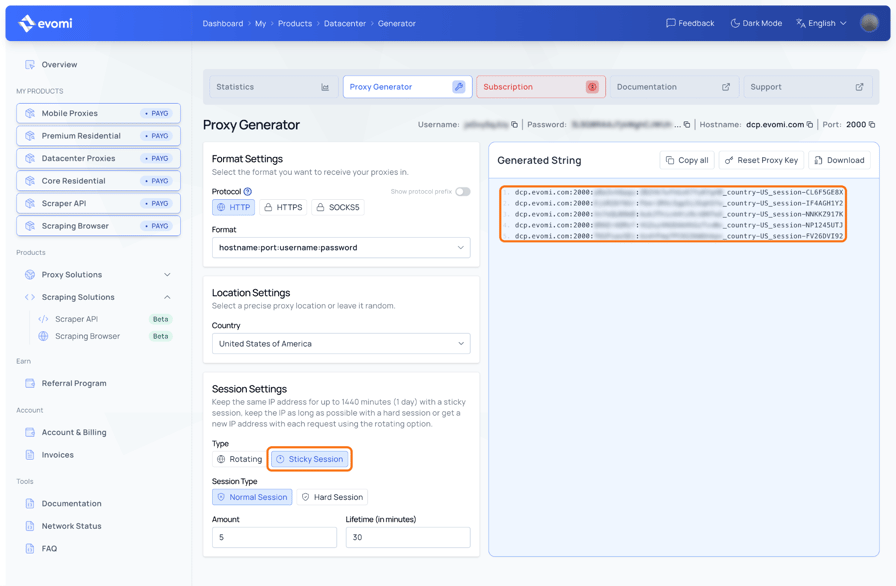
Each string is one worker's credential set. The username and password are masked.
With 1 sticky session per worker, the most-used exit IP carried 1.0% of curl_cffi's requests. httpx sets the proxy per client, so it needed 200 separate HTTP/2 clients, 1 per session, to reach the same 1.0%:
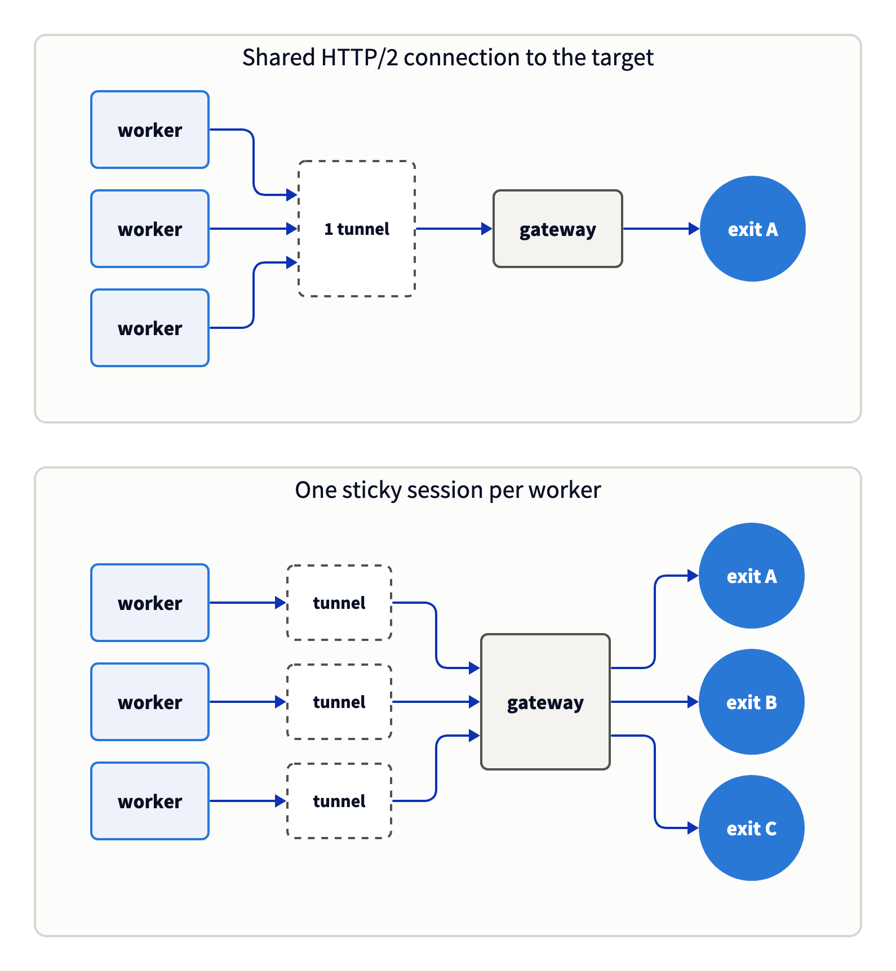
At default settings, curl_cffi and httpx over HTTP/2 behaved like the top panel. With 1 sticky session per worker, they behaved like the bottom one.
Reuse tunnels and session pools for speed
Two kinds of reuse save time. A sticky session that has already sent a warm-up request keeps the same exit node, and its later tunnels set up faster. A reused tunnel is a connection kept open across requests, so it also skips the TLS handshake.
Use sticky sessions with a warm-up request for speed, and size the session pool from the target's per-IP limit, as the next section shows. Rotate per request when you need the widest spread of exit IPs, or when a pool that large isn't practical.
A single warm-up request set each session's exit IP. After that request, 500 requests on 1 session over 100 concurrent tunnels all used 1 IP. A _lockedsession- session behaved the same way.
The session docs list 3 session types. _session- favors success rate, _hardsession- keeps its IP as long as possible, and _lockedsession- never switches to another IP. The _lifetime- parameter sets how long a _session- lasts, while hard and locked sessions hold their IP for as long as it stays online.
On any proxy, a newly rotated tunnel spends time on exit node setup and a TLS handshake. After the warm-up request, a sticky session's TLS phase took a median of 87 ms. A sticky session keeps its exit IP across new tunnels, so it stays fast even when it opens a new tunnel for each request. Here's how 200 sticky sessions compared with a new rotated tunnel for every request, at 200 concurrent requests:
How the client used the pool | Median latency as a share of a new rotated tunnel for every request |
|---|---|
200 sticky sessions, new tunnel per request | about 27% |
200 sticky sessions, 10 requests per tunnel | about 10% |
A session pool uses fewer exit IPs and has lower latency. Even with a new tunnel per request, the 200 sticky sessions delivered 1.98x the steady-state throughput of rotation at the same concurrency. At a fixed concurrency, throughput depends on mean latency. The slowest requests raise the mean, so throughput grew less than the median latency fell.
On Evomi's pool, reused tunnels kept a median latency under 80 ms up to 1K concurrent tunnels. oha, a Rust load generator, ran for 15 seconds at each concurrency level against the rotating gateway, with keep-alive on. The test used a fixed set of connections, so it measured capacity and service time, the time each request took once sent. The client stayed above 80% idle CPU, so the client wasn't the bottleneck:
Concurrent tunnels | Successful requests per second | p50 latency | p99 latency | Success rate |
|---|---|---|---|---|
100 | 1,307 | 56 ms | 261 ms | 99.99% |
500 | 5,762 | 74 ms | 321 ms | 99.97% |
1K | 11,006 | 78 ms | 362 ms | 99.97% |
oha 1.16.0 ignores credentials in the -x proxy URL (hatoo/oha#730), and the resulting error on HTTPS targets is no upgrade available. Pass the credentials with --proxy-header "Proxy-Authorization: Basic <base64 of user:pass>".
Evomi's datacenter proxies list unlimited concurrency, and the gateway accepted every level tested, including a separate 4K-tunnel run.
The pool pattern below combines 1 sticky session per worker, a raised client limit, and a warm-up request for each session:
import asyncio, collections, os, secrets
from curl_cffi.requests import AsyncSession

USER, PASS = os.environ["PROXY_USER"], os.environ["PROXY_PASS"]
URL = "https://www.cloudflare.com/cdn-cgi/trace"
WORKERS, PER_WORKER = 200, 20


def proxy(session_id):
    # One sticky session per worker. curl_cffi reuses a connection only for the same
    # proxy credentials, so each worker keeps its own tunnel and its own exit IP.
    return f"http://{USER}:{PASS}_session-{session_id}@dcp.evomi.com:2000"


def blocked(r):
    # A challenge page can come back with any status code, so check Cloudflare's header too
    return r.status_code in (403, 429) or r.headers.get("cf-mitigated") == "challenge"


def exit_ip(text):
    return next((line[3:] for line in text.splitlines() if line.startswith("ip=")), None)


async def main():
    sessions = [f"wk{w:04d}" for w in range(WORKERS)]
    async with AsyncSession(impersonate="chrome", max_clients=WORKERS, timeout=30) as s:
        # Warm every session with exactly 1 request before the concurrent run
        await asyncio.gather(*(s.get(URL, proxy=proxy(sid)) for sid in sessions),
                             return_exceptions=True)

        async def worker(w):
            ips = set()
            for _ in range(PER_WORKER):
                try:
                    r = await s.get(URL, proxy=proxy(sessions[w]))
                except Exception:
                    continue  # a failed request doesn't change which exit IP the session keeps
                if blocked(r):
                    # A sticky session keeps its exit IP, so move a blocked worker to a new session
                    sessions[w] = secrets.token_hex(4)
                    continue
                if ip := exit_ip(r.text):
                    ips.add(ip)
            return ips

        results = await asyncio.gather(*(worker(w) for w in range(WORKERS)))

    per_worker = collections.Counter(len(ips) for ips in results)
    print(f"unique exit IPs: {len(set().union(*results))}")
    print(f"exit IPs per worker: {dict(sorted(per_worker.items()))}")


asyncio.run(main())
Session IDs are short strings of letters and digits, and the session docs give the exact format. The script printed:
unique exit IPs: 200
exit IPs per worker: {1: 200}
The trace endpoint didn't block any request in these runs. A separate test used httpbin endpoints that return a 429 and a challenge header. Each time, blocked() moved the worker to a new session with a new exit IP.
Each worker waits for a response before it sends the next request, so slow responses also slow the request rate. Use the script to check stickiness, not latency.
Scrapy keeps sticky sessions the same way. This spider sends a warm-up request on each of 200 sessions, then 4 more requests on each:
import collections, os
import scrapy
from scrapy.crawler import CrawlerProcess

USER, PASS = os.environ["PROXY_USER"], os.environ["PROXY_PASS"]
URL = "https://www.cloudflare.com/cdn-cgi/trace"
SESSIONS, PER_SESSION = 200, 5
exits = collections.defaultdict(set)


def proxy(n):
    # Scrapy pools tunnels per proxy credentials, so each session ID keeps its own tunnel
    return f"http://{USER}:{PASS}_session-sc{n:04d}x@dcp.evomi.com:2000"


class Sessions(scrapy.Spider):
    name = "sessions"
    custom_settings = {"CONCURRENT_REQUESTS": 200, "CONCURRENT_REQUESTS_PER_DOMAIN": 200}

    async def start(self):
        for n in range(SESSIONS):  # warm each session with exactly 1 request
            yield scrapy.Request(URL, meta={"proxy": proxy(n), "n": n, "left": PER_SESSION},
                                 dont_filter=True)

    def parse(self, response):
        n, left = response.meta["n"], response.meta["left"] - 1
        if left < PER_SESSION - 1:  # count requests after the warm-up
            exits[n].add(next(l[3:] for l in response.text.splitlines() if l.startswith("ip=")))
        if left:  # the session's next request goes out only after this one returns
            yield response.request.replace(meta={**response.meta, "left": left})


process = CrawlerProcess(settings={"LOG_LEVEL": "ERROR"})
process.crawl(Sessions)
process.start()
print(f"exit IPs per session: {dict(sorted(collections.Counter(map(len, exits.values())).items()))}")
The spider printed:
exit IPs per session: {1: 200}Size session pools from the target's per-IP limit
Size a session pool at about twice the request rate divided by the target's per-IP limit. Sticky sessions and reused tunnels concentrate traffic on each exit IP. At 1,307 requests per second over 100 tunnels, each exit IP sends the target about 13 requests per second. A target that limits each IP to a few requests per second can reject most of that traffic.
The table below uses 30 seconds of real traffic at 100 requests per second for each pool size. A simulated per-IP token bucket, the rate limiter many targets use, then decided which requests a target would reject.
A token bucket lets each IP send a short burst, then limits it to a steady rate. The simulation used 2 settings, a burst of 4 then 2 requests per second, and a burst of 2 then 1 request per second:
Pool strategy at 100 requests per second | Requests per exit IP per second | Rejected by a target limit of 2/s per IP | Rejected by a target limit of 1/s per IP |
|---|---|---|---|
New exit IP for every request | about 0.03 (1 request per exit IP in 30 seconds) | 0% | 0% |
50 sticky sessions | 2 | 1.9% | 49.4% |
100 sticky sessions | 1 | 0% | 2.2% |
When the pool size equaled the request rate divided by the per-IP limit, the rate limiter rejected about 2%. Those pool sizes were 50 sessions for the 2/s limit and 100 sessions for the 1/s limit.
Doubling the pool from 50 to 100 sessions reduced rejections in the 2/s case to 0%. That result is the reason for the factor of 2. Confirm the size on your target before you run at full rate.
Per-IP limits usually apply per site, so size a pool for each target domain. Before you make rotation the default, read our analysis of brute-force rotation in production scrapers.
Run the benchmark open loop with a phase-timing harness
Run the benchmark open loop, which schedules requests at a fixed rate whether or not earlier ones have returned.
In a closed loop, N workers each send the next request only when the previous one returns. When the system slows down, workers send fewer requests, so the slow period gets fewer samples than it should, an effect called coordinated omission.
Dividing by wall time can also mislead. At 500 concurrent tunnels, a closed-loop run kept a steady rate, but its last 3 requests kept the run open long after the others finished. Successes divided by wall time reported a fifth of the steady rate.
The harness ran open loop at 3 request rates for 20 seconds each against the rotating gateway, with a new tunnel per request. Start lag is how late each request started compared with its scheduled time:
Request rate | Median latency compared with the 250/s run | Start lag, p99 |
|---|---|---|
250/s | baseline | 2.2 ms |
500/s | +21 ms | 3.1 ms |
1K/s | +43 ms | 8.4 ms |
The p99 start lag stayed under 9 ms at every rate, so the client kept its schedule. A fixed rate is only one traffic pattern, though. If AI agents generate your traffic, tasks often start many requests at once, so add a spike test in addition to the fixed-rate tests. In the harness, a burst means giving a group of requests the same scheduled time instead of spacing them by 1 / RATE.
oha (-q with --latency-correction), wrk2, and k6 (constant-arrival-rate) also run open loop.
The harness below times each phase on a raw socket, so no HTTP library pool limits its concurrency. It also records the exit IP from every response:
import asyncio, base64, collections, json, os, resource, ssl, sys, time
import numpy as np

GW_HOST, GW_PORT = "dcp.evomi.com", 2000
USER, PASS = os.environ["PROXY_USER"], os.environ["PROXY_PASS"]
TARGET, PATH = "www.cloudflare.com", "/cdn-cgi/trace"
RATE, SECONDS, TIMEOUT = float(sys.argv[1]), float(sys.argv[2]), 30
OUT = sys.argv[3] if len(sys.argv) > 3 else "results.jsonl"


async def one(scheduled, t_start, ctx, auth):
    # sched and done are seconds from the run's start, so any time window can be analyzed afterwards
    rec = {"sched": scheduled - t_start, "start_lag": time.perf_counter() - scheduled}
    t0, w, phase = time.perf_counter(), None, "tcp"
    try:
        r, w = await asyncio.wait_for(asyncio.open_connection(GW_HOST, GW_PORT), TIMEOUT)
        t1, phase = time.perf_counter(), "connect"
        w.write(f"CONNECT {TARGET}:443 HTTP/1.1\r\nHost: {TARGET}:443\r\n"
                f"Proxy-Authorization: Basic {auth}\r\n\r\n".encode())
        head = await asyncio.wait_for(r.readuntil(b"\r\n\r\n"), TIMEOUT)
        t2 = time.perf_counter()
        if head.split()[1] != b"200":
            raise RuntimeError(f"connect_{head.split()[1].decode()}")
        # The gateway answers CONNECT at once, so time the handshake, which includes the exit node's setup
        phase = "tls"
        await asyncio.wait_for(w.start_tls(ctx, server_hostname=TARGET), TIMEOUT)
        t3, phase = time.perf_counter(), "request"
        w.write(f"GET {PATH} HTTP/1.1\r\nHost: {TARGET}\r\nConnection: close\r\n\r\n".encode())
        resp = (await asyncio.wait_for(r.read(), TIMEOUT)).decode(errors="replace")
        t4 = time.perf_counter()
        rec.update(status=int(resp.split()[1]), tcp=t1 - t0, connect=t2 - t1, tls=t3 - t2,
                   request=t4 - t3,
                   ip=next((l[3:] for l in resp.splitlines() if l.startswith("ip=")), None),
                   loc=next((l[4:] for l in resp.splitlines() if l.startswith("loc=")), None))
    except RuntimeError as e:
        rec["error"] = str(e)
    except Exception as e:
        # Label each error with its phase, so setup failures and target errors stay separate
        rec["error"] = f"{phase}_{type(e).__name__}"
    finally:
        if w:
            w.close()
    # Measured from the SCHEDULED start, so client-side queueing counts as latency
    rec["total"] = time.perf_counter() - scheduled
    rec["done"] = rec["sched"] + rec["total"]
    return rec


async def main():
    # Stock soft limits can be 1,024 open files, which fails requests at high concurrency
    soft, hard = resource.getrlimit(resource.RLIMIT_NOFILE)
    resource.setrlimit(resource.RLIMIT_NOFILE, (hard, hard))
    ctx = ssl.create_default_context()  # keep certificate checks on
    auth = base64.b64encode(f"{USER}:{PASS}".encode()).decode()
    t_start, tasks = time.perf_counter(), []
    for i in range(int(RATE * SECONDS)):  # open loop: fire on schedule, never wait for replies
        scheduled = t_start + i / RATE
        await asyncio.sleep(max(0.0, scheduled - time.perf_counter()))
        tasks.append(asyncio.create_task(one(scheduled, t_start, ctx, auth)))
    recs = await asyncio.gather(*tasks)
    with open(OUT, "w") as f:
        f.writelines(json.dumps(r) + "\n" for r in recs)

    ok = [r for r in recs if r.get("status") == 200]
    print(f"rate {RATE:g}/s for {SECONDS:g}s: {len(ok)}/{len(recs)} ok, "
          f"{len({r['ip'] for r in ok})} unique exit IPs")
    for k in ("tcp", "connect", "tls", "request", "total") if ok else ():
        p50, p90, p99 = np.percentile([r[k] for r in ok], [50, 90, 99]) * 1000
        print(f"{k:8s} p50={p50:7.0f} ms  p90={p90:7.0f} ms  p99={p99:7.0f} ms")
    errors = collections.Counter(r["error"] for r in recs if "error" in r)
    if errors:
        print("errors:", dict(errors))
    print(f"max start lag: {max(r['start_lag'] for r in recs) * 1000:.1f} ms")


asyncio.run(main())
Save it as bench.py on Linux or macOS, because it uses Python's Unix-only resource module. This command sends 200 requests per second for 20 seconds, through US exit IPs because of _country-US in PROXY_PASS:
python bench.py 200 20In the output, tcp and connect measure your path to the gateway, and tls includes the exit node's setup. For what a slow phase usually means, see our guide to why a proxy is slow.
If the start lag grows at your rate, 1 process can't keep the schedule. Split the rate across processes, give each one its own output file as a third argument, and join the files before you run steady.py:
for i in 1 2 3 4; do python bench.py 250 20 results_$i.jsonl & done; wait
cat results_*.jsonl > results.jsonl
This script keeps only the steady-state window of results.jsonl and counts exit IPs per country:
import collections, json, statistics, sys

recs = [json.loads(l) for l in open(sys.argv[1] if len(sys.argv) > 1 else "results.jsonl")]
ok = [r for r in recs if r.get("status") == 200]
per_sec = collections.Counter(int(r["done"]) for r in ok)

# Steady state: drop second 0 (ramp-up) and stop before the second that reaches 90% of successes
cum, end = 0, max(per_sec)
for s in sorted(per_sec):
    cum += per_sec[s]
    if cum >= 0.9 * len(ok):
        end = s
        break
window = [per_sec[s] for s in range(1, end)]
print(f"steady successful req/s, seconds 1-{end - 1}: "
      f"median {statistics.median(window):g}, min {min(window)}, max {max(window)}")
print("exit IPs per country (Cloudflare loc):", dict(collections.Counter(r.get("loc") for r in ok).most_common(5)))
Run it as python steady.py results.jsonl. Use the same window for every provider, so their figures compare fairly.
If a tunnel fails during setup, retry the request on a new tunnel. Count first attempts and retries separately, so a rising failure rate stays visible.
Use the same harness for every provider. Change GW_HOST, GW_PORT, and the credential format, including how the provider names sticky sessions. On Evomi, a session is _session- plus an ID in PROXY_PASS.
Fix client-side limits that skew a benchmark
File descriptors. A default Ubuntu 24.04 VM gave an SSH session a soft limit of 1,024 open files. At 1.5K concurrent tunnels, 1,983 of 3,000 requests (66%) failed on the client with EMFILE ("too many open files") before they reached the gateway.
The same script under uv run inherited a limit of 1,048,576 and had no errors. The open-loop harness raises the soft limit with resource.setrlimit, so its results are the same however you launch it. For other scripts, run ulimit -n 65535 in the same shell first.
The event loop. At 2K concurrent tunnels, 4 harness processes used all the CPU on the 4-vCPU VM. With the CPU saturated, the TCP phase, a few milliseconds at low load, measured a median of 252 ms. oha at the same concurrency stayed near the single-request median, which suggests that the client caused the slowdown.
TCP setup takes a near-constant round trip. When the TCP phase grows while client CPU is near 0% idle, your client is likely saturated. Spread the load across more CPU cores or client machines until the TCP phase returns to its low-load value.
The laptop. On the test MacBook, the harness started requests up to 1.4 seconds late at only 10 requests per second. So run timing tests from a server.
Carry many rotating tunnels on 1 gateway connection
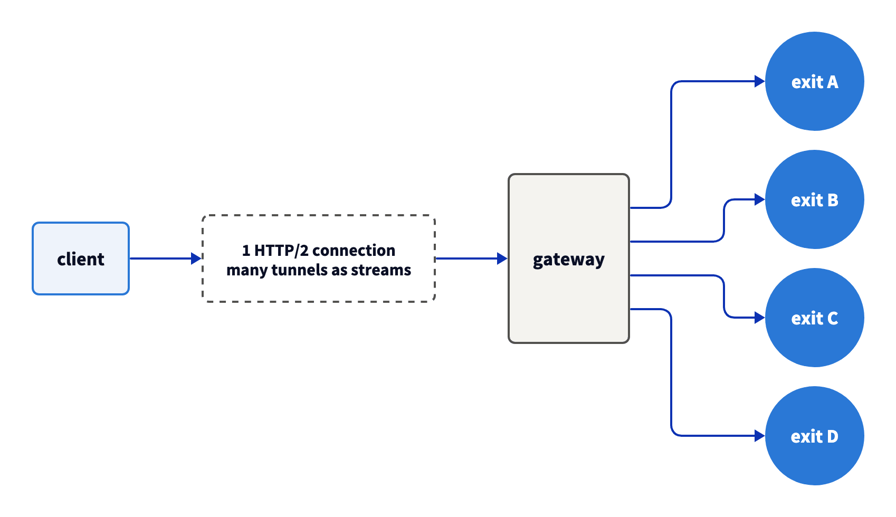
Over HTTP/1.1, every tunnel needs its own TCP connection to the gateway. At 1K requests per second, the client kept as many as 803 of them open at once. Each one cost a file descriptor, a local port, and a handshake.
In testing, Evomi's HTTPS proxy endpoint, dcp.evomi-proxy.com on port 2001, also accepted HTTP/2. This endpoint uses TLS between your client and the gateway. Each CONNECT then becomes a stream on a shared connection, with its own exit IP, and a client can open more connections as load grows:
The dashboard's Proxy Generator switches to that endpoint when you choose HTTPS as the protocol:
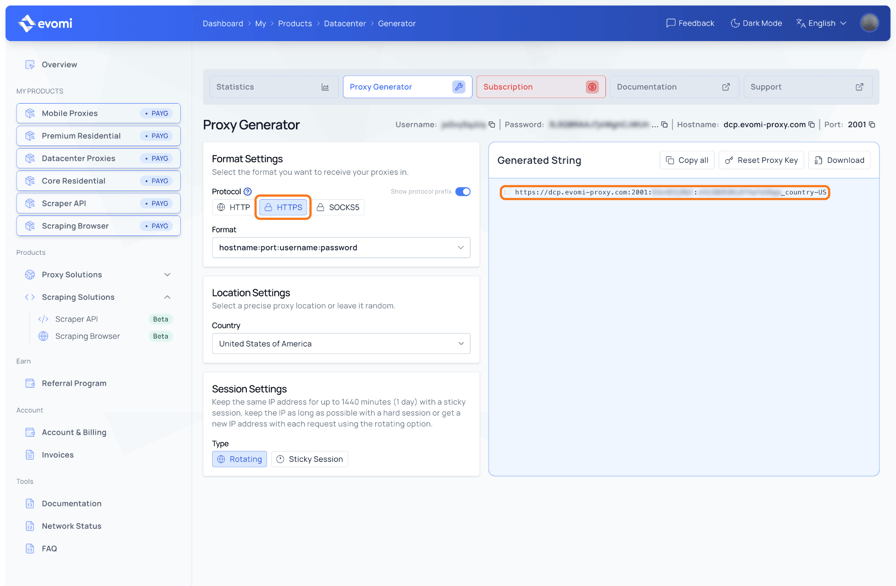
The username and password are masked.
curl 8.1 or later opens a tunnel this way with --proxy-http2:
curl -sv --proxy-http2 -x "https://dcp.evomi-proxy.com:2001" -U "$PROXY_USER:$PROXY_PASS" \
  https://api.ipify.org 2>&1 | grep -E "ALPN: server accepted|CONNECT tunnel"
The first line is the gateway accepting HTTP/2, and the last is the target doing the same inside the tunnel:
* ALPN: server accepted h2
* CONNECT tunnel: HTTP/2 negotiated
* CONNECT tunnel established, response 200
* ALPN: server accepted h2
In Python, build this mode on the h2 library, which implements HTTP/2. None of the Python clients tested here sent CONNECT requests as HTTP/2 streams. The results below came from a client built on h2.
At 500 requests per second over HTTP/2, unique exit IPs equaled 99.6% of successful requests. Separate open-loop runs at 3 rates, once with 1 connection per tunnel and once with tunnels as HTTP/2 streams, gave these results:
Request rate | Peak gateway connections, 1 per tunnel | Peak gateway connections, HTTP/2 streams | Median latency, HTTP/2 streams compared with 1 per tunnel |
|---|---|---|---|
200/s | 158 | 3 | 17 ms lower |
500/s | 421 | 6 | 40 ms lower |
1K/s, 4 client processes (totals) | 803 | 12 | 41 ms lower |
Lower bytes per successful request with tunnel reuse
Tunnel reuse also lowers traffic volume, which lowers cost on per-GB plans. A tunnel carries the TLS handshake, including the target's certificate chain, and those bytes count as tunnel traffic, in addition to your payload. A tcpdump of the gateway connection for the same small trace request shows how reuse changes the bytes per request:
Requests per tunnel | TCP payload bytes per request, both directions |
|---|---|
1 | 7,569 |
10 | 2,006 |
50 | 1,486 |
Post-quantum TLS makes each new tunnel heavier. OpenSSL 3.5 and later, and curl_cffi's Chrome profile, negotiate post-quantum key exchange (X25519MLKEM768) with Cloudflare, and the table's byte counts include it. A classical X25519 handshake transferred 5,415 bytes for the same single request, so post-quantum key exchange adds about 2.1 KB to each new tunnel.
For 1M small requests, a new tunnel per request transfers about 7.6 GB, and tunnels that carry 50 requests each transfer about 1.5 GB. Multiply those 2 numbers by your plan's per-GB rate on the pricing page to see what reuse saves. For a 100 KB HTML page, the handshake adds about 6%, so reuse matters most for small API and JSON responses.
Check subnet, ASN, and country distribution
Targets can block a whole network by its ASN. Across the US exit IPs in these runs, Evomi's pool included IPs from thousands of /24 subnets in hundreds of ASNs. The largest ASN contained about a tenth of the exit IPs, so a block on any single ASN would leave most of the pool available.
To check a provider, count the unique /24 subnets and the IPs per ASN in results.jsonl with jq and Team Cymru's bulk IP-to-ASN service:
jq -r 'select(.ip) | .ip' results.jsonl | sort -u > exit_ips.txt
cut -d. -f1-3 exit_ips.txt | sort -u | wc -l
( echo begin; echo verbose; cat exit_ips.txt; echo end; sleep 5 ) | nc whois.cymru.com 43 > asn.txt
awk -F'|' 'NR>1 {gsub(/ /, "", $1); print $1}' asn.txt | sort | uniq -c | sort -rn | head -5
Without the sleep, the macOS nc can close the connection before the reply arrives.
Match country targeting to the database your target uses. Geolocation databases often disagree about individual IPs, which an IP address lookup across several databases shows. The _geosource- parameter sets which database _country- uses, as the geo-targeting docs describe.
The trace endpoint also returns Cloudflare's country for each exit IP, which the harness saves as loc and steady.py counts. If your target is behind Cloudflare, those counts show how Cloudflare geolocates your exit IPs.
Measure the block rate on your own target
Block rate depends on your target, so measure it there. Cloudflare's trace endpoint, the target in these tests, didn't block any request, so it measured only the proxy path.
The harness sends Python's TLS fingerprint and no browser headers. A bot-protected target can block that bare client through any proxy. For those targets, run the block test through the client and headers your scraper uses, and sort responses into the 5 outcomes below.
For other targets, change TARGET and PATH in the harness. The harness already records each status code. To classify blocks, add these 2 fields to the rec.update(...) call in one():
challenge="cf-mitigated: challenge" in resp.lower(),
body_len=len(resp.partition("\r\n\r\n")[2]),
Then sort every response into one of 5 outcomes:
- Data. The body contains content you expect, such as a price field or a JSON key. Check that content, not only the status, because a 200 response can still hide a block.
- Hard block. A
403or429error page, or a503from the target's bot protection. - Soft block. A challenge page or an empty or truncated body, with any status code, including
200or418. Cloudflare documents a cf-mitigated: challenge header on its challenge pages. For other bot-protection vendors, treat a body far smaller than the median as a soft block. - Target error. A
404or410usually means the page no longer exists, so a retry rarely helps. A request that got a5xxfrom the site can succeed on a later retry. - Proxy failure. A reset or timeout in the TCP, CONNECT, or TLS phase, which the harness already records.
Start with fast rules that check the status code, the headers, and the ratio of script to visible text. Send the responses they can't classify to a slower check, such as parsing the full page.
Run the target test for hours, not minutes. If a target starts to block exit IPs over time, the block rate rises while proxy failures stay the same. Record the block rate per hour.
Your own target's responses usually don't show the exit IP. To see the block rate per exit IP, run the test through _lockedsession- sessions, which keep 1 exit IP for the whole session.
Alternate providers in the same hours. Give each provider 30-minute windows in turn, and repeat on another day, because blocking can change through the day. Then compare them on cost per accepted record, not cost per page.
Turn concurrency benchmark results into a provider decision
Run every provider on your shortlist with the same client, the same test location, and the same target. Then compare them on these measures:
- Steady-state successful requests per second at the concurrency you'll run, from an open-loop load test
- p99 latency at a fixed request rate, with new-tunnel and reused-tunnel latency reported separately
- Success rate after 1 retry, with failures counted by phase
- Unique /24 subnets and ASNs in the country pool you need, and how many exit IPs your target's database geolocates to that country
- Session behavior under a burst, meaning whether a sticky session keeps 1 exit IP across 100 concurrent tunnels
- Plan limits, such as a maximum concurrency, read from each plan and confirmed by a ramp test
- HTTP/2 to the proxy, so 1 gateway connection can carry many tunnels
- Block rate on your target over a multi-hour run, with hard and soft blocks counted separately
- Bytes per successful request at your real response size
Re-run every published benchmark, this one included, on your own setup. After you choose, export the same phase timings to a dashboard, as in our guide to monitoring a scraping fleet with Prometheus and Grafana.
Start with datacenter proxies where your targets accept them. On the pricing page, datacenter traffic is priced lower per GB than residential traffic. Then route each domain by measured success, cost, and latency.
A benchmark can also show which proxy type each target needs. Residential proxies reach targets that block hosting ASNs, and the Scraper API also handles rendering and retries for you.
Final thoughts
A datacenter proxy benchmark under concurrency measures your client, the gateway, and the target, so per-phase timings show which of the 3 caused each result. For HTTPS, rotation happens per tunnel, and default client settings can limit concurrency before your traffic reaches the proxy. On Evomi's pool, reused tunnels gave the biggest gain, and that gain holds on your target while the session pool stays under its per-IP limit.
Where a target blocks hosting ASNs, Evomi's residential proxies take over, and the same harness measures them. Run the harness for 1 minute against each shortlisted provider, including an Evomi free trial, then for hours against your own target.
FAQ
How do you check the speed of a proxy?
Time TCP to the gateway, the CONNECT request, the TLS handshake, and the HTTP request as separate phases. Run a fixed-rate test from a server near your scrapers, and report new-tunnel and reused-tunnel latency separately. From an AWS us-east-1 VM, TCP to Evomi's datacenter gateway took 4 ms.
Do rotating proxies change IP every request?
A rotating proxy changes IP on every plain-HTTP request, but for HTTPS it changes IP per tunnel, the client's connection through the proxy. All requests on a reused connection keep the same exit IP. By default, the Python client curl_cffi sent 98.8% of 1K requests through 1 exit IP. With 1 sticky session per worker, that share fell to 1.0%.
How many concurrent requests can a datacenter proxy handle?
On Evomi, your client and the target usually set the limit, because Evomi's datacenter plans list unlimited concurrency. In a 15-second test to Cloudflare's trace endpoint, the gateway carried 11,006 successful requests per second over 1K reused tunnels. It accepted every concurrency level tried. Check client limits first, because async Python clients defaulted to 10 or 100 connections.
Are datacenter proxies faster than residential proxies?
Often, because datacenter exit nodes run on servers in hosting networks, not on home connections. Tunnel reuse can matter as much as proxy type. In fixed-concurrency tests, reused tunnels on Evomi's datacenter pool had a median latency of 56 to 78 ms at 100 to 1K concurrent tunnels. Run the same benchmark harness through both proxy types before you decide.