

The HTTP CONNECT Method: How HTTPS Proxying Actually Works

The Scraper

Proxy Fundamentals

You point requests at an HTTPS URL through a proxy, it works, and you never think about it again. But stop for a second: an HTTP proxy is a server that reads your request, decides where to send it, and forwards it. That's straightforward when the request is plain HTTP, the proxy can read every byte. HTTPS is encrypted end to end between you and the target. So how does a server that's supposed to read and route your request forward it when it can't read a thing?

The answer is that it doesn't read it. For HTTPS, the proxy stops being a request router and becomes a dumb pipe. The mechanism that flips it into pipe mode is a single HTTP verb you almost never type yourself: CONNECT.


Plain HTTP Proxying: The Proxy Sees Everything

Start with the easy case. When you send a plain HTTP request directly to a server, the request line is in origin form, just the path:


GET /search?q=proxies HTTP/1.1
Host: example.com


When you send that same request through a forward proxy, the request line changes to absolute form. You hand the proxy the full URL, because the proxy needs to know which server to dial:


GET http://example.com/search?q=proxies HTTP/1.1
Host: example.com


The proxy parses this completely. It sees the method, the full URL, the headers, the query string, the body, all of it in cleartext. It can log it, cache it, rewrite headers, strip cookies, inject its own. The proxy is a full participant in the conversation. That's the whole model HTTP proxies were built on.

Now make it HTTPS. The URL is https://example.com/..., and everything after the TCP connection is wrapped in TLS. If the proxy tried to read the request the same way, it would see encrypted bytes and nothing else. It can't route on a path it can't read, and it can't terminate TLS without being the server example.com (it isn't, and it doesn't have the cert). The origin-form/absolute-form trick is useless here.

So HTTPS needs a different deal: the client and the proxy agree, in cleartext, to open a raw TCP tunnel, and then the client does TLS through it.


The CONNECT Handshake, Step by Step

CONNECT is the verb that sets up that tunnel. Here's the full sequence:

  1. The client sends a CONNECT request to the proxy naming the destination host and por, not a URL, just host:port. For HTTPS that's almost always port 443.

  2. The proxy opens a raw TCP connection to that host and port.

  3. The proxy replies 200 Connection Established. No body. This tells the client the pipe is open.

  4. The connection becomes a blind byte pipe. From here the proxy copies bytes in both directions without interpreting them.

  5. The client performs the TLS handshake with the target, through the tunnel. The ClientHello, the server's certificate, the key exchange, the encrypted application data — all of it flows client to target through the proxy, but the proxy is just relaying bytes.

The key consequence: the TLS session is negotiated between the client and the real target. The certificate the client validates is the target's certificate. The proxy never holds a key, never sees the plaintext, never sees the cert chain as anything other than opaque bytes. It set up the pipe and then got out of the way.
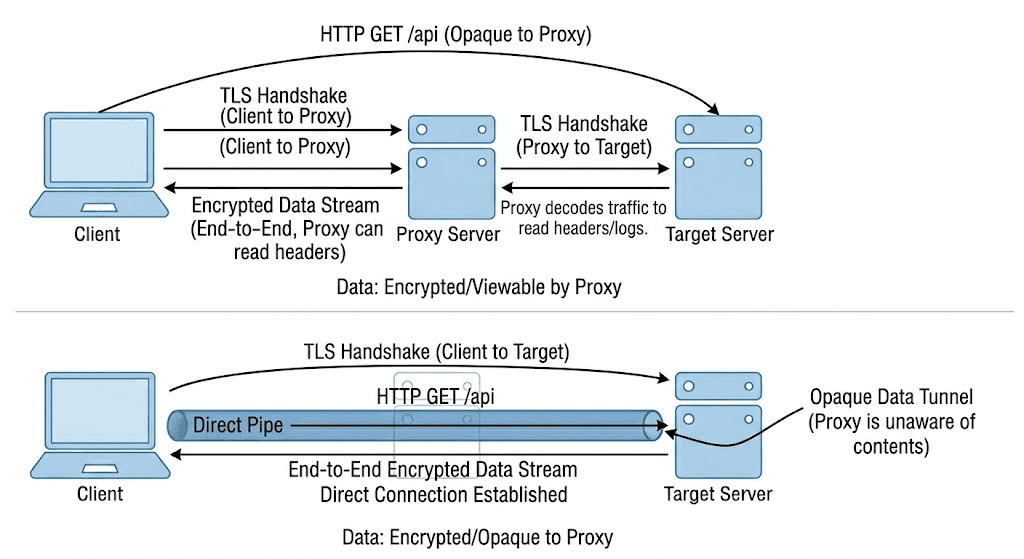

Diagram: a client sends CONNECT example.com:443 to the proxy; the proxy opens TCP to example.com and returns 200 Connection Established; a dashed tunnel then runs client-to-target carrying the TLS handshake and encrypted data straight through the proxy, which sees only ciphertext


The Raw Bytes

This is what actually crosses the wire between the client and the proxy at the start. The client writes:


CONNECT example.com:443 HTTP/1.1
Host: example.com:443
User-Agent: my-scraper/1.0
Proxy-Connection: Keep-Alive


(Note the blank line — the request ends there. There is no body.) The proxy dials example.com:443, succeeds, and writes back:


HTTP/1.1 200 Connection Established


After those two messages, the HTTP framing is finished. The very next byte the client sends is the first byte of the TLS ClientHello(0x16 0x03 0x01 ...), and the proxy forwards it verbatim. Everything from this point is the TLS record protocol, and to the proxy it's noise it shuttles back and forth.


What the Proxy Can Still See

"It can't read the content" is not the same as "it sees nothing." A CONNECT proxy still observes a meaningful amount of metadata:

  • The destination host and port. It's right there in the CONNECT example.com:443 line, the proxy has to know it to open the socket.

  • The SNI. Unless Encrypted Client Hello (ECH) is in use, the TLS ClientHello carries the target hostname in the Server Name Indication field in cleartext, inside the tunnel. The proxy is forwarding those bytes and can read the SNI even though the rest is encrypted.

  • Timing and byte volume. When the connection opened, how long it stayed up, how many bytes flowed each way, the rhythm of the packets.

What it cannot see: the path, query string, headers, cookies, request body, or response body. The URL after the hostname is encrypted; so is everything that identifies what you did on that host.

For a privacy threat model this is the line that matters. A proxy (or anyone watching the proxy) knows you talked to example.com and roughly how much, but not which page or what data. That's also why "the proxy provider can read my traffic" is a misunderstanding for HTTPS, the destination and volume are visible, the content is not.


Proxy Authentication on CONNECT

Commercial proxies don't open tunnels for anyone. Authentication on a CONNECT request works through one header. If the proxy requires credentials and you don't send them, it answers:


HTTP/1.1 407 Proxy Authentication Required
Proxy-Authenticate: Basic realm="proxy"


407 is the proxy-side cousin of 401. You retry the CONNECT with a Proxy-Authorization header, for Basic auth, the base64 of user:pass:


CONNECT example.com:443 HTTP/1.1
Host: example.com:443
Proxy-Authorization: Basic dXNlcjpwYXNz


HTTP libraries build this header for you when you put credentials in the proxy URL (http://user:pass@proxy:8080). If you're seeing 407in your scraper, the credentials never reached the proxy — wrong format, wrong placement, or a library that doesn't forward auth on CONNECT. It's an auth problem, not a tunnel problem.


Why SOCKS5 Is Different

SOCKS5 solves the same problem one layer down. There is no CONNECT verb and no HTTP at all in a SOCKS5 proxy handshake, SOCKS is its own binary protocol that operates closer to raw TCP. The client does a small greeting/auth negotiation, then sends a binary connect command with the destination address, and the proxy opens the socket. From the application's point of view the end result is the same, a transparent tunnel, but because SOCKS isn't HTTP-aware, it tunnels any TCP traffic (and SOCKS5 also handles UDP), not just HTTP and HTTPS. CONNECT is the HTTP-proxy way to get a tunnel; SOCKS5 is a lower-level protocol that's a tunnel from the start.


TLS Interception: How MITM Proxies Break the Tunnel

If the proxy never sees plaintext, how do tools like Charles, Fiddler, and mitmproxy show you decrypted HTTPS? They cheat the trust model, on purpose, with your permission.

A normal CONNECT proxy relays the TLS handshake to the real server. An intercepting proxy terminates it. When your client sends the ClientHello, the MITM proxy answers as if it were the target, it presents a certificate it generated on the fly for example.com, signed by its own certificate authority. Your client then opens a second TLS session from the proxy out to the real example.com. The proxy sits in the middle with plaintext on both sides, which is exactly the point: that's how you read the traffic in a debugger.

Your client would normally reject that forged certificate, it isn't signed by a trusted CA. That's why these tools make you install their root CA certificate into your trust store first. Once their CA is trusted, the certificates they mint validate, and the interception is invisible to the application. This is genuinely useful for debugging your own scraper's HTTPS traffic. It's also a vivid demonstration of why root CA trust is the thing that makes HTTPS mean anything: anyone whose CA you trust can become any site to you.


Using a CONNECT Proxy in Python

You almost never write CONNECT by hand. When you give requests or httpx an HTTPS proxy, the library issues the CONNECT and reads the 200 for you, then runs TLS over the resulting tunnel:


import requests

proxies = {
    "http": "http://user:pass@proxy.example.com:8080",
    "https": "http://user:pass@proxy.example.com:8080",
}

# For the https target, requests sends CONNECT proxy.example.com... under the hood,
# gets "200 Connection Established", then does the TLS handshake with the target.
r = requests.get("https://example.com/ip", proxies=proxies, timeout=30)
print(r.status_code, r.text[:200])


The proxy URL scheme stays http:// even for the HTTPS target, that scheme describes how you talk to the proxy, not the target. httpx works the same way with httpx.Client(proxy="http://user:pass@proxy.example.com:8080").

If you want to see the handshake, do it by hand. This sends a raw CONNECT, then wraps the socket in TLS:


import socket, ssl

proxy_host, proxy_port = "proxy.example.com", 8080
target_host, target_port = "example.com", 443

sock = socket.create_connection((proxy_host, proxy_port), timeout=30)
connect_req = (
    f"CONNECT {target_host}:{target_port} HTTP/1.1\r\n"
    f"Host: {target_host}:{target_port}\r\n"
    f"Proxy-Authorization: Basic dXNlcjpwYXNz\r\n"
    f"\r\n"
)
sock.sendall(connect_req.encode())

resp = sock.recv(4096)
print(resp.split(b"\r\n")[0].decode())  # -> HTTP/1.1 200 Connection Established

# Tunnel is open. Now do TLS *through* it note we verify against the TARGET hostname.
ctx = ssl.create_default_context()
tls = ctx.wrap_socket(sock, server_hostname=target_host)
tls.sendall(b"GET /ip HTTP/1.1\r\nHost: example.com\r\nConnection: close\r\n\r\n")
print(tls.recv(4096).decode(errors="replace")[:200])


The server_hostname=target_host line is the proof of the model: TLS is verified against the real target, through a proxy that only ever saw the cleartext CONNECT line and a stream of ciphertext after it. With a clean residential pool, like Evomi's, the same code works unchanged; only the proxy host and credentials differ.


Wrapping Up

For plain HTTP, a proxy is a full reader and router. For HTTPS, the CONNECT method turns it into a tunnel: the client and proxy agree in cleartext to open a raw TCP pipe (CONNECT host:443200 Connection Established), and the TLS handshake then happens client to target straight through it. The proxy sees the destination host, the SNI, and traffic volume, never the path, headers, or content. The exception is a MITM proxy, which only reads your HTTPS because you installed its root CA. Your HTTP library does all of this for you; understanding it is what lets you debug a 407 or a hung tunnel instead of guessing.


You point requests at an HTTPS URL through a proxy, it works, and you never think about it again. But stop for a second: an HTTP proxy is a server that reads your request, decides where to send it, and forwards it. That's straightforward when the request is plain HTTP, the proxy can read every byte. HTTPS is encrypted end to end between you and the target. So how does a server that's supposed to read and route your request forward it when it can't read a thing?

The answer is that it doesn't read it. For HTTPS, the proxy stops being a request router and becomes a dumb pipe. The mechanism that flips it into pipe mode is a single HTTP verb you almost never type yourself: CONNECT.


Plain HTTP Proxying: The Proxy Sees Everything

Start with the easy case. When you send a plain HTTP request directly to a server, the request line is in origin form, just the path:


GET /search?q=proxies HTTP/1.1
Host: example.com


When you send that same request through a forward proxy, the request line changes to absolute form. You hand the proxy the full URL, because the proxy needs to know which server to dial:


GET http://example.com/search?q=proxies HTTP/1.1
Host: example.com


The proxy parses this completely. It sees the method, the full URL, the headers, the query string, the body, all of it in cleartext. It can log it, cache it, rewrite headers, strip cookies, inject its own. The proxy is a full participant in the conversation. That's the whole model HTTP proxies were built on.

Now make it HTTPS. The URL is https://example.com/..., and everything after the TCP connection is wrapped in TLS. If the proxy tried to read the request the same way, it would see encrypted bytes and nothing else. It can't route on a path it can't read, and it can't terminate TLS without being the server example.com (it isn't, and it doesn't have the cert). The origin-form/absolute-form trick is useless here.

So HTTPS needs a different deal: the client and the proxy agree, in cleartext, to open a raw TCP tunnel, and then the client does TLS through it.


The CONNECT Handshake, Step by Step

CONNECT is the verb that sets up that tunnel. Here's the full sequence:

  1. The client sends a CONNECT request to the proxy naming the destination host and por, not a URL, just host:port. For HTTPS that's almost always port 443.

  2. The proxy opens a raw TCP connection to that host and port.

  3. The proxy replies 200 Connection Established. No body. This tells the client the pipe is open.

  4. The connection becomes a blind byte pipe. From here the proxy copies bytes in both directions without interpreting them.

  5. The client performs the TLS handshake with the target, through the tunnel. The ClientHello, the server's certificate, the key exchange, the encrypted application data — all of it flows client to target through the proxy, but the proxy is just relaying bytes.

The key consequence: the TLS session is negotiated between the client and the real target. The certificate the client validates is the target's certificate. The proxy never holds a key, never sees the plaintext, never sees the cert chain as anything other than opaque bytes. It set up the pipe and then got out of the way.


Diagram: a client sends CONNECT example.com:443 to the proxy; the proxy opens TCP to example.com and returns 200 Connection Established; a dashed tunnel then runs client-to-target carrying the TLS handshake and encrypted data straight through the proxy, which sees only ciphertext


The Raw Bytes

This is what actually crosses the wire between the client and the proxy at the start. The client writes:


CONNECT example.com:443 HTTP/1.1
Host: example.com:443
User-Agent: my-scraper/1.0
Proxy-Connection: Keep-Alive


(Note the blank line — the request ends there. There is no body.) The proxy dials example.com:443, succeeds, and writes back:


HTTP/1.1 200 Connection Established


After those two messages, the HTTP framing is finished. The very next byte the client sends is the first byte of the TLS ClientHello(0x16 0x03 0x01 ...), and the proxy forwards it verbatim. Everything from this point is the TLS record protocol, and to the proxy it's noise it shuttles back and forth.


What the Proxy Can Still See

"It can't read the content" is not the same as "it sees nothing." A CONNECT proxy still observes a meaningful amount of metadata:

  • The destination host and port. It's right there in the CONNECT example.com:443 line, the proxy has to know it to open the socket.

  • The SNI. Unless Encrypted Client Hello (ECH) is in use, the TLS ClientHello carries the target hostname in the Server Name Indication field in cleartext, inside the tunnel. The proxy is forwarding those bytes and can read the SNI even though the rest is encrypted.

  • Timing and byte volume. When the connection opened, how long it stayed up, how many bytes flowed each way, the rhythm of the packets.

What it cannot see: the path, query string, headers, cookies, request body, or response body. The URL after the hostname is encrypted; so is everything that identifies what you did on that host.

For a privacy threat model this is the line that matters. A proxy (or anyone watching the proxy) knows you talked to example.com and roughly how much, but not which page or what data. That's also why "the proxy provider can read my traffic" is a misunderstanding for HTTPS, the destination and volume are visible, the content is not.


Proxy Authentication on CONNECT

Commercial proxies don't open tunnels for anyone. Authentication on a CONNECT request works through one header. If the proxy requires credentials and you don't send them, it answers:


HTTP/1.1 407 Proxy Authentication Required
Proxy-Authenticate: Basic realm="proxy"


407 is the proxy-side cousin of 401. You retry the CONNECT with a Proxy-Authorization header, for Basic auth, the base64 of user:pass:


CONNECT example.com:443 HTTP/1.1
Host: example.com:443
Proxy-Authorization: Basic dXNlcjpwYXNz


HTTP libraries build this header for you when you put credentials in the proxy URL (http://user:pass@proxy:8080). If you're seeing 407in your scraper, the credentials never reached the proxy — wrong format, wrong placement, or a library that doesn't forward auth on CONNECT. It's an auth problem, not a tunnel problem.


Why SOCKS5 Is Different

SOCKS5 solves the same problem one layer down. There is no CONNECT verb and no HTTP at all in a SOCKS5 proxy handshake, SOCKS is its own binary protocol that operates closer to raw TCP. The client does a small greeting/auth negotiation, then sends a binary connect command with the destination address, and the proxy opens the socket. From the application's point of view the end result is the same, a transparent tunnel, but because SOCKS isn't HTTP-aware, it tunnels any TCP traffic (and SOCKS5 also handles UDP), not just HTTP and HTTPS. CONNECT is the HTTP-proxy way to get a tunnel; SOCKS5 is a lower-level protocol that's a tunnel from the start.


TLS Interception: How MITM Proxies Break the Tunnel

If the proxy never sees plaintext, how do tools like Charles, Fiddler, and mitmproxy show you decrypted HTTPS? They cheat the trust model, on purpose, with your permission.

A normal CONNECT proxy relays the TLS handshake to the real server. An intercepting proxy terminates it. When your client sends the ClientHello, the MITM proxy answers as if it were the target, it presents a certificate it generated on the fly for example.com, signed by its own certificate authority. Your client then opens a second TLS session from the proxy out to the real example.com. The proxy sits in the middle with plaintext on both sides, which is exactly the point: that's how you read the traffic in a debugger.

Your client would normally reject that forged certificate, it isn't signed by a trusted CA. That's why these tools make you install their root CA certificate into your trust store first. Once their CA is trusted, the certificates they mint validate, and the interception is invisible to the application. This is genuinely useful for debugging your own scraper's HTTPS traffic. It's also a vivid demonstration of why root CA trust is the thing that makes HTTPS mean anything: anyone whose CA you trust can become any site to you.


Using a CONNECT Proxy in Python

You almost never write CONNECT by hand. When you give requests or httpx an HTTPS proxy, the library issues the CONNECT and reads the 200 for you, then runs TLS over the resulting tunnel:


import requests

proxies = {
    "http": "http://user:pass@proxy.example.com:8080",
    "https": "http://user:pass@proxy.example.com:8080",
}

# For the https target, requests sends CONNECT proxy.example.com... under the hood,
# gets "200 Connection Established", then does the TLS handshake with the target.
r = requests.get("https://example.com/ip", proxies=proxies, timeout=30)
print(r.status_code, r.text[:200])


The proxy URL scheme stays http:// even for the HTTPS target, that scheme describes how you talk to the proxy, not the target. httpx works the same way with httpx.Client(proxy="http://user:pass@proxy.example.com:8080").

If you want to see the handshake, do it by hand. This sends a raw CONNECT, then wraps the socket in TLS:


import socket, ssl

proxy_host, proxy_port = "proxy.example.com", 8080
target_host, target_port = "example.com", 443

sock = socket.create_connection((proxy_host, proxy_port), timeout=30)
connect_req = (
    f"CONNECT {target_host}:{target_port} HTTP/1.1\r\n"
    f"Host: {target_host}:{target_port}\r\n"
    f"Proxy-Authorization: Basic dXNlcjpwYXNz\r\n"
    f"\r\n"
)
sock.sendall(connect_req.encode())

resp = sock.recv(4096)
print(resp.split(b"\r\n")[0].decode())  # -> HTTP/1.1 200 Connection Established

# Tunnel is open. Now do TLS *through* it note we verify against the TARGET hostname.
ctx = ssl.create_default_context()
tls = ctx.wrap_socket(sock, server_hostname=target_host)
tls.sendall(b"GET /ip HTTP/1.1\r\nHost: example.com\r\nConnection: close\r\n\r\n")
print(tls.recv(4096).decode(errors="replace")[:200])


The server_hostname=target_host line is the proof of the model: TLS is verified against the real target, through a proxy that only ever saw the cleartext CONNECT line and a stream of ciphertext after it. With a clean residential pool, like Evomi's, the same code works unchanged; only the proxy host and credentials differ.


Wrapping Up

For plain HTTP, a proxy is a full reader and router. For HTTPS, the CONNECT method turns it into a tunnel: the client and proxy agree in cleartext to open a raw TCP pipe (CONNECT host:443200 Connection Established), and the TLS handshake then happens client to target straight through it. The proxy sees the destination host, the SNI, and traffic volume, never the path, headers, or content. The exception is a MITM proxy, which only reads your HTTPS because you installed its root CA. Your HTTP library does all of this for you; understanding it is what lets you debug a 407 or a hung tunnel instead of guessing.

You point requests at an HTTPS URL through a proxy, it works, and you never think about it again. But stop for a second: an HTTP proxy is a server that reads your request, decides where to send it, and forwards it. That's straightforward when the request is plain HTTP, the proxy can read every byte. HTTPS is encrypted end to end between you and the target. So how does a server that's supposed to read and route your request forward it when it can't read a thing?

The answer is that it doesn't read it. For HTTPS, the proxy stops being a request router and becomes a dumb pipe. The mechanism that flips it into pipe mode is a single HTTP verb you almost never type yourself: CONNECT.


Plain HTTP Proxying: The Proxy Sees Everything

Start with the easy case. When you send a plain HTTP request directly to a server, the request line is in origin form, just the path:


GET /search?q=proxies HTTP/1.1
Host: example.com


When you send that same request through a forward proxy, the request line changes to absolute form. You hand the proxy the full URL, because the proxy needs to know which server to dial:


GET http://example.com/search?q=proxies HTTP/1.1
Host: example.com


The proxy parses this completely. It sees the method, the full URL, the headers, the query string, the body, all of it in cleartext. It can log it, cache it, rewrite headers, strip cookies, inject its own. The proxy is a full participant in the conversation. That's the whole model HTTP proxies were built on.

Now make it HTTPS. The URL is https://example.com/..., and everything after the TCP connection is wrapped in TLS. If the proxy tried to read the request the same way, it would see encrypted bytes and nothing else. It can't route on a path it can't read, and it can't terminate TLS without being the server example.com (it isn't, and it doesn't have the cert). The origin-form/absolute-form trick is useless here.

So HTTPS needs a different deal: the client and the proxy agree, in cleartext, to open a raw TCP tunnel, and then the client does TLS through it.


The CONNECT Handshake, Step by Step

CONNECT is the verb that sets up that tunnel. Here's the full sequence:

  1. The client sends a CONNECT request to the proxy naming the destination host and por, not a URL, just host:port. For HTTPS that's almost always port 443.

  2. The proxy opens a raw TCP connection to that host and port.

  3. The proxy replies 200 Connection Established. No body. This tells the client the pipe is open.

  4. The connection becomes a blind byte pipe. From here the proxy copies bytes in both directions without interpreting them.

  5. The client performs the TLS handshake with the target, through the tunnel. The ClientHello, the server's certificate, the key exchange, the encrypted application data — all of it flows client to target through the proxy, but the proxy is just relaying bytes.

The key consequence: the TLS session is negotiated between the client and the real target. The certificate the client validates is the target's certificate. The proxy never holds a key, never sees the plaintext, never sees the cert chain as anything other than opaque bytes. It set up the pipe and then got out of the way.


Diagram: a client sends CONNECT example.com:443 to the proxy; the proxy opens TCP to example.com and returns 200 Connection Established; a dashed tunnel then runs client-to-target carrying the TLS handshake and encrypted data straight through the proxy, which sees only ciphertext


The Raw Bytes

This is what actually crosses the wire between the client and the proxy at the start. The client writes:


CONNECT example.com:443 HTTP/1.1
Host: example.com:443
User-Agent: my-scraper/1.0
Proxy-Connection: Keep-Alive


(Note the blank line — the request ends there. There is no body.) The proxy dials example.com:443, succeeds, and writes back:


HTTP/1.1 200 Connection Established


After those two messages, the HTTP framing is finished. The very next byte the client sends is the first byte of the TLS ClientHello(0x16 0x03 0x01 ...), and the proxy forwards it verbatim. Everything from this point is the TLS record protocol, and to the proxy it's noise it shuttles back and forth.


What the Proxy Can Still See

"It can't read the content" is not the same as "it sees nothing." A CONNECT proxy still observes a meaningful amount of metadata:

  • The destination host and port. It's right there in the CONNECT example.com:443 line, the proxy has to know it to open the socket.

  • The SNI. Unless Encrypted Client Hello (ECH) is in use, the TLS ClientHello carries the target hostname in the Server Name Indication field in cleartext, inside the tunnel. The proxy is forwarding those bytes and can read the SNI even though the rest is encrypted.

  • Timing and byte volume. When the connection opened, how long it stayed up, how many bytes flowed each way, the rhythm of the packets.

What it cannot see: the path, query string, headers, cookies, request body, or response body. The URL after the hostname is encrypted; so is everything that identifies what you did on that host.

For a privacy threat model this is the line that matters. A proxy (or anyone watching the proxy) knows you talked to example.com and roughly how much, but not which page or what data. That's also why "the proxy provider can read my traffic" is a misunderstanding for HTTPS, the destination and volume are visible, the content is not.


Proxy Authentication on CONNECT

Commercial proxies don't open tunnels for anyone. Authentication on a CONNECT request works through one header. If the proxy requires credentials and you don't send them, it answers:


HTTP/1.1 407 Proxy Authentication Required
Proxy-Authenticate: Basic realm="proxy"


407 is the proxy-side cousin of 401. You retry the CONNECT with a Proxy-Authorization header, for Basic auth, the base64 of user:pass:


CONNECT example.com:443 HTTP/1.1
Host: example.com:443
Proxy-Authorization: Basic dXNlcjpwYXNz


HTTP libraries build this header for you when you put credentials in the proxy URL (http://user:pass@proxy:8080). If you're seeing 407in your scraper, the credentials never reached the proxy — wrong format, wrong placement, or a library that doesn't forward auth on CONNECT. It's an auth problem, not a tunnel problem.


Why SOCKS5 Is Different

SOCKS5 solves the same problem one layer down. There is no CONNECT verb and no HTTP at all in a SOCKS5 proxy handshake, SOCKS is its own binary protocol that operates closer to raw TCP. The client does a small greeting/auth negotiation, then sends a binary connect command with the destination address, and the proxy opens the socket. From the application's point of view the end result is the same, a transparent tunnel, but because SOCKS isn't HTTP-aware, it tunnels any TCP traffic (and SOCKS5 also handles UDP), not just HTTP and HTTPS. CONNECT is the HTTP-proxy way to get a tunnel; SOCKS5 is a lower-level protocol that's a tunnel from the start.


TLS Interception: How MITM Proxies Break the Tunnel

If the proxy never sees plaintext, how do tools like Charles, Fiddler, and mitmproxy show you decrypted HTTPS? They cheat the trust model, on purpose, with your permission.

A normal CONNECT proxy relays the TLS handshake to the real server. An intercepting proxy terminates it. When your client sends the ClientHello, the MITM proxy answers as if it were the target, it presents a certificate it generated on the fly for example.com, signed by its own certificate authority. Your client then opens a second TLS session from the proxy out to the real example.com. The proxy sits in the middle with plaintext on both sides, which is exactly the point: that's how you read the traffic in a debugger.

Your client would normally reject that forged certificate, it isn't signed by a trusted CA. That's why these tools make you install their root CA certificate into your trust store first. Once their CA is trusted, the certificates they mint validate, and the interception is invisible to the application. This is genuinely useful for debugging your own scraper's HTTPS traffic. It's also a vivid demonstration of why root CA trust is the thing that makes HTTPS mean anything: anyone whose CA you trust can become any site to you.


Using a CONNECT Proxy in Python

You almost never write CONNECT by hand. When you give requests or httpx an HTTPS proxy, the library issues the CONNECT and reads the 200 for you, then runs TLS over the resulting tunnel:


import requests

proxies = {
    "http": "http://user:pass@proxy.example.com:8080",
    "https": "http://user:pass@proxy.example.com:8080",
}

# For the https target, requests sends CONNECT proxy.example.com... under the hood,
# gets "200 Connection Established", then does the TLS handshake with the target.
r = requests.get("https://example.com/ip", proxies=proxies, timeout=30)
print(r.status_code, r.text[:200])


The proxy URL scheme stays http:// even for the HTTPS target, that scheme describes how you talk to the proxy, not the target. httpx works the same way with httpx.Client(proxy="http://user:pass@proxy.example.com:8080").

If you want to see the handshake, do it by hand. This sends a raw CONNECT, then wraps the socket in TLS:


import socket, ssl

proxy_host, proxy_port = "proxy.example.com", 8080
target_host, target_port = "example.com", 443

sock = socket.create_connection((proxy_host, proxy_port), timeout=30)
connect_req = (
    f"CONNECT {target_host}:{target_port} HTTP/1.1\r\n"
    f"Host: {target_host}:{target_port}\r\n"
    f"Proxy-Authorization: Basic dXNlcjpwYXNz\r\n"
    f"\r\n"
)
sock.sendall(connect_req.encode())

resp = sock.recv(4096)
print(resp.split(b"\r\n")[0].decode())  # -> HTTP/1.1 200 Connection Established

# Tunnel is open. Now do TLS *through* it note we verify against the TARGET hostname.
ctx = ssl.create_default_context()
tls = ctx.wrap_socket(sock, server_hostname=target_host)
tls.sendall(b"GET /ip HTTP/1.1\r\nHost: example.com\r\nConnection: close\r\n\r\n")
print(tls.recv(4096).decode(errors="replace")[:200])


The server_hostname=target_host line is the proof of the model: TLS is verified against the real target, through a proxy that only ever saw the cleartext CONNECT line and a stream of ciphertext after it. With a clean residential pool, like Evomi's, the same code works unchanged; only the proxy host and credentials differ.


Wrapping Up

For plain HTTP, a proxy is a full reader and router. For HTTPS, the CONNECT method turns it into a tunnel: the client and proxy agree in cleartext to open a raw TCP pipe (CONNECT host:443200 Connection Established), and the TLS handshake then happens client to target straight through it. The proxy sees the destination host, the SNI, and traffic volume, never the path, headers, or content. The exception is a MITM proxy, which only reads your HTTPS because you installed its root CA. Your HTTP library does all of this for you; understanding it is what lets you debug a 407 or a hung tunnel instead of guessing.

Author

The Scraper

Engineer and Webscraping Specialist

About Author

The Scraper is a software engineer and web scraping specialist, focused on building production-grade data extraction systems. His work centers on large-scale crawling, anti-bot evasion, proxy infrastructure, and browser automation. He writes about real-world scraping failures, silent data corruption, and systems that operate at scale.

Like this article? Share it.
You asked, we answer - Users questions:

In This Article