
Verifying a mobile proxy's carrier, ASN (autonomous system number), and location takes more than one lookup, because any single source can be wrong. Iliad's mobile IPs in Italy belong to an ASN held by Scaleway, a hosting company, so a filter that blocks hosting names would reject them. T-Mobile's geofeed, the location file that the carrier publishes, placed one T-Mobile exit IP in Sacramento, but 2 databases placed it in Texas.
Ad verification, mobile app testing, and localized price monitoring need proof of the carrier and the location. This guide shows how to run each check, link every result to one exit IP, and automate the checks in Python.
TL;DR
- Identify the carrier from routing and registry records, not the ASN name. EE's mobile exit IPs came from BT's AS2856, in an IP block registered as
EE-MOBILE. - Learn each carrier's TCP fingerprint. T-Mobile US sent a maximum segment size (MSS) of 1356 on 75 of 77 exit IPs.
- Check location against your target's database. Databases agreed on the country for 361 of 363 mobile IPs, but city results were over 100 km apart for more than half.
- Link each result to one exit IP. A locked session keeps the checked exit IP for the whole job.
Open a locked session on your carrier
Every check applies to one exit IP, so first choose the exit IP that you test. Evomi mobile proxies read targeting options from the password field. Add each option to the end of your password with an underscore before it, and pick the carrier with an _isp- value. Copy the shortcodes from the Proxy Generator or the Public API targeting options endpoint, which list every carrier you can target.
Choose T-Mobile USA, Inc. under ISP in the Proxy Generator. The generator then adds _isp-tmobileusainc to the proxy string, after the country and before the session:
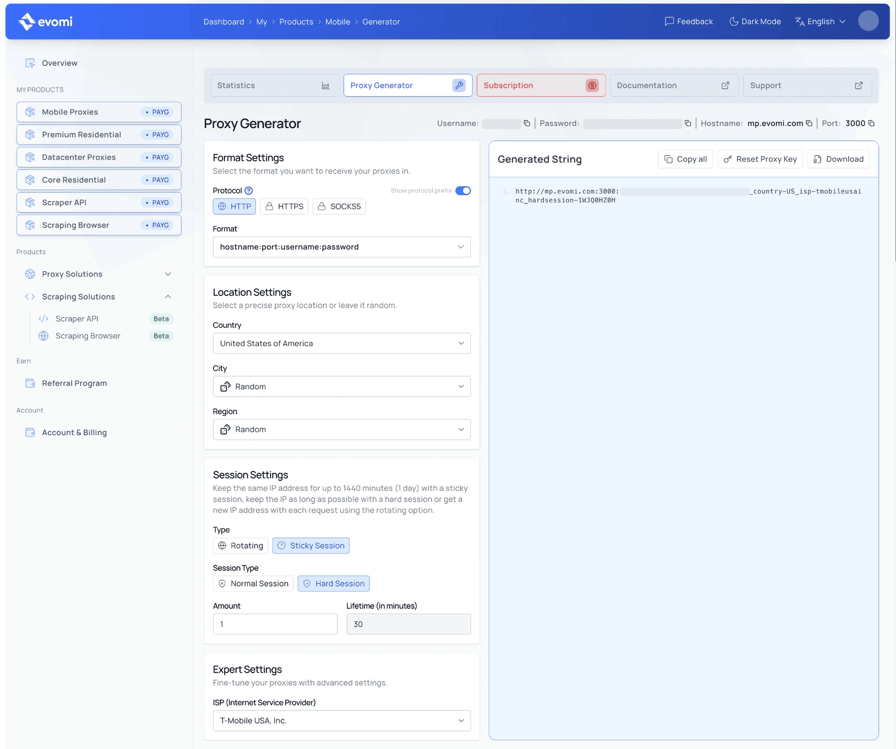
The mobile proxy session parameters offer 3 behaviors:
sessionis optimized for success rate and can rotate to a new IP within the lifetime you set.hardsessionprioritizes keeping the same IP over the lifetime setting.lockedsessionlocks traffic to one IP, so every request in the session uses the same exit IP.
For checks, replace the session part of the string with lockedsession- and a new session ID. A check result applies to the IP that you tested, and a locked session keeps traffic on that IP. A lockedsession and a hardsession each kept one IP across 16 requests.
You need curl, jq, and dig for the lookups, and Python 3.10 with httpx for the acceptance test. Run the shell commands in one terminal session, because the commands that follow reuse $PROXY and $EXIT.
The commands use the URL form of the proxy string, http://username:password@host:port. The examples use T-Mobile US, so replace tmobileusainc with your carrier's shortcode. These commands read your password without showing it, so the password stays out of your shell history. They then open a locked session with a new session ID and print the exit IP:
export EVOMI_USER=USERNAME
printf 'Evomi proxy password: '; read -rs EVOMI_PASS; echo; export EVOMI_PASS
SID=$(LC_ALL=C tr -dc 'A-Z0-9' </dev/urandom | head -c 8)
OPTS="country-US_isp-tmobileusainc_geosource-ipapi_lockedsession-$SID"
PROXY="http://$EVOMI_USER:${EVOMI_PASS}_$OPTS@mp.evomi.com:3000"
EXIT=$(curl -s -m 20 -x "$PROXY" https://ip.evomi.com/s)
echo "${EXIT:-No exit IP. Run this block again before you continue.}"
USERNAME is the proxy username shown in the generator, and the prompt asks for the proxy password. Once the exit IP passes the checks, run the job on the same SID, and check every new session the same way.
Our gateway checks the shortcode before routing, so a mistyped one returns HTTP 410 before any request reaches the target. On an HTTPS target, the 410 is the response to the CONNECT request, so curl reports it in %{http_connect} while %{http_code} shows 000.
Read the carrier from the prefix, not the ASN name
An IP's network operator appears in 3 records. The BGP (Border Gateway Protocol) route shows which ASN announces the prefix. The regional internet registry (RIR) record names the IP block in a field called the netname. The operator's reverse DNS (PTR) records can name its own address pools.
When an IP lookup site shows one "ISP" field, the site doesn't say which of the 3 records it used. If ASNs and registries are new to you, our guide on how ASNs and geolocation databases describe an IP covers the basics.
Look up the exit IP from your own machine. The netname comes from RDAP (Registration Data Access Protocol), the JSON-based replacement for WHOIS. These 4 lookups return the announced prefix and its origin ASN, the netname, the PTR record, and one IP database's mobile and proxy flags:
curl -s "https://stat.ripe.net/data/prefix-overview/data.json?resource=$EXIT" \
  | jq -r '.data | .resource as $p | .asns[] | "\($p) AS\(.asn) \(.holder)"'
curl -sL "https://rdap.org/ip/$EXIT" | jq -r '.name'
dig +short -x "$EXIT"
curl -s "http://ip-api.com/json/$EXIT?fields=as,mobile,proxy,hosting" | jq -c .
For a T-Mobile US exit IP, the results point to one carrier. This IP has no PTR record, so dig printed nothing:
172.58.0.0/21 AS21928 T-MOBILE-AS21928 - T-Mobile USA, Inc.
TMO9
{"as":"AS21928 T-Mobile USA, Inc.","mobile":true,"proxy":false,"hosting":false}
AS21928 is T-Mobile US, and TMO9 is the netname on its registry record. Many mobile IPs have no PTR record, so a missing one proves nothing. RIPEstat is a free query service from RIPE NCC, the European RIR. It returns data for this US IP block too, because it covers addresses from every RIR.
Where the ASN name misleads
Across 363 exit IPs from our mobile proxies in 13 countries, the records showed 3 recurring patterns:
Pattern | Carrier | What the records showed |
|---|---|---|
Another company's ASN name | EE (UK) | AS2856 "British Telecommunications", netname |
Another company's ASN name | Optus (Australia) | AS4804 "Microplex PTY LTD" |
Another company's ASN name | Iliad (Italy) | AS29447, described as Iliad Italia but held by the organization "Scaleway SAS" |
Fixed-line and mobile share one ASN | Telekom (Germany) | Fixed-line |
Fixed-line and mobile share one ASN | Telefónica (Germany) | Fixed-line |
Fixed-line and mobile share one ASN | Vodafone (Germany) | Fixed-line |
Fixed-line and mobile share one ASN | AT&T (US) | AS7018 announces fixed-line IP blocks and the mobile IP block 107.64.0.0/10 ( |
Mobile IP blocks keep a fixed-line netname | AT&T (US) | Mobile exit IPs with the netname |
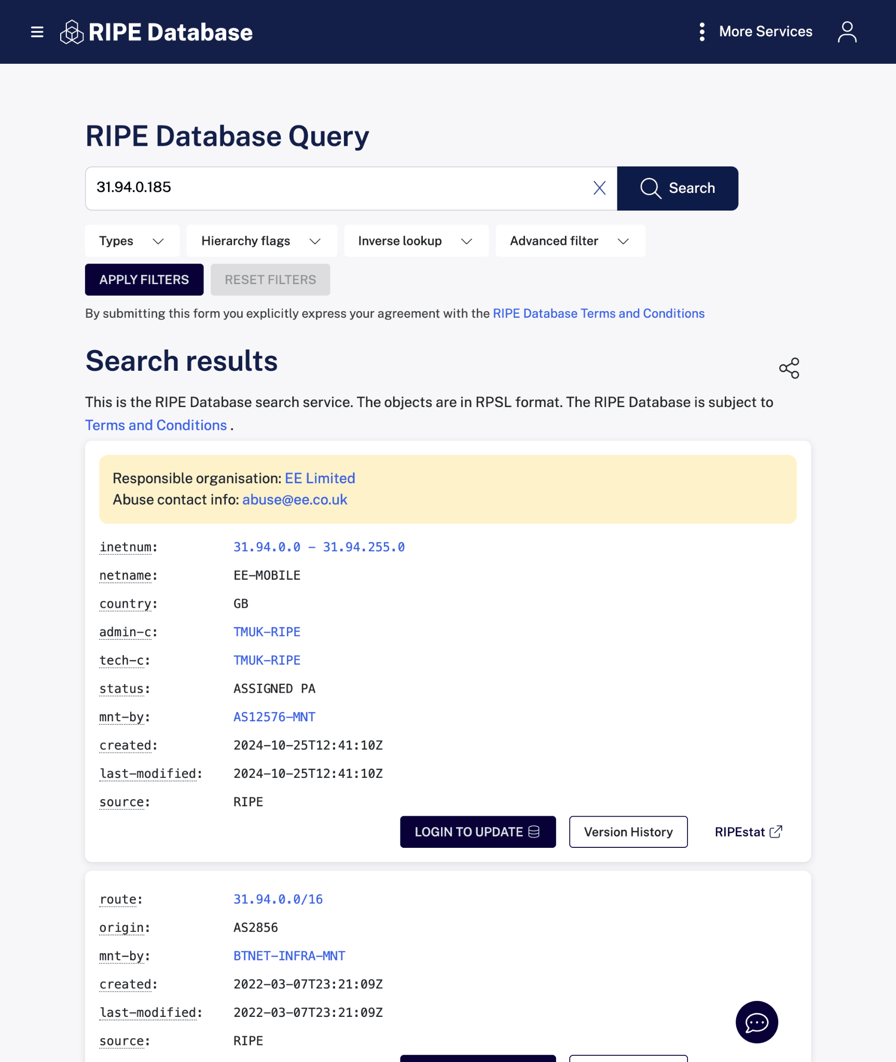
The RIPE Database, RIPE NCC's public registry database, shows the records behind the EE row. EE Limited holds 31.94.0.0/16 as EE-MOBILE and manages it with the maintainer object AS12576-MNT, while the route object names BT's AS2856 as the origin:
The Iliad row is the highest risk, because a filter that blocks hosting-company names would reject Iliad's mobile exit IPs.
The AT&T rows create a different problem. A fixed-line netname can't separate AT&T's mobile and fixed-line IPs, but the MSS can. Mobile exit IPs in SBCIS-SBIS IP blocks sent 1390, the same as the 2 in ATT-MOBILITY-LLC IP blocks. The 2 AT&T residential exit IPs sent 1460.
Carrier targeting returns the carrier's own ASNs
All 69 exit IPs from the 7 shortcodes we tested in the US, the UK, and Germany came from an ASN that the carrier operates. Shortcodes use the ISP name from the geolocation database, not the brand name. That database lists EE's mobile network as British Telecommunications, so its shortcode is britishtelecomm:
Shortcode | Origin ASN (all exit IPs) | Netname |
|---|---|---|
| AS21928 |
|
| AS6167 |
|
| AS7018, AS20057 |
|
| AS25135 |
|
| AS2856 |
|
| AS3320 |
|
| AS6805 |
|
For a carrier outside this table, run the 4 lookups on 10 of its exit IPs, and record its ASNs and netnames as the baseline.
Check whether the IP is mobile
Mobile IP detection starts with IP databases that classify whole prefixes as cellular. The ip-api database sets a mobile field, MaxMind's Connection Type database labels the range Cellular, and IPinfo returns is_mobile. Each label applies to the whole IP block.
MaxMind's GeoIP2 ISP database also returns the MCC and MNC, the mobile country and network codes. Together they identify the carrier by its telecom code instead of its name.
On US exit IPs, ip-api flagged 79 of 80 mobile ones as mobile and flagged none of 30 residential ones. The one that it missed was in an AT&T SBCIS-SBIS IP block, and its SYN carried AT&T's mobile MSS of 1390. The ip-api database also missed a Three UK exit IP with a threembb.co.uk PTR record. Treat a missing flag as a reason to run the other checks.
Ad-tech and traffic-quality systems also check whether an IP belongs to a known proxy or data center. The same ip-api response carries proxy and hosting flags. Both flags were false on all 427 mobile IPs in these tests, including the carrier-targeted ones.
In a spot check, proxycheck.io returned proxy: no with the type Wireless for 20 of those IPs, chosen at random. Check each exit IP against the IP intelligence service that your target uses.
Accept the carrier when the origin ASN and the netname or PTR record point to one carrier. An IP intelligence database should also flag the IP block as mobile. When the records disagree, check the TCP fingerprint next.
Check the TCP fingerprint that the target sees
A database label can stay wrong for months after a carrier reassigns an IP block. The TCP fingerprint is different, because it comes from the exit IP's own connection.
Each connection opens with a SYN packet, which the target reads directly. Usually the exit device sends the SYN. On some carriers, network equipment opens the connection and sends its own SYN instead.
The SYN carries 2 fields that describe the link and the operating system. The MSS is the link's MTU (maximum transmission unit) minus 40 bytes of IPv4 and TCP headers. Network equipment on the path can lower the MSS, which is called MSS clamping. The TTL (time to live) starts at a value set by the operating system and decreases by 1 at each router.
BrowserLeaks reads the SYN that it receives and shows its JA4T fingerprint, a standard TCP fingerprint whose third field is the MSS. This request through the same locked session prints the JA4T fingerprint and the observed TTL:
curl -s -x "$PROXY" https://browserleaks.com/tcp | sed 's/<[^>]*>/ /g' \
  | tr -s '[:space:]' ' ' | grep -oE '(JA4T Fingerprint|Time to Live) [^ ]+'
The T-Mobile exit IP's SYN carried an MSS typical of cellular networks:
JA4T Fingerprint 65535_2-4-8-1-3_1356_6
Time to Live 48
A fixed-line broadband connection over Ethernet or Wi-Fi usually sends 1460. A connection over PPPoE (Point-to-Point Protocol over Ethernet), common on DSL, sends 1452. Many cellular networks use a smaller MTU, so the MSS is smaller too.
Most carriers send a consistent MSS
On each carrier, most exit IPs sent 1 or 2 MSS values, and most carriers sent different values from each other:
Carrier and ASN | MSS on mobile exit IPs | MSS on residential exit IPs |
|---|---|---|
T-Mobile US, AS21928 | 1356 on 75 of 77 | Not measured |
Verizon, AS6167 | 1368 on 25 and 1388 on 4 (29 exit IPs) | 1460 on 6 of 6 (fixed-line, AS701) |
AT&T, AS7018 | 1390 on 19 of 20 | 1460 on 2 of 2 |
EE on BT, AS2856 | 1362 on 9 and 1322 on 6 (15 exit IPs) | 1452 on 4 of 4 |
Vodafone UK, AS25135 | 1320 on 18 of 18 | Not measured |
Telekom, AS3320 | 1460 on 9 and 1440 on 5 (16 exit IPs) | 1452 on 3 of 4 |
Telefónica Germany, AS6805 | 1460 on 15 and 1410 on 4 (20 exit IPs) | 1452 on 4 of 7 |
Rakuten Mobile, AS138384 | 1300 on 13 of 14 | Not measured |
Rogers, AS812 | 1370 on 16 of 16 | Not measured |
No single MSS threshold separates mobile from residential exit IPs. In the US and the UK, mobile exit IPs sent a smaller MSS than residential ones. In Germany, mobile exit IPs often sent a larger MSS, because German DSL connections commonly use PPPoE.
Build each carrier's MSS baseline from about 20 exit IPs that pass every other check. Then inspect any exit IP whose MSS differs from that baseline. A userspace TCP stack can spoof the option order, TTL, and MSS, so a matching SYN supports the carrier claim without proving it.
The initial TTL shows which host sent the SYN
Operating systems set an initial TTL of 64, 128, or 255. Round the observed TTL up to the next of these values, such as 48 up to 64. The 3 initial values mean different things on a carrier IP:
- TTL 64. Android, iOS, macOS, and Linux use an initial TTL of 64, and Android sends the same SYN as Linux. TTL 64 matches a phone's TCP/IP stack, and Linux routers also use 64. Require TTL 64 for ad verification on mobile inventory, so the SYN matches a phone client. Don't require TTL 64 on carriers such as Bouygues Telecom and SFR, where carrier equipment opens the connection.
- TTL 128. Windows uses an initial TTL of 128. On a carrier IP, an initial TTL of 128 points to a Windows PC on a cellular modem, hotspot, or fixed-wireless router. The connection still uses the carrier's network, but the device isn't a phone.
- TTL 255. All 8 Bouygues Telecom exit IPs and all 6 SFR exit IPs had observed TTLs of 243 to 245. AT&T's AS20057 exit IPs had observed TTLs of 231 and 233. No phone's TCP/IP stack uses 255, which points to equipment in the carrier network opening the connection. The target then sees the equipment's SYN for every subscriber behind that equipment, so learn the carrier's baseline before you require 64.
Treat mobile IP geolocation as a database estimate
A mobile IP has no street address. The carrier assigns it from an address pool that serves a region through a packet gateway, and each geolocation database estimates where that pool is.
Across ip-api, IPinfo, MaxMind GeoLite2, IP2Location, and DB-IP, the country matched on 361 of 363 mobile exit IPs. Mobile IP geolocation accuracy dropped sharply at the city level. This table counts IPs whose city results were more than 100 km apart, where at least 3 databases returned a city:
Country | Mobile exit IPs over 100 km apart | Residential exit IPs over 100 km apart |
|---|---|---|
Australia | 6 of 25 | Not measured |
United States | 24 of 80 | 7 of 30 |
Germany | 11 of 25 | 11 of 20 |
United Kingdom | 17 of 25 | 12 of 20 |
Japan | 21 of 25 | Not measured |
In the other 8 countries, the rates fell between Australia's 6 of 25 and Japan's 21 of 25. In the US, Germany, and the UK, the country changed the disagreement rate more than the connection type did. In Germany, the residential rate was even higher than the mobile rate.
Verify the country with any 3 sources, and verify a region or city only against the database your target uses.
Use the carrier's own geofeed when it publishes one
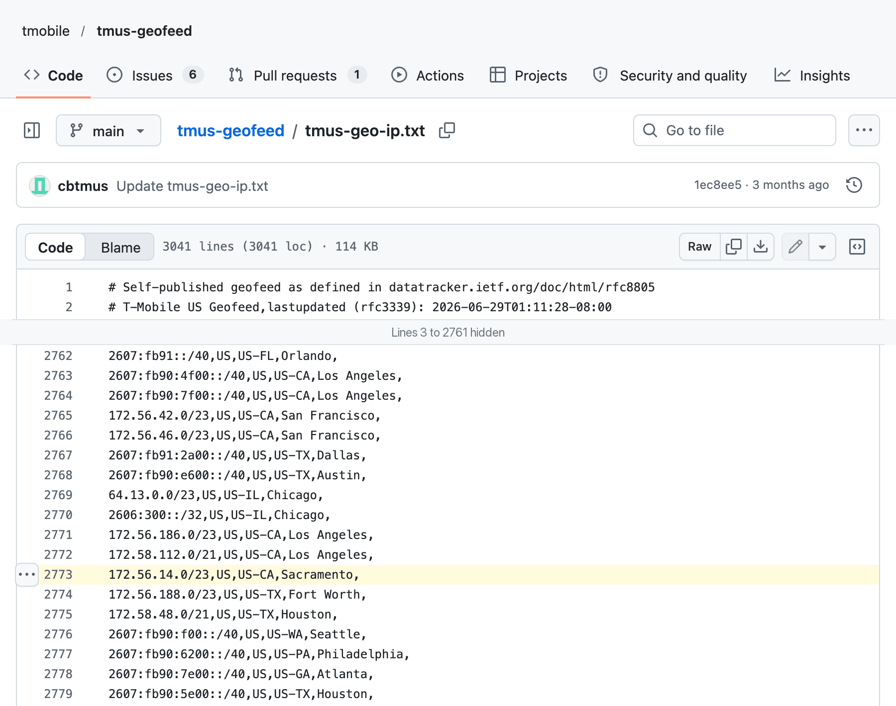
A geofeed is a CSV file in the RFC 8805 format, in which a network operator lists the location of each of its prefixes. The RIR record for the IP block links to the file. T-Mobile US publishes its geofeed on GitHub, and Telstra publishes one too. Each line pairs a prefix with a country, a region, and a city:
These 2 commands use 172.56.15.190, a T-Mobile exit IP whose location the databases disagree on. They find its geofeed URL and print every feed line whose IP block contains it:
curl -sL https://rdap.org/ip/172.56.15.190 \
  | jq -r '.remarks[]?.description[]? | select(test("geofeed"; "i"))'
FEED=https://raw.githubusercontent.com/tmobile/tmus-geofeed/main/tmus-geo-ip.txt
curl -sL "$FEED" | python3 -c '
import ipaddress, sys
ip = ipaddress.ip_address(sys.argv[1])
for line in sys.stdin:
    if line[:1].isdigit() and ip in ipaddress.ip_network(line.split(",")[0]):
        print(line.strip())' 172.56.15.190
For your own exit IP, replace 172.56.15.190 with $EXIT in both commands. The feed can list several IP blocks that contain an IP, and the most specific one wins. Here the /23 block places the IP in Sacramento:
Geofeed https://raw.githubusercontent.com/tmobile/tmus-geofeed/main/tmus-geo-ip.txt
172.32.0.0/11,US,,,
172.56.14.0/23,US,US-CA,Sacramento,
Of the 5 databases, 2 placed this exit IP in Texas, and 3 placed it in California. Across the 67 IPs covered by the T-Mobile and Telstra feeds, 2 databases matched the feed's city on all 67.
Use the feed to choose between databases that disagree. When the carrier publishes no geofeed, compare the Cloudflare data center instead.
Use the network path to check the region
When databases disagree, the exit IP's network path gives a measurement that doesn't depend on any database. Cloudflare uses anycast, so all its data centers announce the same IP addresses. The carrier's routing toward Cloudflare then decides which data center serves the exit IP.
Cloudflare's trace endpoint shows that data center's IATA airport code in colo. It also shows Cloudflare's own country result for the IP in loc:
curl -s -x "$PROXY" https://www.cloudflare.com/cdn-cgi/trace \
  | grep -E '^(ip|colo|loc)='
The T-Mobile exit IP reached Cloudflare in Atlanta:
ip=172.58.2.74
colo=ATL
loc=US
The data center shows roughly where the carrier's traffic reaches Cloudflare, not where the device is. For US mobile exit IPs, the median distance between the data center and the ip-api location was 179 km. For US residential exit IPs, the median was 64 km.
The data center can separate states or countries, but it can't separate nearby cities. For the T-Mobile exit IP that the geofeed places in Sacramento, Cloudflare served it from San Jose.
A data center in another country can still be normal. Cloudflare served 10 of 15 Mexican mobile IPs from Miami, Dallas, or Houston. Compare the data center with the ones that the carrier's other checked exit IPs reached, and reject an exit IP served from another continent.
Match your target site's geolocation database
The target's database still decides whether an exit IP passes, because the target evaluates your traffic with that database.
You can choose the geolocation database that our country, region, and carrier filters use. The default is ip-api, and _geosource-maxmind switches mobile proxies to MaxMind. Set _geosource-ipapi or _geosource-maxmind explicitly, in lowercase, so your filters always use the database you expect. Per the geo source settings, which also cover mobile proxies, every exit IP then matches the filter in the database you chose.
With either setting, a Texas filter returned exit IPs that the matching database placed in Texas, on 10 of 10 requests. When the site's ad-tech or analytics stack uses MaxMind data, target with _geosource-maxmind, so the filter uses the same database as the site.
We offer 2 tools that show how databases classify an exit IP. https://ip.evomi.com/json returns the data that our targeting uses for the IP, including the mobile, as, and isp fields. Use it to confirm that our gateway applied your targeting options.
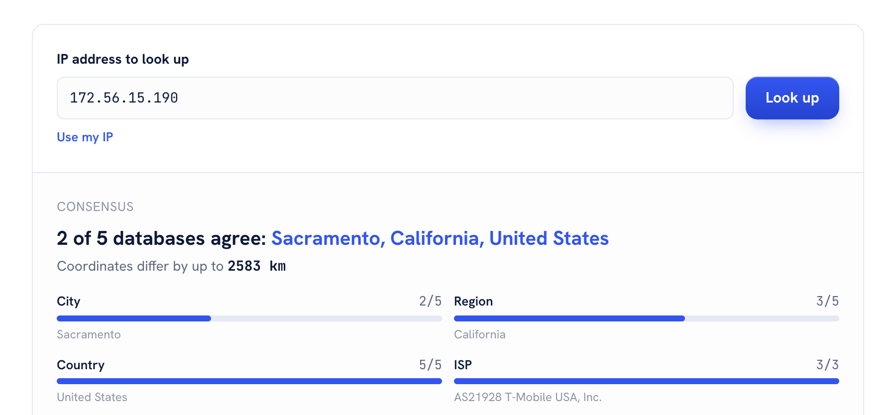
The free IP Address Lookup queries several geolocation databases at once and reports how many agree and how far apart their coordinates are. For the same T-Mobile IP, 172.56.15.190, the coordinates were up to 2,583 km apart:
Many sites show the location they detected, in a currency, a store region, a cookie, or a response header. When the target shows one, compare the exit IP against that location rather than against any database.
Match the browser to the exit IP
Target sites can run a TCP/IP classifier that compares the User-Agent with the SYN. A desktop User-Agent on an exit IP whose SYN matches Linux counts as a mismatch. BrowserLeaks shows the User-Agent and the SYN together. On one T-Mobile exit IP, a Mac User-Agent arrived with a SYN that Zardaxt, the classifier on that page, scores as Android:
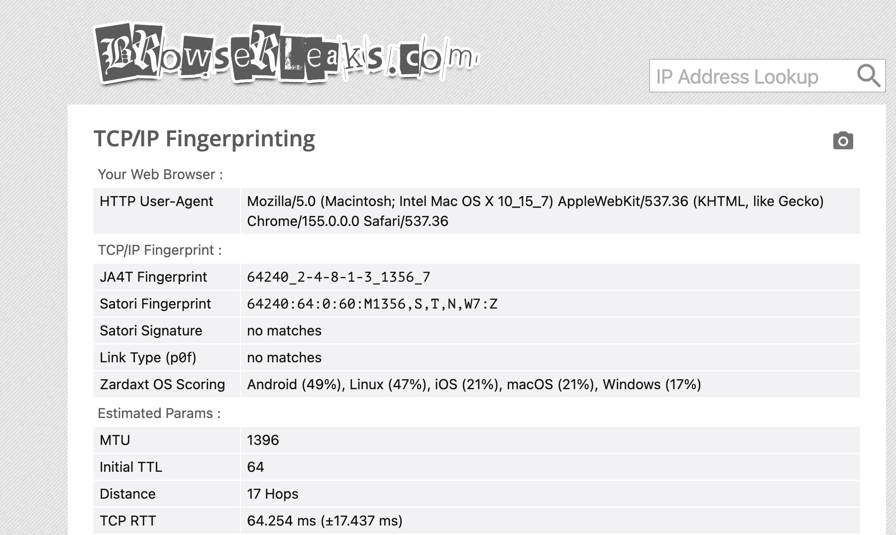
The Android and Linux scores are close, which is expected. The 2 systems share a TCP stack, and the TCP option order and values decide most of the score. Use the TTL and MSS instead of the percentage, and send an Android User-Agent on exit IPs whose SYN matches Linux.
TLS and HTTP/2 fingerprints come from your own client software, at a layer above TCP. Our guides to how JA3 and JA4 TLS fingerprints work and HTTP/2 and HTTP/3 fingerprinting cover those layers.
Set the browser's time zone and language from the verified location, because many sites compare them with the IP's location. Also check for WebRTC leaks, which can expose your real IP behind the proxy.
Run a mobile proxy acceptance test
Each check reads its record at a different point on the request path:
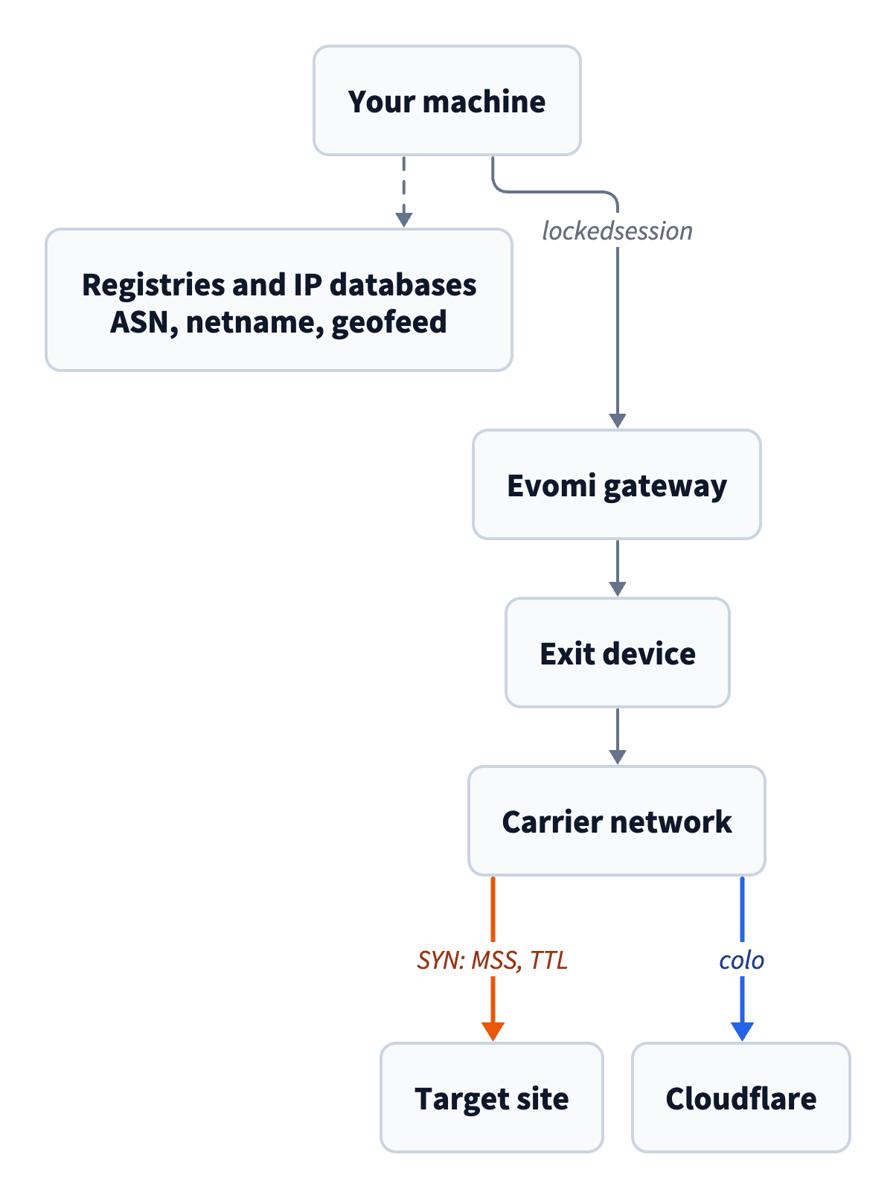
The acceptance test uses 5 acceptance criteria:
Check | Passes when | If it fails |
|---|---|---|
Origin ASN | It's in the carrier's ASN set | Open a new session |
MSS | It matches the carrier's MSS baseline. The check is skipped when the initial TTL is 255 | Compare it with the carrier's baseline before you reject the exit IP |
Initial TTL | It's 64, or it matches the carrier's TTL baseline | Reject the exit IP for jobs that present a phone client |
Cloudflare country | It matches the requested country | Open a new session |
Exit IP | It stays the same across every check, through a | Discard the results and open a new session |
Run the test on every exit IP before the job starts, so each result rests on a checked IP.
This function applies the ASN, MSS, TTL, country, and same-IP criteria through one locked session, before any real request. It also records the netname and the JA4T fingerprint. It needs Python 3.10 or later and httpx 0.26 or later, and it reads the EVOMI_USER and EVOMI_PASS variables that the setup commands export:
import os
import re
import secrets
import string

import httpx

TRACE = "https://www.cloudflare.com/cdn-cgi/trace"
RIPE = "https://stat.ripe.net/data/prefix-overview/data.json"
SYN = "https://browserleaks.com/tcp"


def field(text, label):
    """Read one value from the BrowserLeaks TCP page."""
    match = re.search(label + r"\s+(\S+)", text)
    if not match:
        raise RuntimeError(f"{label} not found on the SYN page")
    return match.group(1)


def exit_check(product_host, params, want_asns, want_mss, want_country,
               syn_url=SYN):
    """Bind one exit with a locked session, then test it."""
    alphabet = string.ascii_uppercase + string.digits
    sid = "".join(secrets.choice(alphabet) for _ in range(8))
    password = f"{os.environ['EVOMI_PASS']}_{params}_lockedsession-{sid}"
    proxy = f"http://{os.environ['EVOMI_USER']}:{password}@{product_host}"

    with httpx.Client(proxy=proxy, timeout=30) as c:
        lines = c.get(TRACE).text.splitlines()
        trace = dict(line.split("=", 1) for line in lines)
        page = re.sub(r"<[^>]+>", " ", c.get(syn_url).text)
        ip_after = c.get("https://ip.evomi.com/s").text.strip()

    ja4t = field(page, "JA4T Fingerprint")
    mss = int(ja4t.split("_")[2])
    ttl = int(field(page, "Time to Live"))

    ip = trace["ip"]
    ripe = httpx.get(RIPE, params={"resource": ip}).json()["data"]
    origin = {a["asn"] for a in ripe["asns"]}
    rdap = httpx.get(f"https://rdap.org/ip/{ip}", follow_redirects=True)
    netname = rdap.json().get("name")

    failed = []
    if ip_after != ip:
        failed.append("exit changed between probes")
    if not origin & want_asns:
        failed.append(f"origin AS{sorted(origin)} not in {sorted(want_asns)}")
    if mss not in want_mss and ttl <= 128:
        failed.append(f"MSS {mss} outside the carrier baseline")
    if 64 < ttl <= 128:
        failed.append(f"TTL {ttl}: initial TTL 128, a Windows stack")
    if trace["loc"] != want_country:
        failed.append(f"Cloudflare sees {trace['loc']}")

    return {"session": sid, "ip": ip, "prefix": ripe["resource"],
            "origin": sorted(origin), "netname": netname, "ja4t": ja4t,
            "mss": mss, "ttl": ttl, "colo": trace["colo"],
            "accept": not failed, "failed": failed}


if __name__ == "__main__":
    from pprint import pprint
    params = "country-US_isp-tmobileusainc_geosource-ipapi"
    pprint(exit_check("mp.evomi.com:3000", params, want_asns={21928},
                      want_mss={1356}, want_country="US"), sort_dicts=False)
Save the code as exit_check.py, install httpx with pip install httpx, and run python3 exit_check.py in the same terminal. The script opens its own session, and on its T-Mobile US exit IP every check passed:
{'session': '9LQKUM9V',
 'ip': '172.56.176.71',
 'prefix': '172.56.176.0/23',
 'origin': [21928],
 'netname': 'TMO9',
 'ja4t': '64240_2-4-8-1-3_1356_7',
 'mss': 1356,
 'ttl': 48,
 'colo': 'SJC',
 'accept': True,
 'failed': []}
For the real job, rebuild the proxy URL with the same parameters and the returned session ID. Fill want_asns and want_mss from the carrier's own exit IPs, and start from the values in the shortcode and MSS tables. Compare the returned colo with the carrier's usual data centers. Add a netname check or a geofeed check when your target relies on those records.
Run the checks at production volume
The acceptance test calls 5 public services for every exit IP, which suits spot checks and trials. At production volume, split the checks by how often each value changes:
- Cache per-prefix data. The origin ASN, the netname, and the geofeed city change far less often than exit IPs do. Cache them per /24 for a day. For a local copy, load the carriers' geofeed files and a downloadable ASN and country database such as IPinfo Lite.
- Check per-session data. The exit IP, the SYN, and the Cloudflare data center change with each exit IP. For high volumes, run your own SYN fingerprinting service, such as Zardaxt in Python or huginn-net in Rust. Then point
syn_urlandfield()at its output. - Run your own Cloudflare Worker. A Cloudflare Worker that returns request.cf reports Cloudflare's ASN, organization, region, city, and data center in one request. It can replace the trace endpoint request.
- Store the test result with the data. Keep the session ID, exit IP, origin ASN, MSS, TTL, and data center next to the data you collected. An ad-verification report or a price audit can then show where each record came from.
- Sample the pool every day. Check about 20 exit IPs per carrier, and alert when the MSS distribution, the ASN distribution, or the mobile-flag rate changes. These metrics show the change first when a carrier changes its MTU or its IP ranges.
- Start a new session when a check fails. Cap the retries, and track the pass rate per carrier as a pool metric.
- Report a trial by carrier and criterion. Put the pass rate for each carrier and each acceptance criterion next to the success rate on your own target. The success rate shows whether the pool works, and the per-criterion pass rates show what to tune.
Final thoughts
Verifying a mobile proxy's carrier, ASN, and location means comparing independent records, and no single record is enough on its own. Trust the ASN name least, because carriers reuse other companies' names and mix fixed-line and mobile IP blocks under one ASN. The MSS baseline, the carrier's geofeed, and the Cloudflare data center don't depend on any database label, so use them when the databases disagree.
For regions and cities, location remains a database estimate, so set _geosource- to the database that your target site uses. To start, open a locked session on Evomi mobile proxies for the carrier you need, and check 20 exit IPs to build its MSS baseline.
FAQ
How to identify mobile IP address?
Look up the IP's origin ASN and its netname, the IP block's name in the registry record. Some netnames say mobile, such as EE-MOBILE. Then check an IP intelligence database's mobile flag. A TCP connection from the IP adds a second signal, such as an MSS of 1356 on 75 of 77 T-Mobile US mobile IPs.
Can two cell phones have the same IP address?
Yes. Many mobile carriers use carrier-grade NAT for IPv4, which places many subscribers behind one public IPv4 address at the same time. So blocking a mobile IP can block real subscribers, and an IP lookup describes a carrier's address pool shared by many devices.
Can you trace an IP address to a phone?
Not from the IP alone. Carrier-grade NAT shares a mobile IP between subscribers, and only the carrier can match the IP, port, and time to one of them. Databases place the IP in the carrier's gateway region. In tests on 363 mobile IPs, their city results were over 100 km apart on 24% to 84%, depending on the country.
Can mobile proxies be detected?
A site can tell that the IP is mobile, and that is the purpose of a mobile proxy. In tests, ip-api's proxy flag was false on all 427 mobile IPs, and proxycheck.io returned proxy: no on a sample of 20. A TCP/IP classifier can still compare the SYN with the browser's claimed OS, so match your User-Agent to it.