

WebRTC Leaks: How Your Real IP Escapes the Proxy

The Scraper

Proxy Fundamentals

You set the proxy. You loaded an IP-check page and it returned the proxy's address, green light. Then you opened a site that fingerprints connections, and it logged your home IP anyway. Same browser, same proxy, two different answers about who you are.

The HTTP request went through the proxy. WebRTC didn't. It opened its own path to the network, asked a public server "what's my IP?", and got an honest answer your proxy never touched.

This is one of the most common ways a carefully proxied browser deanonymizes itself, and it has nothing to do with headers, TLS, or cookies. It happens below the HTTP layer entirely.


What WebRTC Is and Why It Exists

WebRTC (Web Real-Time Communication) is the browser API behind in-page video calls, voice chat, and peer-to-peer file transfer, the things that work without a plugin or a native app. Google Meet, Discord in the browser, Twitter Spaces: WebRTC.

Its whole point is to connect two browsers directly, peer to peer, so media doesn't have to round-trip through a server. Direct connections are lower latency and cheaper to run. But to connect directly, each peer has to tell the other where it actually lives on the network. That means discovering and sharing its real IP addresses.

That requirement — "I need to know my own public IP to hand it to a peer", is the entire source of the leak. The feature is doing exactly what it was designed to do.


ICE and STUN: How the Browser Finds Your Real IP

When a page creates an RTCPeerConnection, the browser runs a discovery process called ICE (Interactive Connectivity Establishment). ICE gathers a list of candidates, every address another peer might use to reach you. There are a few kinds:

  • Host candidates. Your local network addresses, 192.168.x.x, 10.x.x.x, or an IPv6 — read straight off your network interfaces.

  • Server-reflexive candidates. Your real public IP as seen from the outside. The browser learns this by sending a small UDP packet to a STUN server (Session Traversal Utilities for NAT) and asking, in effect, "what source IP did this packet arrive from?" The STUN server replies with the public address it saw, NAT translation and all.

The STUN exchange is the dangerous one. The browser fires UDP at a STUN server, often a default Google one (stun.l.google.com:19302), and the server reports back the address your traffic came from. Crucially, any web page can trigger thiswith a few lines of JavaScript, then read the candidates off the connection object. No permission prompt, no microphone, no camera.

So the page doesn't need to ask the network nicely. It asks the browser, the browser asks a STUN server over UDP, and your real public IP comes back, completely independent of the HTTP request that's politely going through your proxy.
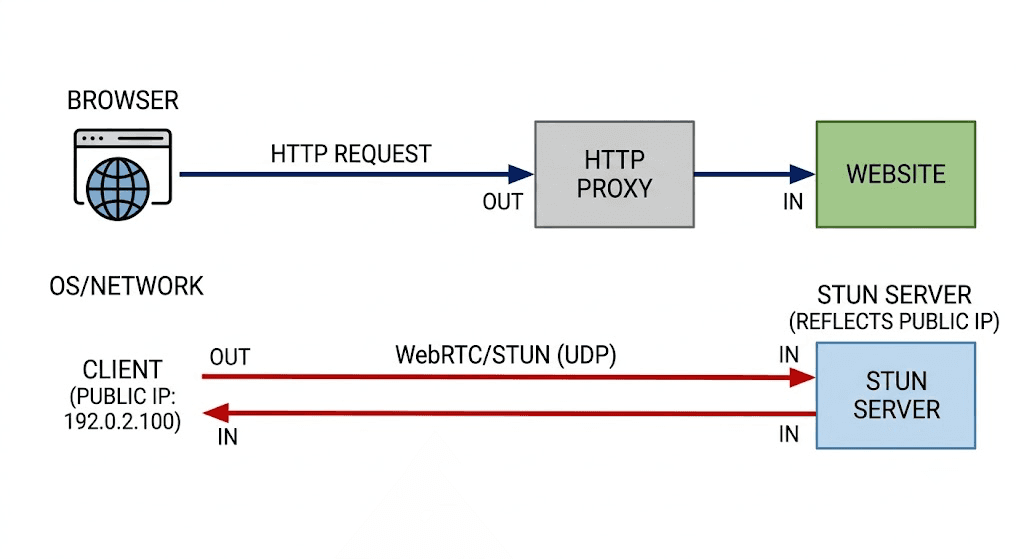

Diagram: browser HTTP request flows through the HTTP proxy to the website, while a separate WebRTC/STUN UDP packet goes directly from the browser to a STUN server and back, returning the real public IP and bypassing the proxy


Why Your HTTP Proxy Doesn't Cover It

An HTTP/HTTPS proxy proxies HTTP. That's the contract. Your browser's HTTP and HTTPS connections get tunneled through it, which is why your IP-check page, itself an HTTP request, shows the proxy address.

WebRTC's STUN discovery is not HTTP. It's UDP, sent on its own, to a STUN server the proxy was never configured to carry. An HTTP proxy has no UDP path, so the browser sends those packets the only way it can: directly, over your real connection. The proxy isn't bypassed maliciously, it simply doesn't apply to that kind of traffic.

This is why the protocol matters:

  • HTTP/HTTPS proxy: carries HTTP only. WebRTC UDP escapes around it. This is the classic leak.

  • SOCKS5 proxy: can carry UDP and resolve DNS remotely (socks5h:// style), so with the right browser configuration WebRTC traffic can be funneled through it. But this depends entirely on the browser actually routing WebRTC over the proxy, which most don't do by default.

The honest summary: changing proxy type alone won't save you. The browser's WebRTC IP-handling behavior is the real switch, and you have to set it explicitly.


Detecting the Leak

You don't need a test site to see this, you can reproduce it yourself. Open any page and run this in the console. It creates a peer connection, generates an offer to kick off ICE, and prints every IP that shows up in the candidates:


const pc = new RTCPeerConnection({
  iceServers: [{ urls: "stun:stun.l.google.com:19302" }],
});
const found = new Set();

pc.onicecandidate = (e) => {
  if (!e.candidate) return;
  // candidate string looks like: "candidate:... <ip> <port> typ srflx ..."
  const m = /([0-9]{1,3}(\.[0-9]{1,3}){3}|[a-f0-9:]+:[a-f0-9:]+)/i.exec(
    e.candidate.candidate
  );
  if (m && !found.has(m[1])) {
    found.add(m[1]);
    console.log("leaked candidate:", m[1], "—", e.candidate.candidate);
  }
};

pc.createDataChannel("probe");
pc.createOffer().then((o) => pc.setLocalDescription(o));


If you see a srflx (server-reflexive) candidate with a public IP that is not your proxy IP, that's the leak. Public test pages, the browserleaks-style "WebRTC leak test" tools, do exactly this and present it nicely, but the mechanism is the snippet above. Compare the candidate to the address your IP-check page reported: if they differ, WebRTC is talking past your proxy.


Fixes, Cheapest First

Try these in order. The earlier ones are config changes; the later ones are for automation.


1. A browser flag or policy (free, no extension)

In Chromium-based browsers you can set the WebRTC IP-handling policy so the browser refuses to expose host or reflexive candidates over a non-proxied path. The values that matter:

  • disable_non_proxied_udp — only let WebRTC use UDP that goes through the proxy. This is the setting you usually want.

  • default_public_interface_only — hides local/private IPs but still exposes the public one. Partial.

In Firefox, media.peerconnection.enabled = false in about:config turns WebRTC off entirely, the bluntest, most reliable fix if you don't need real-time media.


2. An extension

Extensions like the various "WebRTC Network Limiter" / "WebRTC Control" add-ons flip the same Chromium policy through a UI. Convenient for a human's daily browser, but pointless for headless automation, set it at launch instead.


3. --force-webrtc-ip-handling-policy for Chromium automation

For any Chromium you launch from code, the command-line flag is the clean answer:


--force-webrtc-ip-handling-policy=disable_non_proxied_udp


This forces every WebRTC connection to use only proxied UDP. With an HTTP proxy that carries no UDP, the result is that no reflexive candidate gets gathered at all, the real IP simply never appears.


Doing It Right in Playwright and Puppeteer

For scrapers, the leak is the same and the fix is the same, you just pass it at launch. With Playwright (Python), put the flag in args and set your proxy on the context:


from playwright.sync_api import sync_playwright

with sync_playwright() as p:
    browser = p.chromium.launch(
        headless=True,
        args=[
            "--force-webrtc-ip-handling-policy=disable_non_proxied_udp",
            # belt and suspenders: kill the feature outright if you never need media
            "--disable-features=WebRtcHideLocalIpsWithMdns",
        ],
    )
    context = browser.new_context(
        proxy={
            "server": "http://proxy.example.com:8080",
            "username": "user",
            "password": "pass",
        },
        user_agent="Mozilla/5.0 (Macintosh; Intel Mac OS X 10_15_7) "
        "AppleWebKit/537.36 (KHTML, like Gecko) Chrome/148.0.0.0 Safari/537.36",
    )
    page = context.new_page()
    page.goto("https://example.com")
    browser.close()


Puppeteer is the same idea, pass the flag in the args array to puppeteer.launch. Firefox under Playwright takes a preference instead of a flag:


browser = p.firefox.launch(
    headless=True,
    firefox_user_prefs={"media.peerconnection.enabled": False},
)


For headless scraping specifically, the simplest robust choice is to disable WebRTC entirely unless your target genuinely requires it. A scraper almost never needs peer-to-peer media, so there's no reason to leave the discovery machinery on.


Verify it actually worked

Don't trust the flag blindly, confirm. Run the detection snippet from earlier inside the launched browser and assert nothing leaked:


leaked = page.evaluate("""() => new Promise((resolve) => {
  const ips = new Set();
  const pc = new RTCPeerConnection({
    iceServers: [{ urls: "stun:stun.l.google.com:19302" }],
  });
  pc.onicecandidate = (e) => {
    if (!e.candidate) { resolve([...ips]); return; }
    const m = /([0-9]{1,3}(\\.[0-9]{1,3}){3})/.exec(e.candidate.candidate);
    if (m) ips.add(m[1]);
  };
  pc.createDataChannel("x");
  pc.createOffer().then((o) => pc.setLocalDescription(o));
  setTimeout(() => resolve([...ips]), 2000);
})""")

assert not leaked, f"WebRTC leaked: {leaked}"
print("no WebRTC candidates leaked")


If the list is empty, the policy is doing its job and nothing escaped the proxy.


Mistakes That Waste Time

  • Assuming a VPN or proxy alone fixes it. It doesn't. Both operate on the HTTP/transport path you configured; WebRTC's UDP discovery runs beside it. A VPN that captures all UDP at the OS level can mask it, but a per-app or browser-only proxy will not.

  • Trusting incognito / private mode. Incognito clears cookies and history. It does nothing to WebRTC IP handling, the leak is identical.

  • Setting the proxy but never setting the WebRTC policy. This is the default state of most automation setups, and it's exactly the state that leaks.

  • Hiding local IPs and calling it done. default_public_interface_only masks your 192.168.x.x but still reports your real public IP, the one that actually identifies you. Use disable_non_proxied_udp.

  • Testing only an IP-check page. It's HTTP, so it always shows the proxy. It tells you nothing about WebRTC. Test the candidates.


Wrapping Up

A proxy that handles HTTP is not a proxy that handles everything. WebRTC opens its own UDP path, asks a STUN server for your public IP, and hands it to whatever page asked, past your HTTP proxy entirely.

The two changes that matter: launch every Chromium with --force-webrtc-ip-handling-policy=disable_non_proxied_udp (or disable WebRTC outright for headless scraping), and then verify with the candidate snippet instead of trusting the flag. Do those two things and the leak closes — and your clean residential exit, like Evomi's, is the only IP the target ever sees.


You set the proxy. You loaded an IP-check page and it returned the proxy's address, green light. Then you opened a site that fingerprints connections, and it logged your home IP anyway. Same browser, same proxy, two different answers about who you are.

The HTTP request went through the proxy. WebRTC didn't. It opened its own path to the network, asked a public server "what's my IP?", and got an honest answer your proxy never touched.

This is one of the most common ways a carefully proxied browser deanonymizes itself, and it has nothing to do with headers, TLS, or cookies. It happens below the HTTP layer entirely.


What WebRTC Is and Why It Exists

WebRTC (Web Real-Time Communication) is the browser API behind in-page video calls, voice chat, and peer-to-peer file transfer, the things that work without a plugin or a native app. Google Meet, Discord in the browser, Twitter Spaces: WebRTC.

Its whole point is to connect two browsers directly, peer to peer, so media doesn't have to round-trip through a server. Direct connections are lower latency and cheaper to run. But to connect directly, each peer has to tell the other where it actually lives on the network. That means discovering and sharing its real IP addresses.

That requirement — "I need to know my own public IP to hand it to a peer", is the entire source of the leak. The feature is doing exactly what it was designed to do.


ICE and STUN: How the Browser Finds Your Real IP

When a page creates an RTCPeerConnection, the browser runs a discovery process called ICE (Interactive Connectivity Establishment). ICE gathers a list of candidates, every address another peer might use to reach you. There are a few kinds:

  • Host candidates. Your local network addresses, 192.168.x.x, 10.x.x.x, or an IPv6 — read straight off your network interfaces.

  • Server-reflexive candidates. Your real public IP as seen from the outside. The browser learns this by sending a small UDP packet to a STUN server (Session Traversal Utilities for NAT) and asking, in effect, "what source IP did this packet arrive from?" The STUN server replies with the public address it saw, NAT translation and all.

The STUN exchange is the dangerous one. The browser fires UDP at a STUN server, often a default Google one (stun.l.google.com:19302), and the server reports back the address your traffic came from. Crucially, any web page can trigger thiswith a few lines of JavaScript, then read the candidates off the connection object. No permission prompt, no microphone, no camera.

So the page doesn't need to ask the network nicely. It asks the browser, the browser asks a STUN server over UDP, and your real public IP comes back, completely independent of the HTTP request that's politely going through your proxy.


Diagram: browser HTTP request flows through the HTTP proxy to the website, while a separate WebRTC/STUN UDP packet goes directly from the browser to a STUN server and back, returning the real public IP and bypassing the proxy


Why Your HTTP Proxy Doesn't Cover It

An HTTP/HTTPS proxy proxies HTTP. That's the contract. Your browser's HTTP and HTTPS connections get tunneled through it, which is why your IP-check page, itself an HTTP request, shows the proxy address.

WebRTC's STUN discovery is not HTTP. It's UDP, sent on its own, to a STUN server the proxy was never configured to carry. An HTTP proxy has no UDP path, so the browser sends those packets the only way it can: directly, over your real connection. The proxy isn't bypassed maliciously, it simply doesn't apply to that kind of traffic.

This is why the protocol matters:

  • HTTP/HTTPS proxy: carries HTTP only. WebRTC UDP escapes around it. This is the classic leak.

  • SOCKS5 proxy: can carry UDP and resolve DNS remotely (socks5h:// style), so with the right browser configuration WebRTC traffic can be funneled through it. But this depends entirely on the browser actually routing WebRTC over the proxy, which most don't do by default.

The honest summary: changing proxy type alone won't save you. The browser's WebRTC IP-handling behavior is the real switch, and you have to set it explicitly.


Detecting the Leak

You don't need a test site to see this, you can reproduce it yourself. Open any page and run this in the console. It creates a peer connection, generates an offer to kick off ICE, and prints every IP that shows up in the candidates:


const pc = new RTCPeerConnection({
  iceServers: [{ urls: "stun:stun.l.google.com:19302" }],
});
const found = new Set();

pc.onicecandidate = (e) => {
  if (!e.candidate) return;
  // candidate string looks like: "candidate:... <ip> <port> typ srflx ..."
  const m = /([0-9]{1,3}(\.[0-9]{1,3}){3}|[a-f0-9:]+:[a-f0-9:]+)/i.exec(
    e.candidate.candidate
  );
  if (m && !found.has(m[1])) {
    found.add(m[1]);
    console.log("leaked candidate:", m[1], "—", e.candidate.candidate);
  }
};

pc.createDataChannel("probe");
pc.createOffer().then((o) => pc.setLocalDescription(o));


If you see a srflx (server-reflexive) candidate with a public IP that is not your proxy IP, that's the leak. Public test pages, the browserleaks-style "WebRTC leak test" tools, do exactly this and present it nicely, but the mechanism is the snippet above. Compare the candidate to the address your IP-check page reported: if they differ, WebRTC is talking past your proxy.


Fixes, Cheapest First

Try these in order. The earlier ones are config changes; the later ones are for automation.


1. A browser flag or policy (free, no extension)

In Chromium-based browsers you can set the WebRTC IP-handling policy so the browser refuses to expose host or reflexive candidates over a non-proxied path. The values that matter:

  • disable_non_proxied_udp — only let WebRTC use UDP that goes through the proxy. This is the setting you usually want.

  • default_public_interface_only — hides local/private IPs but still exposes the public one. Partial.

In Firefox, media.peerconnection.enabled = false in about:config turns WebRTC off entirely, the bluntest, most reliable fix if you don't need real-time media.


2. An extension

Extensions like the various "WebRTC Network Limiter" / "WebRTC Control" add-ons flip the same Chromium policy through a UI. Convenient for a human's daily browser, but pointless for headless automation, set it at launch instead.


3. --force-webrtc-ip-handling-policy for Chromium automation

For any Chromium you launch from code, the command-line flag is the clean answer:


--force-webrtc-ip-handling-policy=disable_non_proxied_udp


This forces every WebRTC connection to use only proxied UDP. With an HTTP proxy that carries no UDP, the result is that no reflexive candidate gets gathered at all, the real IP simply never appears.


Doing It Right in Playwright and Puppeteer

For scrapers, the leak is the same and the fix is the same, you just pass it at launch. With Playwright (Python), put the flag in args and set your proxy on the context:


from playwright.sync_api import sync_playwright

with sync_playwright() as p:
    browser = p.chromium.launch(
        headless=True,
        args=[
            "--force-webrtc-ip-handling-policy=disable_non_proxied_udp",
            # belt and suspenders: kill the feature outright if you never need media
            "--disable-features=WebRtcHideLocalIpsWithMdns",
        ],
    )
    context = browser.new_context(
        proxy={
            "server": "http://proxy.example.com:8080",
            "username": "user",
            "password": "pass",
        },
        user_agent="Mozilla/5.0 (Macintosh; Intel Mac OS X 10_15_7) "
        "AppleWebKit/537.36 (KHTML, like Gecko) Chrome/148.0.0.0 Safari/537.36",
    )
    page = context.new_page()
    page.goto("https://example.com")
    browser.close()


Puppeteer is the same idea, pass the flag in the args array to puppeteer.launch. Firefox under Playwright takes a preference instead of a flag:


browser = p.firefox.launch(
    headless=True,
    firefox_user_prefs={"media.peerconnection.enabled": False},
)


For headless scraping specifically, the simplest robust choice is to disable WebRTC entirely unless your target genuinely requires it. A scraper almost never needs peer-to-peer media, so there's no reason to leave the discovery machinery on.


Verify it actually worked

Don't trust the flag blindly, confirm. Run the detection snippet from earlier inside the launched browser and assert nothing leaked:


leaked = page.evaluate("""() => new Promise((resolve) => {
  const ips = new Set();
  const pc = new RTCPeerConnection({
    iceServers: [{ urls: "stun:stun.l.google.com:19302" }],
  });
  pc.onicecandidate = (e) => {
    if (!e.candidate) { resolve([...ips]); return; }
    const m = /([0-9]{1,3}(\\.[0-9]{1,3}){3})/.exec(e.candidate.candidate);
    if (m) ips.add(m[1]);
  };
  pc.createDataChannel("x");
  pc.createOffer().then((o) => pc.setLocalDescription(o));
  setTimeout(() => resolve([...ips]), 2000);
})""")

assert not leaked, f"WebRTC leaked: {leaked}"
print("no WebRTC candidates leaked")


If the list is empty, the policy is doing its job and nothing escaped the proxy.


Mistakes That Waste Time

  • Assuming a VPN or proxy alone fixes it. It doesn't. Both operate on the HTTP/transport path you configured; WebRTC's UDP discovery runs beside it. A VPN that captures all UDP at the OS level can mask it, but a per-app or browser-only proxy will not.

  • Trusting incognito / private mode. Incognito clears cookies and history. It does nothing to WebRTC IP handling, the leak is identical.

  • Setting the proxy but never setting the WebRTC policy. This is the default state of most automation setups, and it's exactly the state that leaks.

  • Hiding local IPs and calling it done. default_public_interface_only masks your 192.168.x.x but still reports your real public IP, the one that actually identifies you. Use disable_non_proxied_udp.

  • Testing only an IP-check page. It's HTTP, so it always shows the proxy. It tells you nothing about WebRTC. Test the candidates.


Wrapping Up

A proxy that handles HTTP is not a proxy that handles everything. WebRTC opens its own UDP path, asks a STUN server for your public IP, and hands it to whatever page asked, past your HTTP proxy entirely.

The two changes that matter: launch every Chromium with --force-webrtc-ip-handling-policy=disable_non_proxied_udp (or disable WebRTC outright for headless scraping), and then verify with the candidate snippet instead of trusting the flag. Do those two things and the leak closes — and your clean residential exit, like Evomi's, is the only IP the target ever sees.

You set the proxy. You loaded an IP-check page and it returned the proxy's address, green light. Then you opened a site that fingerprints connections, and it logged your home IP anyway. Same browser, same proxy, two different answers about who you are.

The HTTP request went through the proxy. WebRTC didn't. It opened its own path to the network, asked a public server "what's my IP?", and got an honest answer your proxy never touched.

This is one of the most common ways a carefully proxied browser deanonymizes itself, and it has nothing to do with headers, TLS, or cookies. It happens below the HTTP layer entirely.


What WebRTC Is and Why It Exists

WebRTC (Web Real-Time Communication) is the browser API behind in-page video calls, voice chat, and peer-to-peer file transfer, the things that work without a plugin or a native app. Google Meet, Discord in the browser, Twitter Spaces: WebRTC.

Its whole point is to connect two browsers directly, peer to peer, so media doesn't have to round-trip through a server. Direct connections are lower latency and cheaper to run. But to connect directly, each peer has to tell the other where it actually lives on the network. That means discovering and sharing its real IP addresses.

That requirement — "I need to know my own public IP to hand it to a peer", is the entire source of the leak. The feature is doing exactly what it was designed to do.


ICE and STUN: How the Browser Finds Your Real IP

When a page creates an RTCPeerConnection, the browser runs a discovery process called ICE (Interactive Connectivity Establishment). ICE gathers a list of candidates, every address another peer might use to reach you. There are a few kinds:

  • Host candidates. Your local network addresses, 192.168.x.x, 10.x.x.x, or an IPv6 — read straight off your network interfaces.

  • Server-reflexive candidates. Your real public IP as seen from the outside. The browser learns this by sending a small UDP packet to a STUN server (Session Traversal Utilities for NAT) and asking, in effect, "what source IP did this packet arrive from?" The STUN server replies with the public address it saw, NAT translation and all.

The STUN exchange is the dangerous one. The browser fires UDP at a STUN server, often a default Google one (stun.l.google.com:19302), and the server reports back the address your traffic came from. Crucially, any web page can trigger thiswith a few lines of JavaScript, then read the candidates off the connection object. No permission prompt, no microphone, no camera.

So the page doesn't need to ask the network nicely. It asks the browser, the browser asks a STUN server over UDP, and your real public IP comes back, completely independent of the HTTP request that's politely going through your proxy.


Diagram: browser HTTP request flows through the HTTP proxy to the website, while a separate WebRTC/STUN UDP packet goes directly from the browser to a STUN server and back, returning the real public IP and bypassing the proxy


Why Your HTTP Proxy Doesn't Cover It

An HTTP/HTTPS proxy proxies HTTP. That's the contract. Your browser's HTTP and HTTPS connections get tunneled through it, which is why your IP-check page, itself an HTTP request, shows the proxy address.

WebRTC's STUN discovery is not HTTP. It's UDP, sent on its own, to a STUN server the proxy was never configured to carry. An HTTP proxy has no UDP path, so the browser sends those packets the only way it can: directly, over your real connection. The proxy isn't bypassed maliciously, it simply doesn't apply to that kind of traffic.

This is why the protocol matters:

  • HTTP/HTTPS proxy: carries HTTP only. WebRTC UDP escapes around it. This is the classic leak.

  • SOCKS5 proxy: can carry UDP and resolve DNS remotely (socks5h:// style), so with the right browser configuration WebRTC traffic can be funneled through it. But this depends entirely on the browser actually routing WebRTC over the proxy, which most don't do by default.

The honest summary: changing proxy type alone won't save you. The browser's WebRTC IP-handling behavior is the real switch, and you have to set it explicitly.


Detecting the Leak

You don't need a test site to see this, you can reproduce it yourself. Open any page and run this in the console. It creates a peer connection, generates an offer to kick off ICE, and prints every IP that shows up in the candidates:


const pc = new RTCPeerConnection({
  iceServers: [{ urls: "stun:stun.l.google.com:19302" }],
});
const found = new Set();

pc.onicecandidate = (e) => {
  if (!e.candidate) return;
  // candidate string looks like: "candidate:... <ip> <port> typ srflx ..."
  const m = /([0-9]{1,3}(\.[0-9]{1,3}){3}|[a-f0-9:]+:[a-f0-9:]+)/i.exec(
    e.candidate.candidate
  );
  if (m && !found.has(m[1])) {
    found.add(m[1]);
    console.log("leaked candidate:", m[1], "—", e.candidate.candidate);
  }
};

pc.createDataChannel("probe");
pc.createOffer().then((o) => pc.setLocalDescription(o));


If you see a srflx (server-reflexive) candidate with a public IP that is not your proxy IP, that's the leak. Public test pages, the browserleaks-style "WebRTC leak test" tools, do exactly this and present it nicely, but the mechanism is the snippet above. Compare the candidate to the address your IP-check page reported: if they differ, WebRTC is talking past your proxy.


Fixes, Cheapest First

Try these in order. The earlier ones are config changes; the later ones are for automation.


1. A browser flag or policy (free, no extension)

In Chromium-based browsers you can set the WebRTC IP-handling policy so the browser refuses to expose host or reflexive candidates over a non-proxied path. The values that matter:

  • disable_non_proxied_udp — only let WebRTC use UDP that goes through the proxy. This is the setting you usually want.

  • default_public_interface_only — hides local/private IPs but still exposes the public one. Partial.

In Firefox, media.peerconnection.enabled = false in about:config turns WebRTC off entirely, the bluntest, most reliable fix if you don't need real-time media.


2. An extension

Extensions like the various "WebRTC Network Limiter" / "WebRTC Control" add-ons flip the same Chromium policy through a UI. Convenient for a human's daily browser, but pointless for headless automation, set it at launch instead.


3. --force-webrtc-ip-handling-policy for Chromium automation

For any Chromium you launch from code, the command-line flag is the clean answer:


--force-webrtc-ip-handling-policy=disable_non_proxied_udp


This forces every WebRTC connection to use only proxied UDP. With an HTTP proxy that carries no UDP, the result is that no reflexive candidate gets gathered at all, the real IP simply never appears.


Doing It Right in Playwright and Puppeteer

For scrapers, the leak is the same and the fix is the same, you just pass it at launch. With Playwright (Python), put the flag in args and set your proxy on the context:


from playwright.sync_api import sync_playwright

with sync_playwright() as p:
    browser = p.chromium.launch(
        headless=True,
        args=[
            "--force-webrtc-ip-handling-policy=disable_non_proxied_udp",
            # belt and suspenders: kill the feature outright if you never need media
            "--disable-features=WebRtcHideLocalIpsWithMdns",
        ],
    )
    context = browser.new_context(
        proxy={
            "server": "http://proxy.example.com:8080",
            "username": "user",
            "password": "pass",
        },
        user_agent="Mozilla/5.0 (Macintosh; Intel Mac OS X 10_15_7) "
        "AppleWebKit/537.36 (KHTML, like Gecko) Chrome/148.0.0.0 Safari/537.36",
    )
    page = context.new_page()
    page.goto("https://example.com")
    browser.close()


Puppeteer is the same idea, pass the flag in the args array to puppeteer.launch. Firefox under Playwright takes a preference instead of a flag:


browser = p.firefox.launch(
    headless=True,
    firefox_user_prefs={"media.peerconnection.enabled": False},
)


For headless scraping specifically, the simplest robust choice is to disable WebRTC entirely unless your target genuinely requires it. A scraper almost never needs peer-to-peer media, so there's no reason to leave the discovery machinery on.


Verify it actually worked

Don't trust the flag blindly, confirm. Run the detection snippet from earlier inside the launched browser and assert nothing leaked:


leaked = page.evaluate("""() => new Promise((resolve) => {
  const ips = new Set();
  const pc = new RTCPeerConnection({
    iceServers: [{ urls: "stun:stun.l.google.com:19302" }],
  });
  pc.onicecandidate = (e) => {
    if (!e.candidate) { resolve([...ips]); return; }
    const m = /([0-9]{1,3}(\\.[0-9]{1,3}){3})/.exec(e.candidate.candidate);
    if (m) ips.add(m[1]);
  };
  pc.createDataChannel("x");
  pc.createOffer().then((o) => pc.setLocalDescription(o));
  setTimeout(() => resolve([...ips]), 2000);
})""")

assert not leaked, f"WebRTC leaked: {leaked}"
print("no WebRTC candidates leaked")


If the list is empty, the policy is doing its job and nothing escaped the proxy.


Mistakes That Waste Time

  • Assuming a VPN or proxy alone fixes it. It doesn't. Both operate on the HTTP/transport path you configured; WebRTC's UDP discovery runs beside it. A VPN that captures all UDP at the OS level can mask it, but a per-app or browser-only proxy will not.

  • Trusting incognito / private mode. Incognito clears cookies and history. It does nothing to WebRTC IP handling, the leak is identical.

  • Setting the proxy but never setting the WebRTC policy. This is the default state of most automation setups, and it's exactly the state that leaks.

  • Hiding local IPs and calling it done. default_public_interface_only masks your 192.168.x.x but still reports your real public IP, the one that actually identifies you. Use disable_non_proxied_udp.

  • Testing only an IP-check page. It's HTTP, so it always shows the proxy. It tells you nothing about WebRTC. Test the candidates.


Wrapping Up

A proxy that handles HTTP is not a proxy that handles everything. WebRTC opens its own UDP path, asks a STUN server for your public IP, and hands it to whatever page asked, past your HTTP proxy entirely.

The two changes that matter: launch every Chromium with --force-webrtc-ip-handling-policy=disable_non_proxied_udp (or disable WebRTC outright for headless scraping), and then verify with the candidate snippet instead of trusting the flag. Do those two things and the leak closes — and your clean residential exit, like Evomi's, is the only IP the target ever sees.

Author

The Scraper

Engineer and Webscraping Specialist

About Author

The Scraper is a software engineer and web scraping specialist, focused on building production-grade data extraction systems. His work centers on large-scale crawling, anti-bot evasion, proxy infrastructure, and browser automation. He writes about real-world scraping failures, silent data corruption, and systems that operate at scale.

Like this article? Share it.
You asked, we answer - Users questions:

In This Article