
HTTP error 429 Too Many Requests means a server is rate limiting your scraper, API client, AI agent, or browser. A Retry-After header may give the wait time.
Yet many clients respond with more requests. A script that retries immediately can lose most of its data in under a second. Even a library that honors the header can wake every worker together and exceed the limit.
This guide shows how to check whether the site or your proxy sent a 429, handle it in Python and Node.js, send one from nginx or Express, and fix it in a browser.
TL;DR
- Check who sent the 429. With certificate verification, a proxied 429 response comes from the site, and "Tunnel connection failed: 429" comes from your provider. Retrying won't fix an AI API's billing 429.
- Honor Retry-After in one retry loop with jitter. Without jitter, urllib3 and undici woke 10 workers together, and the server rejected 63% of requests.
- Pace near 80% of the limit, and share one rate limiter. Two processes at 4 per second each exceed a limit of 5.
- Start near 1 per second without a published limit. Increase the rate gradually, and halve it on each 429.
What error 429 means
RFC 6585 defines the 429 status code as the response to a user who "has sent too many requests in a given amount of time". The response should explain the condition and may include a Retry-After header. Caches must not store a 429 response.
The RFC doesn't define how a server identifies "the user" or how it counts requests, so each service that sends a 429 sets its own rules. Three kinds of service can send one:
- The site or API itself. Its rate limiter can count requests per account, API key, session, or IP address.
- A CDN or API gateway in front of the site. Cloudflare's rate limiting rules return 429 by default, and visitors can see that block as Cloudflare error 1015.
- A service between you and the site. A proxy provider or a scraper API can send its own 429, for example when you exceed a plan limit.
A browser shows the error page, and its developer tools show the status code and the Retry-After header that your code reads:
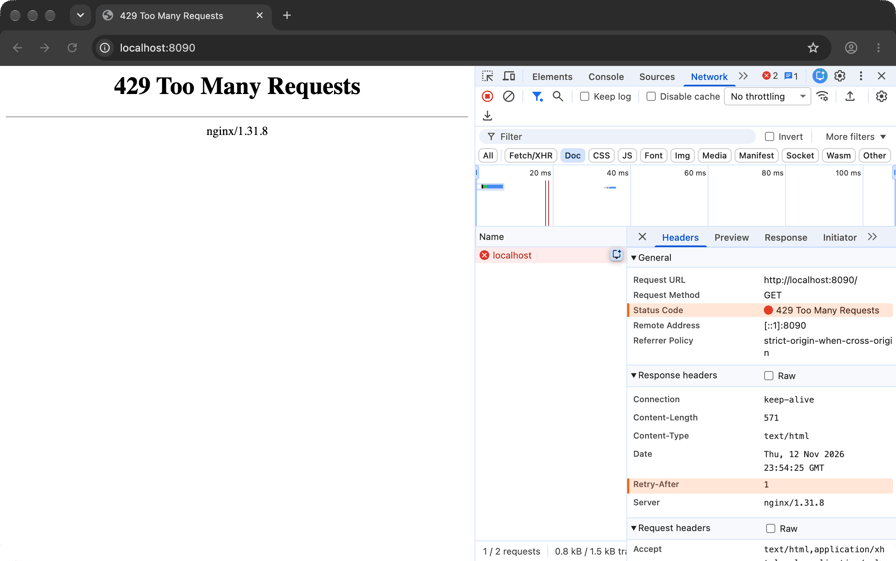
nginx's built-in 429 error page in Chrome, from a test server that adds Retry-After: 1, with the 429 status code and that header highlighted. To see the same rows, open DevTools, select the request in the Network panel, and read Status Code and Retry-After under Headers.
Why you're seeing a 429 error
Most 429 errors have one of these causes, and the response or your own logs show which one:
Cause | How to identify it | What to do |
|---|---|---|
More requests than the quota allows in the window | The 429 follows a series of successful requests. If the API sends a remaining-quota header such as | Pace below the limit, and honor |
A burst, even though your average rate is under the limit | 429s appear together at the start of a batch or right after a pause | Spread requests evenly with a rate limiter |
A stricter limit on one endpoint, such as search or login | 429s on that path while other pages on the same site still load | Pace that endpoint separately |
Your own retries counting toward the limit | Your logs show retries sent at the same moment, in bursts | Use one retry loop with jitter |
A plan limit at your proxy provider or scraper API | Your client raises a proxy error that includes 429, or the scraper API's own HTTP status code is 429 | Lower your concurrency, or scale your plan with that service as your volume grows |
Other users who share your public IP address, for example on an office network, a campus network, or a VPN | You see 429s while sending very few requests yourself | Wait, or contact the site |
Bot management that responds with 429 | A 429 as early as the first request, sometimes with an HTML challenge page and no | Use the site's API or a data feed |
A plan quota on an AI or data API, counted in requests, tokens, or money spent | The response body identifies the quota, and some of these 429s continue until the quota resets | Wait for the reset, add credits, or raise the limit |
A sudden rise in request rate on an AI API, even under its per-minute limits | The 429s start when a large job begins, and OpenAI's error response contains the code | Increase the rate gradually |
A 429 from bot management is a different problem, because slowing down may not stop these 429s. Some bot management systems send a 429 because of the client's fingerprint rather than its request rate, for example when an HTTP client's TLS fingerprint matches no real browser. Check the site's terms of service, and use its API or a data feed if it offers one.
How to tell who sent a 429 through a proxy or scraper API
Through an HTTP proxy, the step at which the 429 arrives shows who sent it. For an HTTPS site, your client first sends the proxy a CONNECT request to open a tunnel. After that, the proxy only relays encrypted TLS traffic, which it can neither read nor change as long as your client verifies the site's certificate.
To see both steps, send a request through Evomi Core Residential proxies to httpbingo.org's /status/429 endpoint, which always returns 429, and keep only the tunnel lines, the status lines, and two response headers:
# httpbingo.org/status/429 is a test endpoint that always returns 429
curl -sv -x http://rp.evomi.com:1000 -U "USERNAME:PASSWORD" https://httpbingo.org/status/429 2>&1 \
  | grep -E '^(> CONNECT|< HTTP|< server|< via|\* CONNECT)'
Replace USERNAME and PASSWORD with the credentials from the Proxy Generator in your Evomi dashboard. With valid credentials, the output looks like this:
* CONNECT tunnel: HTTP/1.1 negotiated
> CONNECT httpbingo.org:443 HTTP/1.1
< HTTP/1.1 200 Connection established
* CONNECT phase completed
* CONNECT tunnel established, response 200
< HTTP/2 429
< server: Fly/366e4bf88 (2026-10-27)
< via: 2 fly.io, 2 fly.io
The proxy opened the tunnel with 200 Connection established, and the 429 came from inside the tunnel. The server and via headers of that 429 come from Fly.io, the platform that hosts httpbingo, not from the proxy. A proxy error appears earlier, at the tunnel step. With a wrong password, the same command printed CONNECT tunnel failed, response 407.
When a proxy refuses a tunnel, each client reports the refusal with its own error message. A test proxy that refused every tunnel with a 429 produced these errors:
Client | Error when a test proxy refused the tunnel with 429 |
|---|---|
curl 8.7.1 |
|
requests 2.34.2 |
|
httpx 0.28.1 |
|
Node.js 26.13 built-in |
|
So, through a tunnel like this one, a 429 that your code reads from the response status code comes from the site, or from a CDN or API gateway on the site's side. A 429 inside a proxy error comes from your proxy provider rather than the site, so slowing down for the site won't fix that 429. For a plain http:// URL there is no tunnel, so a proxy's own 429 arrives as a normal response. Check its server and via headers to see who sent it.
When the site sent the 429, you need to reduce the load that you send to the site, so pacing is the fix, whatever IP address you use. Against a per-IP limit, more IP addresses spread the same load, so the site still receives all of that load, and its terms of service may forbid that. Against a limit keyed on your account, session, or API key, a different IP address leaves the count unchanged, and spreading the same load over extra accounts is a pattern that site owners can detect.
Through the Evomi Scraper API, the site's own status code arrives in the status_code field of the JSON response. The capture_headers=true parameter adds the site's response headers. Pass your API key in the x-api-key header, the method that our authentication docs recommend for production:
# The target always returns 429, so status_code shows the site's 429
curl -sG "https://scrape.evomi.com/api/v1/scraper/realtime" \
  -H "x-api-key: YOUR_API_KEY" \
  --data-urlencode "url=https://httpbingo.org/status/429" \
  -d mode=request -d delivery=json -d capture_headers=true
Replace YOUR_API_KEY with the API key from the Playground in your Evomi dashboard. The response, shortened to the fields that matter here, looks like this. The test endpoint sends no Retry-After header, so response_headers contains none:
{
  "url": "https://httpbingo.org/status/429",
  "status_code": 429,
  "mode_used": "request",
  "headers": {
    "response_headers": {
      "date": "Tue, 10 Nov 2026 04:35:36 GMT",
      "server": "Fly/366e4bf88 (2026-10-27)",
      "via": "2 fly.io, 2 fly.io"
    }
  }
}
Branch on status_code in your code. When status_code is 429 and the site sent Retry-After, read the header from response_headers, and ignore upper and lower case when you match the header name, because HTTP header names are case-insensitive. The header's value arrives as the site sent it, so the parsing and pacing rules below apply to it too.
The Scraper API already retries transient errors, such as network and gateway errors, inside each call, and those retries are included in the call's price. So your code only makes the decisions that belong to your pipeline, such as when to pause a site after a 429, as our Scraper API retry handling guide explains.
How Retry-After and RateLimit headers work
Retry-After has two formats, and RFC 9110 allows either one, so your client has to parse both:
Retry-After: 120
Retry-After: Fri, 31 Dec 1999 23:59:59 GMT
The first is a delay in whole seconds, and the second is an HTTP-date, both from the RFC's own examples. Some APIs also send decimal values such as 2.0, or a retry-after-ms header in milliseconds. Three details determine whether a client waits the right amount.
The HTTP-date has whole-second precision. When the server will accept the next request within the same second, the computed wait is 0, so the client waits only for its jitter, if it adds any, before it retries. When the server sent only HTTP-dates, the unpaced client with jitter from the comparison below (10 workers, 5 retries per URL) exhausted its retries this way and lost 3 to 7 of 50 items. A paced client lost none, so pace your requests, and honor the header too.
The wait from a date depends on two clocks. Compute the wait as the Retry-After date minus the response's Date header, not minus your local clock. Then a client with a skewed clock still waits the right amount.
Set your own maximum wait. Libraries honor, cap, or refuse a long Retry-After, as the library table below shows, and a retry after a capped wait can get another 429. The built-in fetch in Node.js uses the undici library. When a server sent Retry-After: 120, the RetryAgent in undici 8.12.4 retried after 30 seconds, its default maximum wait, and got a second 429, so requeue URLs that require a longer wait.
The RateLimit header fields draft
A working group at the Internet Engineering Task Force (IETF) has drafted two header fields that report the quota before a client reaches the limit. Revision 11 of draft-ietf-httpapi-ratelimit-headers is a working-group draft, not an RFC. In that revision, the RateLimit-Policy field contains the quota (q) and the window in seconds (w). The RateLimit field contains the remaining quota (r) and the number of seconds that the remaining quota has to last (t).
After a client had exhausted its quota, express-rate-limit, a rate-limiting middleware for Express, sent this pair of headers:
RateLimit: "100-in-1min"; r=0; t=60
RateLimit-Policy: "100-in-1min"; q=100; w=60; pk=:MTJjYTE3YjQ5YWYy:
In this pair, r=0 shows that the quota is exhausted, and pk, the partition key, identifies whose quota it is. Many APIs send X-RateLimit-Limit, X-RateLimit-Remaining, and X-RateLimit-Reset instead, and the reset value has no standard format:
Source | Header | Reset value |
|---|---|---|
| Unix epoch seconds | |
OpenAI API |
| A duration, such as |
Anthropic API |
| An RFC 3339 timestamp |
If a parser read an epoch value such as 1794229755 as a delay in seconds, it would wait about 57 years. When Retry-After is present, wait for the time it gives. The draft also gives Retry-After priority over its own fields. Without Retry-After, read the reset value in the format that the API documents.
When the 429 comes from an AI API
AI APIs limit requests per minute (RPM) and tokens per minute (TPM), and some also restrict how fast your usage grows. OpenAI's rate limit guide lists a 429 with the error code slow_down for a request rate that rises too quickly, even within your per-minute limits, and Anthropic calls this type of limit a ramp limit. Start a large job well below your limit and increase the request rate in steps, as the guide describes.
- Use one retry loop. The OpenAI and Anthropic Python SDKs (openai 3.50.0, anthropic 2.8.0) already retry a 429 twice by default and honor
Retry-After, so setmax_retries=0inside your own loop. Otherwise a loop with 5 retries makes 6 attempts, and each attempt can make 3 SDK attempts, so the client can send 18 requests for one prompt. - Pace by tokens when the limit counts tokens. Long prompts can reach a TPM limit at a low request rate, so read a remaining-tokens header such as OpenAI's
x-ratelimit-remaining-tokens, and pause before its value reaches 0. - Read the error code before you retry. Billing and spend-limit 429s continue until you add credits or raise the limit, so a retry won't fix them. OpenAI's error codes for these are
credit_balance_exhaustedandorganization_spend_limit_exceeded, and the broader error type can still beinsufficient_quota. Anthropic's spend-limit 429 has noRetry-Afterheader, and its error code on the Messages API isenforced_spend_limit_reached. - In an agent, handle the 429 inside the tool. A model can't wait, so when the tool returns a 429 to the model as a tool result, the model can repeat the same tool call immediately and use more tokens. Let the tool honor
Retry-Afterand pace itself, limit the number of parallel tool calls, and report a failure only when the wait is longer than the task allows.
How to handle a 429 in your code
A client that handles 429s well honors Retry-After, adds a random delay (jitter), pauses every worker on a host together, and paces below the limit.
To compare the approaches, four clients requested the same 50 URLs from a server that allowed 5 requests per second, with a burst of 5. The server and the clients shared one machine, so the numbers show only how each client handled the limit. Each cell shows the median of 3 runs, Python first and Node.js second, with Retry-After given in seconds:
Client | Concurrency | Items saved of 50 (Python, Node.js) | 429s | Requests sent | Time |
|---|---|---|---|---|---|
Retries a 429 immediately, up to 3 times | 10 | 5, 5 | 180, 180 | 185, 185 | 0.27 s, 0.08 s |
urllib3 | 10 | 49, 50 | 84, 85 | 133, 135 | 9.1 s, 9.2 s |
Honors the header, adds up to 1 s of jitter, no pacing | 10 | 50, 50 | 55, 55 | 105, 105 | 10.0 s, 10.0 s |
Paced at 5 requests per second, one pause shared by all workers | 2 | 50, 50 | 0, 0 | 50, 50 | 9.9 s, 9.8 s |
The client that retried immediately exhausted its 3 retries per URL in under a second and lost 45 of 50 items. The retry libraries, urllib3 in Python and undici in Node.js, saved nearly every item but needed about 2.7 requests for each one. Their workers all slept exactly the 1 second that the header specified and woke at the same moment, a pattern known as a thundering herd. In a typical second, all 10 workers retried at the same moment, the 5 that succeeded sent their next request immediately, and the server received these 15 requests within 100 ms and rejected 10 of them.
The timeline shows one Python run each of the immediate-retry client, urllib3, and the paced client:
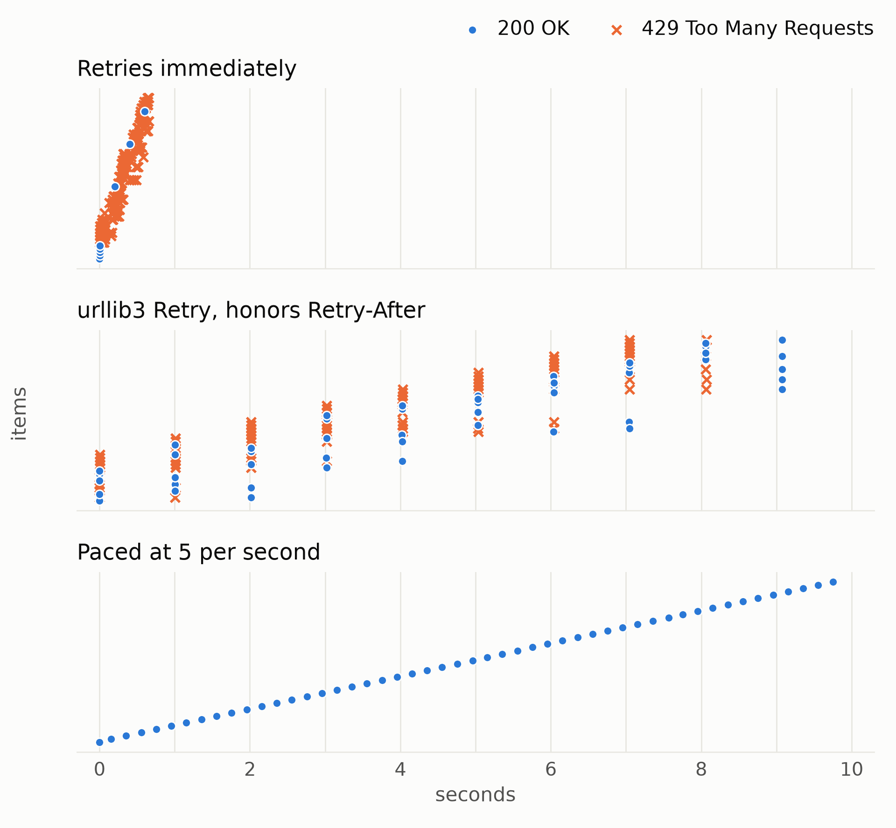
Each row is one item, and each mark is one request as the server received it.
Adding jitter to the header's wait spread the retries over time and reduced the 429s by about a third, compared with the retry libraries. The paced client got no 429s and needed only one request per URL. Pacing took under a second longer than the retry libraries, because the paced client never used the server's burst allowance.
Pace below the documented limit
Pacing at exactly the limit worked in that comparison only because the server allowed a burst of 5. Without the burst parameter, nginx's limit_req allows no burst at all, and at rate=5r/s it rejects any request that arrives less than 200 ms after the previous one. When a client sent exactly 5 requests per second, nginx rejected about a quarter of its requests even on one machine, and the share rose to about a third when up to 50 ms of latency variation was added. At 4 requests per second, rejections decreased to at most 3 in 50, and with burst=5 nodelay, nginx accepted every request at all the tested rates, including 5 per second.
So pace at about 80% of the documented limit. That margin keeps rejections rare. If a server-side rate limiter allows no burst and has a high per-second rate, leave a larger margin, because a few milliseconds are a larger share of the interval between requests. Many APIs with high limits count requests per minute or per hour, and for those APIs, the margin mainly reserves capacity for retries and for other jobs on the same API key.
When the site publishes no limit
Many websites publish no rate limit, so there is no number to calculate 80% of, and the common practice is to probe for the limit. Start near 1 request per second per host when a site's robots.txt sets no Crawl-delay. Increase the rate in small steps while responses succeed, and halve it at each 429 or 503.
This pattern is called additive increase, multiplicative decrease (AIMD), and the full client below works this way when you set START_RATE to 1 and set MAX_RATE high. Against a server that allowed 5 requests per second without publishing that limit, the client averaged about 3.4 requests per second and got only three 429s across 300 URLs. At that rate, the client finished the 300 URLs in under 90 seconds, while a fixed rate of 1 request per second takes 5 minutes.
A live site gives less clear signals than a server with one fixed limit. The site's limit may count requests per minute or change with its load, so expect more 429s before the rate stabilizes. Many sites never send a 429 at all and respond with a 403, a 418, a challenge page, or a 200 response with degraded data, so count these responses as signals to slow down too.
When a site sends no clear signal, a block, a rate limit, and an overloaded server can look alike in your logs. Record each site's baseline response time, then slow down and monitor the responses. If responses return to normal, the cause was most likely a rate limit or an overloaded server, and pacing fixes both. If responses don't return to normal, the cause is more likely a block, which pacing alone won't fix.
A quick fix with Python's requests library
If your script uses the requests library and fetches one URL at a time, you may not need the full client below. Mount an HTTPAdapter with urllib3's Retry, which honors Retry-After, and pause between requests. Save this script as requests_fetch.py:
import sys
import time

import requests
from requests.adapters import HTTPAdapter
from urllib3.util import Retry

retry = Retry(
    total=5,
    status_forcelist=[429, 503],
    backoff_factor=0.5,              # used when no Retry-After arrives
    respect_retry_after_header=True,
    raise_on_status=False,           # return the last response instead of raising
)
session = requests.Session()
session.mount("http://", HTTPAdapter(max_retries=retry))
session.mount("https://", HTTPAdapter(max_retries=retry))

saved = 0
for url in sys.stdin.read().split():
    response = session.get(url, timeout=30)
    saved += response.status_code == 200
    time.sleep(0.25)                 # 4 requests per second, about 80% of a 5-per-second limit
print(f"saved {saved}")
Put one URL per line in urls.txt, then run python requests_fetch.py < urls.txt. Against the same 5-per-second server, the script saved all 50 items with no 429s in about 13 seconds. Without the pause, Retry still saved all 50 items but got nine 429s first. With several workers, use the client below instead, because in the comparison above, urllib3's Retry woke every worker at the same moment and caused a thundering herd.
A client that honors Retry-After and adapts its rate
This Python client paces each host separately, as large crawlers do. Every host gets its own queue, its own CONCURRENCY workers, and its own rate limiter. Each rate limiter follows AIMD. The rate limiter adds 0.5 requests per second after 10 successes in a row and halves its rate whenever the site responds with a 429, 503, or 403.
When a 429 or 503 arrives, every worker on that host waits for the time that Retry-After specifies, plus jitter, so clients on different machines don't wake together. With no usable header, or after a network error, the client uses exponential backoff with full jitter instead, which is a random wait between zero and the current backoff. The client doesn't retry a 403. On a proxy error, such as invalid credentials, it stops the whole run, so you can fix the setup and then run the same command again.
When the server sends a Retry-After longer than 2 minutes, the client defers the remaining URLs for that host. The client writes these URLs, and any URL that reaches its retry limit, to retry_later.txt, so you can run them again later with python polite_fetch.py < retry_later.txt.
Keep CONCURRENCY at or above the rate multiplied by your average response time in seconds (Little's law), so the client can reach that rate. At 4 requests per second and a 0.5-second average response time, the result is 2. Measure your own response times, including proxy latency, before you set CONCURRENCY.
The client requires Python 3.11 or newer and httpx (pip install httpx). Save the client as polite_fetch.py:
import asyncio
import email.utils
import random
import sys
import time
from collections import defaultdict, deque
from datetime import datetime, timezone
from urllib.parse import urlsplit

import httpx

START_RATE = 4.0   # requests per second per host to start with
MAX_RATE = 4.0     # about 80% of a documented limit. With no published limit, set this high and START_RATE to 1
CONCURRENCY = 2    # concurrent requests per host
MAX_RETRIES = 5
MAX_WAIT = 120.0   # for a longer wait, defer this host's URLs to retry_later.txt


def backoff(attempt: int) -> float:
    return random.uniform(0, min(30.0, 0.5 * 2**attempt))  # capped exponential, full jitter


def retry_after_seconds(resp: httpx.Response) -> float | None:
    """Seconds to wait from retry-after-ms or Retry-After. None if absent or invalid."""
    for name, scale in (("retry-after-ms", 1000), ("retry-after", 1)):
        try:  # some APIs send decimal values such as 2.0
            return max(0.0, float(resp.headers.get(name, "")) / scale)
        except ValueError:
            pass
    try:
        when = email.utils.parsedate_to_datetime(resp.headers.get("retry-after", ""))
    except (TypeError, ValueError):
        return None
    try:  # subtract the server's own Date header, so a skewed local clock can't change the wait
        now = email.utils.parsedate_to_datetime(resp.headers["date"])
    except (KeyError, TypeError, ValueError):
        now = datetime.now(timezone.utc)
    try:
        return max(0.0, (when - now).total_seconds())
    except TypeError:  # the date has no time zone, so treat it as invalid
        return None


class Host:
    """Per host: an adaptive rate limiter, plus a pause shared by the host's workers."""

    def __init__(self):
        self.rate, self.streak = START_RATE, 0
        self.next_slot = self.paused_until = 0.0
        self.lock = asyncio.Lock()

    async def wait(self) -> None:
        async with self.lock:
            slot = max(time.monotonic(), self.next_slot, self.paused_until)
            self.next_slot = slot + 1 / self.rate
        await asyncio.sleep(max(0.0, slot - time.monotonic()))

    def succeeded(self) -> None:  # additive increase: +0.5 per second after 10 successes in a row
        self.streak += 1
        if self.streak >= 10:
            self.rate, self.streak = min(MAX_RATE, self.rate + 0.5), 0

    def slow_down(self, pause: float = 0.0) -> None:  # multiplicative decrease: halve the rate, pause every worker
        self.rate, self.streak = max(0.5, self.rate / 2), 0
        self.paused_until = max(self.paused_until, time.monotonic() + pause)

    def closed(self) -> bool:
        return self.paused_until - time.monotonic() > MAX_WAIT


async def fetch(client: httpx.AsyncClient, host: Host, url: str, stats: dict) -> httpx.Response | None:
    for attempt in range(MAX_RETRIES + 1):
        if host.closed():
            return None  # the server sent a long Retry-After: defer the URL
        await host.wait()
        try:
            r = await client.get(url)
        except httpx.ProxyError:
            raise  # the proxy refused the tunnel (for example 407, invalid credentials): don't retry
        except httpx.TransportError:  # timeout or dropped connection: back off, retry
            await asyncio.sleep(backoff(attempt))
            continue
        if r.status_code == 403:
            host.slow_down()  # often a block, not a rate limit: slow down, don't retry
            return r
        if r.status_code not in (429, 503):
            host.succeeded()
            return r
        # A retry won't fix a quota or billing 429: check your API's error body here
        stats["throttled"] += 1
        wait = retry_after_seconds(r)
        if wait is None:
            wait = backoff(attempt)
        elif wait <= MAX_WAIT:
            wait += random.uniform(0, max(1.0, wait / 10))  # jitter of up to 1 s, or up to 10% of a long wait
        host.slow_down(wait)  # halve this host's rate and pause all its workers
    return None  # out of retries: defer the URL


async def main(urls: list[str]) -> None:
    queues: dict[str, deque[str]] = defaultdict(deque)
    for url in urls:
        queues[urlsplit(url).netloc].append(url)  # group requests by what the site limits, which is the host here
    stats, results, later = {"throttled": 0}, [], []
    t0 = time.monotonic()

    # both set explicitly: follow redirects, and read HTTPS_PROXY from the environment
    async with httpx.AsyncClient(timeout=30, follow_redirects=True, trust_env=True) as client:
        async def worker(host: Host, queue: deque[str]) -> None:
            while queue:
                url = queue.popleft()
                r = await fetch(client, host, url, stats)
                results.append(r)
                if r is None:
                    later.append(url)  # deferred to retry_later.txt

        workers = []
        for queue in queues.values():
            host = Host()
            workers += [worker(host, queue) for _ in range(CONCURRENCY)]
        await asyncio.gather(*workers)

    with open("retry_later.txt", "w") as f:  # run these again later: python polite_fetch.py < retry_later.txt
        f.writelines(f"{url}\n" for url in later)
    saved = sum(1 for r in results if r is not None and r.status_code == 200)
    print(f"saved {saved} of {len(urls)}, throttled responses {stats['throttled']}, "
          f"{time.monotonic() - t0:.1f} s")
    if later:
        print(f"{len(later)} URLs deferred to retry_later.txt")


if __name__ == "__main__":
    # One URL per line on stdin: python polite_fetch.py < urls.txt
    asyncio.run(main([line.strip() for line in sys.stdin if line.strip()]))
Put one URL per line in urls.txt. Set START_RATE and MAX_RATE to about 80% of a documented limit, or set START_RATE to 1 with a high MAX_RATE when no limit is published. Then run the client:
python polite_fetch.py < urls.txtOn 50 URLs at 4 requests per second, the client printed:
saved 50 of 50, throttled responses 0, 12.3 sSaved means that the URL returned a 200 response, so parse or store each page where the worker receives the response.
Because each host has its own rate limiter, 50 URLs on each of two sites also finished in about 12 seconds, while one rate limiter for the same 100 URLs took twice as long.
To send the requests through Evomi Core Residential proxies, set HTTPS_PROXY to http://USERNAME:PASSWORD@rp.evomi.com:1000, the gateway that our connection guide lists, before you run the client, which reads the variable from the environment. The pacing still applies per host, whatever exit IP each request uses. Evomi Core Residential proxies include unlimited concurrent sessions, so you can crawl many sites in parallel, each at its own pace.
To keep the same exit IP for multiple requests, add a sticky session ID to the password. A site then counts all your requests as one client, which matches your per-host pacing, and a logged-in session keeps a stable IP. For example, set HTTPS_PROXY to http://USERNAME:PASSWORD_session-crawl01@rp.evomi.com:1000.
The same client in Node.js
The Node.js client requires Node.js 22 or newer and uses only built-in modules. Save the client as polite_fetch.mjs:
import { writeFileSync } from 'node:fs';
import { text } from 'node:stream/consumers';

const START_RATE = 4;     // requests per second per host to start with
const MAX_RATE = 4;       // about 80% of a documented limit. With no published limit, set this high and START_RATE to 1
const CONCURRENCY = 2;    // concurrent requests per host
const MAX_RETRIES = 5;
const MAX_WAIT = 120;     // seconds: for a longer wait, defer this host's URLs to retry_later.txt
const sleep = (s) => new Promise((resolve) => setTimeout(resolve, s * 1000));
const backoff = (attempt) => Math.random() * Math.min(30, 0.5 * 2 ** attempt);  // capped exponential, full jitter
const SECONDS = /^\d+(\.\d+)?$/;                  // some APIs send decimal values such as 2.0

// Seconds to wait from retry-after-ms or Retry-After. null if absent or invalid.
function retryAfterSeconds(res) {
  const ms = (res.headers.get('retry-after-ms') ?? '').trim();
  if (SECONDS.test(ms)) return Number(ms) / 1000;
  const value = (res.headers.get('retry-after') ?? '').trim();
  if (SECONDS.test(value)) return Number(value);
  const when = Date.parse(value);
  if (Number.isNaN(when)) return null;
  // Subtract the server's own Date header, so a skewed local clock can't change the wait
  const date = Date.parse(res.headers.get('date') ?? '');
  return Math.max(0, (when - (Number.isNaN(date) ? Date.now() : date)) / 1000);
}

// Per host: an adaptive rate limiter, plus a pause shared by the host's workers.
class Host {
  rate = START_RATE;
  streak = 0;
  next = 0;
  pausedUntil = 0;
  async wait() {
    const now = performance.now() / 1000;
    const slot = Math.max(now, this.next, this.pausedUntil);
    this.next = slot + 1 / this.rate;
    await sleep(Math.max(0, slot - now));
  }
  succeeded() {                                    // additive increase: +0.5 per second after 10 successes in a row
    if (++this.streak >= 10) { this.rate = Math.min(MAX_RATE, this.rate + 0.5); this.streak = 0; }
  }
  slowDown(pause = 0) {                            // multiplicative decrease: halve the rate, pause every worker
    this.rate = Math.max(0.5, this.rate / 2);
    this.streak = 0;
    this.pausedUntil = Math.max(this.pausedUntil, performance.now() / 1000 + pause);
  }
  closed() { return this.pausedUntil - performance.now() / 1000 > MAX_WAIT; }
}

let throttled = 0;
async function politeFetch(host, url) {
  for (let attempt = 0; attempt <= MAX_RETRIES; attempt++) {
    if (host.closed()) return null;                // the server sent a long Retry-After: defer the URL
    await host.wait();
    let res;
    try {
      res = await fetch(url, { signal: AbortSignal.timeout(30_000) });  // 30 s timeout per attempt
    } catch {                                      // timeout, dropped connection, or proxy refusal
      await sleep(backoff(attempt));
      continue;
    }
    if (res.status === 403) { host.slowDown(); return res; }  // often a block, not a rate limit: slow down, don't retry
    if (res.status !== 429 && res.status !== 503) { host.succeeded(); return res; }
    // A retry won't fix a quota or billing 429: check your API's error body here
    throttled++;
    await res.arrayBuffer();                       // release the connection
    let wait = retryAfterSeconds(res);
    if (wait === null) wait = backoff(attempt);
    else if (wait <= MAX_WAIT) wait += Math.random() * Math.max(1, wait / 10);  // jitter of up to 1 s, or up to 10% of a long wait
    host.slowDown(wait);                           // halve this host's rate and pause all its workers
  }
  return null;                                     // out of retries: defer the URL
}

// One URL per line on stdin: node polite_fetch.mjs < urls.txt
const urls = (await text(process.stdin)).split('\n').map((s) => s.trim()).filter(Boolean);
const queues = new Map();
for (const url of urls) {
  const key = new URL(url).host;                   // group requests by what the site limits, which is the host here
  if (!queues.has(key)) queues.set(key, []);
  queues.get(key).push(url);
}
const t0 = performance.now();
const results = [];
const later = [];                                 // URLs deferred to retry_later.txt
await Promise.all([...queues.values()].map(async (queue) => {
  const host = new Host();
  await Promise.all(Array.from({ length: CONCURRENCY }, async () => {
    for (let url = queue.shift(); url; url = queue.shift()) {
      const res = await politeFetch(host, url);
      if (res) { results.push(res.status); await res.arrayBuffer(); }
      else later.push(url);
    }
  }));
}));
// Run these again later: node polite_fetch.mjs < retry_later.txt
writeFileSync('retry_later.txt', later.map((url) => `${url}\n`).join(''));
const saved = results.filter((s) => s === 200).length;
console.log(`saved ${saved} of ${urls.length}, throttled responses ${throttled}, ` +
            `${((performance.now() - t0) / 1000).toFixed(1)} s`);
if (later.length) console.log(`${later.length} URLs deferred to retry_later.txt`);
Run the client the same way:
node polite_fetch.mjs < urls.txtThe Node.js client printed the same summary line as the Python client. To use HTTPS_PROXY with the built-in fetch in Node.js, also set NODE_USE_ENV_PROXY=1, which Node.js 22.21 and 24.0 added. Older versions ignore the variable without an error, so confirm once that requests leave through the proxy.
This command requests ip.evomi.com/s, which returns your exit IP as plain text. The printed IP should differ from your own IP, which our IP checker shows when you open the checker in a browser:
HTTPS_PROXY="http://USERNAME:PASSWORD@rp.evomi.com:1000" NODE_USE_ENV_PROXY=1 \
  node -e "fetch('https://ip.evomi.com/s').then((r) => r.text()).then(console.log)"
In Node.js 26.13, fetch reported a refused tunnel only as fetch failed, so the Node.js client treats a refused tunnel like a network error and backs off, while the Python client stops.
When several processes share one limit
Each process paces its own requests, but no process can count the requests of the other processes, and the same is true for containers, serverless functions, and parallel agents that share one API key. Two clients that each pace at 4 requests per second send a combined 8 requests per second against a limit of 5. When the Python and Node.js clients ran concurrently against one host, they got a few 429s in each run before multiplicative decrease reduced their combined rate to the limit. On a longer run, additive increase would raise the combined rate above the limit again.
For a known limit, use a distributed rate limiter, which is one rate limiter that every process shares. This rate limiter follows the generic cell rate algorithm (GCRA), but it delays each request until its time slot instead of rejecting it. The rate limiter stores the next free time slot (GCRA's theoretical arrival time) under one key in Redis or its fork Valkey and reads the store's clock, so processes on different machines don't require synchronized clocks. Save the rate limiter as shared_rate_limiter.py next to the client, and install redis-py (pip install redis), which works with both Redis and Valkey:
import asyncio

import redis.asyncio as redis

# One "next free time slot" per limit key (GCRA's theoretical arrival time), shared by every process.
# Every process reads the time from Redis, so local clocks don't matter.
RESERVE = """
local t = redis.call('TIME')
local now = t[1] + t[2] / 1000000
local slot = math.max(now, tonumber(redis.call('GET', KEYS[1]) or '0'))
redis.call('SET', KEYS[1], tostring(slot + tonumber(ARGV[1])), 'EX', 3600)
return tostring(slot - now)
"""
PAUSE = """
local t = redis.call('TIME')
local until_time = t[1] + t[2] / 1000000 + tonumber(ARGV[1])
if until_time > tonumber(redis.call('GET', KEYS[1]) or '0') then
  redis.call('SET', KEYS[1], tostring(until_time), 'EX', 3600)
end
"""


class SharedRateLimiter:
    """Paces every process that uses the same key at `rate` requests per second in total."""

    def __init__(self, redis_url: str, key: str, rate: float):
        db = redis.from_url(redis_url)
        self.key, self.interval = f"ratelimit:{key}", 1 / rate
        self.reserve, self.push = db.register_script(RESERVE), db.register_script(PAUSE)

    async def wait(self) -> None:
        delay = float(await self.reserve(keys=[self.key], args=[self.interval]))
        await asyncio.sleep(delay)

    async def pause(self, seconds: float) -> None:
        await self.push(keys=[self.key], args=[seconds])
The shared rate limiter paces at the fixed rate you give it, so it takes the place of the per-host AIMD rate. Every process must reach the same Redis or Valkey server, which the example expects on localhost:6379. To use SharedRateLimiter in the Python client, give each host its own rate limiter, keyed by the hostname so that every process shares it, and make these changes:
from shared_rate_limiter import SharedRateLimiter  # at the top, next to the other imports

# in main(), where the client creates each host
for name, queue in queues.items():
    host = Host()
    host.limiter = SharedRateLimiter("redis://localhost:6379/0", name, 4)  # 4 requests per second across all processes
    workers += [worker(host, queue) for _ in range(CONCURRENCY)]  # unchanged

# in fetch()
await host.limiter.wait()  # in place of: await host.wait()
# ...
host.slow_down(wait)
await host.limiter.pause(min(wait, MAX_WAIT))  # added: every process pauses, and a longer wait still defers the host's URLs
With these changes, three processes that shared 4 requests per second against a limit of 5 got no 429s and lost no items, with Redis and with Valkey. If your jobs already go through a message queue, a single consumer per limit is another way to stay under the limit.
Habits that make any client more reliable
- Count requests, not pages. A browser page load also fetches subresources such as scripts, images, and API calls from the same site, and each one can count toward the limit. Block the requests you don't need, or call the site's JSON API directly.
- Limit retries, and use a circuit breaker per host. Keep retries under about 10% of all requests, the per-client retry budget that Google's Site Reliability Engineering book suggests. When a host keeps sending 429s at your slowest rate, the circuit breaker should stop all requests to that host for a cool-down period, such as an hour, and alert a person.
- Cache and deduplicate requests. A request that you never send can't get a 429.
- Set connect and read timeouts. One attempt without a timeout can keep a retry loop waiting indefinitely.
What popular HTTP libraries do with a 429 by default
Check your library's defaults before you rely on its retry behavior:
Library and version | Retries a 429 by default | Parses | A very long | Jitter by default |
|---|---|---|---|---|
requests 2.34.2 | No | Only through urllib3's | Not applicable | Not applicable |
urllib3 2.8.0 | Yes, 3 times, if the 429 includes | Seconds and HTTP-date | Capped at 6 hours, since 2.6.3 | No |
httpx 0.28.1 | No, its | No | Not applicable | Not applicable |
Yes, up to 10 times on 429, 502, 503, and 504 | Whole seconds and HTTP-date, measured against your local clock | Capped at 2 minutes | Only on its own backoff, which is 0 by default | |
Only what you configure | Only through a backoff hook you write that returns the wait | Set by your hook | On its own backoff, but not on the wait your hook returns | |
tenacity 9.2.1 | Only what you configure | Only through a wait function you write, for example one passed to | Set by your wait function |
|
Yes, 2 times | Ignored | Not applicable | No, and no delay at all unless | |
Node.js 26.13 | No | No | Not applicable | Not applicable |
undici 8.12.4 | Yes, once you enable | Seconds and HTTP-date | Capped at 30 seconds | No |
Yes, 2 times | Seconds and HTTP-date, or | Waits the full time, no cap | Opt-in, and never added to | |
Yes, 2 times | Seconds and HTTP-date | Waits the full time, unless you set | Up to 100 ms on its own backoff, never on | |
axios-retry 4.5.0 | Yes, 3 times on GET, HEAD, OPTIONS, PUT, and DELETE | Seconds and HTTP-date | Waits the full time, no cap | None, and no delay at all without the header |
httpx-retries adds urllib3-style retries to httpx, and against the same 5-per-second server it behaved like urllib3, because it adds no jitter to the header's wait. Without a Retry-After header and with its default settings, httpx-retries retried immediately, so on 50 URLs it sent 494 requests in 0.3 seconds and saved only 6 items. If you use httpx-retries, set backoff_factor and pace each host. If you use stamina, add jitter inside your backoff hook, because stamina adds no jitter to the wait that your hook returns.
With its default settings and no Retry-After, axios-retry sent all 3 retries within 11 ms of the first 429, so pass retryDelay: axiosRetry.exponentialDelay, as in our axios-retry examples.
In Scrapy, pace with DOWNLOAD_DELAY and CONCURRENT_REQUESTS_PER_DOMAIN, and add your own Retry-After handling. In Scrapy 2.20.0, RetryMiddleware ignores the header, and AutoThrottle adjusts its delay based only on response latency.
urllib3, httpx-retries, undici, ky, got, and axios-retry don't retry a POST by default, and AI API calls are usually POST requests. The OpenAI and Anthropic SDKs retry a 429 on these calls by default, so for those APIs your own retry loop is safe too. For other APIs, retry a POST after a 429 only when the API documents that this is safe, or send an idempotency key if the API supports one.
How to send a 429 from your own server
If your server rate-limits clients, respond with 429, a Retry-After header in seconds, and a response body that states the limit. Use 503 only when the server is overloaded or down for maintenance, and use 403 only for requests that you always refuse.
nginx's limit_req requires three changes to its default behavior. With limit_req alone, nginx rejects excess requests with 503 Service Temporarily Unavailable and no Retry-After. This server block sets the status to 429, adds the header, and allows a burst. Save this server block in a file under /etc/nginx/conf.d/, which nginx includes inside its http block:
limit_req_zone $binary_remote_addr zone=perip:10m rate=5r/s;

server {
    listen 8082;
    root /usr/share/nginx/html;

    location / {
        limit_req zone=perip burst=10 nodelay;
        limit_req_status 429;
        error_page 429 = @ratelimited;
    }

    location @ratelimited {
        add_header Retry-After 1 always;
        default_type application/json;
        return 429 '{"error":"rate_limited","detail":"5 requests per second per client"}\n';
    }
}
The burst=10 nodelay setting serves up to 10 requests above the rate without delay, so a client that paces below the limit is no longer rejected because of a few milliseconds of latency variation. The always parameter is also needed, because without it nginx adds the header only to success and redirect responses. Because limit_req doesn't provide the actual wait, the server block sends a fixed Retry-After of 1 second, the smallest nonzero value in whole seconds. If nginx runs behind a load balancer or CDN, set set_real_ip_from and real_ip_header first, so nginx limits each client's IP address instead of the load balancer's IP address.
In Express, express-rate-limit 8.7.4 returns 429 with Retry-After by default. Install both packages with npm install express express-rate-limit, and save this configuration as app.mjs:
import express from 'express';
import { rateLimit } from 'express-rate-limit';

const app = express();
app.set('trust proxy', 1); // behind one reverse proxy or load balancer: read the client IP that it forwards

app.use('/api/', rateLimit({
  windowMs: 60_000,          // 1 minute
  limit: 100,                // per client per window
  standardHeaders: 'draft-8', // RateLimit and RateLimit-Policy
  legacyHeaders: false,       // don't send X-RateLimit-*
  message: { error: 'rate_limited', detail: '100 requests per minute per client' },
}));

app.get('/api/items', (req, res) => res.json({ items: [] }));
app.listen(process.env.PORT || 3000);
Set trust proxy to the exact number of reverse proxies in front of the app. If the number is too low, every client shares the load balancer's limit. If you set true or a number that is too high, the app takes the client IP from an X-Forwarded-For header that any client can set to any value, so clients can exceed the limit.
Both examples count requests in memory per instance, so with 4 replicas, one client can send up to 4 times the limit you set. Use a shared store such as Redis, or enforce the limit at the edge, for example in Cloudflare or an API gateway.
How to fix error 429 as a visitor
If a website or an app shows error code 429, the service is limiting how many requests it accepts from your device, account, or network. Try these steps in order:
1. Wait, then reload once. Each site sets its own wait time, and on Cloudflare-protected sites, continued requests during a block may extend the block.
2. Close anything that refreshes automatically. Extra tabs on the same site, auto-refresh extensions, and download managers all send requests that count toward the limit.
3. Sign in. Many sites give signed-in users a higher limit than anonymous visitors.
4. Check the service's status page. If Spotify, Roblox, Etsy, or another app reports an incident there, waiting is the fix.
5. Contact support from a shared network. If the 429 persists on an office or campus network, other users who share your IP address may have reached the limit, so contact the site's support team.
Related errors
These codes can appear in the same logs as a 429, and not all of them mean that you should slow down:
Code | What it means | How to handle it |
|---|---|---|
503 Service Unavailable | The server is temporarily overloaded or under maintenance, as with OpenAI's | Handle it like a 429, and back off when it has no |
403 Forbidden | The server refuses the request. AWS WAF rate-based rules use 403 by default, and GitHub's API sends 403 or 429 for its rate limits | If a rate limiter sent it, slow down as for a 429. Retrying immediately won't help |
529 (Anthropic API) | The API is overloaded. Your quota isn't the cause | Retry with exponential backoff |
Cloudflare 1015 | Cloudflare's error page for rate limiting, with a 30-second | Wait, then slow down |
Your proxy requires valid credentials | Fix the proxy username or password | |
nginx logged that the client closed the connection before the response was sent | Check your own client timeouts |
Final thoughts
A 429 means that your client exceeded someone's limit, so first check whose limit it is. When your proxy or scraper API sent the 429, fix the cause with that service instead of slowing down for the site. When the site sent the 429, pace each host below its limit, increase the rate gradually, and use one retry loop that pauses every worker for the time that Retry-After specifies, plus jitter. Pacing alone won't clear a 429 from bot management, so use the site's API or a data feed if it offers one.
For data collection that respects rate limits, Evomi Core Residential proxies include unlimited concurrent sessions, and the Evomi Scraper API returns each site's status code and its response headers, including any Retry-After, when you set capture_headers=true, so your code can check each site's status and apply the same pacing rules.
FAQ
How do I fix 429 too many requests?
Slow down and wait for the time that the server specifies. In a browser, wait, reload once, and close tabs that refresh automatically. In code, honor Retry-After, add jitter, pause every worker, and pace each host below its limit. If your proxy or scraper API sent the 429, fix the cause with that service instead.
Does error 429 go away?
Yes, when your request rate drops below the limit. Many rate limits reset within seconds to an hour. The Retry-After header, when present, gives the wait time. A 429 from a plan quota, such as a daily limit, a spend limit, or exhausted credits on an AI API, lasts until the quota resets or you increase it.
How long to wait for 429 too many requests?
Wait at least the time that Retry-After specifies, in seconds or until its HTTP-date, plus jitter so workers don't retry together. Without the header, use capped exponential backoff with jitter, starting from about half a second. GitHub asks clients to wait at least a minute when its API sends no reset information.
How to get rid of too many requests?
Lower your request rate. Pace each host at about 80% of its documented limit, or start near 1 request per second when no limit is published. Use one retry loop, cache and deduplicate requests, and back off before every retry. If you run the server, return 429 with Retry-After and a response body that states the limit.
What is proxy error 429?
Through a proxy, a 429 comes from the site or your provider, and the step where it appears shows which. With certificate verification, a 429 response comes from the site or its CDN. A proxy error such as "Tunnel connection failed: 429" means your proxy provider refused the tunnel, for example because of a plan limit.
What is a 429 error?
A 429 error is the HTTP status code 429 Too Many Requests. The code means a server is rate limiting you because you sent too many requests in a given amount of time. The response may include a Retry-After header that gives the wait time, and the server can count requests per IP address, account, or API key.