Every page in your browser fails at once, including sites that worked a minute ago. The message says "cannot establish proxy connection", or Chrome shows ERR_PROXY_CONNECTION_FAILED. You may not even remember setting a proxy. An old VPN, an app or a leftover setting probably did.
This guide is an ordered fix flow, and each step says when to stop or continue. If you never meant to use a proxy, skip to how to turn off proxy settings.
What "cannot establish proxy connection" means
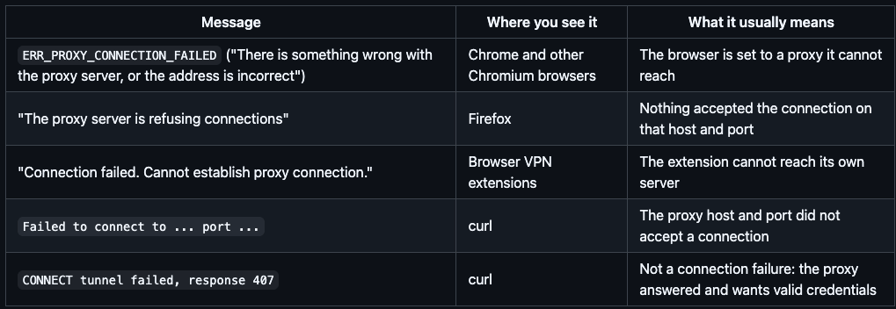
Your browser, app or VPN extension is set to send traffic through a proxy server, but it could not open a connection to that server. The website you wanted was never contacted. The fault is in the proxy setting, the proxy server or the network path to it.
Each tool words it differently:
Testing note. The curl failure cases below were run on 14 Oct 2026 with curl 8.7.1 on macOS and placeholder credentials. The valid-credentials cases, the browser error screens and the turn-off steps were not run for this post. Menu labels follow vendor documentation and can differ by version, and error wording can change, so match yours by the code or key phrase.
Why you're seeing it
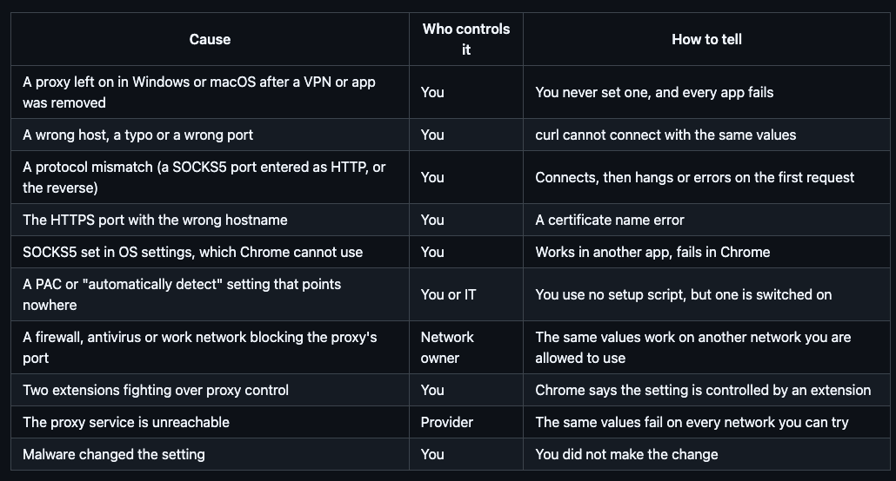
How to fix it, step by step
Do these in order, and try a page after each.
Step 1: Do you want a proxy at all?
If you did not mean to use one, go to how to turn off proxy settings below. A stale system proxy is a common cause. Stop here if turning it off fixed the page. If you did set one up, continue.
Step 2: Check the three values together
Host, port and protocol must be a matching set. For Evomi residential proxies:
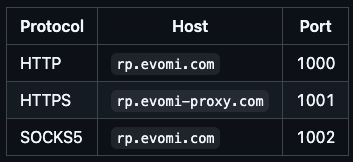
The dashboard's Proxy Generator produces these values. If you entered a SOCKS5 port as an HTTP proxy, or the reverse, the connection fails. Continue only if all three match.
Step 3: Port 1001 needs rp.evomi-proxy.com
The HTTPS endpoint uses the evomi-proxy.com domain, because that is what the TLS certificate covers. A client that verifies certificates rejects rp.evomi.com on port 1001. You do not need the HTTPS proxy for HTTPS websites: an HTTP proxy on 1000 carries them using CONNECT. Fix the hostname, or switch to port 1000. Never turn off certificate checks to make the error go away. Stop here if the certificate error was your symptom and the hostname fixed it.
Step 4: SOCKS5 in Chrome
Chrome's system-settings path does not support SOCKS5, according to Evomi's browser guide. Use HTTP on 1000, or an extension. See ZeroOmega and SwitchyOmega setup and Chrome proxy settings. Continue if you were not using SOCKS5 in Chrome.
Step 5: Test outside the browser with curl
This separates "cannot reach the proxy" from "the proxy answered":
curl -x http://rp.evomi.com:1000 -U USERNAME:PASSWORD https://ip.evomi.com/s
curl -x https://rp.evomi-proxy.com:1001 -U USERNAME:PASSWORD https://ip.evomi.com/s
curl -x socks5h://rp.evomi.com:1002 -U USERNAME:PASSWORD https://ip.evomi.com/s
Output of the failure cases from that run (trimmed):
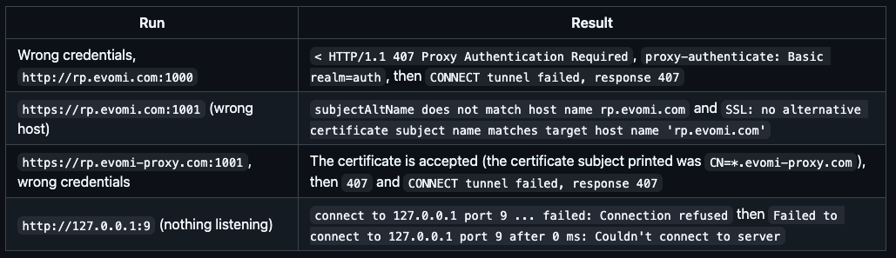
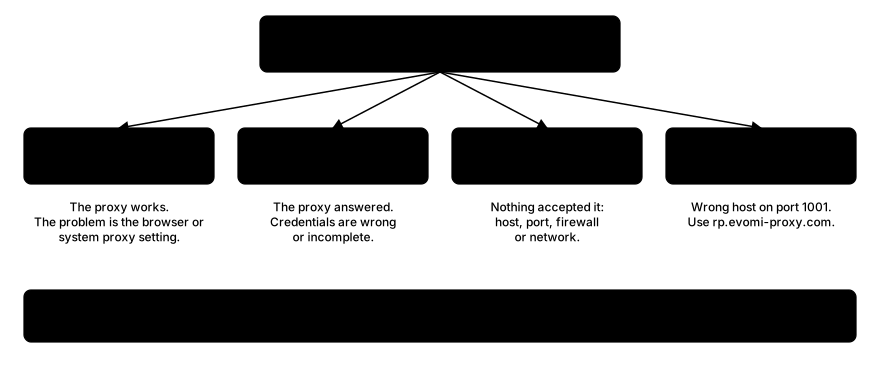
With valid credentials the first command prints your exit IP as plain text. Here is what each outcome means:
- An IP address means the proxy works, and the problem is the browser or system setting. Go to the section on turning proxy settings off, or recheck how the browser is configured.
407means the credentials are wrong or incomplete. The proxy answered, so this is not a connection failure.Failed to connector a timeout means a network, firewall or port problem. Go to step 6.- A certificate name error means the wrong host on 1001. Go back to step 3.
Step 6: Firewall, antivirus, or a work or school network
Ports 1000 to 1002 are not web ports, so some networks block them. Test on another network you are allowed to use, such as a home connection, or ask IT whether the port is open. The network's policy is for whoever runs it to decide.
Step 7: PAC and auto-detect
If you do not use a setup script, turn off Use setup script and Automatically detect settings on Windows, or Automatic proxy configuration on macOS. A script pointing at a server that no longer exists produces this error too. Continue if both were already off.
Step 8: Extensions
In Chrome, the proxy settings page says when an extension controls the proxy. Disable all but one proxy or VPN extension, or switch the extension to Direct. Two extensions cannot both own the setting. Continue if no extension controls the proxy.
Step 9: Reset WinHTTP (Windows apps and services)
Some Windows services use a separate proxy setting from the Settings app. In a command prompt, run:
netsh winhttp show proxyIf it shows an old proxy, run netsh winhttp reset proxy from an administrator prompt to clear it. If it shows no proxy, this step is not your problem. See Windows proxy settings for the difference between the two.
How to turn off proxy settings
Windows 11 and 10
- Open Settings › Network & internet › Proxy.
- Under Manual proxy setup, next to Use a proxy server, choose Set up (or Edit), turn Use a proxy server off, and choose Save.
- Under Automatic proxy setup, turn off Use setup script and Automatically detect settings.
Windows (legacy dialog)
- Press Win+R, type
inetcpl.cpland press Enter. - Open Connections › LAN settings.
- Untick Use a proxy server for your LAN.
macOS
- Open System Settings › Network and select your connection.
- Choose Details… › Proxies.
- Switch off every proxy type that is on, then choose OK.
Chrome
- Open Settings › System and choose Open your computer's proxy settings. This opens the operating system page above.
- If an extension controls the proxy, switch the extension to Direct or remove it.
Firefox
- Open Settings › General › Network Settings › Settings….
- Choose No proxy (or Use system proxy settings) and choose OK.
Android Wi-Fi
- Open the Wi-Fi network's settings and edit the network.
- Under Advanced options, set Proxy to None.
iPhone and iPad Wi-Fi
- Open Settings › Wi-Fi and tap the (i) next to your network.
- Tap Configure Proxy and choose Off.
Full guides: Windows, Chrome and Mac.
If your VPN says "cannot establish proxy connection"
Browser VPN extensions work through the browser's proxy setting, so this message means the extension could not reach its server. Try these:
- Turn the extension off and on, and sign in again.
- Disable other proxy or VPN extensions.
- Update it, or reinstall it from the official store.
- Check the provider's status page or contact their support.
If you see it with Evomi proxies
- Recheck the values from the dashboard's Proxy Generator.
- Paste the whole password string, including any
_country-USor_session-abc123part. - Authentication is by username and password only, so there is no IP allowlist setting to look for.
- Test with the proxy checker or the curl commands above. cURL with proxy has more.
- Match your app to its setup guide: FoxyProxy or ZeroOmega.
These are the residential hosts and ports. Mobile uses mp. hosts on 3000 to 3002, and datacenter uses dcp. hosts on 2000 to 2002. More background: common HTTP proxy errors.
If you suspect malware changed the setting, run your security software's full scan.
Related errors
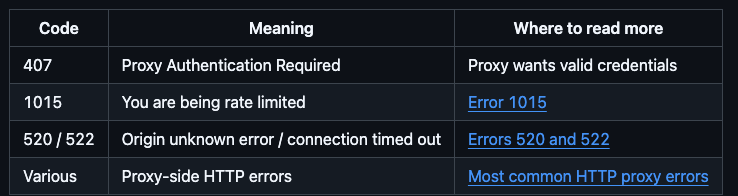
FAQ
Why does my VPN say cannot establish proxy connection?
Browser VPN extensions route traffic through the browser's proxy setting, and this message means the extension could not reach its own server. Toggle it off and on, sign in again, disable other proxy extensions, update or reinstall it, and check the provider's status page.
How do I fix a proxy error?
Work in order: confirm you want a proxy, check host, port and protocol match, test with curl, then look at firewalls, setup scripts and extensions. If you never meant to use a proxy, turn off the proxy in your system settings. Each step above says whether to stop or continue.
How can I fix proxy issues in Chrome?
Open Settings, then System, then "Open your computer's proxy settings", because Chrome uses the operating system's proxy. Turn off any manual proxy or setup script you do not need, and disable extensions that control the proxy. If you do use a proxy, make sure it is not SOCKS5, which system settings cannot use in Chrome.
How do I reset my Internet proxy?
Turn the proxy off in your system settings: Windows Settings › Network & internet › Proxy, or macOS System Settings › Network › Details › Proxies. For Windows apps and services, run netsh winhttp reset proxyfrom an administrator prompt. Then disable proxy extensions in your browser and reload.
What does "cannot establish proxy connection" mean?
It means a browser, app or VPN extension is set to use a proxy and could not open a connection to it. The site you wanted was never contacted. The cause is a wrong or stale proxy setting, a proxy server that is down, or a firewall or network blocking the path.
Wrapping Up
"Cannot establish proxy connection" nearly always comes down to two things: a proxy setting you forgot about, or host, port and protocol that do not match. Run the curl test to learn which, and use the turn-off lists when you never wanted a proxy at all.