
HTTP error 407 Proxy Authentication Required means a proxy refused your request because it didn't get valid credentials. The website never sees that request, so the fix is in your proxy setup.
Many tools don't print the 407 itself. Node's fetch shows only "fetch failed", and Playwright can report a navigation timeout. Java code can also get a 407 with the correct password, because by default the JDK doesn't send it through HTTPS tunnels.
This guide shows how to check whether the credentials or the tool is wrong, then the error message and fix for each tool.
TL;DR
- Test credentials outside your tool first. One curl request or Evomi's free proxy checker shows whether they work. If so, fix your tool.
- Evomi's 407 response body separates two causes. "Invalid proxy authorization format" means no usable credentials arrived. "Proxy Authentication Required" means they were wrong.
- Some tools don't send the password you set. By default, the JDK doesn't send it through HTTPS tunnels. Playwright ignores credentials in the
serverURL, and%41in a proxy URL arrives asA. - Track 407s separately and stop retrying them. By default, Scrapy sends an HTTPS request 3 times and pip 6 times.
How HTTP error 407 works
RFC 9110 defines 407 as the proxy equivalent of 401. The proxy names the authentication scheme it requires, such as Basic, NTLM, or Negotiate, in a Proxy-Authenticate header. The client then retries with credentials in a Proxy-Authorization header. A website usually returns 401 or 403 for its own login failures.
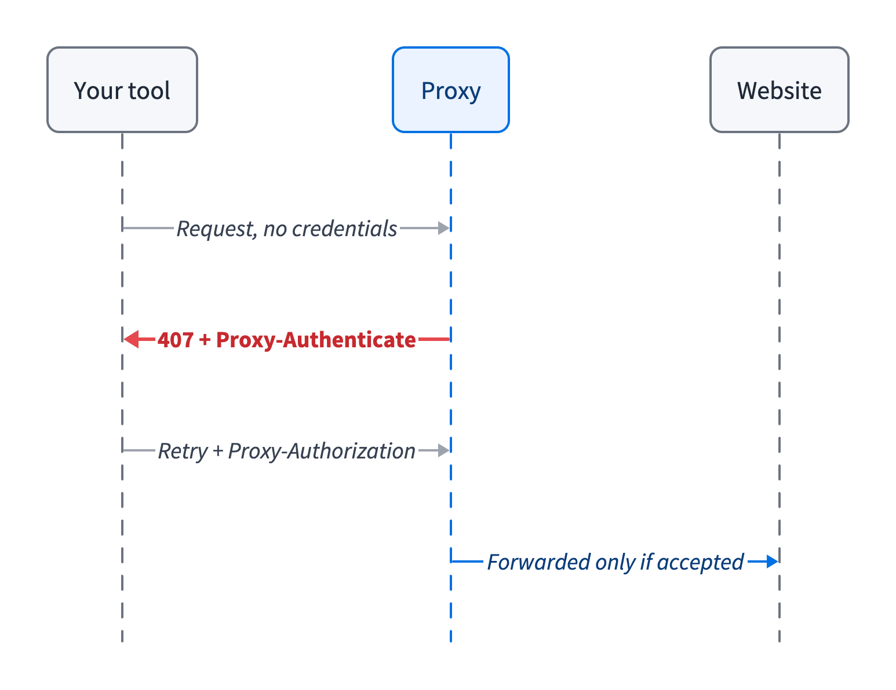
The 407 exchange happens between your tool and the proxy. The website receives the request only after the proxy accepts the credentials.
The error messages below are what each tool prints through Evomi's gateway, with long values shortened to .... A request without credentials gets this response:
HTTP/1.1 407 Proxy Authentication Required
proxy-authenticate: Basic realm=auth
proxy-connection: close
date: Mon, 26 Oct 2026 13:09:42 GMT
content-length: 34
content-type: text/plain; charset=utf-8

Invalid proxy authorization format
The gateway sends the response body "Invalid proxy authorization format" when no usable Basic credentials arrive, such as when the header is missing, the password is empty, or the base64 is invalid. Credentials that arrive but are wrong get the same status code with the body "Proxy Authentication Required". So the first body points to your tool, and the second to your username, password, or port.
Test the credentials outside your tool
One curl request tells you whether the proxy accepts your credentials. Point it at an HTTP site, so that curl prints the proxy's own response instead of a generic CONNECT tunnel error. Take the host and HTTP port from your product's Proxy Generator tab in the dashboard, or from its connection guide for Residential, Mobile, or Datacenter.
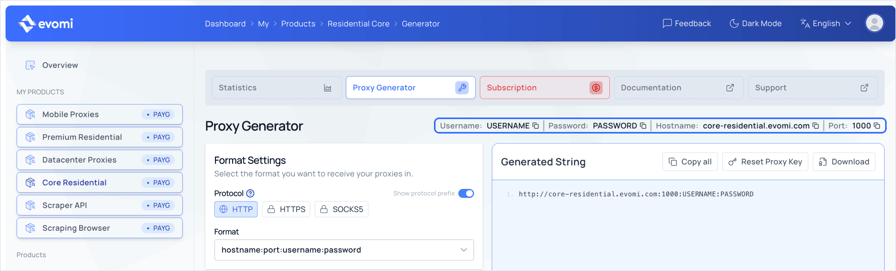
The Proxy Generator tab shows the username, password, hostname, and port that work together. The curl command below uses rp.evomi.com, which accepts both Core and Premium Residential credentials, and the hostname your Proxy Generator shows works the same way.
First, put the password in a shell variable for this session. If the password contains a %, type it as %25, because curl percent-decodes the value you pass to -U. The command waits for you to type it and press Enter, shows nothing while you type, and keeps the password out of your shell history:
read -rs PROXY_PASSThen send one request. The example uses the Residential endpoint, so change the host and port if you use another product. Replace USERNAME with your proxy username. tail -c 90 keeps only the last 90 bytes, which hold the status code and, for a 407, the whole response body:
curl -s -w '\n%{http_code}\n' -x http://rp.evomi.com:1000 \
  -U "USERNAME:$PROXY_PASS" http://example.com/ | tail -c 90
A wrong password prints:
Proxy Authentication Required
407
The output tells you what to do next:
Output | Meaning |
|---|---|
| No usable credentials arrived. Check that |
| The credentials arrived, but the username, password, or port is wrong |
| The credentials work, but a targeting value (424) or a session ID (400) in the password is wrong |
| The credentials work, so fix how your tool sends them |
Other proxies may not explain the 407 in the response body. With those proxies, add -v and read the < Proxy-Authenticate: line. If it lists NTLM or Negotiate but not Basic, the proxy won't accept the Basic credentials that -U sends by default. For the fix, see "407 on a corporate or school network" below.
Evomi's free proxy checker tests one proxy or several at once from a web page, so it also works on Windows without the shell commands above. Paste the string from the Proxy Generator as it is, with the http:// prefix, such as http://rp.evomi.com:1000:USERNAME:PASSWORD. If the proxy accepts the credentials, the checker shows the exit IP's location and anonymity level. If it rejects them, it shows "Auth failed", and if the proxy doesn't respond, it shows "Unreachable".
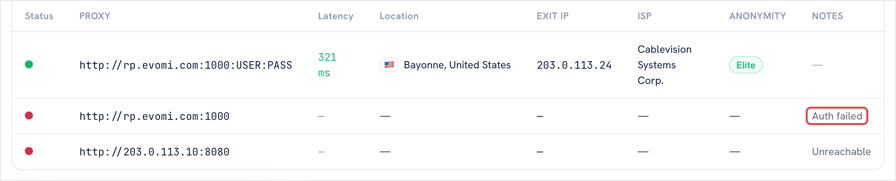
With credentials, the checker shows a US exit IP with Elite anonymity. Without them, the checker shows "Auth failed". The exit IP is masked.
Why you're seeing HTTP error 407
Start with the causes you control:
Cause | Who controls it | How to recognize it |
|---|---|---|
The client sent no usable credentials | You | Evomi response body "Invalid proxy authorization format" |
Wrong username or password | You | Evomi response body "Proxy Authentication Required" |
Credentials from a different product | You | Try them on the host and port of the product they came from |
A targeting parameter in the username instead of the password | You | The same credentials work without the parameter |
The password was reset, and a worker still has the old one | You | Worked before, fails on some or all workers |
Whitespace, | You | Works when typed, fails when read from a secret or |
Quotes around the password in a | You | Works in your shell and in Docker Compose, fails in |
| Your HTTP client | Fails only for passwords that contain a |
The proxy accepts only NTLM or Negotiate | IT team |
|
The JDK blocks Basic authentication for HTTPS tunnels | Java runtime | HTTP sites work, HTTPS sites return 407 |
Playwright ignores credentials in the | Playwright | HTTPS navigation times out, and HTTP sites return 407 |
The username, password, and port of each Evomi product belong together. Copy all three from that product's Proxy Generator tab in the dashboard.
When credentials worked before and fail now, check the credentials each worker receives before you check the code. A changed password may not be deployed to every worker yet. In Kubernetes, a Secret passed as an environment variable doesn't change in a running pod, so restart the pods after a rotation. To compare workers without printing the password, run printf %s "$PROXY_PASS" | sha256sum in each one.
A secret created with echo instead of printf ends in a \n that the proxy reads as part of the password. Recreate it with printf, or remove the trailing newline where your code reads it.
An old copy of the credentials in an environment variable or a tool's config can also override the one you fixed. These commands print the proxy that your shell, npm, git, and pip use, or null or nothing when none is set:
env | grep -i _proxy
npm config get https-proxy
git config --show-origin --get-all http.proxy
pip config list | grep -i proxy
When only some requests get a 407, compare how each worker and each retry builds the proxy URL.
The 407 error message and fix for each tool
The table shows what each tool prints when it sends a wrong password through Evomi's HTTP port, unless a cell says otherwise. For HTTPS sites, the proxy sends the 407 in reply to the client's CONNECT tunnel request. For HTTP sites, it arrives as a normal response, so several tools report no error:
Tool and version | HTTPS site, wrong password | HTTP site, wrong password |
|---|---|---|
curl 7.88.1 to 8.23.0 |
| Exit code 0, response body printed |
curl_cffi 0.17.0 (libcurl 8.23.0) |
| Status 407 |
Python requests 2.34.2 |
|
|
httpx 0.28.1 |
| Status 407 |
aiohttp 3.14.5 |
| Status 407 |
Scrapy 2.19.0 |
|
|
Node.js 24.22.1 and 26.12.1 |
| Same, because |
axios 1.20.0 |
| Same |
Go 1.27.0 |
| Status 407 |
Java 21 to 27 | Status 407 with a wrong or a correct password, because the JDK doesn't send the password |
|
Maven 3.10.0 |
| Maven Central uses HTTPS only |
Gradle 9.8.2 |
| Repositories use HTTPS by default |
PowerShell 7.6.8 (.NET 10.0.14) |
|
|
npm 11.12.1 and 12.2.1 |
| The registry uses HTTPS |
pip 26.2.1 |
| The index uses HTTPS |
uv 0.13.5 |
| The index uses HTTPS |
git 2.55.0 |
| Hosted remotes usually use HTTPS |
Playwright 1.64.1 (Chromium) |
| Status 407 |
Puppeteer 25.16.0 (Chrome 156) | Status 407 with a wrong password, | Same |
Selenium 4.51.0 (Chrome 156) | No password reaches the proxy, so a blank page and no exception. With the BiDi auth handler, | Same blank page and no exception |
The Python, Node.js, Java, and Playwright samples below read the credentials from the PROXY_USER and PROXY_PASS environment variables. In the same shell, run read -rs PROXY_PASS if you haven't yet, then export PROXY_USER=USERNAME PROXY_PASS, with your proxy username in place of USERNAME.
curl
The exit code curl returns for a 407 on an HTTPS site changed from 56 to 7 in 8.20.0, and Linux distributions can backport the change. For example, Ubuntu 26.04's curl shows version 8.18.0 but exits with 7. On an HTTP site, curl exits with 0, because the proxy returned a normal HTTP response. So in scripts, don't rely on the exit code. Add -fsS so that any status code of 400 or above fails the command. Also print the proxy's CONNECT status code next to the site's status code to see which one failed:
curl -fsS -o /dev/null -w 'proxy=%{http_connect} site=%{http_code}\n' \
  -x http://rp.evomi.com:1000 -U "USERNAME:$PROXY_PASS" https://ip.evomi.com/s
A wrong password prints proxy=407 site=000, and a 403 from the website prints proxy=200 site=403. Both fail the command, so read the proxy= value, not the exit code, to see whether the proxy or the website failed.
Evomi's TLS endpoint, https://rp.evomi-proxy.com:1001, encrypts the connection to the gateway, including the proxy credentials. To use it, set -x to that URL, as Evomi's cURL guide shows. Traffic to HTTPS sites is encrypted end to end on either port. The curl proxy authentication guide lists the other flags.
Python
The requests and httpx libraries raise an exception for HTTPS sites but return a normal 407 response for HTTP sites. Call raise_for_status() so that HTTP sites also raise an exception. Percent-encode the credentials before you put them in the URL, as Evomi's Python requests guide also shows:
import os
from urllib.parse import quote

import requests

user = quote(os.environ["PROXY_USER"], safe="")
password = quote(os.environ["PROXY_PASS"], safe="")
proxy = f"http://{user}:{password}@rp.evomi.com:1000"

resp = requests.get(
    "https://ip.evomi.com/s",
    proxies={"http": proxy, "https": proxy},
    timeout=30,
)
# An http:// target returns the 407 as a normal response, not an exception
resp.raise_for_status()
print(resp.text)
To also encrypt the credentials on the way to the gateway, set the proxy URL to Evomi's TLS endpoint, https://rp.evomi-proxy.com:1001. Both requests 2.34.2 and httpx 0.28.1 accept it.
In aiohttp, the ClientHttpProxyError message includes the full proxy URL, with the password, so the password appears in your logs if you log the error. Send the credentials in a Proxy-Authorization header instead. Since version 3.14, aiohttp.BasicAuth, the object behind the older proxy_auth= argument, raises a DeprecationWarning that points to the new helper. Build the header with encode_basic_auth():
import asyncio
import os

import aiohttp

async def main():
    auth = aiohttp.encode_basic_auth(
        os.environ["PROXY_USER"], os.environ["PROXY_PASS"]
    )
    async with aiohttp.ClientSession() as session:
        async with session.get(
            "https://ip.evomi.com/s",
            proxy="http://rp.evomi.com:1000",
            proxy_headers={"Proxy-Authorization": auth},
        ) as resp:
            print(resp.status, (await resp.text()).strip())

asyncio.run(main())
On aiohttp 3.13 and earlier, use aiohttp.BasicAuth(user, password).encode() instead of encode_basic_auth(). The error for a wrong password then shows only url='http://rp.evomi.com:1000'.
Scrapy
Scrapy reports a 407 for HTTPS sites as a TunnelError in the errback. For HTTP sites, the default HttpErrorMiddleware ignores the 407, and the crawl still ends with finish_reason: finished. To catch both, alert on the downloader/exception_type_count/scrapy.core.downloader.handlers.http11.TunnelError stat for HTTPS sites and the downloader/response_status_count/407 stat for HTTP sites.
Percent-encode the credentials in request.meta["proxy"], because Scrapy decodes them. Evomi's Scrapy guide sets that value for every request in a downloader middleware.
For HTTPS sites, Scrapy retries a failed CONNECT by default, but the retry can't succeed with the same credentials. Remove TunnelError from RETRY_EXCEPTIONS, the list of exceptions that Scrapy retries:
from scrapy.settings.default_settings import RETRY_EXCEPTIONS

custom_settings = {
    # A 407 tunnel failure does not succeed on retry with the same credentials
    "RETRY_EXCEPTIONS": [
        e for e in RETRY_EXCEPTIONS if "TunnelError" not in str(e)
    ],
}
The spider then sends 1 CONNECT request instead of 3. TunnelError is also raised for other CONNECT failures that a retry can fix, so handle those in the errback if you rely on retries for them.
Node.js
In Node's built-in fetch, a 407 appears as fetch failed, and the status code is only in the chain of causes. When fetch uses the proxy in HTTPS_PROXY and the password is wrong, the chain is fetch failed, then Request was cancelled., then Proxy response (407) !== 200 when HTTP Tunneling.
In Node 24 and 26, fetch ignores HTTPS_PROXY unless you set NODE_USE_ENV_PROXY=1 or pass --use-env-proxy. Without them, requests are sent directly from your own IP, with no error. A request to Evomi's IP check page, https://ip.evomi.com/s, shows which IP the site sees. Node 22 has both options from 22.21.0, according to the Node.js CLI docs.
From Node 24.14.0, http.setGlobalProxyFromEnv() in node:http enables the same proxy support in code, without an extra package. With any of these three options, the credentials come from the HTTPS_PROXY URL, so percent-encode them there.
When the proxy or its credentials change per request, use fetch and ProxyAgent from undici, the HTTP client that Node's built-in fetch uses, and log the innermost cause:
import { fetch, ProxyAgent } from "undici";

const credentials = `${process.env.PROXY_USER}:${process.env.PROXY_PASS}`;
const dispatcher = new ProxyAgent({
  uri: "http://rp.evomi.com:1000",
  token: `Basic ${Buffer.from(credentials).toString("base64")}`,
});

function rootCause(err) {
  while (err.cause) err = err.cause;
  return err;
}

try {
  const res = await fetch("https://ip.evomi.com/s", { dispatcher });
  console.log(await res.text());
} catch (err) {
  console.error(rootCause(err).message);
}
Node 24 bundles undici 7, so an undici 8 ProxyAgent passed to the global fetch fails with invalid onRequestStart method. Node 26 bundles undici 8, so the two match there. On either version, import both fetch and ProxyAgent from undici.
In axios 1.20.0, put the credentials in proxy.auth, as Evomi's Node.js guide does. The top-level auth option sets the Authorization header for the website, so the proxy receives no credentials and returns 407.
Java, Maven, and Gradle
The JDK has blocked Basic authentication for CONNECT tunnels by default since Java 8u111. Java 11 and 17 have the same default, and Java 21 to 27 still include jdk.http.auth.tunneling.disabledSchemes=Basic in the JDK's net.properties. With that default, HttpClient and HttpURLConnection return 407 on HTTPS sites even with correct credentials. Set the property to an empty value before the first client is created:
import java.net.*;
import java.net.http.*;

public class Fix {
  public static void main(String[] args) throws Exception {
    // Must run before the first HttpClient is created
    System.setProperty("jdk.http.auth.tunneling.disabledSchemes", "");

    String user = System.getenv("PROXY_USER");
    char[] pass = System.getenv("PROXY_PASS").toCharArray();
    HttpClient client = HttpClient.newBuilder()
        .proxy(ProxySelector.of(new InetSocketAddress("rp.evomi.com", 1000)))
        .authenticator(new Authenticator() {
          protected PasswordAuthentication getPasswordAuthentication() {
            return new PasswordAuthentication(user, pass);
          }
        })
        .build();

    URI target = URI.create("https://ip.evomi.com/s");
    HttpRequest req = HttpRequest.newBuilder(target).build();
    HttpResponse<String> res =
        client.send(req, HttpResponse.BodyHandlers.ofString());
    System.out.println(res.statusCode() + " " + res.body().trim());
  }
}
The program prints 200 and the exit IP. The JDK blocks Basic because Basic sends the password only base64-encoded, not encrypted. Change the property only for proxies you trust.
If you can't change the code, pass -Djdk.http.auth.tunneling.disabledSchemes="" on the command line instead. Clients with their own HTTP stack, such as OkHttp 5.5.1, don't read this setting and work without the change.
Maven 3.10.0 uses its own HTTP client, and so does Gradle 9.8.2 when it resolves dependencies, so this setting doesn't affect them. The Gradle wrapper (./gradlew) downloads Gradle with the JDK client, so that download gets a 407 even with correct credentials. Add systemProp.jdk.http.auth.tunneling.disabledSchemes= to gradle.properties to fix it. Otherwise, a 407 in Maven or Gradle usually means the proxy settings in settings.xml or gradle.properties are wrong.
Playwright, Puppeteer, and Selenium
Playwright 1.64.1 drops any credentials in its server URL and keeps only the protocol, host, and port. The proxy then receives no Proxy-Authorization header, and navigation to an HTTPS site times out. Pass the credentials in the separate username and password fields, as Evomi's Playwright guide also shows:
import { chromium } from "playwright";

const browser = await chromium.launch({
  proxy: {
    server: "http://rp.evomi.com:1000",
    username: process.env.PROXY_USER,
    password: process.env.PROXY_PASS,
  },
});
const page = await browser.newPage();
const res = await page.goto("https://ip.evomi.com/s");
console.log(res.status(), (await page.textContent("body")).trim());
await browser.close();
In Puppeteer, credentials inside --proxy-server fail with net::ERR_NO_SUPPORTED_PROXIES, because Chrome rejects them. Pass them with page.authenticate() instead, as Evomi's Puppeteer guide shows. A wrong password there doesn't throw. page.goto() resolves with a 407 response, and the page shows Chrome's "This page isn't working" error, so check res.status() after each navigation.
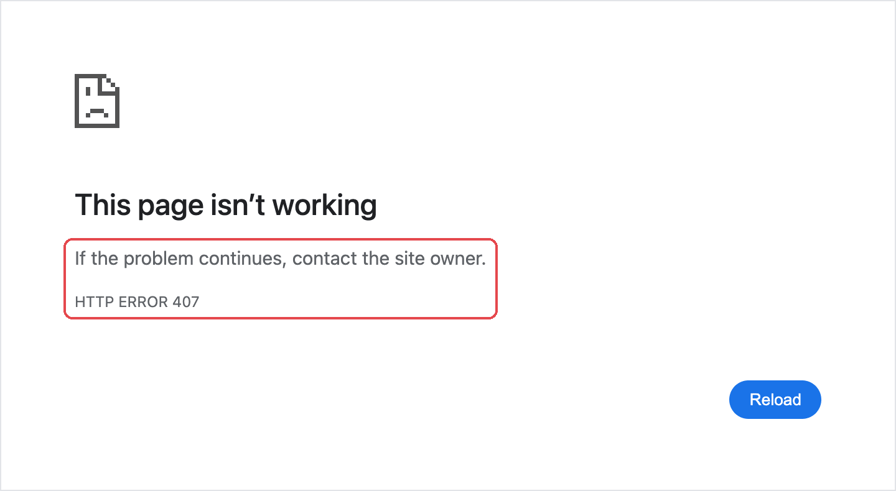
Chrome 156 shows this page when the proxy rejects the password from page.authenticate(). It says to contact the site owner, but the 407 came from the proxy, so the fix is in your credentials.
With Selenium and Chrome, a reliable fix is a local proxy that stores the credentials and forwards requests to the upstream proxy. The selenium-wire package is archived, and with Selenium 4.51.0 and Chrome 156, the WebDriver BiDi network.add_auth_handler() doesn't respond to the proxy's Proxy-Authenticate challenge. gost 3.3.2 works as that local proxy:
gost -L http://127.0.0.1:8899 -F "http://USERNAME:$PROXY_PASS@rp.evomi.com:1000"Start Chrome with --proxy-server=http://127.0.0.1:8899 and no credentials, then check the exit IP at https://ip.evomi.com/s. The same local proxy works for the JDK client and Playwright too. If your password has special characters, percent-encode them in the gost URL. Run gost only on a machine you control, because other local users can see its command line and use its listener.
Some local proxies connect directly to the website when the request to the upstream proxy fails, so the website sees your own IP address. Choose one that blocks the traffic instead, which is called failing closed. The gost setup above fails closed. With wrong credentials, your tool gets a 503 for an HTTP site and a failed connection for an HTTPS site, and the 407 appears only in gost's log.
Use the HTTP port for browsers, because Chromium can't authenticate to SOCKS5 proxies.
A 407 in a Chrome net log from chrome://net-export isn't always a failure. Chromium sends credentials only after the proxy returns a 407 with a Proxy-Authenticate header, so a 407 followed by 200 Connection established is the normal exchange. For HTTPS sites, DevTools doesn't show that first 407, because the CONNECT request to the proxy doesn't appear in its Network panel.
npm, pip, uv, and git
All four tools read the HTTPS_PROXY environment variable. If you export it for a scraper, they also use the proxy when they install packages or clone repositories in the same shell or container, which uses proxy bandwidth. Set it only for the scraper's own command, such as HTTPS_PROXY="http://USERNAME:$PROXY_PASS@rp.evomi.com:1000" python scraper.py. For Node.js fetch, also set NODE_USE_ENV_PROXY=1. If npm, uv, or git shows a 407, check the proxy they read with the config commands under "Why you're seeing HTTP error 407", then fix or unset it.
With pip, the 407 appears only in the retry warnings. Its final error says no matching distribution was found, so the 407 is easy to miss.
Stop retrying a 407 and track it separately
A retry can't fix a wrong password. With default settings, Scrapy sends the same failing HTTPS request 3 times and pip sends it 6 times. With Retry(total=3), urllib3 sends it 4 times.
Treat a 407 as a non-retryable error. Check for a 407 before your retry logic runs. For HTTPS sites, most clients raise a tunnel error instead of returning a status code. The error message differs between clients and versions, so add a test that checks your code detects it.
A 407 is a credential problem, not an outage, so it shouldn't trigger failover. If a crawler retries a 407 request through a fallback proxy, nobody notices the invalid credentials. Alert on the 407 instead.
In monitoring, track 407s as a separate metric from 403s and timeouts. Otherwise invalid credentials appear as a lower success rate that looks like the site is blocking you. Teams may then replace the proxies, even though the status code already shows the cause.
Special characters in proxy passwords
When a password is part of a URL, its special characters must be percent-encoded. In a proxy URL, an unencoded /, #, or ? causes a parse error in curl's -x option, requests, httpx, and aiohttp. An unencoded @ or space works in some clients and fails in others. The requests, httpx, and aiohttp libraries send these characters unchanged, and the proxy accepts the credentials. In curl's -x URL, the same password fails with Unsupported proxy syntax.
A % followed by two hex digits changes the password without any warning, because curl, requests, httpx, and aiohttp all percent-decode it. For example, p%41ss arrives at the proxy as pAss, even with curl's -U option.
Encode the password once, not twice, with quote(password, safe="") in Python or encodeURIComponent() in JavaScript. Evomi's targeting parameters, such as _country-US and _isp-comcast, pass through encoding unchanged.
407 on a corporate or school network
If you never configured a proxy yourself, the 407 usually comes from a proxy on your network, or from a proxy that a VPN app or browser extension set up. Sign in when the browser asks for your username and password, disable any VPN app or proxy extension you installed, and contact IT if the error continues.
Many corporate proxies require NTLM or Negotiate (Kerberos) instead of Basic. The npm and pip clients support only Basic, and from curl 8.20.0, NTLM is off unless the build turns it on, so run curl -V | grep NTLM before you rely on curl or git.
Ask IT for the supported setup, such as a port that accepts Basic or a local NTLM authenticating proxy they approve.
Errors that look like a 407
Each of these errors means the proxy accepted your credentials:
What you see | Cause | Fix |
|---|---|---|
| A targeting parameter value that doesn't exist, such as | Use a valid value, such as |
| A session ID in the wrong format | Use the format in Evomi's proxy sessions docs |
| The website you requested | Follow the site's own access rules |
On a company network, the company's own proxy can also return a 403 when its policy blocks the site. If a 403 has no headers from the site or its CDN, such as cf-ray, it more likely comes from that proxy.
If you can't connect to the proxy at all, see how to fix "cannot establish proxy connection". The most common HTTP proxy errors guide explains the other status codes.
Final thoughts
Before you change any code, test the credentials with the curl command above. If the proxy accepts the credentials and your tool still fails, check Java's jdk.http.auth.tunneling.disabledSchemes property, Playwright's server field, a % in the password, or an outdated proxy environment variable, such as HTTPS_PROXY.
In production, a 407 is a credential problem, so don't retry it and track it separately from 403s and timeouts. On any Evomi product, copy the username, password, and port from the same Proxy Generator tab, and read the 407 response body to see whether credentials arrived. For a new project, start with Evomi's residential proxies.
FAQ
What does 407 mean?
HTTP 407 Proxy Authentication Required means a proxy server refused the request because it didn't receive valid credentials. The website never sees the request. The proxy names the authentication scheme in a Proxy-Authenticate header, and the client can retry with credentials in a Proxy-Authorization header.
How do I fix error 407?
Test credentials outside your tool with one curl request or Evomi's free proxy checker. If they don't work, copy the username, password, and port from your provider's dashboard. If they work, fix your tool's setup. Encode special characters, and in Java, allow Basic for HTTPS tunnels on a trusted proxy.
What does network error 407 mean?
A network error 407 means a proxy on your network asked for a username and password, and your browser or app did not send valid ones. It often comes from a company, school, or VPN proxy. Sign in when asked, disable proxy extensions you installed, or ask your IT team for the correct proxy settings.
How can I fix the HTTP error 407 in Google Chrome?
By default, Chrome uses your operating system's proxy settings, so the 407 comes from the proxy set there or in an extension. Sign in when Chrome asks, check the proxy host and port in system settings, and disable unused proxy extensions. To use an authenticated proxy on purpose, follow Evomi's Chrome proxy guide.