
Cross-country ecommerce price monitoring can record a correct-looking price from the wrong market without any error. In our tests, a Shopify store served US dollar prices to correctly targeted UK and Australian proxies in all 11 sessions. A missing Accept-Language header caused it. Common Python HTTP libraries don't send one by default.
Also called international price monitoring, it helps pricing teams compare one product's price across markets and find regional promotions. Each wrong-market record skews that comparison.
This guide shows how stores choose the market, how to prove where each price came from, and what checks cost.
TL;DR
- Choose exit IPs by each store's localization method. Stores placed all 204 Evomi exit IPs in the requested country on default settings.
- Record each price's currency and detected country, then normalize tax and decimals. A UK request without Accept-Language passed the country check but got dollars.
- Give each country its own session, cookies, and headers. Sticky sessions and stored cookies each keep one market.
- Fetch the price, not the page. Catalog JSON used under 1 KB per product, and rendered pages up to 7.5 MB.
Find each store's localization method
A store that sells in several markets selects which market's price list applies before it renders a price. Across 20 retailers, tested from exit IPs in the US, Germany, the UK, and Japan, 7 localization methods set the market. Several stores combined 2 or more:
Localization method | Examples | Result for an exit IP in another country |
|---|---|---|
Exit IP at the same URL | ColourPop (Shopify Markets), Temu, Best Buy | Another market's currency, or HTTP 200 with a country selector |
Exit IP, then a redirect | Nike, Uniqlo, Shein, AliExpress | A redirect to the store for the exit IP's country |
URL path or domain | Apple, IKEA, sephora.de | The market in the URL, from every exit IP tested |
Path restricted by IP | SKIMS | A redirect to the path for the exit IP's country |
Stored cookie | The Shopify | The market saved from the first visit |
Explicit parameter | The Shopify | The requested market, from every exit IP tested |
Delivery location | Amazon.com | Another seller, extra shipping and import charges, a "cannot be shipped" notice, or a redirect to a local Amazon store |
ColourPop, SKIMS, and Amazon show how these methods combine on a product page.
How a Shopify Markets store sets the market
On ColourPop, the exit IP set the market unless a cookie, a form post, or a URL parameter chose another. One 3-piece lip set cost $42.00 from a US exit IP, £33.00 from a UK one, and AUD 63.00 from an Australian one. German and Japanese exit IPs got the US market in dollars.
The same product page through a US exit IP and a UK exit IP:
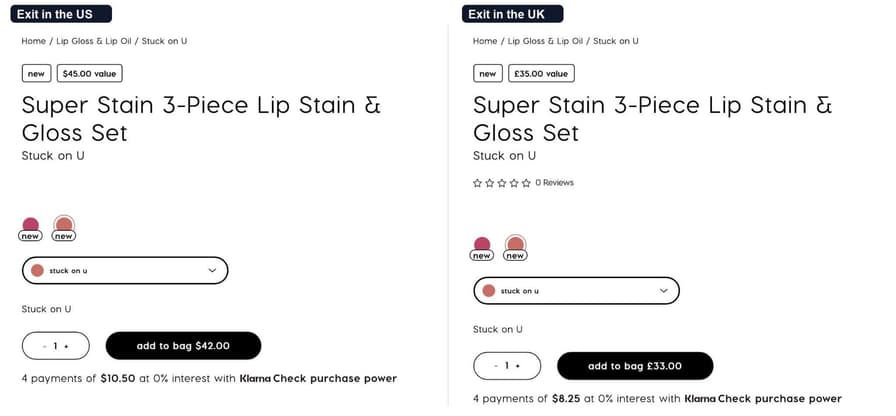
A US exit IP also got £33.00 through 3 other methods. They were a stored UK cookie, the localization form posted with country_code=GB, and ?country=GB on the product JSON endpoint. On stores with one-page checkout, a checkout restriction then switches the currency to match the shipping country.
An Accept-Language header enables local pricing. Without it, UK and Australian exit IPs got $42.00 in 11 of 11 new sessions, while the store's Server-Timing header still reported the right country. With any value, even de-DE or *, they got local prices in 20 of 20 sessions.
By default, curl, requests, and httpx send no Accept-Language, so send one that matches each market. The Evomi Scraper API and Scraping Browser set it from the exit IP's country automatically.
How a store with country paths redirects visitors
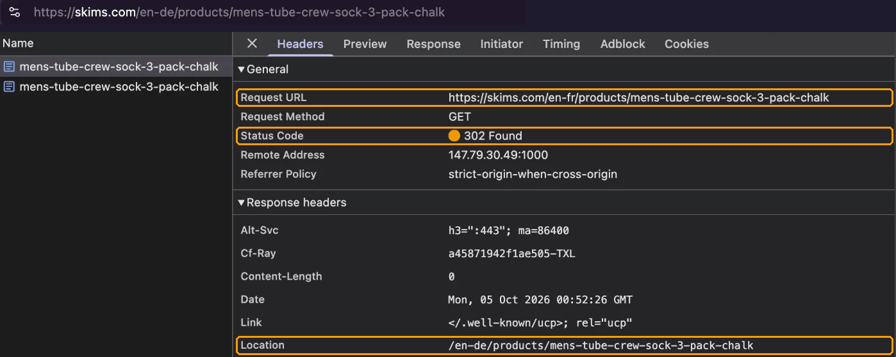
SKIMS priced one 3-pack of crew socks at $28 in its US store. Its /en-de, /en-gb, and /en-jp paths charged €36, £30, and ¥5,700. A US exit IP opened the German and Japanese paths, and the store redirected every other exit IP to its own country's path. In Chrome DevTools, a German exit IP's request for the French path returned a 302 to the German path:
How Amazon sets the offer by delivery country
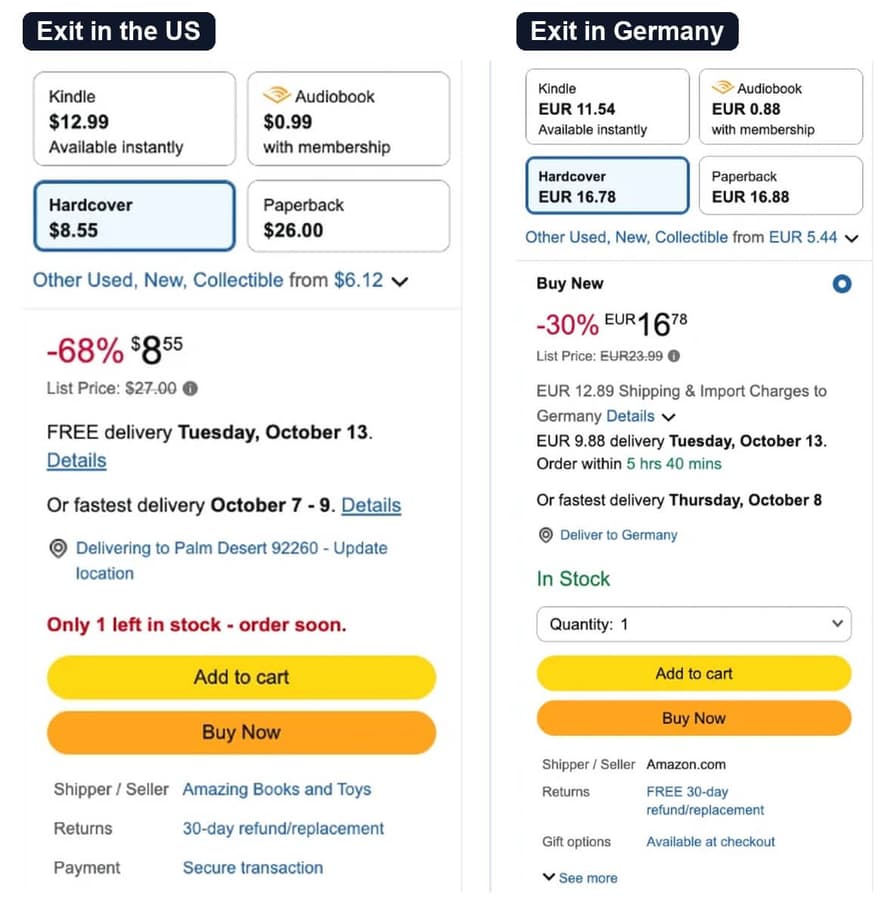
Through the Evomi Scraper API, the same amazon.com URL for a hardcover book showed a US exit IP a third-party seller at $8.55. German exit IPs got Amazon.com itself as the seller, at €16.77 plus €9.87 for delivery. A day later, the German buy box showed €16.78 plus €12.89 of shipping and import charges:
Amazon also changed which store it served. Its marketplace redirect (ref_=mr_direct_us_jp_jp) sent 3 of 10 Japanese requests for the same URL to amazon.co.jp, so record the final host with every price. Through one Japanese exit IP, the URL opened amazon.com on one visit and amazon.co.jp on another:
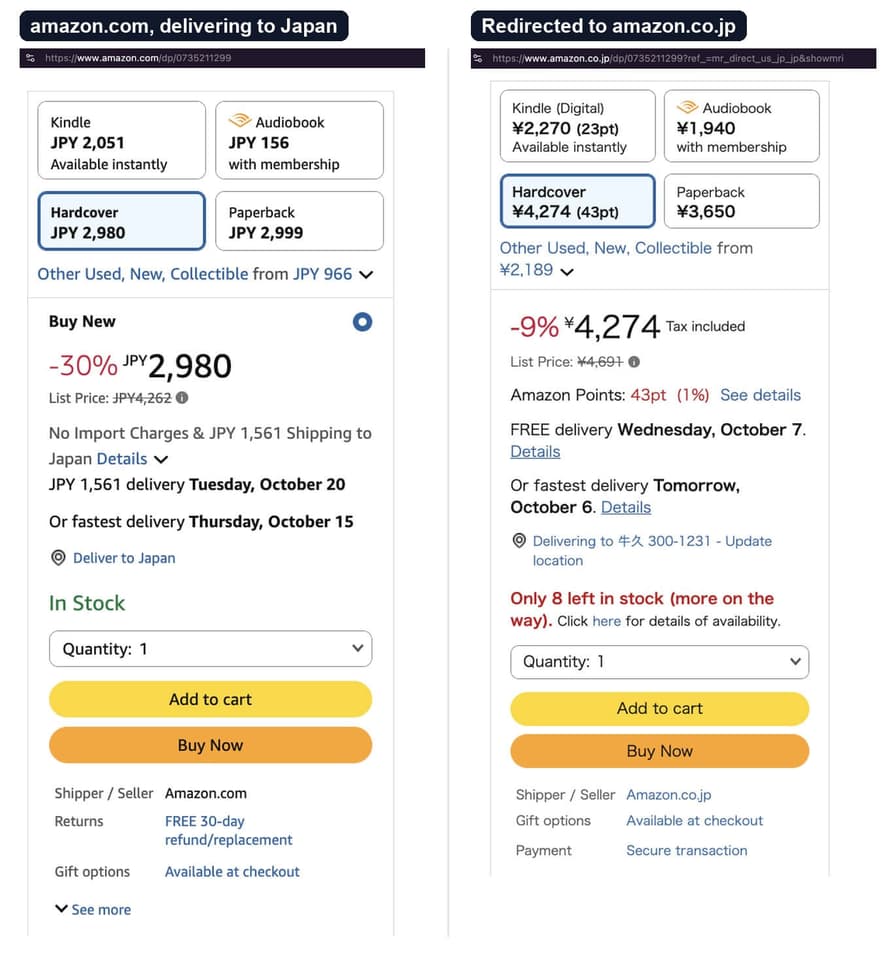
For a country's own Amazon price, use that country's marketplace. On amazon.co.jp, the hardcover cost a tax-inclusive ¥4,250 to ¥4,274. Amazon also picks a delivery postcode for you, so set it through Amazon's location selector when delivery terms matter.
Test the method before you choose a proxy plan
Request one country's prices from an exit IP in another country. If the store serves that market anyway, exit IPs in one country can get other markets. Spot-check them with a few exit IPs inside each market. If the store redirects or changes the price, each market needs exit IPs inside that country.
A store's JSON endpoint can use a different method than its HTML pages. On Glossier, German and Japanese exit IPs got the US price of $22 from the .js endpoint. With ?country=DE and ?country=JP, it returned €28 and ¥4,400.
To find a store's markets, start with the hreflang alternate links on a product page. Glossier listed 190 market URLs, while ColourPop and SKIMS listed none, so test those stores with an exit IP in each market.
Prove each price came from the right country
Geo-targeted price monitoring needs evidence of the market each price came from.
Where stores report the visitor's country
Look for the country in these places:
- Shopify storefronts returned
country;desc="GB"in theServer-Timingresponse header, on 6 of the 7 stores checked. - Sites behind Cloudflare returned
loc=GBfrom the/cdn-cgi/tracepath. - Akamai and Fastly sites set a geolocation cookie or header, such as Nike's
geoloccookie and Arc'teryx'sfastly-geoip-countrycodeheader. - Apple set a
geo=DEcookie on its home page. - Structured product data includes the currency, such as Amazon's
currencySymbol. Map each value to an ISO 4217 code.
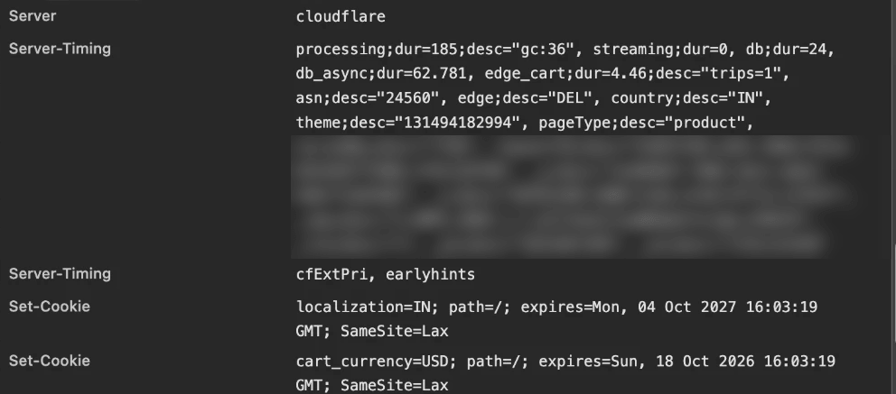
In Chrome DevTools, Server-Timing appears in the response headers. From India, ColourPop returned country IN and prices in USD:
How Evomi exit IPs matched the detected country
The same signals can audit a proxy pool. Each Evomi exit IP kept one sticky session and ran 6 lookups: ip-api, ipinfo, Cloudflare, Shopify's country suggestion, and the Nike and Apple cookies. Both pools used default settings:
Pool | Exit IPs across 17 countries | Exit IPs where all 6 lookups matched the requested country |
|---|---|---|
136 | 136 | |
68 | 68 |
Geolocation databases disagree on some IPs, so trust the store's detected country when they differ. Where a store follows another database, the Evomi _geosource- setting selects exit IPs by it.
Record the detected country with each price
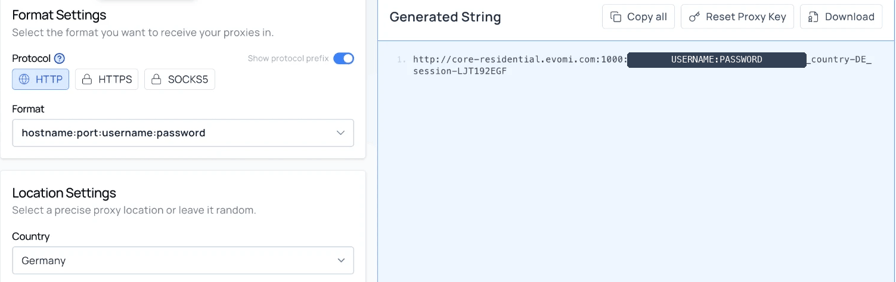
Evomi reads the country and the session as parameters added to the proxy password. The Proxy Generator in the Evomi dashboard builds the full string:
The examples need Python 3.9 or later and httpx 0.26 or later, installed with pip install "httpx>=0.26". They read credentials from the EVOMI_USER, EVOMI_PASS, and EVOMI_API_KEY environment variables.
The function below returns the store's detected country with the price. It also sends ?country=, because the JSON endpoints of some Shopify stores, such as Glossier and Alo, ignore the IP market:
import os
import random
import re
import string

import httpx

HOST = "core-residential.evomi.com:1000"  # from the Proxy Generator
USER, PASSWORD = os.environ["EVOMI_USER"], os.environ["EVOMI_PASS"]
LANGS = {"US": "en-US", "GB": "en-GB", "DE": "de-DE", "JP": "ja-JP"}  # one per market


def session_id(country: str) -> str:
    # A sticky session keeps its first exit IP, so each market gets its own
    tail = "".join(random.choices(string.ascii_lowercase + string.digits, k=8))
    return country.lower() + tail


def shopify_price(store: str, handle: str, country: str) -> dict:
    # Without Accept-Language, the tested store served its primary market
    headers = {"Accept-Language": LANGS.get(country, "en")}
    r = None
    for _ in range(3):  # retry a store rate limit or a network error on a new IP
        creds = f"{PASSWORD}_country-{country}_session-{session_id(country)}"
        proxy = f"http://{USER}:{creds}@{HOST}"
        try:
            with httpx.Client(proxy=proxy, headers=headers, timeout=30) as client:
                r = client.get(f"https://{store}/products/{handle}.json",
                               params={"country": country})  # some stores need it
        except httpx.TransportError:
            continue
        if r.status_code != 429:
            break
    if r is None:
        raise RuntimeError(f"no response for {store} in {country}")
    timing = r.headers.get("server-timing", "")
    seen = re.search(r'country;desc="([A-Z]{2})"', timing)
    record = {"requested": country, "status": r.status_code,
              "detected_country": seen.group(1) if seen else None,
              "product_found": False, "price": None, "currency": None}
    if r.status_code == 200:
        variant = r.json()["product"]["variants"][0]
        record.update(product_found=True, price=variant["price"],
                      currency=variant["price_currency"])
    return record


for country in ("US", "GB", "DE"):
    print(shopify_price("colourpop.com", "stuck-on-u", country))
It printed the same result on 2 runs:
{'requested': 'US', 'status': 200, 'detected_country': 'US', 'product_found': True, 'price': '42.00', 'currency': 'USD'}
{'requested': 'GB', 'status': 200, 'detected_country': 'GB', 'product_found': True, 'price': '33.00', 'currency': 'GBP'}
{'requested': 'DE', 'status': 200, 'detected_country': 'DE', 'product_found': True, 'price': '42.00', 'currency': 'USD'}
The German row is correct, because ColourPop priced Germany in US dollars. Without Accept-Language, a UK request also passed both checks but got $42.00 instead of £33.00. Record detected_country and currency with the requested country, the final URL, and a timestamp. If you expect pounds for the UK, the currency check catches it:

Stores can change or remove their country headers without notice, so alert when a store stops returning one.
Manage sessions, cookies, and rate limits per country
Multi-step price checks need sticky sessions, because a sticky session keeps one exit IP across requests. These 4 rules keep each request in its market.
Give each country its own sticky session. One session ID sent with _country-DE, then _country-FR, then _country-JP kept the same German IP, because the session holds its exit IP. Build each session ID from the country, as session_id() does. The Scraper API's proxy_session_id works the same way, with the format in its parameter reference.
Keep one cookie jar per country. A US exit IP with a cookie jar from a UK visit got £33.00, because the stored localization cookie took priority over the IP.
Build proxy credentials in code. Generate the country parameter from validated ISO codes, and check the detected country on each session's first request. The proxy rejected a too-short session ID with an explicit HTTP 400.
Retry an HTTP 429 on a new session. ColourPop answered some first requests from new exit IPs with HTTP 429 and the body local_rate_limited, so don't record a 429 as a missing price. After a first successful request, 8 of 8 exit IPs handled 30 product requests in a row with no 429. A monitor should reuse one session and connection per market, which also saves a TLS handshake on each request.
Read a whole Shopify catalog per market
Shopify stores provide their full catalog at /products.json, 250 products a page. The robots.txt files of all 7 Shopify stores checked allowed it. On ColourPop, all 1,048 products took 5 requests and 510 KB, and the catalog matched the product endpoint on 240 of 240 sampled requests. On 1 of 6 stores, the catalog returned 404 or a redirect, so request that store's products one at a time.
The catalog's variants have no currency field, and the store limited requests per IP on later pages. A new session gets a fresh IP right away. The function below handles both and stops on a 404 or redirect. It reuses the settings and session_id() from the first code block:
def market_client(country: str) -> httpx.Client:
    creds = f"{PASSWORD}_country-{country}_session-{session_id(country)}"
    return httpx.Client(proxy=f"http://{USER}:{creds}@{HOST}", timeout=30,
                        headers={"Accept-Language": LANGS.get(country, "en")})


def shopify_catalog(store: str, country: str, handle: str) -> dict:
    prices, seen, page, new_sessions = {}, set(), 1, 0
    client = market_client(country)
    while True:
        try:
            r = client.get(f"https://{store}/products.json",
                           params={"limit": 250, "page": page, "country": country})
        except httpx.TransportError:
            r = None
        if r is None or r.status_code == 429:  # switch to a new IP and retry the page
            if new_sessions == 10:
                raise RuntimeError(f"catalog incomplete at page {page}")
            client.close()
            client, new_sessions = market_client(country), new_sessions + 1
            continue
        r.raise_for_status()  # a 404 or redirect means no public catalog
        hit = re.search(r'country;desc="([A-Z]{2})"', r.headers.get("server-timing", ""))
        seen.add(hit.group(1) if hit else None)  # check every exit IP, not only the last
        products = r.json()["products"]
        if not products:
            break
        prices.update({p["handle"]: p["variants"][0]["price"] for p in products})
        page += 1
    # The catalog has no currency field, so get it from one product
    probe = client.get(f"https://{store}/products/{next(iter(prices))}.json",
                       params={"country": country})
    client.close()
    return {"requested": country, "detected_country": sorted(seen, key=str),
            "currency": probe.json()["product"]["variants"][0]["price_currency"],
            "products": len(prices), handle: prices.get(handle),
            "new_sessions": new_sessions}


for country in ("US", "GB"):
    print(shopify_catalog("colourpop.com", country, "stuck-on-u"))
Across 7 runs, each market returned all 1,048 products with the right detected country and currency, using 0 to 2 new sessions. Run 7 printed:
{'requested': 'US', 'detected_country': ['US'], 'currency': 'USD', 'products': 1048, 'stuck-on-u': '42.00', 'new_sessions': 2}
{'requested': 'GB', 'detected_country': ['GB'], 'currency': 'GBP', 'products': 1048, 'stuck-on-u': '33.00', 'new_sessions': 2}
Both functions use only the first variant of each product. On 3 of 5 stores, 7 to 11 first-page products priced their variants differently, so store each price by variant ID. A market that runs as a separate store, as Glossier's UK market did, has its own variant IDs. Match variants across stores by GTIN or by options such as shade and size.
Detect pages that return 200 with the wrong price
A basic monitoring script checks the status code and parses the first price it finds. That approach can record a wrong price in 6 ways:
- Challenge pages with a success code. To a plain HTTP client that impersonated Chrome, Amazon and Zara returned about 2 KB of challenge markup under HTTP 202 or 200. Through the Evomi Scraper API, amazon.com returned complete product pages.
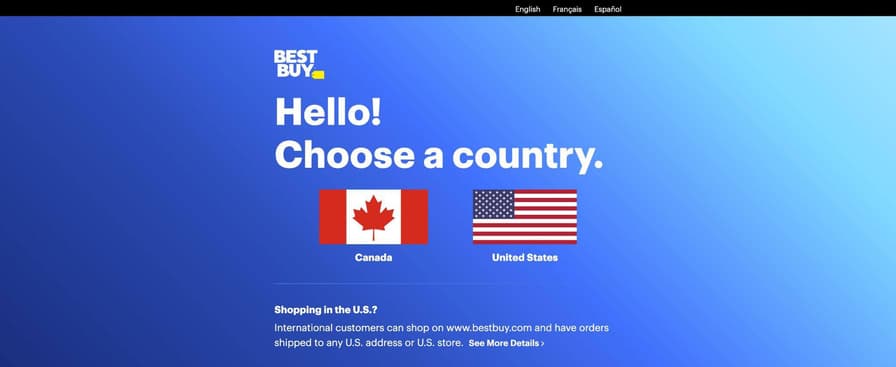
- Country selectors. Best Buy returned a 7 KB "Select your Country" page with HTTP 200 to non-US exit IPs. Its US product page was 516 KB.
- Products that can't be shipped. On the Kindle Paperwhite page from Germany, the first price belonged to an accessory carousel.
- Foreign prices on the right page. The ColourPop UK page showed a Klarna line reading "4 payments of $8.25" below a £33.00 add-to-bag button.
- Locale formatting. A French browser writes 1299 euros as
1 299,00 €, with a narrow no-break space that areplace(" ", "")cleanup misses. - Translated labels. A parser that looks for "In Stock" would miss the German Amazon page, which said "Auf Lager".
Best Buy returned this whole page to a German exit IP, with HTTP 200 and no product on it:
Read prices from structured data fields instead of page text. Use price with price_currency on Shopify, price with priceCurrency in JSON-LD, and priceAmount with currencySymbol on Amazon. Then classify every record before you save it:
def classify(record: dict, expected_currency: str) -> str:
    if record["status"] == 429:
        return "retry_new_session"  # store rate limit, not a missing price
    if not record["product_found"]:
        return "not_a_product_page"  # challenge, country selector, or redirect
    if record["detected_country"] and record["detected_country"] != record["requested"]:
        return "wrong_country"
    if record["price"] is None:
        return "unavailable_in_market"  # or a parser miss, so re-check it
    if record["currency"] != expected_currency:
        return "currency_mismatch"  # wrong market, or one priced in USD
    return "ok"
On 6 records from the tests, classify() passed the first and gave each of the other 5 its own label:
Shopify, GB exit IP                        ok
Shopify, GB exit IP, no Accept-Language    currency_mismatch
Shopify, FR request on a DE session        wrong_country
Shopify, store rate limit                  retry_new_session
Best Buy, DE exit IP                       not_a_product_page
Amazon Kindle Paperwhite, DE exit IP       unavailable_in_market
A status-code check would have passed 4 of the 5. For the currency check, set expected_currency per store and market by hand, because some stores price a market in another currency. ColourPop, for example, priced Germany in US dollars.
With ?country= sent from exit IPs in one country, the detected country is the exit IP's country. Judge those records by currency.
Counting prices per region misses these errors. Compare each price with the product's last price in that market, and re-check a change outside its usual range. Some bot managers can also serve a fake page with a realistic price, so re-check a small sample through the Scraping Browser.
Treat a 2xx response as a claim to verify: a price is valid only when the product, the market, and the currency are all correct.
Match the fingerprints a store checks
Through an HTTP CONNECT proxy, the store receives some connection layers from your client and some from the proxy's exit device. They matter when a store runs bot checks beyond IP geolocation. Start with a basic HTTP client, and match these layers for stores that challenge you:
Layer the store checks | Comes from | Measured result | What controls it |
|---|---|---|---|
TCP/IP handshake | The exit device | A public classifier identified each exit device's operating system | The Evomi TCP/IP device filter |
TLS (JA4 fingerprint) and HTTP/2 settings | Your client | Unchanged through the proxy, with | A browser-grade client |
IP geolocation | The exit IP | 204 of 204 exit IPs placed in the requested country |
|
Language, clock, and number format | Your client or browser | Matched the exit IP's country in the Scraping Browser |
|
When a CONNECT tunnel doesn't terminate TLS, it relays bytes, so TLS and HTTP/2 reach the store as your client sent them. The TCP connection starts at the exit device and uses that device's handshake:

So a Windows Chrome User-Agent fits best with an exit IP whose TCP fingerprint is also Windows. Add the _device-windows expert setting to select such exit IPs for stores that challenge your requests.
For browser work, the language, clock, and number format should match the market too. The Evomi Scraping Browser set all 3 from proxy_country automatically, so a German session got de-DE, Europe/Berlin, and 1.234.567,891. Override these defaults with language or timezone on the Scraping Browser URL when a market needs another value, such as a US West Coast clock.
Estimate the cost of cross-country ecommerce price monitoring
Evomi bills proxies by bandwidth, Scraper API calls in credits per request, and the Scraping Browser by browser time. The pricing page lists current rates, and the Scraper API docs list the credits per mode. For 10K SKUs in 10 countries checked daily, or 3M checks a month before retries, the measured sizes come to:
Source | Size per check (compressed) | Monthly volume for 3M checks | Scraper API mode |
|---|---|---|---|
Shopify catalog ( | 0.4 to 0.9 KB per product | 1.3 to 2.6 GB | Request, one call per 250 products |
Shopify product JSON ( | 4 to 11 KB with headers | 11 to 32 GB | Request |
Product HTML page | 129 to 267 KB | 387 to 801 GB | Request |
Page rendered in a browser | 3.7 to 7.5 MB | 11 to 22 TB, plus browser servers | Browser |
The catalog figure assumes your SKUs make up most of each catalog. Through the Scraper API, the same volume is 3M requests.
To compare raw bandwidth with an API request, divide the price of 1 request in your mode by the price of 1 GB. Pages below that break-even size cost less over raw proxies. Larger pages cost less through the API, which also runs the browsers for rendered pages.
Ad and tracker blocking in the Scraping Browser cut the SKIMS page from 3.69 MB to 1.07 MB, about 71% fewer bytes. The saving is largest on pages with many ads and trackers.
Choose the smallest response that contains the price. Start with a catalog or product endpoint, use an API request for large HTML, and render the page when the price needs a browser.
Make prices comparable across countries
Correct prices from different markets still aren't directly comparable. Make 6 adjustments:
- Tax-inclusive pricing. EU, UK, and Japanese prices include VAT or consumption tax, and US prices don't. Cross-border offers, such as Amazon.com's, can exclude local tax too, so record whether each price includes tax.
- Exchange rate. Convert with a published reference rate, and keep the rate's date. ColourPop's UK and Australian prices ran 2.9% and 4.1% above a conversion at the store's own rate.
- Minor units. Shopify's
.jsendpoint returned every currency in hundredths, including yen: £33.00 came back as3300, and ¥4,400 as440000. Divide those prices by 100, then round to the currency's decimal places in ISO 4217. Amazon's data held 2967.37 for ¥2,967, so round it to 0 decimals. - Currency fluctuation. Converted prices changed overnight while the US offer stayed at $8.55, so give converted prices a tolerance before you alert on a change. Overnight changes stayed under 0.5%.
- Landed cost. Shipping and import charges can be larger than the price difference. The Japanese Amazon page added ¥1,554 of shipping to a ¥2,967 book.
- Seller and product match. The same URL showed different sellers in different markets, so record the seller and match products by GTIN. Shopify's
.jsendpoint carries it in the variantbarcodefield, and a check-digit test filters out codes that aren't GTINs.
EU discounts need one more step. An EU store that announces a reduction must show its lowest price from the previous 30 days. In 2024, the EU Court of Justice ruled that the advertised percentage must use that price, so compute discounts from your own price history.
A public scraper collects the guest price. Member and app-only prices need an account or the app, so compare guest prices only with guest prices.
Save every record exactly as the store returned it, and run conversions in a separate, versioned step. The Scraper API can send each raw result straight to an S3, Google Cloud Storage, or Azure Blob bucket through cloud storage delivery.
Choose a cross-country price monitoring setup per store
Each row names the Evomi product for one type of store and the settings that matter:
The store | Collection method | Settings that matter |
|---|---|---|
Sets the market by IP and has a JSON endpoint, such as Shopify Markets | Core Residential proxies and an HTTP client |
|
Sets the market by IP or redirect, with the price in HTML | Core Residential in each country, or the Scraper API for large pages |
|
Accepts an explicit market parameter | Core Residential from a single country, plus local spot checks | The market parameter on every request |
Prices by delivery location, such as Amazon (scraping Amazon pricing) | Scraper API in request mode | The country's own marketplace, |
Renders the price in the browser | Scraping Browser, or Scraper API browser mode |
|
Checks the TCP/IP fingerprint | Core Residential with | A device filter that matches your User-Agent |
Needs a different IP pool | Premium Residential or Mobile proxies | The same session and header rules |
Core Residential worked for every store priced, and Premium Residential and Mobile proxies add other IP pools for stores that need them.
The Scraper API can also return the store's response headers, including its detected country, next to the price:
import json
import os
import re
import time

import httpx

API = "https://scrape.evomi.com/api/v1/scraper"
HEADERS = {"x-api-key": os.environ["EVOMI_API_KEY"]}

resp = httpx.post(
    f"{API}/realtime",
    headers=HEADERS,
    json={
        "url": "https://colourpop.com/products/stuck-on-u.js",
        "mode": "request",
        "proxy_country": "GB",  # the default is US, so always set it
        "delivery": "json",
        "include_content": True,
        "capture_headers": True,
    },
    timeout=120,
).json()
task = resp.get("task_id")
while resp.get("status") in ("pending", "processing"):  # a long call continues as a task
    time.sleep(3)
    resp = httpx.get(f"{API}/tasks/{task}", headers=HEADERS, timeout=60).json()
if resp.get("status_code") != 200:  # the store's own status, such as a challenge page
    raise SystemExit(f"store returned {resp.get('status_code')}")

timing = resp["headers"]["response_headers"].get("server-timing", "")
seen = re.search(r'country;desc="([A-Z]{2})"', timing)
print(resp["credits_used"], seen.group(1) if seen else None,
      json.loads(resp["content"])["price"])
The call printed its credit cost, the detected country, and the UK price in pence:
2.0 GB 3300The API sets Accept-Language from proxy_country automatically. The docs list US as the default country, so set proxy_country and mode on every call.
Before a market goes live, check a few of its exit IPs with the free Evomi proxy checker and IP geolocation lookup. Then check the store's detected country for the same exit IPs.
Final thoughts
Cross-country ecommerce price monitoring needs proof of the market behind each price, because wrong-market prices look valid. The exit IP sets the request's country, and the store's detected country and currency show which market the store applied.
Your setup depends mainly on each store's localization method, from exit IPs inside every market to one parameter checked with local exit IPs. For Amazon's challenge pages and for prices rendered in the browser, the Evomi Scraper API and Scraping Browser handle the collection. To monitor competitor prices in different countries, start with 10 targets and request their prices through Evomi Core Residential proxies, one session per country.
FAQ
What does price monitoring mean?
Price monitoring means collecting competitors' product prices on a schedule and tracking how they change. Cross-country price monitoring repeats this for each market and records the price, currency, and availability that local shoppers see. Teams use it to compare markets and find regional promotions.
How to track competitor pricing?
Get each product's price from structured data, such as a JSON endpoint or JSON-LD, through an exit IP in the shopper's country. Record the store's detected country, currency, and seller with each price, then validate the record. On 6 test records, validation flagged all 5 wrong ones, while a status check passed 4.
Can you give me an example of geographic pricing?
SKIMS priced one 3-pack of crew socks at $28 in the US, €36 in Germany, £30 in the UK, and ¥5,700 in Japan. It also sent visitors from Germany, the UK, and Japan to their own country's store. Its foreign pages said duties and taxes were included, so remove tax before you compare them with the US price.
Can websites detect scraping?
Yes. Sites can check IP reputation, TLS and HTTP/2 fingerprints, the TCP/IP handshake, headers, cookies, request patterns, and whether these match. A TCP/IP classifier can flag a connection whose operating system doesn't match the User-Agent. Evomi's device filter selects exit IPs with a matching operating system.
Why do online prices differ by country?
Many stores set a price list per market, and the price shown can also include local taxes, duties, shipping, conversion fees, and rounding. ColourPop priced a 3-piece lip set at $42.00 in the US, £33.00 in the UK, and AUD 63.00 in Australia. Compare net, delivered prices before you call a price difference a markup.
Does Amazon show different prices by country?
Yes. Each Amazon marketplace sets its own prices, and amazon.com also changes its offer by delivery country. For one book, amazon.com showed a third-party seller at $8.55 in the US, and Amazon itself at €16.77 plus delivery in Germany. On amazon.co.jp, it cost a tax-inclusive ¥4,250 to ¥4,274.
What are the best proxies for price monitoring?
Geo-targeted residential proxies with sticky sessions work best for stores that set the market by the visitor's IP. Cloudflare, Akamai, Apple, and Shopify placed all 136 tested Evomi Core Residential exit IPs in the requested country, on default settings. For Amazon's bot challenges, use the Evomi Scraper API.
Is price scraping legal?
Many businesses collect publicly displayed prices, but whether it's lawful depends on the jurisdiction, the site's terms, and your method. Stay on public pages, and skip personal data and anything behind a login. Keep request rates low, and have a lawyer review your use case before you scale.