
You are sampling a public pricing page and need to know whether consecutive requests leave from different IPs. Or you are halfway through a multi-step checkout in a test environment, and the site forgets you because your exit IP changed between steps. Both come down to one setting: whether your IP rotates or sticks. That setting is what this guide is about.
Rotating proxies send your requests out through a different IP address each time, or hold one IP for a set time with a sticky session. Here is how rotation works at a residential proxy gateway, when you need each mode, and what it does to cost. The session parameters below come from Evomi's docs, and a short script at the end lets you check the behaviour on your own connection.
What Is a Rotating Proxy?
A rotating proxy changes the exit IP that the destination sees, either on every request or after a set time. Your tools talk to one address, and the service decides which IP each request leaves from.
With rotating residential proxies, the exit IPs are consumer internet connections, the kind a household has. With rotating datacenter proxies, the exits come from servers in data centers instead. The mechanism is identical; only the origin of the IPs differs.
Rotation has two modes:
- Per-request rotation. Each request gets a fresh exit IP. This is the default at most gateways, including Evomi's.
- Sticky sessions. You ask the gateway to hold one IP for a period of time, so a sequence of requests looks like one visitor.
The rest of this post is about telling those modes apart and picking the right one.
How IP Rotation Works at a Proxy Gateway
You don't get a list of IPs. You connect to one host and port, for example rp.evomi.com:1000, and the gateway behind it picks an exit for each request. Evomi's default is a new IP on every request (sessions docs).
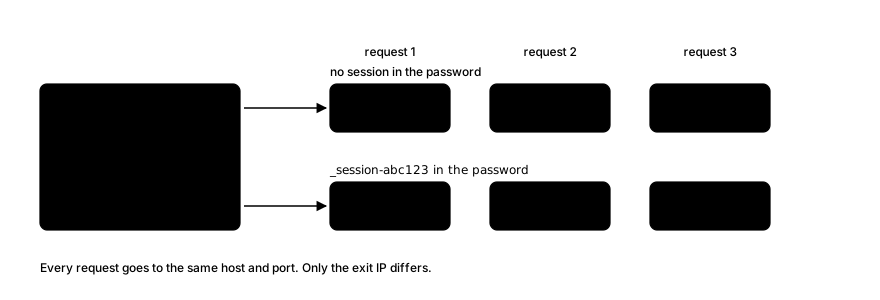
In the diagram, requests 1, 2 and 3 all go to the same gateway. With no session they leave through exits A, B and C. With _session-abc123 in the password they all leave through exit A.
The website sees only the exit IP, not the gateway. This is why the address you type and the IP a site sees are different things, a point covered in how to find your proxy server address.
The pattern, one front door and many exits, has a name: a backconnect proxy. What a backconnect proxy iswalks through it in more detail.
Rotating vs Sticky Sessions
You control the mode by appending a parameter to your password. Login is username and password only. Here is what each mode does, in the wording of the Evomi docs:
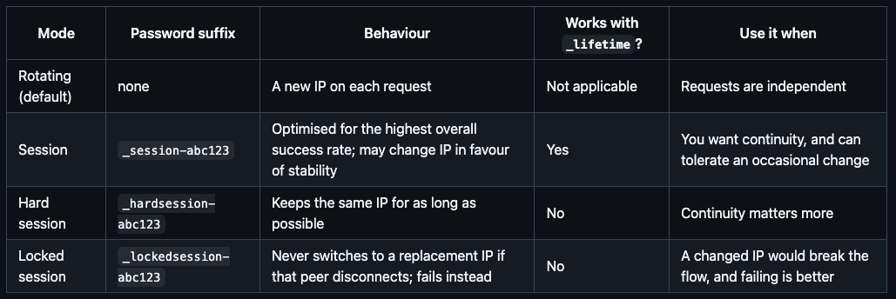
The session ID is 6 to 10 alphanumeric characters that you make up. Reuse the same ID to stay on the same session; use a new ID for a new one.
The three sticky modes differ in what they do when the underlying IP, a real person's connection, goes away:
_session-may quietly swap in a different IP to keep the session working._hardsession-holds the IP as long as it can._lockedsession-never swaps. If that peer goes offline, the request fails rather than getting a new IP.
That last distinction is the one most guides skip. Pick _lockedsession- when a silent IP change would corrupt your results, and accept that you will see errors instead.
Lifetime
_session- works with _lifetime-<minutes>. The default is 30 minutes and the maximum is 1440 (24 hours). A value above the maximum returns an HTTP 412 error. _hardsession- and _lockedsession-take no lifetime.
Here is one curl example per mode, with placeholder credentials:
# Rotating (default): new IP each request
curl -x http://rp.evomi.com:1000 -U "USERNAME:PASSWORD_country-US" https://ip.evomi.com/s

# Session, 10-minute lifetime
curl -x http://rp.evomi.com:1000 -U "USERNAME:PASSWORD_country-US_session-abc123_lifetime-10" https://ip.evomi.com/s

# Hard session
curl -x http://rp.evomi.com:1000 -U "USERNAME:PASSWORD_country-US_hardsession-abc123" https://ip.evomi.com/s

# Locked session
curl -x http://rp.evomi.com:1000 -U "USERNAME:PASSWORD_country-US_lockedsession-abc123" https://ip.evomi.com/s
Geo or ISP targeting applies to the first request of a session. Later requests in that session keep their IP, even if you change the targeting. If you need a different location, start a new session ID. The Session Rotation API can force a new IP for an existing session ID.
When to Use Rotation and When to Use a Sticky Session
The deciding question is whether your requests have state.
Use a sticky session when requests belong together:
- logged-in sessions on accounts you own or are authorised to use
- carts and checkouts in QA
- multi-step forms
- paginated flows that expect one visitor throughout
Use rotation when requests are independent of each other:
- spreading load across exits while collecting public data within a site's terms
- sampling prices or search results as seen from many locations
- checking how ads or content appear by geography
Rotation does not change what a site's rules allow. It is not a response to a 429 or a CAPTCHA. If a site tells you to slow down, honour Retry-After, back off, lower your concurrency, and check its robots.txt and terms. For a scraping-specific look at rotation, see boosting web scraping with rotating proxies.
Test It Yourself: Rotating vs Sticky in 20 Requests
You can check all of this in a few minutes. The method: ten requests with no session, then ten with a session ID, and count the unique IPs in each.
Set your credentials as environment variables so they stay out of your shell history, then run:
export EVOMI_USER=USERNAME
export EVOMI_PASS=PASSWORD

echo "--- rotating (no session) ---"
for i in $(seq 1 10); do
  curl -s -x http://rp.evomi.com:1000 -U "$EVOMI_USER:$EVOMI_PASS" https://ip.evomi.com/s
  echo
done | tee rotating.txt

SID=$(LC_ALL=C tr -dc 'a-z0-9' </dev/urandom | head -c 8)
echo "--- sticky (_session-$SID) ---"
for i in $(seq 1 10); do
  curl -s -x http://rp.evomi.com:1000 -U "$EVOMI_USER:${EVOMI_PASS}_session-$SID" https://ip.evomi.com/s
  echo
done | tee sticky.txt

echo "unique IPs, rotating: $(sort -u rotating.txt | grep -c .)"
echo "unique IPs, sticky:   $(sort -u sticky.txt | grep -c .)"
This post doesn't include measured results, so the expectations below come from the documented behaviour. Here is how to read what you get:
- Rotating arm: the default is a new IP per request, so you should see several different addresses. The count is rarely exactly ten, and it isn't a measure of pool size; the same exit can be picked twice.
- Sticky arm: a
_session-ID should return the same address for all or most requests. Because_session-may change the IP in favour of stability, a different address partway through is within the documented behaviour. If you need zero changes, repeat the test with_hardsession-or_lockedsession-.
Results vary by moment and location, and one run of ten proves little. Repeat it a few times, and record the date, your location, the Evomi product and your curl --version if you want to compare runs. Replace real exit IPs with 203.0.113.x before you share the output.
Rotating Residential, Mobile and Datacenter Proxies
Evomi's three rotating products share the same session parameters. They differ in where the exits come from.
Residential exits are consumer internet connections. Evomi's Core Residential pool is 54M+ ethically sourced residential IPs across 195+ countries (residential proxies; for the concept, see what is a residential proxy).
Mobile exits are carrier connections, 3M+ mobile IPs on 3G, 4G and 5G (mobile proxies). They fit work that has to be seen from a phone network.
Datacenter exits come from servers in data centers (datacenter proxies). Sites can identify that kind of address as hosting infrastructure, which matters for some jobs and not for others.
Static Residential does not rotate. You choose a fixed IP by prefixing it to your password, and the product takes no geo or session parameters. It fits jobs that need one consistent address over time (Static Residential). For what "dedicated", "static" and "rotating" each mean, see dedicated proxy vs shared, private and virgin proxies.
How Much Do Rotating Proxies Cost?
Rotating residential, mobile and datacenter proxies are generally billed by traffic. The detail that surprises people is the minimum: Evomi bills a 512-byte minimum per request on those products. A request that transfers 200 bytes is counted as 512. So very small, very frequent requests cost more than their size suggests, and ten thousand tiny pings cost more than ten thousand times their payload.
Static Residential is billed differently: per IP, with unlimited bandwidth.
Prices are on the pricing page.
Is there a free rotating proxy? Free proxy lists exist, but you don't know who runs them or what they log. Don't send credentials or anything private through one.
How to Choose a Rotating Proxy Service
This is a list of criteria, not a ranking. Ask any provider:
- IP sourcing. How are the IPs obtained, and does the provider publish that?
- Geo targeting depth. Country, region, city, ASN?
- Session controls. What lengths and behaviours are available, and are they documented?
- Protocols. HTTP, HTTPS and SOCKS5?
- Billing unit and minimums. Per GB? Is there a per-request minimum?
- Documentation. Can you reproduce its claims yourself?
- Acceptable-use rules. What is allowed, and what happens if you break them?
FAQ
What does a rotating proxy do?
A rotating proxy changes the IP address that websites see, either on every request or after a set time. You connect to one gateway address and the service picks the exit IP behind it. You can leave that on its default, a new IP per request, or ask for a sticky session.
Is there a free rotating proxy available?
Free rotating proxies exist, but they are a poor trade. Their operators are unknown, may log or alter what you send, and the service is often slow or unreliable. For logins or private data, use a provider with documented terms.
How much does a rotating IP proxy cost?
Rotating proxies are usually billed by traffic. Evomi counts at least 512 bytes for every request on residential, mobile and datacenter, so many tiny requests add up. Static Residential is billed per IP with unlimited bandwidth. For current prices, see the pricing page.
What is proxy rotation?
Proxy rotation means changing the exit IP your requests use, per request or at intervals. At a gateway the provider does it for you. With a sticky session such as _session-abc123, you ask the gateway to keep one IP for the lifetime you set, 30 minutes by default, though it may change IP for stability.
Which rotating proxy is the best?
There is no single best. It depends on what you need to do. Compare providers on how they source IPs, geo targeting, session controls, protocols, billing and minimums, documentation and acceptable-use rules. Then test with a small run, like the 20-request test above, before committing to anything.
Wrapping Up
Rotation happens at the gateway: you connect to one address, and the exit IP changes per request unless you ask for a session. The difference that matters is between _session- (may swap IP for stability), _hardsession- (holds the IP as long as it can) and _lockedsession- (never swaps, fails instead).
Pick sticky when requests share state and rotation when they don't. The 20-request test shows the difference on your own connection. To try it, see Evomi residential proxies.