A page loads in Firefox but not in Chrome. Or curl works in one terminal and times out in another. Somewhere a proxy is involved, and nobody remembers which one. Before you can fix anything you need to know what the machine is actually pointed at.
A proxy server address is the host and port your traffic is sent through, like rp.evomi.com:1000. This guide shows how to find the proxy address your computer, phone or browser is set to use, and where to get one from a proxy provider if you don't have one yet.
What Is a Proxy Server Address?
A note on testing: the macOS and environment-variable output below was captured on 14 October 2026. Windows output is labelled as its typical shape, and menu labels follow each vendor's documentation, so check them on your version.
A proxy server address is two things joined by a colon: a host (a hostname or an IP address) and a port (a number). The host picks the machine. The port picks the service on it. Some tools also want a protocol and a login, but the address itself is host plus port.

The proxy hostname is just the host part: rp.evomi.com in the first row. If you are not sure why a port is there at all, or what 8080 or 3128 mean, see what a proxy port is.
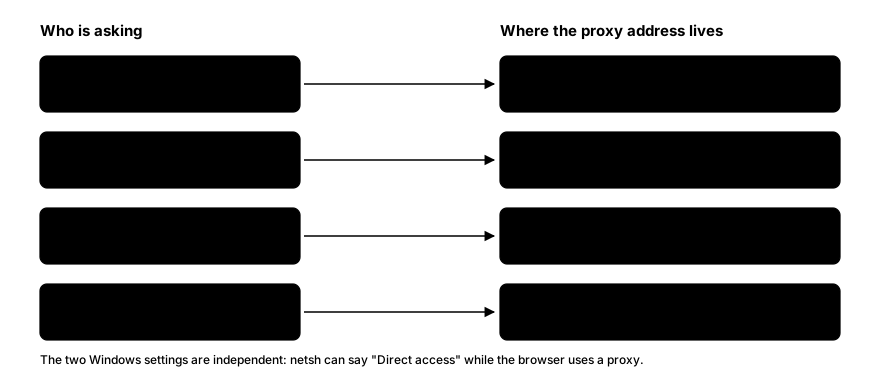
Where the address lives depends on who is reading it: the operating system, Firefox, command-line tools and PAC scripts each hold their own. The rest of this post walks through each place. (In Microsoft Exchange and Entra ID, proxyAddresses is an email-alias attribute, unrelated to network proxies.)
Proxy Address vs Your IP Address
These get confused constantly. "What is my IP" sites show the address websites see when you visit. If you use a proxy, that is the proxy's exit IP, not the address you typed into your settings.
With a gateway proxy like Evomi's, the two differ. You type rp.evomi.com and port 1000. The site sees an exit IP chosen by the gateway, and by default that exit IP changes on every request unless you use a session (Evomi sessions docs). So:
- Proxy address: where you send traffic. Stays the same.
- Exit IP: what the website sees. May change per request.
To see the exit IP, use https://ip.evomi.com/s or the what is my IP tool. For why one host gives many exits, read what a backconnect proxy is.
How to Find the Proxy Address on Windows
Windows has two separate proxy settings, and mixing them up is the most common source of confusion.
Option 1: Settings. Open Settings › Network & internet › Proxy. Under Manual proxy setup, the address and port appear if a proxy is on. Under Automatic proxy setup, Use setup script shows a script address instead (more on that in the PAC section below).
Option 2: the classic dialog. Open Control Panel › Internet Options › Connections › LAN settings. The same user setting appears in the Proxy server box.
Option 3: the command line. Two commands, two different settings.
The first reads the per-user setting that Settings and Internet Options write to:
reg query "HKCU\Software\Microsoft\Windows\CurrentVersion\Internet Settings" /v ProxyServer
reg query "HKCU\Software\Microsoft\Windows\CurrentVersion\Internet Settings" /v ProxyEnable
reg query "HKCU\Software\Microsoft\Windows\CurrentVersion\Internet Settings" /v AutoConfigURL
ProxyEnable is 0x1 when the manual proxy is on. ProxyServer holds the host and port. AutoConfigURLholds the PAC script address if one is set; the command reports that the value is not found when there is none.
The second reads the separate WinHTTP setting that some services and system components use:
netsh winhttp show proxyTypical output shape (not captured from a test machine). First reg query:
HKEY_CURRENT_USER\Software\Microsoft\Windows\CurrentVersion\Internet Settings
    ProxyServer    REG_SZ    rp.evomi.com:1000
Then netsh winhttp show proxy:
Current WinHTTP proxy settings:

    Direct access (no proxy server).
That last line is the trap. netsh winhttp show proxy often says Direct access (no proxy server) even while your browser is happily using a proxy, because the two settings are independent. If a background service is the thing misbehaving, check WinHTTP. If your browser is, check the user setting. For the full Windows walkthrough, see Windows proxy settings.
How to Find the Proxy Address on a Mac
Settings. Open System Settings › Network, pick your connection (Wi-Fi or Ethernet), click Details…, then Proxies. Any protocol with its toggle on shows a server and port.
Terminal. Two tools read the same configuration.
scutil --proxy
networksetup -listallnetworkservices
networksetup -getwebproxy Wi-Fi
networksetup -getsecurewebproxy Wi-Fi
networksetup -getsocksfirewallproxy Wi-Fi
networksetup -getautoproxyurl Wi-Fi
scutil --proxy prints the effective system proxy configuration as a dictionary with keys such as HTTPEnable, HTTPProxy, HTTPPort, HTTPSProxy, SOCKSProxy and ProxyAutoConfigURLString. The networksetup commands are per service, so use the exact name that -listallnetworkservices prints; it may not be Wi-Fi.
Here is real output, captured on macOS 26.2 on 14 October 2026, from the networksetup -getsecurewebproxy Wi-Fi command on a machine where no HTTPS proxy was set:
Enabled: No
Server:
Port: 0
Authenticated Proxy Enabled: 0
So "off" looks like Enabled: No, an empty server and port 0. When a proxy is on, Enabled reads Yesand the server and port are filled in. A server and port can stay stored while Enabled is No, so read the Enabled line first.
Mac users who want the full setup can follow the Mac proxy guide.
How to Find the Proxy Address on iPhone and iPad
On iOS the proxy is set per Wi-Fi network, not for the whole device.
- Open Settings › Wi-Fi.
- Tap the (i) next to the connected network.
- Scroll to HTTP Proxy (labelled Configure Proxy on some versions).
Three states exist. Off means no proxy. Manual shows a Server and Port, and Authentication if one is set. Automatic shows a script URL.
If you use an app such as Shadowrocket, the proxy may not appear here at all. Those apps create a VPN profile, and the address lives inside the app's own server list. Check Settings › VPN to see whether a profile is active. Apple's native proxy support is HTTP only, which is covered in the iPhone and iPad proxy guide.
How to Find the Proxy Address on Android
Android's built-in proxy belongs to each Wi-Fi network too.
- Open Settings › Network & internet › Internet (the path differs between Android versions and makers).
- Tap the gear next to your network, then the pencil or Edit icon.
- Open Advanced options and look at Proxy.
None means no proxy. Manual shows Proxy hostname and Proxy port. Proxy auto-config shows a PAC URL. Samsung's One UI puts the same fields in a similar place, but the exact menu names differ, so verify on your device.
Android's built-in setting has no field for a username and password. If your traffic goes through a proxy app such as Postern, Drony or SocksDroid, the address is in that app instead. See Android proxy settings.
How to Find the Proxy Address in Chrome, Edge and Firefox
Chrome and Edge use the operating system's proxy settings. In Chrome, open Settings › System › Open your computer's proxy settings and you land on the same Windows or macOS screen described above (Evomi browser docs). There is no separate address stored inside Chrome.
Extensions override the system setting. If you use ZeroOmega or FoxyProxy, the active profile in the extension's menu is what Chrome follows, and the address is in that profile. The browser's own proxy page will still show the system setting, which can mislead you. See Chrome proxy settings.
Firefox has its own. Open Settings › General, scroll to Network Settings, and click Settings…. The options are No proxy, Auto-detect proxy settings for this network, Use system proxy settings, Manual proxy configuration and Automatic proxy configuration URL. Manual shows host and port fields per protocol, plus a SOCKS host. More in the Firefox guide.
How to Find the Proxy Address on Linux and in the Terminal
Command-line tools do not read the operating system's proxy screens. They read environment variables:
env | grep -i proxyHere is real output. I set the variables for a single command so nothing on the machine changed, then listed them (macOS shell, 14 October 2026):
$ http_proxy=http://rp.evomi.com:1000 https_proxy=http://rp.evomi.com:1000 NO_PROXY=localhost,127.0.0.1 env | grep -i proxy | sort
NO_PROXY=localhost,127.0.0.1
http_proxy=http://rp.evomi.com:1000
https_proxy=http://rp.evomi.com:1000
The variables to look for are http_proxy, https_proxy, all_proxy and no_proxy, in lower or upper case. no_proxy lists hosts that skip the proxy. If a tool is going through a proxy you did not set, this is the first place to look.
On GNOME desktops the system setting is separate: gsettings get org.gnome.system.proxy modereports 'none', 'manual' or 'auto'. For curl-specific details, see cURL with a proxy.
If the Setting Says "Automatic": PAC Files and WPAD
"Automatic" means a script decides the proxy for each URL. That script is a PAC file (proxy auto-config), and the address you are looking for is written inside it, not in the settings screen.
To read it:
- Find the script address: Use setup script on Windows,
AutoConfigURLin the registry,ProxyAutoConfigURLStringinscutil --proxyon macOS, or the URL under Automatic on iPhone. - Open that address in a browser or fetch it with
curl. - Look for lines like
return "PROXY proxy.example.net:8080".
A PAC file can return different proxies for different sites, so there may be several. WPAD (web proxy auto-discovery) is a way for a device to find the PAC script automatically on some networks, which is why "Automatic" can be on even though you never typed a script address.
If your employer or school manages the proxy, through a PAC file or a device-management profile, ask your IT team before changing anything. A managed proxy is part of the network's policy.
Where to Get a Proxy Address From Your Provider
The other meaning of the question is "where do I get an address to type in?" Your proxy provider gives you that in its dashboard.
With Evomi, open the dashboard, choose the product, and use the Proxy Generator tab. It builds the host, port and credentials for you (Proxy Generator docs). Login is username and password. Options such as country go on the end of the password, for example PASSWORD_country-US.
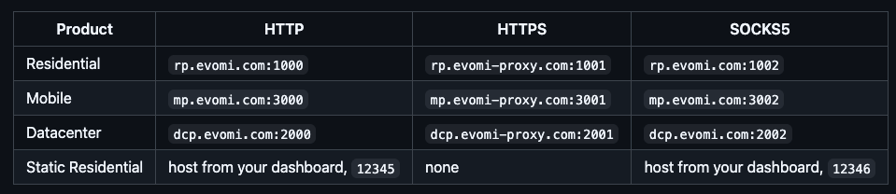
Two details. The HTTPS ports use the evomi-proxy.com hostname because that is what the TLS certificate covers; the same port on rp.evomi.com will fail certificate checks. And Static Residential gateways are assigned per account, so your dashboard is the source of truth for the host. The dashboard lists static entries as host:port:username:password, which is a display format, not a string to paste into a client. Proxy ports and formats shows how to convert it.
How to Check the Proxy Address Works
Once you have an address, confirm it:
- Set it in your browser or app, then open
https://ip.evomi.com/s. It returns the exit IP as plain text. It should not be your own IP. - Or test from a terminal, without changing any settings:
curl -x http://rp.evomi.com:1000 -U "USERNAME:PASSWORD" https://ip.evomi.com/s- Or paste it into the proxy checker.
With valid credentials you should see one IP address, which is the exit IP (shown in documentation examples as 203.0.113.x). A 407 Proxy Authentication Required means the gateway wants valid credentials.
FAQ
How do I find my proxy address?
Look in the place your software reads from. On Windows it is Settings › Network & internet › Proxy, or reg query for the user setting. On a Mac it is System Settings › Network › Proxies, or scutil --proxy. Terminal tools read http_proxy variables, and Firefox keeps its own.
What is an example of a proxy address?
rp.evomi.com:1000 is a proxy address: a hostname, a colon and a port. An IP version looks like 203.0.113.10:3128. Some tools want the full URL form, http://USERNAME:PASSWORD@rp.evomi.com:1000, which adds the protocol and login in front of the same host and port.
How do I get a proxy address?
Get it from your proxy provider's dashboard, or from your IT team for a work network. With Evomi, the dashboard's Proxy Generator builds the host, port and login for each product. Use credentials from a provider you trust rather than a public list, since unknown operators can see what you send.
What is a proxy hostname?
A proxy hostname is the host part of the address, the name before the colon. In rp.evomi.com:1000 it is rp.evomi.com. It resolves to the proxy's IP address through DNS. Enter it alone in a "Server" or "Host" field, and put the port in the separate "Port" field.
Which proxy server is free?
Public free proxies exist, but they are a poor answer. They are usually unauthenticated, run by operators you cannot identify, and unreliable. Anything sent without encryption can be read or altered along the way. Use a proxy from a provider you trust, or one your employer or school supplies.
Wrapping Up
The address you need depends on who is asking. Browsers, the operating system, Windows services and command-line tools each keep their own, so check the one that matters for the thing that is misbehaving. On Windows, remember there are two settings, and netsh winhttp show proxy can say "direct" while your browser uses a proxy.
If you just need an address to use, your provider's dashboard builds it for you, as the Proxy Generator section above describes.