


The modern web has become significantly more hostile to automation.
Platforms deploy advanced anti-bot systems, browser fingerprinting techniques, and behavioral analysis to detect suspicious activity. For developers, marketers, and data teams that rely on automation or multiple accounts, a simple proxy is no longer enough.
This is where anti-detect browsers enter the picture.
Tools like Incogniton allow users to create isolated browser environments with unique fingerprints, enabling safer automation, multi-account management, and web data operations.
In this article, we’ll explore why anti-detect browsers matter, how Incogniton works, and how pairing it with Evomi proxies can significantly improve reliability and anonymity.
Why Anti-Detect Browsers Matter More Than Ever
Web platforms have become extremely effective at identifying automated activity.
Modern detection systems don’t rely solely on IP addresses anymore. They analyze a combination of signals including:
browser fingerprints
device characteristics
behavioral patterns
session cookies
IP reputation
Even if you rotate proxies, websites can still link sessions together through fingerprinting techniques.
Anti-detect browsers solve this problem by creating fully isolated browser profiles, each with its own digital identity.
Instead of one browser pretending to be many users, each profile behaves like a completely different device.
This makes anti-detect browsers essential for workflows such as:
multi-account management
ad verification
automation testing
affiliate marketing
web data collection
What Is Incogniton?
Incogniton is an anti-detect browser designed to manage multiple online identities safely.
Rather than running everything through a single browser instance, Incogniton allows users to create independent browser profiles, each with its own fingerprint, cookies, and network configuration.
Every profile operates as a separate environment, with unique attributes like:
user agent
operating system
screen resolution
timezone
WebGL fingerprint
browser storage
These profiles can also be assigned dedicated proxies, ensuring that both the network identity and browser fingerprint remain consistent.
This level of isolation dramatically reduces the risk of accounts being linked or flagged.
Key Features of Incogniton
Incogniton provides a wide range of tools designed for teams and individuals working with multiple browser identities.
Flexible Proxy Management
Each browser profile can use a dedicated proxy connection.
Incogniton supports:
third-party proxies
Incogniton Proxy Shop proxies
built-in free proxies
This makes it easy to route traffic through reliable networks while keeping profiles separated.
Isolated Browser Profiles & Stable Fingerprints
Every profile runs in an isolated environment with a consistent device-level fingerprint.
This helps prevent fingerprint collisions that could otherwise reveal automated behavior.
Built-In Cookie Management
Incogniton includes powerful cookie management tools:
cookie import and export
automated cookie generation
cookie collector for account warming
These features allow users to build more natural browsing sessions over time.
Automation SDKs & Developer Support
For developers, Incogniton offers automation capabilities through its API and SDKs.
Supported tools include:
Python SDK
TypeScript SDK
Playwright
Puppeteer
Selenium
This enables programmatic profile management and automation workflows.
Team Collaboration & Cloud Synchronization
Incogniton also supports team environments.
Features include:
role-based access control
encrypted cloud synchronization
profile sharing
bulk profile creation
This makes it easier for teams to manage multiple identities without exposing sensitive credentials.
Why Pair Incogniton with Evomi Proxies
Anti-detect browsers solve the fingerprinting problem, but they still rely on high-quality proxy infrastructure to maintain reliable network identities.
Pairing Incogniton with Evomi proxies offers several advantages.
First, each Incogniton profile can be assigned a dedicated Evomi proxy, ensuring that every browser environment has a consistent IP address and network footprint.
Second, Evomi’s proxy network helps maintain stable connections, which is particularly important for workflows involving:
account management
automation
web data extraction
geo-targeted access
Together, the combination of browser fingerprint isolation and reliable proxy routing creates a far more robust setup than using either tool alone.
How to Set Up Evomi Proxies in Incogniton
Setting up Evomi proxies inside Incogniton is straightforward and takes only a few minutes.
Below is a simple step-by-step guide.
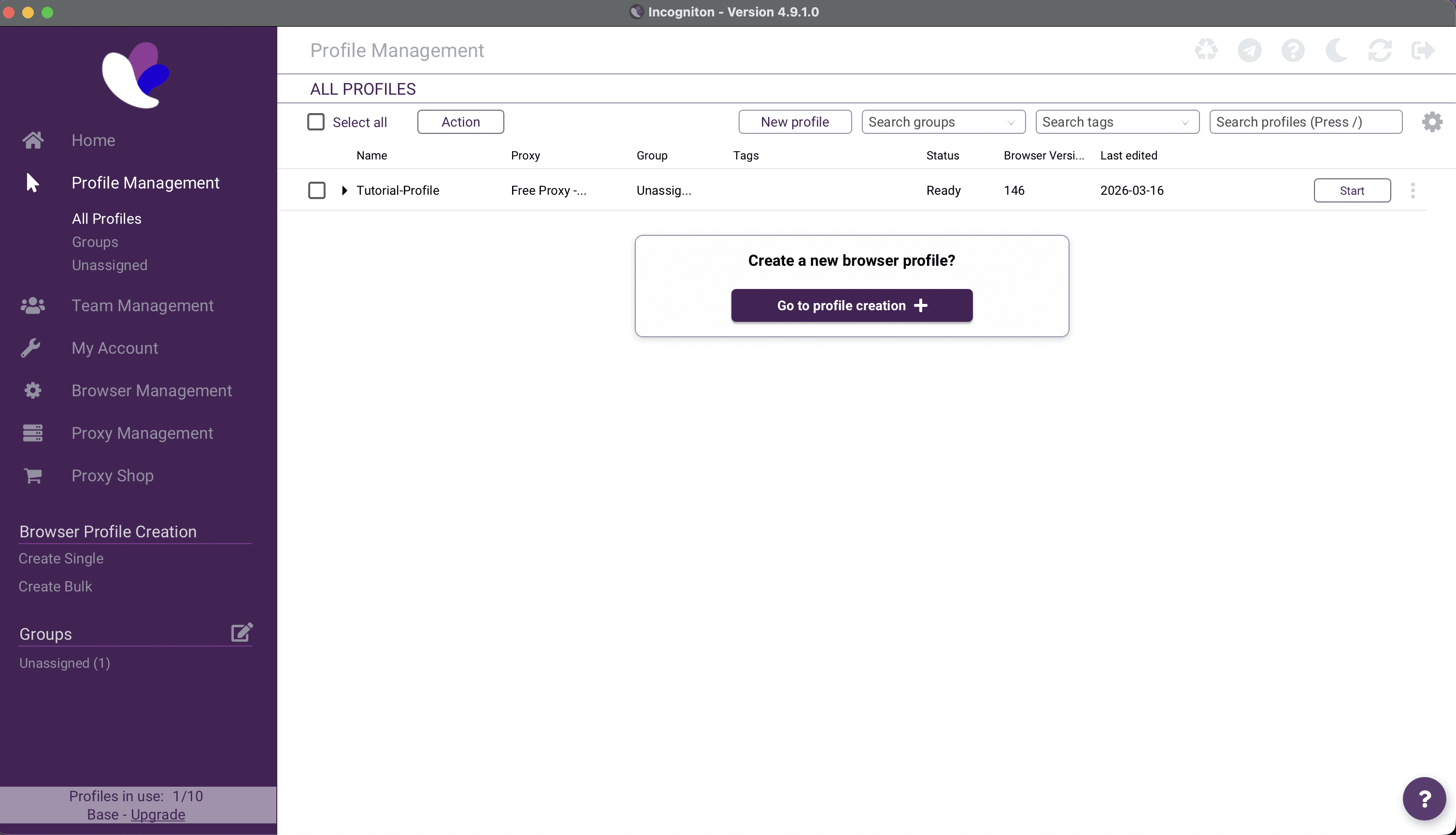
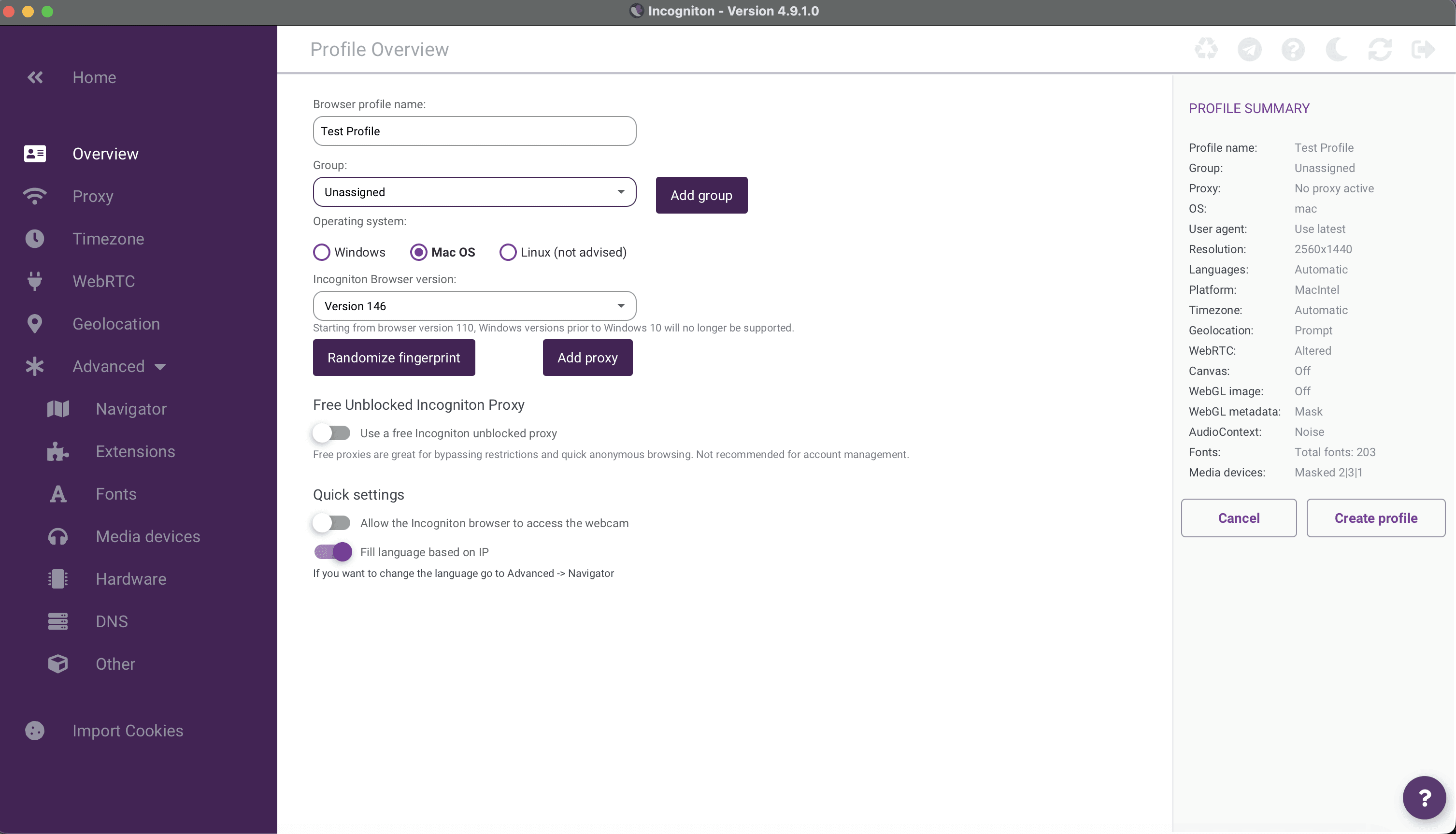
Step 1: Create a New Browser Profile
Open Incogniton and click “New Profile.”
Here you can configure:
browser fingerprint
operating system
timezone
language
Step 2: Configure Proxy Settings
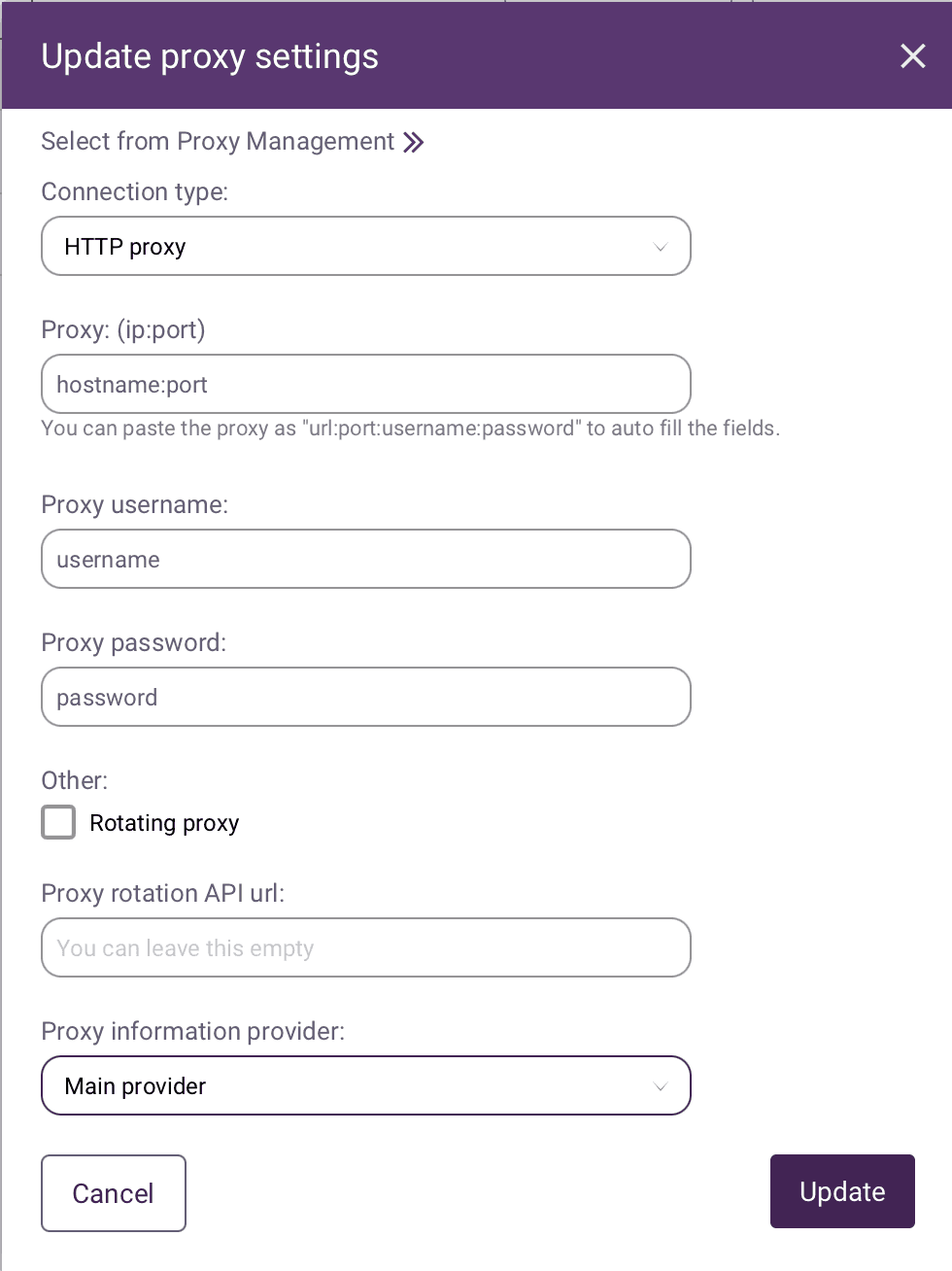
In the profile settings, navigate to the Proxy section.
Enter your Evomi proxy details:
proxy type (HTTP / HTTPS / SOCKS5)
proxy host
proxy port
username
password
Step 3: Test the Proxy Connection
Incogniton includes a built-in proxy test.
Click “Check Proxy” to verify that the connection is working correctly.
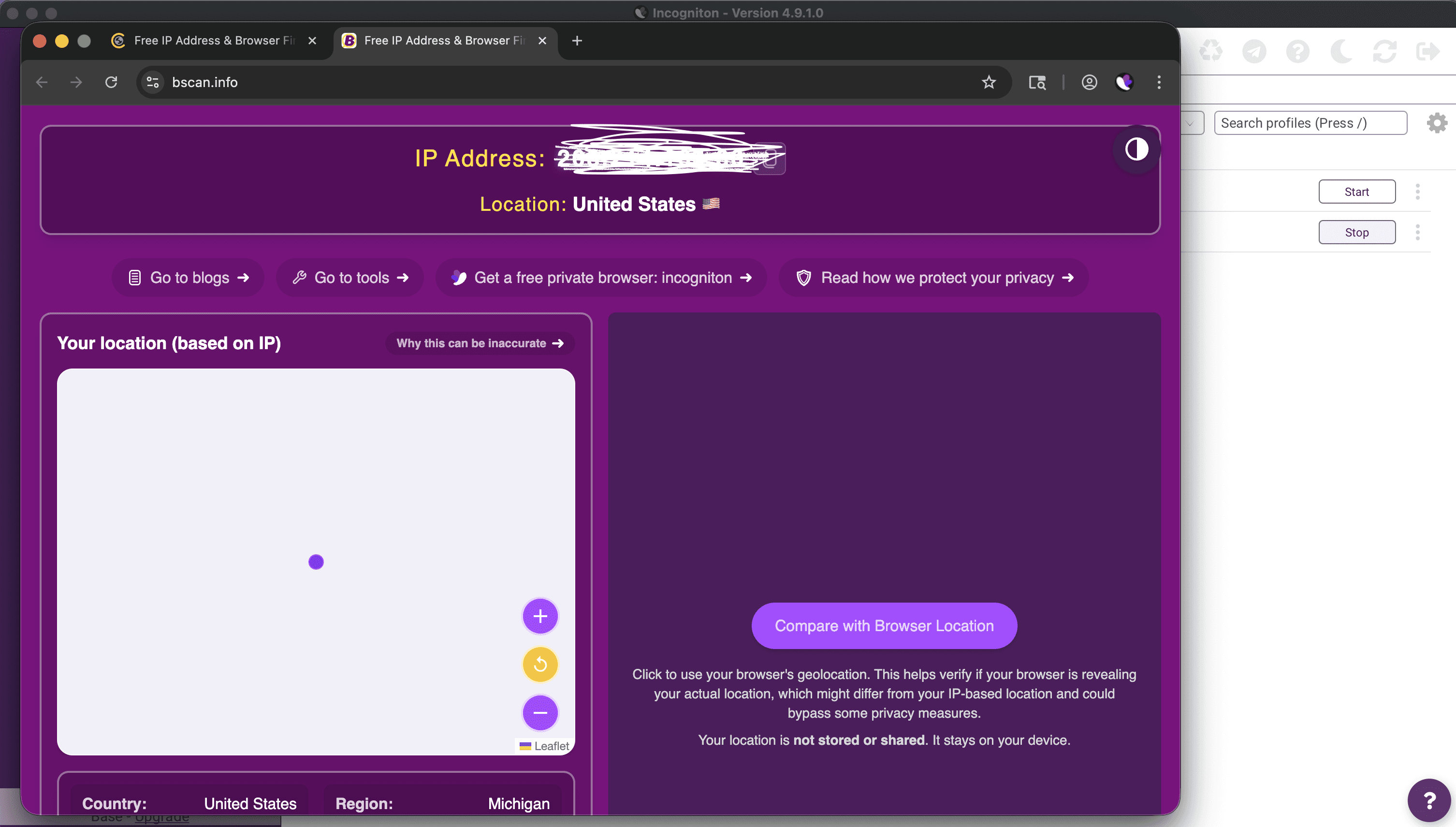
Step 4: Launch the Profile
Once the proxy is configured, launch the browser profile.
The session will now operate with:
a unique browser fingerprint
a dedicated Evomi proxy
isolated cookies and storage
This creates a completely independent browsing environment.
Final Thoughts
The web continues to evolve, and platforms are becoming increasingly sophisticated in detecting automation and suspicious activity.
Tools like Incogniton provide a powerful way to manage multiple browser identities safely, while high-quality proxy networks ensure that each identity has a consistent and reliable network presence.
By combining anti-detect browsers with robust proxy infrastructure, teams can build more resilient automation and data workflows.
For developers, marketers, and data teams alike, this combination has become an essential part of the modern web automation stack.