
Most people who look into proxies start with the same question: why pay for one when free public proxies are everywhere? It's a fair question. A quick search turns up endless lists of open proxies, sorted by country, ready to use with no signup. On paper it looks like a great deal. In practice, the economics rarely work in your favor, and the hidden costs land squarely on your privacy and your data.
Before you paste a random IP:port into your browser settings, it's worth understanding what a proxy actually does, what a free one realistically delivers, and why the phrase "free" tends to mean "you're paying with something else."
What a proxy actually does
A proxy server sits between you and the site you're connecting to. Instead of your device talking directly to the destination, it hands the request to the proxy, the proxy forwards it on your behalf, and the response comes back through the same route. The destination sees the proxy's IP address rather than yours.
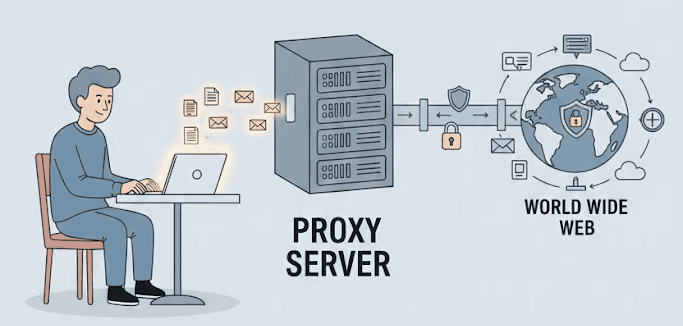
You might expect this extra hop to noticeably slow things down. With a well-run proxy, the added latency is usually small. The legitimate reasons people use proxies include:
Privacy: The destination sees the proxy's IP, not your real one, which keeps your home address out of routine web logs.
Public data collection: Researchers and businesses gather publicly available information at scale, and proxies help distribute those requests so a single IP isn't hammering a server.
QA and testing: Developers verify how a site renders and behaves from different regions before shipping changes.
Access control: A forward proxy on a company or home network can be configured to restrict which sites internal devices reach.
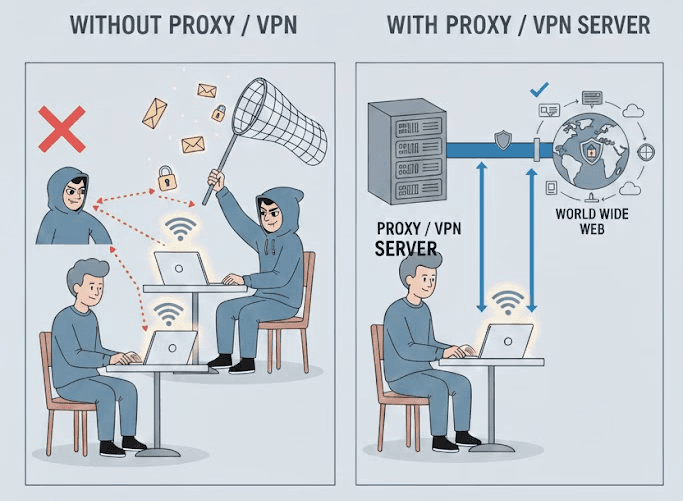
One thing a proxy does not reliably do is "prevent hacks." A proxy is not a firewall, an antivirus, or an intrusion-prevention system. Routing traffic through one changes what the destination sees; it doesn't harden your machine against malware or exploits. If a source tells you a proxy protects you from being hacked, treat everything else it says with suspicion. For a clearer picture of what an IP address reveals about you in the first place, our breakdown of public vs. private IPs is a useful primer.
How public proxies work
Public proxies are open servers anyone can route traffic through, usually with no account and no payment. Some are set up deliberately as free services. Many others are simply misconfigured servers or devices left open by accident, which quietly become "free proxies" that thousands of strangers pass their traffic through without the owner's knowledge.
Functionally, a public proxy does the same core job as a paid one: it relays your requests and swaps in its own IP. The problem isn't the mechanism. It's who runs the server, how it's maintained, and what happens to your traffic while it's passing through.
The real risks of public proxy servers
A handful of open proxies are run by well-meaning people. Even those rarely offer the reliability or safeguards of a maintained service, and plenty of others are operated by people who are counting on you not to read this section.
Your traffic can be read and modified. If a proxy handles plain HTTP traffic, the operator can see and alter everything passing through it. That's how some public proxies inject ads, insert tracking scripts, or serve malware into pages. Even with HTTPS, a badly run or malicious proxy can attempt to interfere with the connection. The takeaway: you are trusting a complete stranger with your browsing.
Your credentials are exposed on insecure connections. Anything sent over unencrypted HTTP through a public proxy, logins, form data, session tokens, is visible to whoever controls that server. Some operators harvest exactly this and resell it.
Performance is unpredictable. Popular open proxies are shared by huge numbers of people, so they get overloaded, throttled, or simply disappear mid-session. If a page ever loads at all, it's often painfully slow. Our guide on diagnosing proxy latency explains why shared, overloaded routes behave this way.
They're widely flagged. Because so many people funnel traffic through the same open IPs, those addresses are well known and frequently blocked. You may not even be able to reach the site you wanted, which defeats the point.
People often justify "just a quick connection" through a public proxy as harmless. But you rarely know what the server is doing with your data while you're connected, and by then it's too late to take it back. This is a broader industry issue too: the way some proxy pools are sourced and operated raises real ethical questions worth understanding before you route anything sensitive through an unknown network.

A safer, saner alternative
If your use case is legitimate, gathering public data, testing from other regions, managing accounts you actually own, or simply keeping your IP out of routine logs, a reputable paid provider removes almost every risk above. You get maintained infrastructure, full HTTPS support, consistent performance, and an accountable company behind the service rather than an anonymous open port.
Cost is the usual objection, but the gap has narrowed a lot. At Evomi, datacenter proxies start at $0.30/GB, residential at $0.49/GB, and static ISP IPs from $1 each, with ethically sourced pools and Swiss-based operations. There are free trials on residential, mobile, and datacenter plans, so you can validate the service before committing. If you're weighing options, a residential proxy versus a VPN comparison is a good next read, since the right tool depends heavily on what you're trying to do.
If you still test a public proxy
Sometimes you just want to see whether a random open proxy works before spending anything. If you go that route, keep the exposure minimal:
Never send anything sensitive through it, no logins, no banking, no personal accounts, no work credentials.
Only use it for non-sensitive, throwaway browsing you'd be comfortable with a stranger reading.
Prefer HTTPS destinations so at least the payload is encrypted, and be aware that even that isn't a guarantee against a hostile operator.
Test it properly before trusting it. Our write-up on why proxy testing matters covers how to check speed, location, and whether the IP is already flagged.
Keep your device's security software current and run a scan afterward, though remember: that mitigates risk on your machine, it doesn't undo any data the proxy already captured.
Once you've dealt with the dropped connections, the throttling, and the uncertainty about who's watching your traffic, the math usually settles itself. For anything you actually care about, a maintained, transparent proxy service costs very little and removes the guesswork entirely.