
DNS Leaks and Proxies: Causes, Detection & Prevention


The Scraper
Proxy Fundamentals
Your requests exit through a residential proxy in São Paulo. The exit IP geolocates to Brazil, your headers are clean, your TLS fingerprint impersonates Chrome. And the target still serves you prices in euros and flags the session as inconsistent. You double-check the proxy, it's fine. The IP really is Brazilian.
The leak isn't in the connection. It's in the lookup that happened before the connection. Your client asked your own ISP's DNS resolver "what's the IP for target.com?", and that question went out over your home network, not through the proxy. The site's DNS-side analytics saw a resolver in your home city. Your exit IP says Brazil; your resolver says home. That mismatch is a DNS leak, and it's one of the most common reasons a "working" proxy setup still gets geolocated wrong.
This post is the sibling to the WebRTC-leak writeup: same idea (something bypasses your tunnel), different layer. Here's how DNS leaks happen, how to confirm you have one, and how to fix it in each tool.
DNS in One Paragraph
Before any HTTP or TLS connection, your client needs to turn a hostname (target.com) into an IP address (93.184.216.34). That translation is DNS resolution, and it's a separate network round-trip to a resolver, usually the one your OS is configured to use, which is usually your ISP's. The resolver answers, your client gets an IP, and then it opens the connection. The question is: when you're using a proxy, does that "what's the IP for target.com?" question go through the proxy, or does it leak out over your real connection? With a lot of default setups, it leaks.
The Leak Mechanism: Local vs Remote Resolution
There are two places the hostname can be resolved.
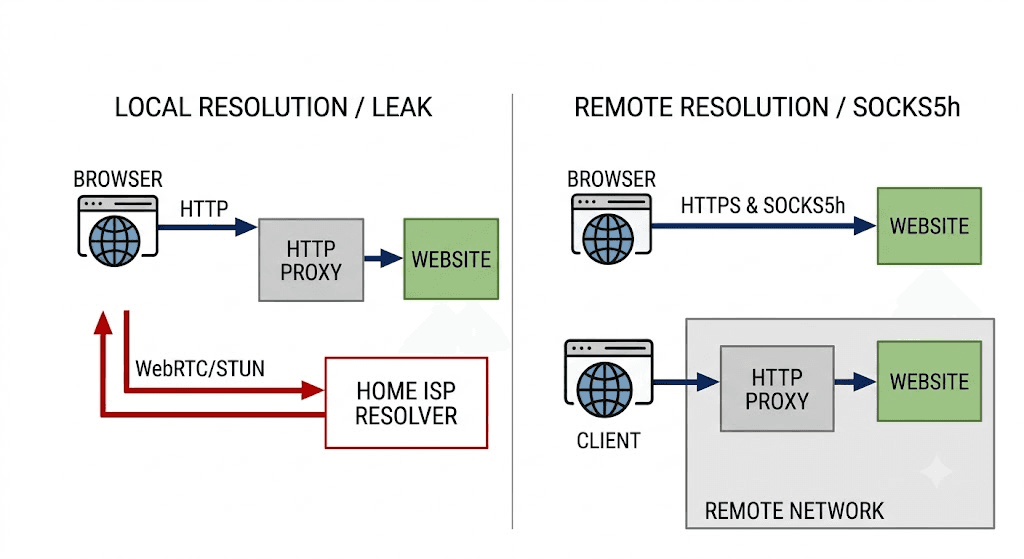
Local resolution. Your client resolves the hostname itself, using your OS resolver, then hands the resulting IP to the proxy and says "connect me to this IP." The proxy never sees the hostname, and your real resolver handled the lookup. This is the leak.
Remote resolution. Your client hands the hostname to the proxy and says "you resolve this and connect me." The lookup happens from the proxy's side of the world. No DNS leaves your machine for the target.
Which one you get depends on the proxy protocol and your configuration:
HTTP/HTTPS proxies tunnel HTTP requests. For
CONNECTtunnels the client typically passes the hostname through, but plenty of client libraries still resolve locally first depending on configuration, and an HTTP proxy does not, by design, proxy your other DNS traffic.SOCKS4 has no field for a hostname. The client must resolve locally and send an IP. SOCKS4 always leaks DNS. (SOCKS4a added hostname support, but it's rarely the default.)
SOCKS5 supports sending the hostname to the proxy for remote resolution, but only if your client is told to use it. Many clients default to resolving locally even over SOCKS5.
This is exactly where the socks5:// versus socks5h:// distinction comes from in curl, requests, and friends. The two schemes look almost identical and behave completely differently:
socks5://proxy:1080— connect via SOCKS5, but resolve the hostname locally. DNS leaks.socks5h://proxy:1080— connect via SOCKS5 and send the hostname to the proxy to resolve. No DNS leak. Thehstands for hostname (resolve at the proxy).
If you remember one thing from this post: the h is not optional. socks5:// leaks; socks5h:// does not.
Why It Matters for Scrapers
A DNS leak isn't just a privacy footnote; it actively breaks proxy-based scraping in three ways.
It reveals your real resolver, ASN, and rough geo. Even if the site can't read your real IP, DNS-level telemetry (and some CDNs do correlate this) sees a resolver sitting in your home ISP's network.
It desyncs apparent location from exit IP. A Brazilian exit IP paired with a resolver in, say, Frankfurt is an inconsistency. Real users almost never look like that. Inconsistencies are exactly what fingerprinting systems score on, so a leak can make a clean proxy moresuspicious, not less.
It breaks geo-targeted scraping. If you're scraping localized prices, inventory, or search results, some services key partly off resolver geo (think ECS-aware CDNs and geo-DNS). Resolve locally and you get your region's content no matter how exotic your exit IP is.
Detection: Confirm You Actually Have a Leak
First, prove it to yourself in Python. The point is to see where the DNS lookup originates. A clean test routes a request through the proxy to a service that echoes back the resolver it observed.
import requests # Same proxy, two schemes. Watch the difference. local = {"http": "socks5://user:pass@proxy.example.com:1080", "https": "socks5://user:pass@proxy.example.com:1080"} remote = {"http": "socks5h://user:pass@proxy.example.com:1080", "https": "socks5h://user:pass@proxy.example.com:1080"} # httpbin-style endpoint that reflects the requesting IP. for label, proxies in [("socks5 (local DNS)", local), ("socks5h (remote DNS)", remote)]: r = requests.get("https://api.ipify.org?format=json", proxies=proxies, timeout=20) print(label, "->", r.json())
If both print the same exit IP, that only tells you the connection is proxied, it does not prove DNS is. To actually catch the resolver, hit a DNS-leak-style endpoint. Public sites like dnsleaktest.com and browserleaks.com/dns run a test that fires lookups at unique subdomains and report back which resolvers answered. Drive one through your proxy and compare the reported resolver to your proxy's region. If the resolver is your home ISP, you're leaking.
A quick way to see what your client is doing: with socks5:// your machine performs the DNS query, so you can watch it on the wire.
# In one terminal, watch outbound DNS on port 53: sudo tcpdump -n -i any port 53 # In another, run the two requests and watch which one triggers local DNS: curl --proxy socks5://user:pass@proxy.example.com:1080 https://target.com -o /dev/null -s curl --proxy socks5h://user:pass@proxy.example.com:1080 https://target.com -o /dev/null -s
The socks5:// call will produce a DNS packet from your machine. The socks5h:// call should produce none, the proxy did the lookup. That tcpdump silence is your confirmation.
Prevention, Per Tool
requests and curl. Use the h scheme everywhere. In requests, set socks5h:// in the proxies dict (requires pip install "requests[socks]"). In curl, use --proxy socks5h://... or the --socks5-hostname flag, which does the same thing.
proxies = {"http": "socks5h://user:pass@proxy.example.com:1080", "https": "socks5h://user:pass@proxy.example.com:1080"} r = requests.get("https://target.com", proxies=proxies, timeout=20)
httpx. Same rule, same scheme. Pass the proxy with the socks5h:// scheme (install httpx[socks]). httpx will route the hostname to the proxy:
import httpx with httpx.Client(proxy="socks5h://user:pass@proxy.example.com:1080", timeout=20) as c: print(c.get("https://api.ipify.org?format=json").json())
Browsers and Playwright. Chromium-based browsers resolve DNS through the SOCKS proxy by default when launched with a SOCKS proxy, which is good, but the flag matters. In Playwright, pass the proxy in the launch options; for SOCKS5, Chromium proxies the hostname. To be certain, you can force it with --host-resolver-rules and ensure no system resolver shortcut fires. Verify with a DNS-leak test page loaded in the proxied browser context, not in your normal browser.
from playwright.sync_api import sync_playwright with sync_playwright() as p: browser = p.chromium.launch(proxy={ "server": "socks5://proxy.example.com:1080", "username": "user", "password": "pass", }) page = browser.new_page() page.goto("https://browserleaks.com/dns") # inspect the reported resolver
Docker and OS resolver pitfalls. Inside a container, /etc/resolv.conf often points at Docker's embedded DNS or the host resolver, your application-level proxy scheme still governs whether the target hostname goes through the proxy, but any tooling that resolves outside your proxied client (health checks, sidecars, custom resolvers) will leak. Don't assume "the OS is set up right" inside a container; the OS resolver and your proxied client are different paths.
DoH/DoT considerations. Encrypted DNS (DNS-over-HTTPS, DNS-over-TLS) hides the content of your lookups from your ISP, but it does not route them through your proxy. If your client does local resolution over DoH, the target site's geo-DNS still sees a resolver that is not your proxy's. Encrypted-but-local is still a geo leak. The fix is the same: resolve remotely at the proxy.
Mistakes That Waste Time
Assuming an HTTP proxy proxies your DNS. It tunnels HTTP requests; it is not a system-wide resolver. Other lookups go straight out.
Setting
socks5and forgetting theh.socks5://resolves locally. This is the single most common DNS leak in scraper code, and it looks correct at a glance.Relying on OS DNS settings inside containers. The container resolver and your proxied client are separate paths; configuring one says nothing about the other.
Testing the leak in your normal browser. A DNS-leak page only tells you about the context it loads in. Test inside the proxiedclient/browser, or you're measuring your home connection.
Trusting encrypted DNS to fix geo. DoH/DoT encrypts the lookup but doesn't move it to the proxy's region.
Wrapping Up
A DNS leak is a tunnel bypass: your connection is proxied but your name lookups aren't, so the resolver gives you away even when the exit IP is perfect. The fix is almost always one character, use socks5h:// (or --socks5-hostname) so the hostname is resolved at the proxy, not at home. Then verify it with a tcpdump that stays silent on port 53 and a DNS-leak test run inside the proxied client. Get those two things right and your apparent location stops contradicting your exit IP.

Your requests exit through a residential proxy in São Paulo. The exit IP geolocates to Brazil, your headers are clean, your TLS fingerprint impersonates Chrome. And the target still serves you prices in euros and flags the session as inconsistent. You double-check the proxy, it's fine. The IP really is Brazilian.
The leak isn't in the connection. It's in the lookup that happened before the connection. Your client asked your own ISP's DNS resolver "what's the IP for target.com?", and that question went out over your home network, not through the proxy. The site's DNS-side analytics saw a resolver in your home city. Your exit IP says Brazil; your resolver says home. That mismatch is a DNS leak, and it's one of the most common reasons a "working" proxy setup still gets geolocated wrong.
This post is the sibling to the WebRTC-leak writeup: same idea (something bypasses your tunnel), different layer. Here's how DNS leaks happen, how to confirm you have one, and how to fix it in each tool.
DNS in One Paragraph
Before any HTTP or TLS connection, your client needs to turn a hostname (target.com) into an IP address (93.184.216.34). That translation is DNS resolution, and it's a separate network round-trip to a resolver, usually the one your OS is configured to use, which is usually your ISP's. The resolver answers, your client gets an IP, and then it opens the connection. The question is: when you're using a proxy, does that "what's the IP for target.com?" question go through the proxy, or does it leak out over your real connection? With a lot of default setups, it leaks.
The Leak Mechanism: Local vs Remote Resolution
There are two places the hostname can be resolved.
Local resolution. Your client resolves the hostname itself, using your OS resolver, then hands the resulting IP to the proxy and says "connect me to this IP." The proxy never sees the hostname, and your real resolver handled the lookup. This is the leak.
Remote resolution. Your client hands the hostname to the proxy and says "you resolve this and connect me." The lookup happens from the proxy's side of the world. No DNS leaves your machine for the target.
Which one you get depends on the proxy protocol and your configuration:
HTTP/HTTPS proxies tunnel HTTP requests. For
CONNECTtunnels the client typically passes the hostname through, but plenty of client libraries still resolve locally first depending on configuration, and an HTTP proxy does not, by design, proxy your other DNS traffic.SOCKS4 has no field for a hostname. The client must resolve locally and send an IP. SOCKS4 always leaks DNS. (SOCKS4a added hostname support, but it's rarely the default.)
SOCKS5 supports sending the hostname to the proxy for remote resolution, but only if your client is told to use it. Many clients default to resolving locally even over SOCKS5.
This is exactly where the socks5:// versus socks5h:// distinction comes from in curl, requests, and friends. The two schemes look almost identical and behave completely differently:
socks5://proxy:1080— connect via SOCKS5, but resolve the hostname locally. DNS leaks.socks5h://proxy:1080— connect via SOCKS5 and send the hostname to the proxy to resolve. No DNS leak. Thehstands for hostname (resolve at the proxy).
If you remember one thing from this post: the h is not optional. socks5:// leaks; socks5h:// does not.

Why It Matters for Scrapers
A DNS leak isn't just a privacy footnote; it actively breaks proxy-based scraping in three ways.
It reveals your real resolver, ASN, and rough geo. Even if the site can't read your real IP, DNS-level telemetry (and some CDNs do correlate this) sees a resolver sitting in your home ISP's network.
It desyncs apparent location from exit IP. A Brazilian exit IP paired with a resolver in, say, Frankfurt is an inconsistency. Real users almost never look like that. Inconsistencies are exactly what fingerprinting systems score on, so a leak can make a clean proxy moresuspicious, not less.
It breaks geo-targeted scraping. If you're scraping localized prices, inventory, or search results, some services key partly off resolver geo (think ECS-aware CDNs and geo-DNS). Resolve locally and you get your region's content no matter how exotic your exit IP is.
Detection: Confirm You Actually Have a Leak
First, prove it to yourself in Python. The point is to see where the DNS lookup originates. A clean test routes a request through the proxy to a service that echoes back the resolver it observed.
import requests # Same proxy, two schemes. Watch the difference. local = {"http": "socks5://user:pass@proxy.example.com:1080", "https": "socks5://user:pass@proxy.example.com:1080"} remote = {"http": "socks5h://user:pass@proxy.example.com:1080", "https": "socks5h://user:pass@proxy.example.com:1080"} # httpbin-style endpoint that reflects the requesting IP. for label, proxies in [("socks5 (local DNS)", local), ("socks5h (remote DNS)", remote)]: r = requests.get("https://api.ipify.org?format=json", proxies=proxies, timeout=20) print(label, "->", r.json())
If both print the same exit IP, that only tells you the connection is proxied, it does not prove DNS is. To actually catch the resolver, hit a DNS-leak-style endpoint. Public sites like dnsleaktest.com and browserleaks.com/dns run a test that fires lookups at unique subdomains and report back which resolvers answered. Drive one through your proxy and compare the reported resolver to your proxy's region. If the resolver is your home ISP, you're leaking.
A quick way to see what your client is doing: with socks5:// your machine performs the DNS query, so you can watch it on the wire.
# In one terminal, watch outbound DNS on port 53: sudo tcpdump -n -i any port 53 # In another, run the two requests and watch which one triggers local DNS: curl --proxy socks5://user:pass@proxy.example.com:1080 https://target.com -o /dev/null -s curl --proxy socks5h://user:pass@proxy.example.com:1080 https://target.com -o /dev/null -s
The socks5:// call will produce a DNS packet from your machine. The socks5h:// call should produce none, the proxy did the lookup. That tcpdump silence is your confirmation.
Prevention, Per Tool
requests and curl. Use the h scheme everywhere. In requests, set socks5h:// in the proxies dict (requires pip install "requests[socks]"). In curl, use --proxy socks5h://... or the --socks5-hostname flag, which does the same thing.
proxies = {"http": "socks5h://user:pass@proxy.example.com:1080", "https": "socks5h://user:pass@proxy.example.com:1080"} r = requests.get("https://target.com", proxies=proxies, timeout=20)
httpx. Same rule, same scheme. Pass the proxy with the socks5h:// scheme (install httpx[socks]). httpx will route the hostname to the proxy:
import httpx with httpx.Client(proxy="socks5h://user:pass@proxy.example.com:1080", timeout=20) as c: print(c.get("https://api.ipify.org?format=json").json())
Browsers and Playwright. Chromium-based browsers resolve DNS through the SOCKS proxy by default when launched with a SOCKS proxy, which is good, but the flag matters. In Playwright, pass the proxy in the launch options; for SOCKS5, Chromium proxies the hostname. To be certain, you can force it with --host-resolver-rules and ensure no system resolver shortcut fires. Verify with a DNS-leak test page loaded in the proxied browser context, not in your normal browser.
from playwright.sync_api import sync_playwright with sync_playwright() as p: browser = p.chromium.launch(proxy={ "server": "socks5://proxy.example.com:1080", "username": "user", "password": "pass", }) page = browser.new_page() page.goto("https://browserleaks.com/dns") # inspect the reported resolver
Docker and OS resolver pitfalls. Inside a container, /etc/resolv.conf often points at Docker's embedded DNS or the host resolver, your application-level proxy scheme still governs whether the target hostname goes through the proxy, but any tooling that resolves outside your proxied client (health checks, sidecars, custom resolvers) will leak. Don't assume "the OS is set up right" inside a container; the OS resolver and your proxied client are different paths.
DoH/DoT considerations. Encrypted DNS (DNS-over-HTTPS, DNS-over-TLS) hides the content of your lookups from your ISP, but it does not route them through your proxy. If your client does local resolution over DoH, the target site's geo-DNS still sees a resolver that is not your proxy's. Encrypted-but-local is still a geo leak. The fix is the same: resolve remotely at the proxy.
Mistakes That Waste Time
Assuming an HTTP proxy proxies your DNS. It tunnels HTTP requests; it is not a system-wide resolver. Other lookups go straight out.
Setting
socks5and forgetting theh.socks5://resolves locally. This is the single most common DNS leak in scraper code, and it looks correct at a glance.Relying on OS DNS settings inside containers. The container resolver and your proxied client are separate paths; configuring one says nothing about the other.
Testing the leak in your normal browser. A DNS-leak page only tells you about the context it loads in. Test inside the proxiedclient/browser, or you're measuring your home connection.
Trusting encrypted DNS to fix geo. DoH/DoT encrypts the lookup but doesn't move it to the proxy's region.
Wrapping Up
A DNS leak is a tunnel bypass: your connection is proxied but your name lookups aren't, so the resolver gives you away even when the exit IP is perfect. The fix is almost always one character, use socks5h:// (or --socks5-hostname) so the hostname is resolved at the proxy, not at home. Then verify it with a tcpdump that stays silent on port 53 and a DNS-leak test run inside the proxied client. Get those two things right and your apparent location stops contradicting your exit IP.
Your requests exit through a residential proxy in São Paulo. The exit IP geolocates to Brazil, your headers are clean, your TLS fingerprint impersonates Chrome. And the target still serves you prices in euros and flags the session as inconsistent. You double-check the proxy, it's fine. The IP really is Brazilian.
The leak isn't in the connection. It's in the lookup that happened before the connection. Your client asked your own ISP's DNS resolver "what's the IP for target.com?", and that question went out over your home network, not through the proxy. The site's DNS-side analytics saw a resolver in your home city. Your exit IP says Brazil; your resolver says home. That mismatch is a DNS leak, and it's one of the most common reasons a "working" proxy setup still gets geolocated wrong.
This post is the sibling to the WebRTC-leak writeup: same idea (something bypasses your tunnel), different layer. Here's how DNS leaks happen, how to confirm you have one, and how to fix it in each tool.
DNS in One Paragraph
Before any HTTP or TLS connection, your client needs to turn a hostname (target.com) into an IP address (93.184.216.34). That translation is DNS resolution, and it's a separate network round-trip to a resolver, usually the one your OS is configured to use, which is usually your ISP's. The resolver answers, your client gets an IP, and then it opens the connection. The question is: when you're using a proxy, does that "what's the IP for target.com?" question go through the proxy, or does it leak out over your real connection? With a lot of default setups, it leaks.
The Leak Mechanism: Local vs Remote Resolution
There are two places the hostname can be resolved.
Local resolution. Your client resolves the hostname itself, using your OS resolver, then hands the resulting IP to the proxy and says "connect me to this IP." The proxy never sees the hostname, and your real resolver handled the lookup. This is the leak.
Remote resolution. Your client hands the hostname to the proxy and says "you resolve this and connect me." The lookup happens from the proxy's side of the world. No DNS leaves your machine for the target.
Which one you get depends on the proxy protocol and your configuration:
HTTP/HTTPS proxies tunnel HTTP requests. For
CONNECTtunnels the client typically passes the hostname through, but plenty of client libraries still resolve locally first depending on configuration, and an HTTP proxy does not, by design, proxy your other DNS traffic.SOCKS4 has no field for a hostname. The client must resolve locally and send an IP. SOCKS4 always leaks DNS. (SOCKS4a added hostname support, but it's rarely the default.)
SOCKS5 supports sending the hostname to the proxy for remote resolution, but only if your client is told to use it. Many clients default to resolving locally even over SOCKS5.
This is exactly where the socks5:// versus socks5h:// distinction comes from in curl, requests, and friends. The two schemes look almost identical and behave completely differently:
socks5://proxy:1080— connect via SOCKS5, but resolve the hostname locally. DNS leaks.socks5h://proxy:1080— connect via SOCKS5 and send the hostname to the proxy to resolve. No DNS leak. Thehstands for hostname (resolve at the proxy).
If you remember one thing from this post: the h is not optional. socks5:// leaks; socks5h:// does not.

Why It Matters for Scrapers
A DNS leak isn't just a privacy footnote; it actively breaks proxy-based scraping in three ways.
It reveals your real resolver, ASN, and rough geo. Even if the site can't read your real IP, DNS-level telemetry (and some CDNs do correlate this) sees a resolver sitting in your home ISP's network.
It desyncs apparent location from exit IP. A Brazilian exit IP paired with a resolver in, say, Frankfurt is an inconsistency. Real users almost never look like that. Inconsistencies are exactly what fingerprinting systems score on, so a leak can make a clean proxy moresuspicious, not less.
It breaks geo-targeted scraping. If you're scraping localized prices, inventory, or search results, some services key partly off resolver geo (think ECS-aware CDNs and geo-DNS). Resolve locally and you get your region's content no matter how exotic your exit IP is.
Detection: Confirm You Actually Have a Leak
First, prove it to yourself in Python. The point is to see where the DNS lookup originates. A clean test routes a request through the proxy to a service that echoes back the resolver it observed.
import requests # Same proxy, two schemes. Watch the difference. local = {"http": "socks5://user:pass@proxy.example.com:1080", "https": "socks5://user:pass@proxy.example.com:1080"} remote = {"http": "socks5h://user:pass@proxy.example.com:1080", "https": "socks5h://user:pass@proxy.example.com:1080"} # httpbin-style endpoint that reflects the requesting IP. for label, proxies in [("socks5 (local DNS)", local), ("socks5h (remote DNS)", remote)]: r = requests.get("https://api.ipify.org?format=json", proxies=proxies, timeout=20) print(label, "->", r.json())
If both print the same exit IP, that only tells you the connection is proxied, it does not prove DNS is. To actually catch the resolver, hit a DNS-leak-style endpoint. Public sites like dnsleaktest.com and browserleaks.com/dns run a test that fires lookups at unique subdomains and report back which resolvers answered. Drive one through your proxy and compare the reported resolver to your proxy's region. If the resolver is your home ISP, you're leaking.
A quick way to see what your client is doing: with socks5:// your machine performs the DNS query, so you can watch it on the wire.
# In one terminal, watch outbound DNS on port 53: sudo tcpdump -n -i any port 53 # In another, run the two requests and watch which one triggers local DNS: curl --proxy socks5://user:pass@proxy.example.com:1080 https://target.com -o /dev/null -s curl --proxy socks5h://user:pass@proxy.example.com:1080 https://target.com -o /dev/null -s
The socks5:// call will produce a DNS packet from your machine. The socks5h:// call should produce none, the proxy did the lookup. That tcpdump silence is your confirmation.
Prevention, Per Tool
requests and curl. Use the h scheme everywhere. In requests, set socks5h:// in the proxies dict (requires pip install "requests[socks]"). In curl, use --proxy socks5h://... or the --socks5-hostname flag, which does the same thing.
proxies = {"http": "socks5h://user:pass@proxy.example.com:1080", "https": "socks5h://user:pass@proxy.example.com:1080"} r = requests.get("https://target.com", proxies=proxies, timeout=20)
httpx. Same rule, same scheme. Pass the proxy with the socks5h:// scheme (install httpx[socks]). httpx will route the hostname to the proxy:
import httpx with httpx.Client(proxy="socks5h://user:pass@proxy.example.com:1080", timeout=20) as c: print(c.get("https://api.ipify.org?format=json").json())
Browsers and Playwright. Chromium-based browsers resolve DNS through the SOCKS proxy by default when launched with a SOCKS proxy, which is good, but the flag matters. In Playwright, pass the proxy in the launch options; for SOCKS5, Chromium proxies the hostname. To be certain, you can force it with --host-resolver-rules and ensure no system resolver shortcut fires. Verify with a DNS-leak test page loaded in the proxied browser context, not in your normal browser.
from playwright.sync_api import sync_playwright with sync_playwright() as p: browser = p.chromium.launch(proxy={ "server": "socks5://proxy.example.com:1080", "username": "user", "password": "pass", }) page = browser.new_page() page.goto("https://browserleaks.com/dns") # inspect the reported resolver
Docker and OS resolver pitfalls. Inside a container, /etc/resolv.conf often points at Docker's embedded DNS or the host resolver, your application-level proxy scheme still governs whether the target hostname goes through the proxy, but any tooling that resolves outside your proxied client (health checks, sidecars, custom resolvers) will leak. Don't assume "the OS is set up right" inside a container; the OS resolver and your proxied client are different paths.
DoH/DoT considerations. Encrypted DNS (DNS-over-HTTPS, DNS-over-TLS) hides the content of your lookups from your ISP, but it does not route them through your proxy. If your client does local resolution over DoH, the target site's geo-DNS still sees a resolver that is not your proxy's. Encrypted-but-local is still a geo leak. The fix is the same: resolve remotely at the proxy.
Mistakes That Waste Time
Assuming an HTTP proxy proxies your DNS. It tunnels HTTP requests; it is not a system-wide resolver. Other lookups go straight out.
Setting
socks5and forgetting theh.socks5://resolves locally. This is the single most common DNS leak in scraper code, and it looks correct at a glance.Relying on OS DNS settings inside containers. The container resolver and your proxied client are separate paths; configuring one says nothing about the other.
Testing the leak in your normal browser. A DNS-leak page only tells you about the context it loads in. Test inside the proxiedclient/browser, or you're measuring your home connection.
Trusting encrypted DNS to fix geo. DoH/DoT encrypts the lookup but doesn't move it to the proxy's region.
Wrapping Up
A DNS leak is a tunnel bypass: your connection is proxied but your name lookups aren't, so the resolver gives you away even when the exit IP is perfect. The fix is almost always one character, use socks5h:// (or --socks5-hostname) so the hostname is resolved at the proxy, not at home. Then verify it with a tcpdump that stays silent on port 53 and a DNS-leak test run inside the proxied client. Get those two things right and your apparent location stops contradicting your exit IP.


Author
The Scraper
Engineer and Webscraping Specialist
About Author
The Scraper is a software engineer and web scraping specialist, focused on building production-grade data extraction systems. His work centers on large-scale crawling, anti-bot evasion, proxy infrastructure, and browser automation. He writes about real-world scraping failures, silent data corruption, and systems that operate at scale.