

Your crawler worked. On your laptop it pulled forty pages a minute for three hours: no blocks, no CAPTCHAs, clean HTML. So you containerised it, pushed it to a private subnet, and scaled to two hundred replicas.
It died in about ninety seconds.
Nothing about the requests changed, same headers, same TLS stack, same parsing. What changed is the address: two hundred workers in a private subnet all route through one NAT gateway, so the target sees a single IP asking for eight thousand pages a minute. That is a topology problem, solved in the network layer, not the request builder.
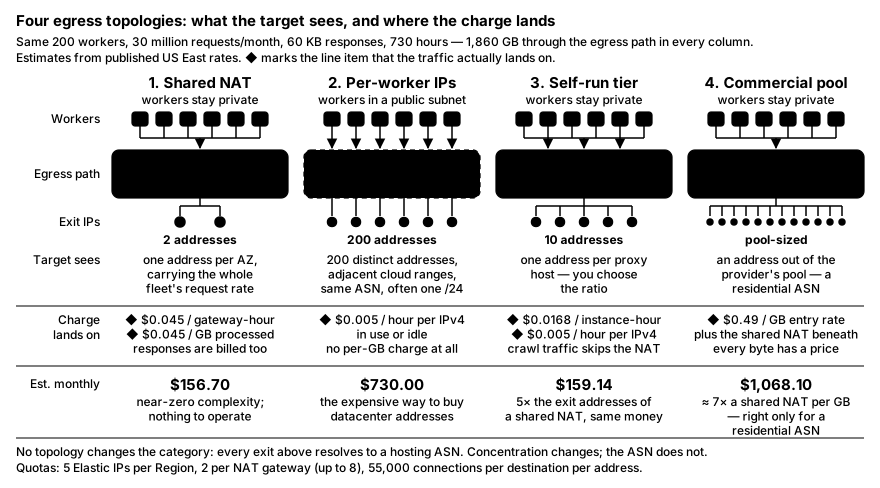
What No Topology Fixes
Cloud address space is trivially identifiable. Every major provider publishes its IP ranges as a machine-readable file, and those files feed every "is this a hosting provider" check in existence. Your exit IP resolves to a hosting ASN whether it is one NAT gateway or two hundred Elastic IPs. Topology changes concentration, not category: how many requests one address is responsible for, not what that address is.
Topology 1: Shared NAT
One NAT gateway per Availability Zone, everything else private, the default from almost every Terraform module and managed Kubernetes setup.
What the target sees: one address per AZ, carrying the whole fleet's request rate.
Cost shape: hourly per gateway plus a per-GB charge on data processed, not sent, so response bodies coming back in are billed too, and for a crawler that is the dominant term. In US East (Ohio) the published rates are $0.045 per gateway-hour and $0.045 per GB.
Complexity: near zero. Nothing to operate.
The limit you hit first: each IPv4 address on a NAT gateway supports up to 55,000 simultaneous connections per unique destination, the combination of IP, port and protocol, and a fleet hammering one hostname on 443 shares that budget. Attaching up to 8 IPv4 addresses widens it; the default is 2 Elastic IPs per public NAT gateway. Failures surface as ErrorPortAllocation, alarm on it before you need it.
Topology 2: One Public IP per Worker
Workers in a public subnet, each with an auto-assigned public IPv4 or an Elastic IP.
What the target sees: two hundred distinct addresses, in adjacent cloud ranges, the same ASN, frequently the same /24.
Cost shape: $0.005 per hour for every public IPv4 address, in use or idle, in all commercial regions. No NAT gateway in the path, so the per-GB charge disappears.
Complexity: moderate, and the quota is the forgotten part: the default is 5 Elastic IP addresses per Region. Adjustable, but a request for two hundred is a support conversation, not a console click, plan it a week ahead.
The subtlety: two hundred sequential addresses in one /24 are, for reputation purposes, closer to one entity than two hundred. You removed the rate concentration and kept the correlation.
Topology 3: Your Own Egress Proxy Tier
A small pool of hosts running Squid, HAProxy or a Go forward proxy, each with its own public address; workers stay private and send everything to the tier.
What the target sees: as many addresses as you run proxy hosts. You choose the ratio.
Cost shape: instance-hours plus one public IPv4 per host. Workers reach the proxies over private addresses, so crawl traffic never touches a NAT gateway and the per-GB charge vanishes. Keep the hosts in the workers' Availability Zone, or you trade the NAT charge for a cross-AZ transfer.
Complexity: highest of the self-hosted options. You own an availability-critical network tier — health checks, connection limits, timeouts, patching, and when it degrades, every worker degrades. It earns its keep when you need deliberate assignment: this worker always leaves from that address, for a whole session.
Topology 4: A Commercial Proxy Pool
Route through a provider's gateway. The type matters more than the provider:
- Datacenter — cheapest per GB, fastest, openly a hosting ASN.
- ISP / static residential — residential ASN with datacenter stability, billed per IP rather than per GB. Small pools, so each address carries a lot of your traffic.
- Residential — real consumer connections, largest pools, per-GB billing, higher and more variable latency.
- Mobile — carrier ASNs behind CGNAT where thousands of real users share an address. Most expensive per GB by a wide margin.
Cost shape: almost always per GB, which inverts the arithmetic. Hourly infrastructure stops mattering and every kilobyte has a price, this is where Accept-Encoding: gzip, skipping images and not re-fetching known pages turn into money. Setup is easy, but the hard problems move into configuration rather than disappearing.
Topology 5: Multi-Region Egress
The same worker image in four regions, each job routed to the region matching its market.
What the target sees: an address that geolocates to that region. For anything that varies by country, pricing, catalogue, search results, this is the difference between correct and quietly wrong data.
Cost shape: per-region fixed costs multiply; per-GB costs do not, because the bytes are the same bytes split four ways. Complexity is the highest of any option, and almost none of it is networking: deployment, secret distribution, per-region observability, bugs fixed in four places.
Cost Math for 30 Million Requests a Month
All figures are estimates from published US East rates. Scenario: 200 workers, 30 million requests/month, 60 KB average response, 2 KB average request, 730 hours.
- Downloaded: 30,000,000 × 60 KB = 1,800 GB
- Uploaded: 30,000,000 × 2 KB = 60 GB
- Total through the egress path: 1,860 GB
The 60 GB of upload sits under AWS's 100 GB/month free data transfer out, so internet egress is $0 in every row.
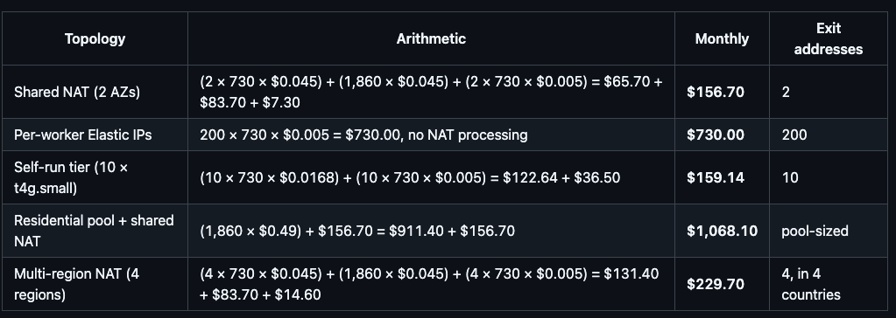
A self-run tier gives five times the exit addresses of a shared NAT for the same money, moving crawl traffic off the gateway refunds most of the instance cost — and per-worker Elastic IPs are the expensive way to buy datacenter addresses.
The residential row uses $0.49/GB, Evomi's published entry rate for core residential bandwidth; volume tiers reduce it, so treat it as an upper bound. Either way, per-GB egress at this volume is around seven times a shared NAT , the right price if the target requires a residential ASN, waste if it does not.
The Parts People Get Wrong
Per-request rotation breaks anything session-bound. A new exit IP per request is fine for stateless fetches and fatal for logged-in work: the session cookie was issued to one address, and presenting it from another is a contradiction you introduced yourself.
A sticky session must outlive the thing it authenticates. If a login is good for thirty minutes, a ten-minute sticky window guarantees two identity changes inside it. Derive the key from the logical work unit, not the request:
import hashlib

def session_key(work_unit_id: str) -> str:
    """One exit IP per work unit, stable for the unit's whole lifetime.

    The parameter name for pinning a session is provider-specific — check
    your provider's docs. What matters is that this key changes when the
    work unit changes and not one moment sooner.
    """
    return hashlib.sha256(work_unit_id.encode()).hexdigest()[:16]
IPv6 is cheap and frequently useless. An egress-only internet gateway carries outbound IPv6 free, and allocations are large enough that per-worker addressing is trivial. The catch is the other end: no AAAA record on the target means none of it applies, and a cloud IPv6 prefix is a clearer hosting signal than IPv4.
Verify what you actually egress from. This catches the misconfiguration that costs a day:
import httpx

# Log at worker startup and after any rotation. If every replica prints
# the same value, you are on a shared NAT whatever the diagram says.
resp = httpx.get("https://checkip.amazonaws.com", timeout=10)
print(resp.text.strip())
Matching Topology to Job
- Broad public crawl, politeness-limited — shared NAT; if you already rate-limit per host, concentration is not the bottleneck.
- Logged-in session work — self-run tier, or a pool with long sticky sessions. You need stable assignment, not many addresses.
- Geo-specific collection — multi-region if regional resolution is enough, residential or mobile if you need a consumer ASN. Confirm the target varies by geography first.
- High-volume API polling — per-worker public IPs or a self-run tier: you are optimising per-address request budget and predictable latency, and per-GB billing at polling volume is the worst of both worlds.
Mistakes That Waste Time
- Rotating harder when the block is a rate limit. If the target counts requests per hostname regardless of source, more addresses spread the same total and the limit still trips. Slow down instead.
- Reaching for residential first. Most expensive per GB, slowest. Try the cheap topology, measure the block rate, let the number decide.
- Forgetting the quota until deploy day. Five Elastic IPs per Region, two per NAT gateway.
- Optimising egress before fixing request coherence. A Chrome 152 User-Agent over a TLS handshake that does not look like Chrome's is not an egress problem.
Wrapping Up
Egress design is one decision: how many requests may a single address be responsible for, and how stable must that address be for the work in flight. Answer that and the topology picks itself.
Two changes are worth making today. Check what your workers actually egress from before touching anything else. And if you need more than a couple of exit addresses, move crawl traffic off the NAT gateway: a small self-run tier buys five times the addresses for the same spend.