
You moved a scraper onto Lambda, fanned it out over SQS, and the compute line on the bill looks tiny. Then Cost Explorer shows the biggest item in the account is "NAT Gateway", and nobody remembers creating one. The function only fetches pages and writes results to S3.
The usual cause is a single setting: the function was attached to a VPC so it could reach a database or a fixed egress IP. From that moment its internet traffic stops being free-flowing and starts passing through a metered appliance.
This post covers why that happens, what you are billed for, and an estimate you can rerun with your own numbers. All prices were read from AWS pages on 2026-11-10 and are for orientation. Check the current pages before you budget.
Why VPC-attached Lambda needs a NAT gateway
By default a Lambda function runs in a Lambda-managed VPC that has internet access. You pay nothing extra for the networking, and nothing to configure.
Once you add a VPC configuration, the function gets an elastic network interface in your subnets, and AWS's own documentation states the consequence: the function is restricted to resources in that VPC "unless the VPC has internet access." Two details trip people up:
- A public subnet does not help. The Lambda docs say connecting a function to a public subnet doesn't give it internet access. The function's interface has no public IP.
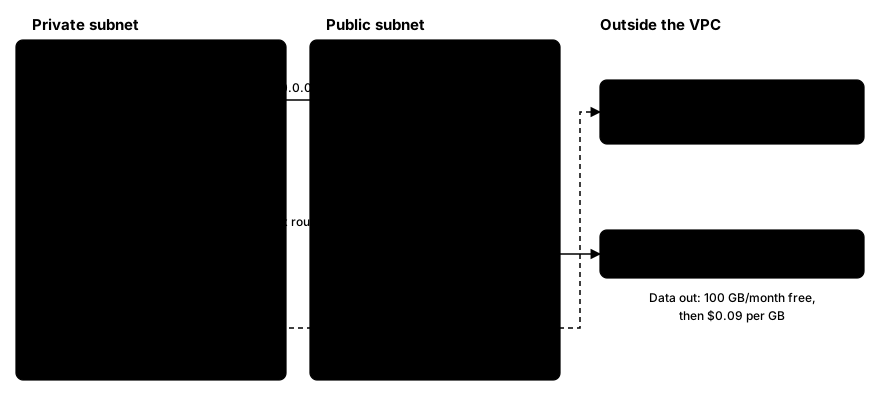
- The route must go through a NAT gateway. Put the function in private subnets, give those subnets a
0.0.0.0/0route to a NAT gateway (nat-xxxxxxxx), and place the NAT gateway itself in a public subnet whose route table points at an internet gateway.
The symptom of getting this wrong is not an error. It is Task timed out, because the connection simply never leaves the VPC.
The three charges, and which one is the surprise
A NAT gateway adds three separate costs on top of Lambda's own price:
- An hourly charge for every hour the gateway exists, whether or not anything flows through it. The VPC pricing page's worked examples use $0.045 per hour.
- A per-GB data processing charge on the data the gateway handles. The same examples use $0.045 per GB.
- Normal data transfer out to the internet, billed as usual. The EC2 pricing page lists 100 GB per month free, aggregated across services, then a per-GB rate in tiers. The pricing example on the VPC page uses $0.09 per GB.
One caveat on provenance: the VPC pricing page examples I could read were for US East (Ohio), not N. Virginia. I could not confirm a separate us-east-1 NAT rate from the text, so the calculator below treats every rate as a parameter. Replace them with the figures for your region.
The NAT gateway's Elastic IP is also a billable public IPv4 address, at $0.005 per hour.
The surprise is the second line. Look at what a scraper's bytes actually do. Requests are small: a URL and some headers. Responses are large: the HTML or JSON you came to fetch. Inbound transfer to AWS is not what you pay for as data transfer, so the "data out" line stays near zero, which makes the account look cheap. But the NAT gateway charges per GB it processes, and the downloaded pages are processed. A scraper is a download-heavy workload, so the per-GB NAT charge scales with exactly the thing you are trying to maximise.
The mistake that wastes money on every run
Your function fetches a page, parses it, and writes the result to S3 or DynamoDB. If the VPC has no endpoint for those services, the write goes out through the NAT gateway like any other traffic. You pay per-GB processing to send data to a service in the same region.
The fix is a gateway VPC endpoint. AWS's documentation says there is no additional charge for using gateway endpoints, and the VPC pricing page says there are no data processing or hourly charges for them. Both S3 and DynamoDB support them. You add the endpoint, associate your private subnets' route tables, and traffic to those services stops going through the NAT gateway.
Gateway endpoints are regional, so create them in the same region as your bucket or table. For other AWS services such as SQS, the option is an interface endpoint, which has its own charges. Price it separately.
This only covers AWS-service traffic. Fetches from target sites cannot use an endpoint. They still go through NAT.
Proxy traffic is egress too
If your scraper sends requests through a proxy, the bytes do not skip the NAT gateway. The Lambda function opens a connection to the proxy gateway's public address, and that connection traverses the NAT like any other. The pages travel back the same way.
So with a metered proxy and a VPC Lambda you pay for each downloaded gigabyte twice: once to the proxy provider and once as NAT processing. That is not a reason to avoid proxies, only a reason to count NAT cost per GB as part of the per-GB price. Sending Accept-Encoding: gzip and requesting only the endpoints you need cuts bytes on both meters.
Running Lambda outside the VPC
The cheapest fix is often to skip the VPC. If the function only needs the public internet, S3 and DynamoDB, it needs none of the VPC machinery: no NAT gateway, no hourly charge, no processing charge.
What you give up:
- A fixed egress IP. A NAT gateway's Elastic IP is a stable address you can give to a partner who allowlists your traffic. Outside a VPC you do not get that.
- Private resources. A database that only accepts VPC traffic is unreachable.
If the only reason for the VPC was one private database, consider splitting the workload: a VPC-attached function that reads and writes the database, and a separate non-VPC function that fetches pages. The fetchers carry the heavy bytes and stay off the meter.
A worked monthly estimate
This is an estimate with stated assumptions, not a measurement. Assume a scraper doing 5 million requests per month, with:
- 300 KB average response (inbound)
- 2 KB average request (outbound)
- 50 KB written to S3 per page
- one NAT gateway running all month (730 hours)
- rates: $0.045/hour, $0.045/GB processed, $0.005/hour for the Elastic IP, 1 GB = 1,000,000 KB
Arithmetic:
- Inbound: 5,000,000 × 300 KB = 1,500 GB
- Outbound requests: 5,000,000 × 2 KB = 10 GB (under the 100 GB free tier, so data-out is $0)
- S3 writes: 5,000,000 × 50 KB = 250 GB
- NAT hourly: 730 × $0.045 = $32.85
- Elastic IP: 730 × $0.005 = $3.65
- NAT processing with S3 through NAT: (1,500 + 10 + 250) × $0.045 = $79.20
- NAT processing with an S3 gateway endpoint: (1,500 + 10) × $0.045 = $67.95
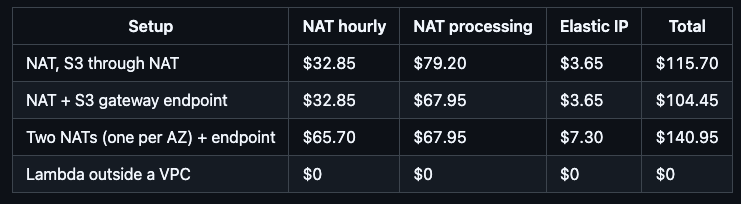
These are the network lines only. Lambda compute and request fees come on top and are the same in every row. At the $0.0000166667 per GB-second and $0.20 per million requests rates on the Lambda pricing page, a 512 MB function running one second per request would add about $41.67 of compute and $1.00 of requests before the free tier. The point is the ratio: in this scenario the NAT lines cost more than the compute.
The two-NAT row matters because the Lambda docs recommend one NAT gateway per Availability Zone for resilience, which doubles the hourly and IP lines.
Here is the calculator used for the table. It runs as written with only the standard library:
NAT_HOUR = 0.045   # USD per NAT gateway hour
NAT_GB = 0.045     # USD per GB processed
IPV4_HOUR = 0.005  # USD per public IPv4 hour (the NAT gateway's Elastic IP)
DTO_GB = 0.09      # USD per GB out to internet, first 10 TB tier
DTO_FREE_GB = 100  # free GB out per month, account-wide
HOURS = 730

def monthly(requests, resp_kb, req_kb=2, s3_kb=0, nat_count=1, s3_endpoint=False, vpc=True):
    gb = lambda kb: requests * kb / 1e6          # decimal GB
    down, up, s3 = gb(resp_kb), gb(req_kb), gb(s3_kb)
    if not vpc:                                   # Lambda outside a VPC: no NAT
        return {"nat_hourly": 0, "nat_processing": 0, "ipv4": 0,
                "data_out": max(up - DTO_FREE_GB, 0) * DTO_GB}
    processed = down + up + (0 if s3_endpoint else s3)
    return {"nat_hourly": nat_count * HOURS * NAT_HOUR,
            "nat_processing": processed * NAT_GB,
            "ipv4": nat_count * HOURS * IPV4_HOUR,
            "data_out": max(up - DTO_FREE_GB, 0) * DTO_GB}

m = monthly(5_000_000, 300, s3_kb=50, s3_endpoint=True)
print({k: round(v, 2) for k, v in m.items()}, "total", round(sum(m.values()), 2))
Output from my run of the full script: {'nat_hourly': 32.85, 'nat_processing': 67.95, 'ipv4': 3.65, 'data_out': 0.0} total 104.45.
Mistakes That Waste Time
- Assuming "inbound is free" means the scraper is free. It is free as data transfer, not as NAT processing.
- Forgetting the endpoint's route table association. Creating a gateway endpoint without associating the private subnets' route tables changes nothing.
- Leaving a NAT gateway running in a dev VPC. The hourly charge accrues whether or not traffic flows.
Wrapping Up
A VPC-attached Lambda needs a NAT gateway for internet access, and the NAT bills by the hour plus per GB processed, on a workload whose bytes are mostly downloads. Add a free gateway endpoint for S3 and DynamoDB so your own storage writes skip the meter, and ask honestly whether the function needs a VPC at all. If it does not, running it outside one removes the line entirely.